
You can create multilingual custom post types, custom fields, or custom taxonomies, by first making them translatable. You can then translate them as any other content.
How can I make custom types in WordPress multilingual?
WPML works out-of-the-box with custom types created using all major plugins like Toolset and ACF.
If you’re creating custom types using your own code, you need declare them according to the recommended WordPress procedure:
- Make sure they’re registered on the init hook.
- Never use a GetText call for the custom post type.
- Always use the constants TRUE and FALSE. 0 and 1 may not work.
- Check the WordPress Codex for complete documentation.
Here is a working example that we use on our own website:
<?php
add_action('init', 'icl_theme_register_custom', 0);
function icl_theme_register_custom() {
        register_taxonomy(
        'service_type',
        array('post', 'page'),
        array(
            'hierarchical' => true,
            'label' => 'Service type',
            'query_var' => true,
            'rewrite' => true
        )
    );

        register_post_type( 'testimonial',
        array(
            'description' => __( 'Testimonials.' ),
            'labels' => array(
                'name' => __( 'Testimonials' ),
                'singular_name' => __( 'Testimonial' ),
                'add_new' => __( 'Add New' ),
                'add_new_item' => __( 'Add New Testimonial' ),
                'edit' => __( 'Edit' ),
                'edit_item' => __( 'Edit Testimonial' ),
                'new_item' => __( 'New Testimonial' ),
                'view' => __( 'View Testimonial' ),
                ...
How can I make custom types translatable?
Go to the WPML → Settings page and scroll to the section for the custom type you want to make translatable. For example, you might scroll to the Taxonomies Translation section.
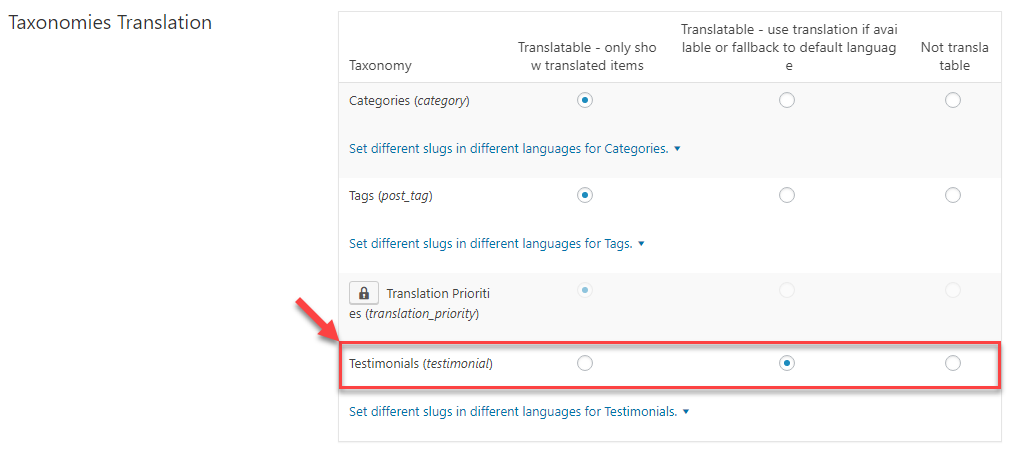
When custom types are translatable, they have language attributes. Each entry will appear for a specific language only and you can translate them to other languages.
WPML will filter the entries per language when you use the WordPress API calls to load them.
When custom types are not translatable, WPML does not filter them and entries will appear for all languages. This is useful if the data is not unique per language.