


WPML 5.0 Beta – A Redesigned Experience and Smarter Automatic Translation
WPML 5.0 is the biggest update we’ve shipped in years.

WPML 4.9 improves translation functionality for WordPress sites. You can now see automatic translation costs and time estimates, fix stuck jobs with one click, easily translate custom Elementor widgets, and more.
Since publishing this post, we’ve released WPML 4.9.2, which includes various bug fixes.
Here’s what’s new in WPML 4.9:
WPML now calculates the exact credits needed before you send content for automatic translation. If you don’t have enough prepaid credits or Pay-As-You-Go set up, translations won’t start. The interface will guide you through the options to continue translating.
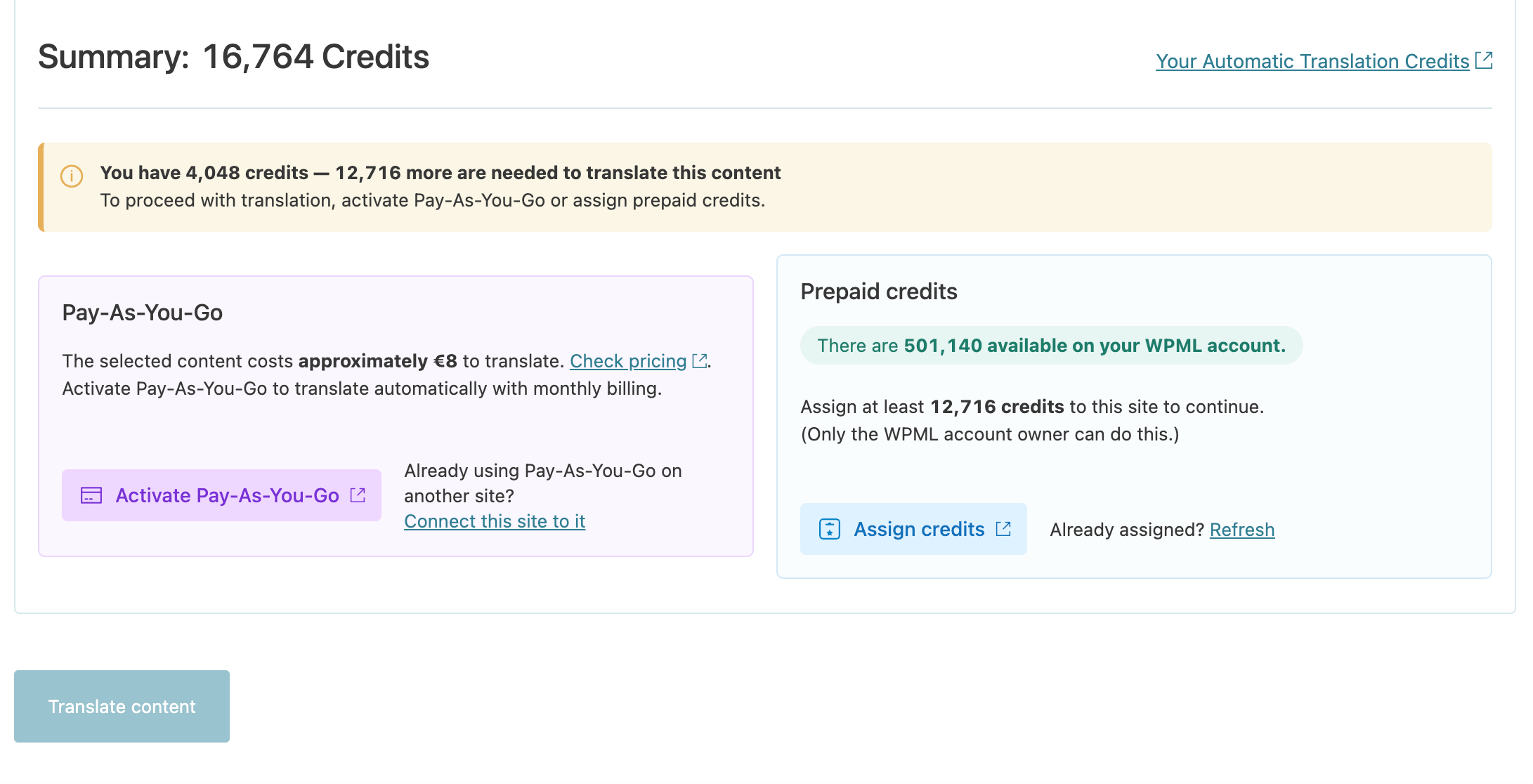
And that’s not all—when you send content for translation in bulk, you’ll see progress and an estimated time remaining at the top of the Translation Dashboard. With WPML 4.9, you always know what’s happening, so even big jobs run smoothly without guesswork.
Large sites translating bigger volumes of content sometimes experienced stuck translation jobs. In WPML 4.9, we’ve improved how WPML communicates with the Advanced Translation Editor, so these issues should happen less often.
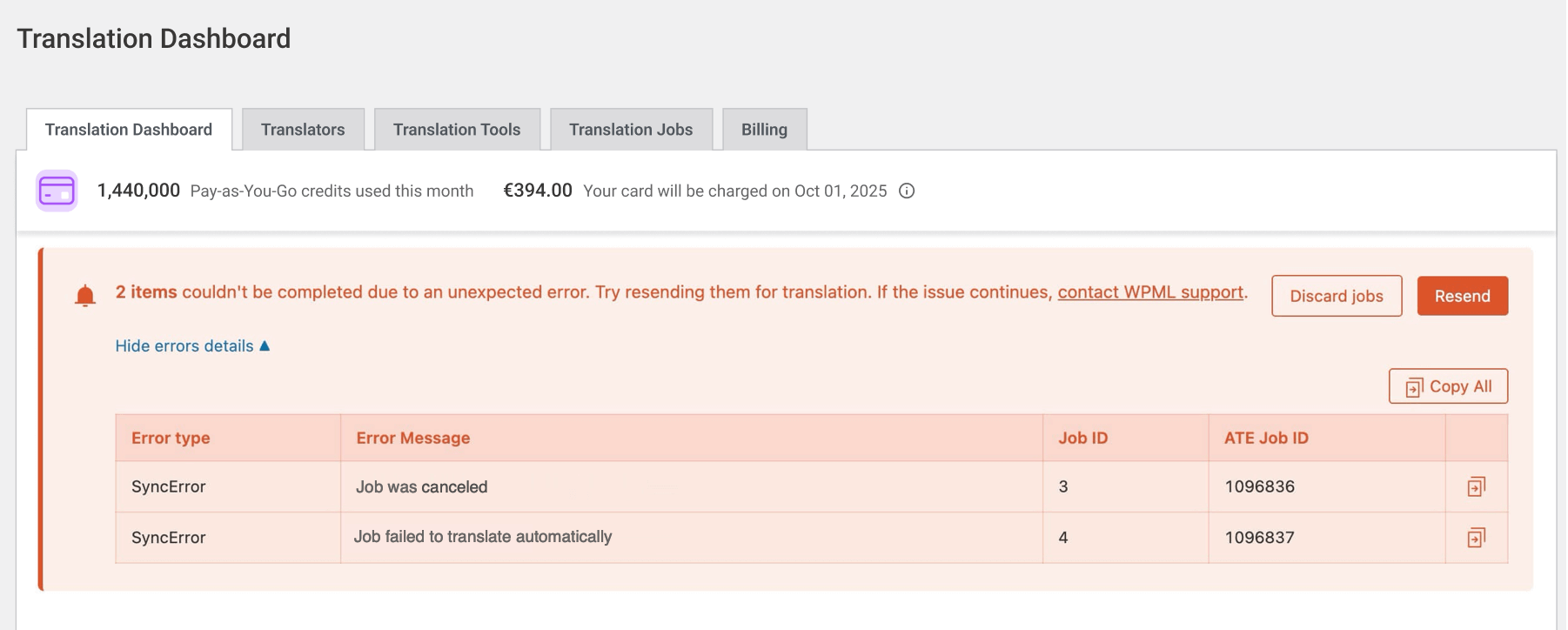
If a job does get stuck, a new Resend button appears in the Translation Dashboard to restart them with one click. In case you need to contact support, error messages now include all the technical details your Supporter needs to help you right away.

We asked you to help us test both Divi 5 compatibility and custom Elementor widget support in WPML 4.9 beta. After your feedback and more testing from our team, both features are stable in WPML 4.9.
All known compatibility issues are fixed. Update to Divi 5 safely—your multilingual website will work smoothly with the newest Divi version.
Widgets from third-party themes and plugins like Woodmart, Wolmart, and Emphires are automatically detected. No XML configuration needed. Translate them from the Translation Dashboard – they’ll also appear for translation in the Advanced Translation Editor.
Some themes and plugins store text in JavaScript files instead of PHP. WooCommerce Cart and Checkout blocks are common examples.
While translations are usually included for widely spoken languages like Spanish, less common languages are often left out. WPML couldn’t scan these files before, so parts of your site could remain untranslated for some visitors.
WPML 4.9 adds a Detect strings in JavaScript files option in WPML → Settings. Enable it, scan your theme or plugin, and translate all strings via the Other texts (Strings) section in the Translation Dashboard.
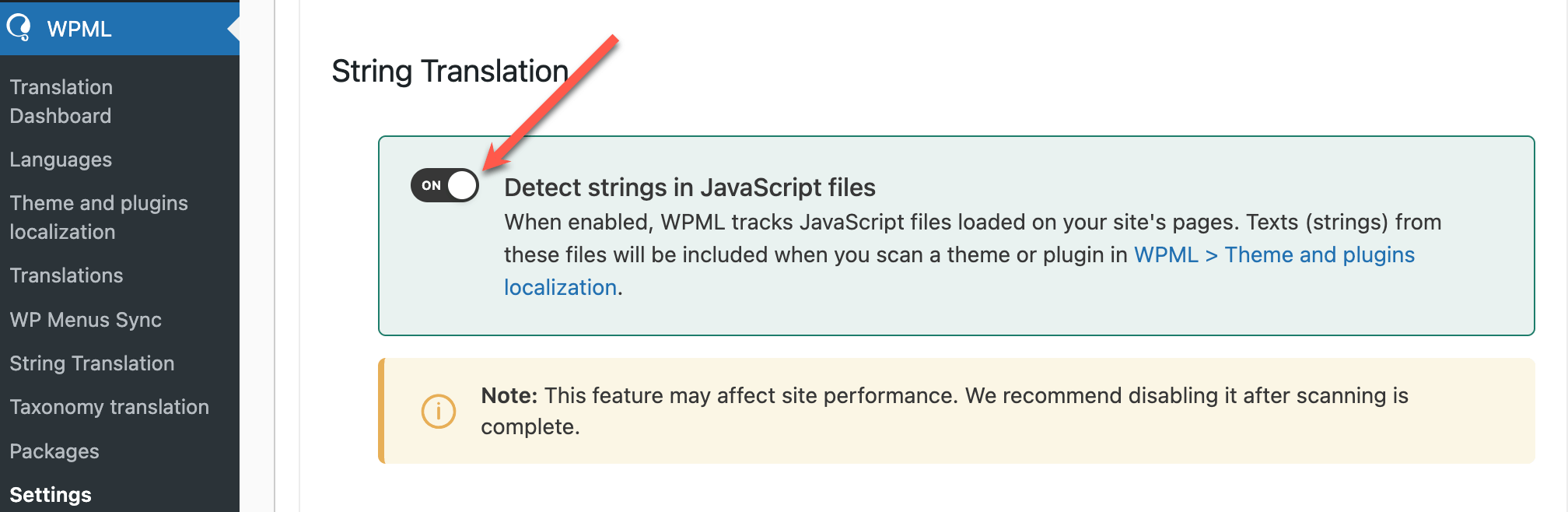
This way, your visitors get a truly multilingual experience, whether they speak Spanish, Latvian, or any other language.
See the full documentation about translating strings in JavaScript files.
If you run a large site, you probably use object caching like Redis or Memcached to improve performance. Until now, using object caching with WPML could cause issues with translations not updating, post status not syncing between languages, or reviewed translations not saving properly.
WPML 4.9 fixes these issues. We’ve tested with Redis, Memcached, and other common caching solutions to ensure translations work reliably in object-cached environments. You can now use object caching on large multilingual sites without affecting translations.
We’re releasing WPML 4.9 gradually. When the update becomes available to your site, you’ll see it on your Plugins page.
If you want to install WPML 4.9 right away:
In your site’s admin, go to Plugins → Add New Plugin and click the Commercial tab.
Click the Check for updates button.
Select WPML 4.9 and String Translation 3.5 from the list and click Install. Several features in WPML 4.9, including the option to translate JavaScript strings, require String Translation 3.5 to work.
We built WPML 4.9 around your feedback. Now that you’ve seen what’s new, we’d love to hear how it’s working on your site.
What’s improved for you? What features would you like to see next? Leave a comment below.
WPML 5.0 is the biggest update we’ve shipped in years.
We just released WPML 4.9.4, which brings full compatibility with WordPress 7.0.
WPML 4.9.1 is out today with a focus on Divi 5 compatibility, so your multilingual sites are ready for the official Divi 5 launch on February 26.