Skip to content Skip to sidebar
8

Translate Options Pages directly in Translation Dashboard, manage local fields more easily, and enjoy faster performance with ACFML 2.2.0.

ACF Multilingual 2.2.1 is now available

Since publishing this post, we’ve released ACFML 2.2.1, which includes two important fixes.

Translate Options Pages in Translation Dashboard

You can now translate Options Pages directly in WPML Translation Dashboard. Just expand the ACF Options section and send your Options Page for translation.  
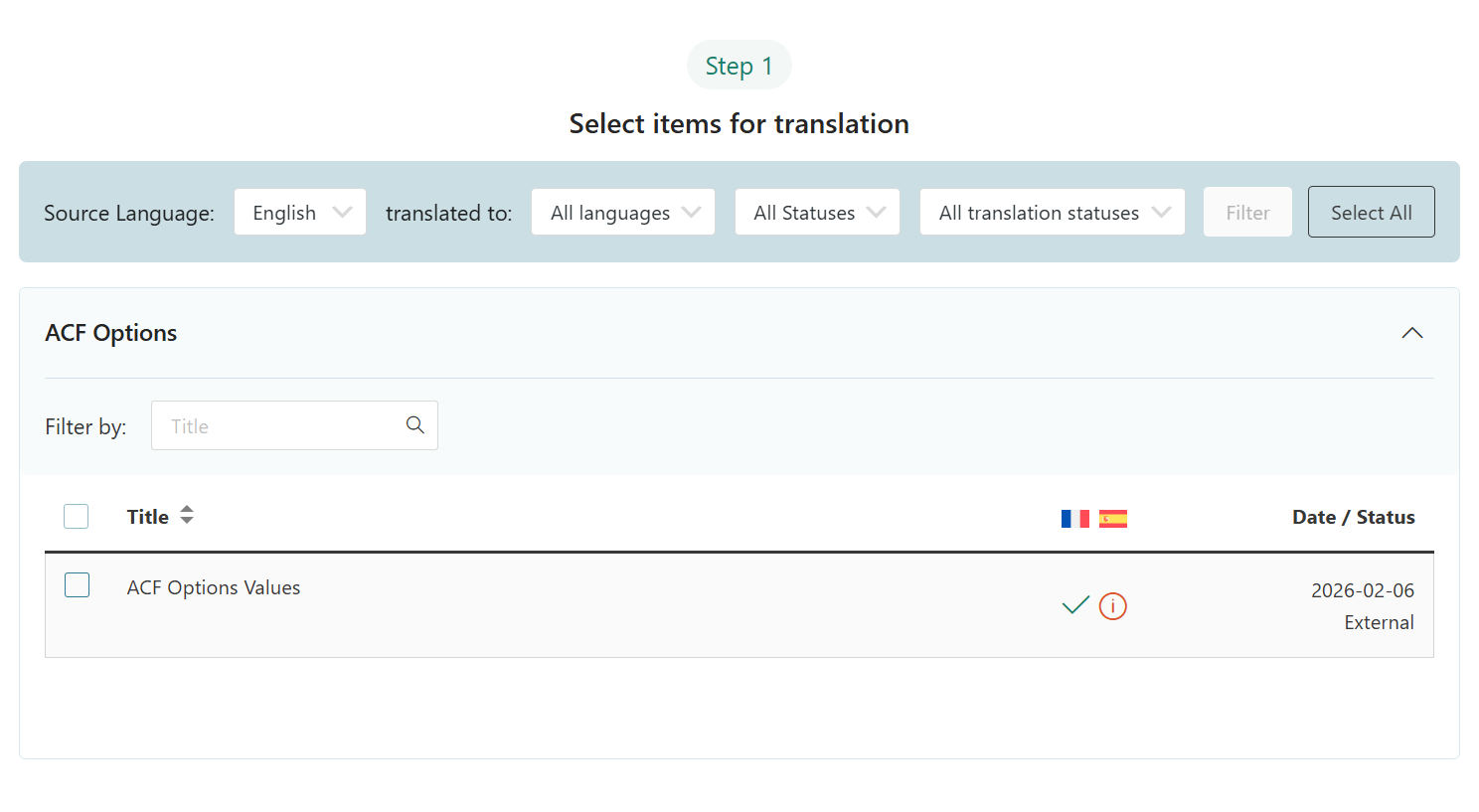
Options Page in Translation Dashboard

Improved Support for Local Fields

ACFML 2.2.0 brings a number of updates relevant for developers using “Local Fields” – fields you define using PHP or JSON instead of the WordPress admin GUI.  

Simpler Syncing Process for Local Content

After creating your custom fields and other content using PHP or JSON, you need to sync them with WPML. This makes them available for translation.

You can now easily sync the following types of local ACF content:

  • Custom post types
  • Custom taxonomies
  • Field groups
  • Options pages 

Just go to ACF Tools after creating your local content, select Sync once now and click Apply.
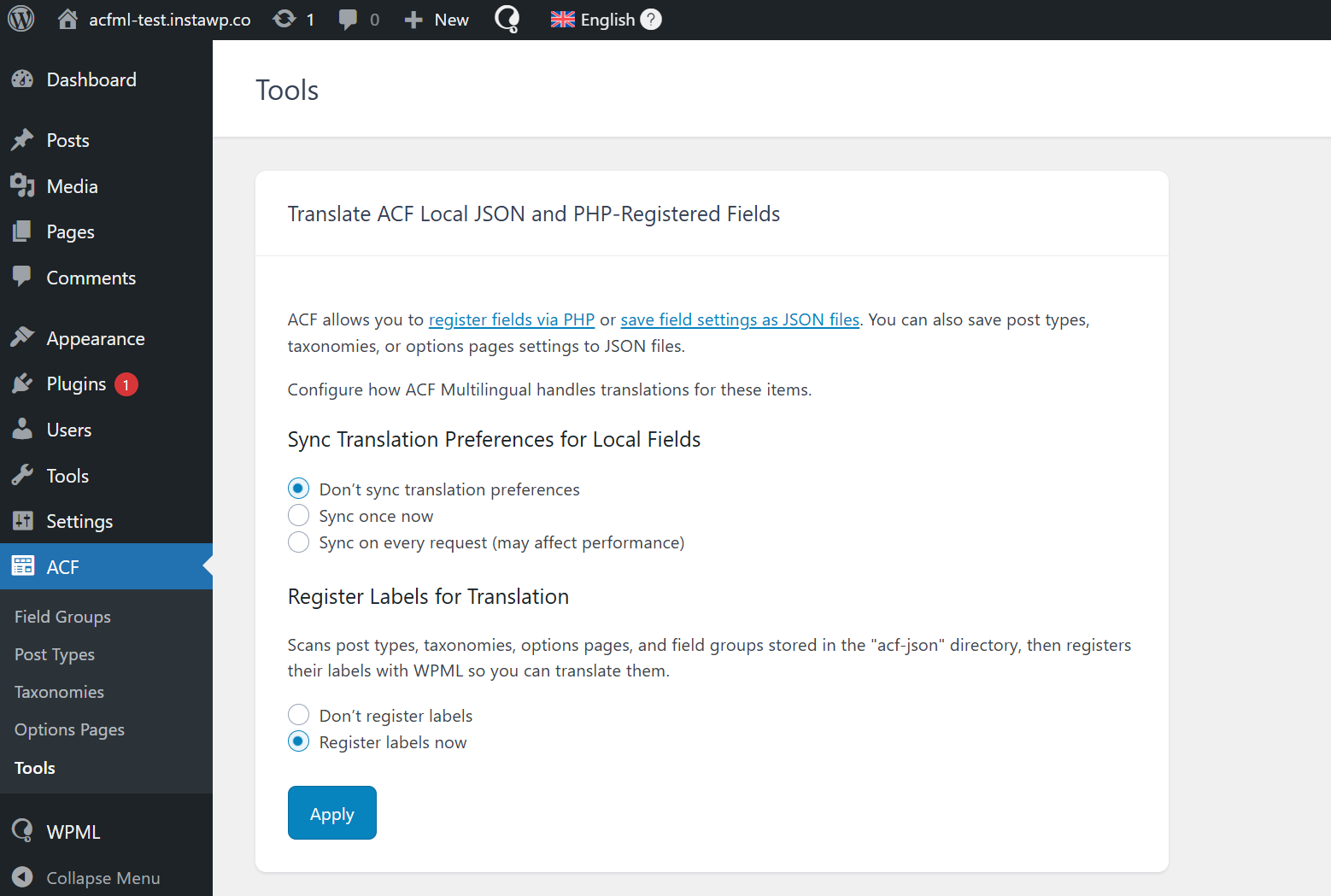
Local content settings in ACF → Tools

This way, you sync your local fields and content only once, when you want to. Until now, this would happen on every request, which could impact performance.

Better Management for Translated Local Fields

Local fields are now recognized as ACF fields, so they can appear in templates or blocks like fields in the original language.

Performance Improvements

Faster Performance

ACFML no longer translates backend labels that never appear on your website, resulting in faster performance and lower translation costs.

Less Database Calls

ACFML now syncs translation settings more efficiently. It skips execution when nothing has changed, which effectively eliminates unnecessary database calls.

Better ACF-WPML Sync

ACFML now uses existing data when converting field names, preventing name collisions when importing field groups or auto-syncing local fields – like repeaters and groups.

How to Update to ACFML 2.2.0

We’re rolling out this release in batches, so you may not see the update immediately. To update right away, follow these steps:

  1. Log into your WordPress admin dashboard.
  2. Go to Plugins Add New and click the Commercial tab.
  3. Click the Check for updates button.
  4. Select ACFML 2.2.0 and click the Download button.

Tell Us What You Think

Have any questions about ACFML 2.2.0? Leave a comment below and we’ll reply to you.

8 Responses to “ACF Multilingual 2.2.0 – Easier Options Page Translation and Better Local Fields Support”

    • Hi Pieter! Actually it’s for ACF Option values, regardless of where the Options Page was created or defined, as long as they are set to be translated.

      Fields used in option pages that are defined within the ACF user interface get a translation preference by default. However, when fields and option pages are defined with a PHP API, they might lack those translation preferences and they might not be set to be translated.

      You can check our documentation on how to set proper translation preferences for fields defined with the PHP API, here: Setting the Translation Preferences for ACF Fields Created Using PHP Code. By default, the most common translation preferences for different field types are described here: Custom Fields Translation Preferences for ACF and WPML.

      If you have any doubt or problem, please open a support ticket for us and we’ll help.

  1. Hi Dario,

    Thanks for your swift reply.

    I was referring to option pages registered/defined in the child theme, but of course all of the options itself including translation settings are done within the ACF interface (Field Groups).

    I updated all WPML software including addons (WPML 4.9.0, string translation 3.5.0, acfml 2.2.0), and there are 3 options pages (1 parent, 2 children), but all I get in Translation Management is ACF Field Group, which was already there before the 2.2.0 update and is for labels afaik.

    I saw the announcement and thought cool, although I am perfectly fine with the old fashioned way too.

    • OK, so for existing options, you do need to save them (again) to get them registered with WPML. Please try resaving them and see if that solves it.

      • Hi Dario,

        Tried that and does not work, eg. there is no such thing as a new ACF Options drop down appearing in the Translation Management.

        No worries, I am fine with how it was (don’t try to fix what isn’t broken), perhaps it only works on new sites or something like that.

        Maybe add an errata?

        Cheers,
        Pieter

Leave a Reply

Please stay on topic and be respectful to others. If you need help with issues not related to this post, use our Support Forum to start a chat or submit a ticket.

You can use these tags:
<a href="" title=""> <abbr title=""> <acronym title=""> <b> <blockquote cite=""> <cite> <code> <del datetime=""> <em> <i> <q cite=""> <s> <strike> <strong>