I automatically translated the contents of my desired template from english into german but they were not translated. Later, when I opened it in the editor and tried to translate it manually, the texts were not there, only the fields were shown. This is definitely what the editor should show.
* I tried to make it compatible from the WPML theme plugin localization options, but it still doesn't work.
* The text should have come directly without the field appearing in the editor. I updated the WordPress and PHP versions.But not working. Please check and solve it.
1. "I opened it in the editor and tried to translate it manually"
If the translation was created using the WPML Editor, this is not recommended. I understand you're doing this as a workaround, but apart from mostly not solving the issue, it can create new ones.
2. "I tried to make it compatible from the WPML theme plugin localization options"
The "Theme and Plugin localization" tool is used to register translatable strings from themes and plugins and make them available in WPML > String Translation. It won't register texts from templates.
Now, I need the following information:
1. What's the templates name, and where can it be found? Please share its location and name in the wp-admin panel.
2. Website access.
The required fields can be found below the comments section. The information you enter is private, i.e. only you and I can see it and have access to it.
Thank you for sharing. I've made a couple of assumptions, since the information I have so far is a bit unclear. Please take into consideration that I'm not familiar with your website, and a website can be built in almost infinite ways. I shared my point of view here:
hidden link
So, what I assume is happening:
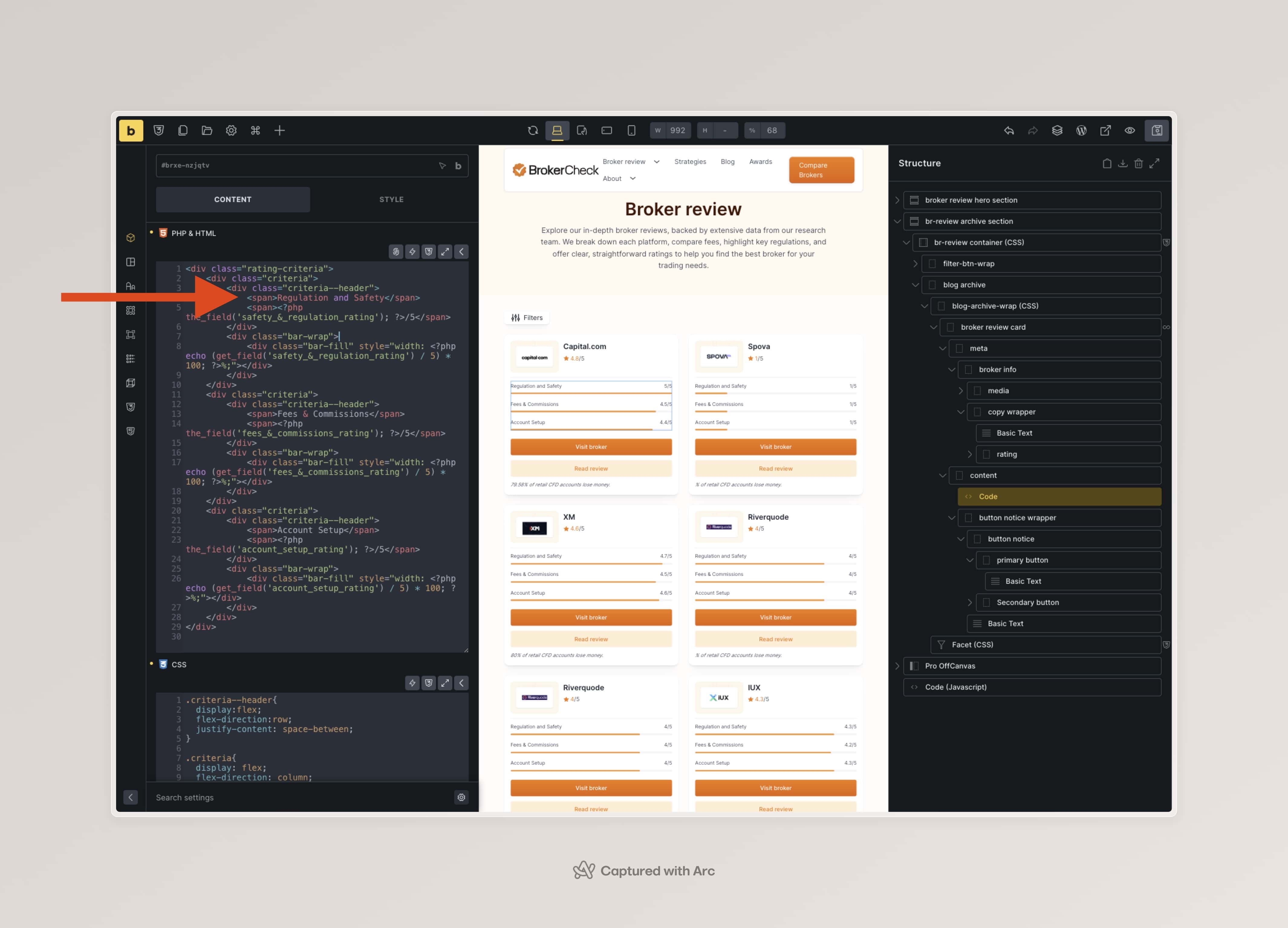
1. The template "broker review card" uses information from ACF and hard-coded strings, like "Regulation and safety";
2. Your issue is that the hard-coded strings are not being available for translation;
If understood it correctly, it's about the hard-coded strings. To solve it you need to wrap them using the proper functions, so that WordPress and WPML understand that the code must be translated and shown in the correct language.
To ensure that WPML recognizes this text and makes it translatable, you should wrap it inside the `esc_html__()` or `esc_html_e()` function (for escaping HTML) or `__()` and `_e()` (if no escaping is needed) functions in PHP. These functions register strings for translation in WPML when used within a theme or plugin that supports WPML’s String Translation module.. Let me share some example steps:
1. Check the line "<span>Regulation and Safety</span>" in your code. Check the image;
2. It must be changed to:
<span><?php _e('Regulation and Safety', 'bricks'); ?></span>
The translatable bit, is properly wrapped, and belongs to the theme domain "bricks";
Once this is done, the text will be available for translation in WPML > String Translation.
As you can probably see, this type of implementation already requires some custom work, and that falls outside the scope of our Support Policy.
However, I wanted to at least share a few steps to guide you in the right direction. I always like to do that if possible and the need is not super complex.