This thread is resolved. Here is a description of the problem and solution.
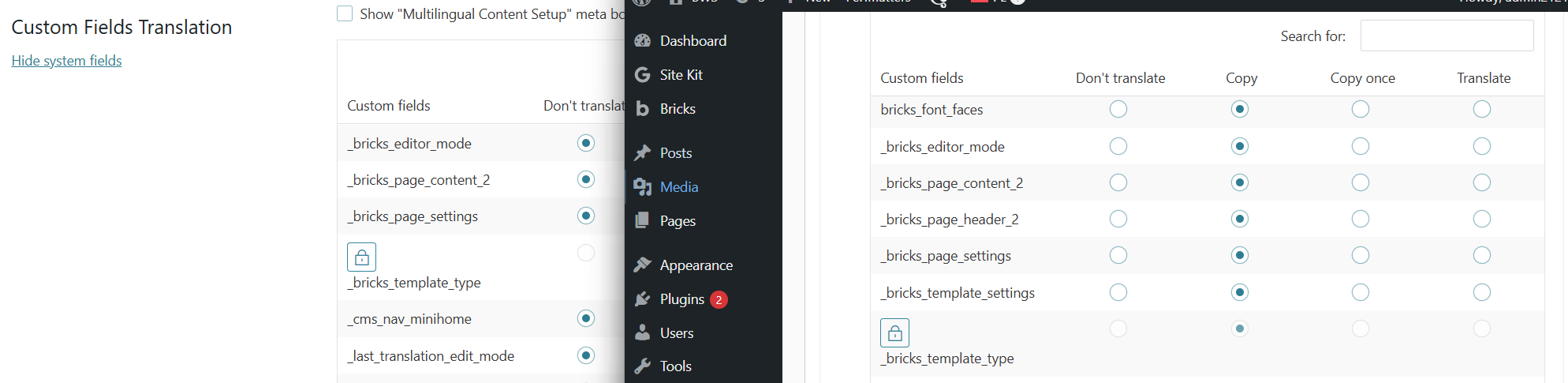
Problem: The client reported that the Bricks Builder blog template layout was not displaying correctly in translated versions, despite multiple updates to the translation. The issue persisted even after creating separate templates for each language and manually connecting them. Solution: We investigated the issue and found that it was related to the translation settings in WPML. Specifically, the settings under WPML > Settings > Custom Field Translation had been modified. To resolve the issue, we recommend: 1. Reverting the translation settings to match those on our sandbox site. 2. Resaving the original template and its translations. Please ensure to back up your site before making these changes.
If this solution does not resolve your issue or seems outdated, we highly recommend checking related known issues at https://wpml.org/known-issues/, verifying the version of the permanent fix, and confirming that you have installed the latest versions of themes and plugins. If the problem persists, please open a new support ticket.
This is the technical support forum for WPML - the multilingual WordPress plugin.
Everyone can read, but only WPML clients can post here. WPML team is replying on the forum 6 days per week, 22 hours per day.
Update:
I've encountered another problem with Bricks Builder templates. My blog template layout wouldn't display correctly in translated versions, despite updating the translation a few times. Unlike the homepage, which eventually shows the correct layout after updating the translation a few times, the blog template never displays properly regardless of how many times I update it.
The only solution that worked was to create separate templates for each language and then connect them manually. However, this issue persists after each change to the original template.
Regards
Hi,
I attached a screenshot of how the translated website: hidden link . The original polish site is displaying correctly, but both translations (English and German) are showing with wrong layout or no layout hidden link. The template I'm using for blog posts is: hidden link. The template in German language shows like this on posts (I attached a screenshot): hidden link, English one is now correct, but that happens on both translations.
Regards
Hi,
I’m unable to install Bricks Builder on the sandbox site. When I try to upload the Bricks Builder theme, I get the message: ‘The link you followed has expired.
Hi,
I’ve recorded two videos showing the issues. Here is the link: hidden link?
I wasn’t able to reproduce the problem on the sandbox site with only WPML and Bricks Builder installed. However, on the staging site—with troubleshooting mode enabled, so only Bricks Builder and WPML are active—the issue still persists.
Thank you and regards.
Hi,
It's displaying correctly now. Thank you very much. I just need to know what was changed so I can apply the same fix on the original site if this issue appears there again.
Regards
Thanks for your reply. This is what our 2nd Tier Support has done to fix it.
If you edit the PL post, you'll see that it doesn't use the bricks builder directly. Instead, it uses a bricks template (for all blog posts). So resaving the original template and its translations
Could you try this on your production site? Please remember to backup first.
Hi,
so the solution is basically the same as what I was doing—re-saving the page or template until it displays correctly. But do you know why something like this happens? Is it a compatibility issue between Bricks Builder and WPML?
Regards
Thanks for your patience. Our 2nd Tier Support mentioned that the issue is caused by the translation settings in WPML > Settings > Custom Field Translation is being modified when comparing with the sandbox site that I've prepared.
They changed the settings back, and you'll need to resave the templates and translations to fix it.