
This is the technical support forum for WPML - the multilingual WordPress plugin.
Everyone can read, but only WPML clients can post here. WPML team is replying on the forum 6 days per week, 22 hours per day.
| Sun | Mon | Tue | Wed | Thu | Fri | Sat |
|---|---|---|---|---|---|---|
| 10:00 – 14:00 | 10:00 – 14:00 | 10:00 – 14:00 | 10:00 – 14:00 | 10:00 – 14:00 | - | - |
| 16:00 – 20:00 | 16:00 – 20:00 | 16:00 – 20:00 | 16:00 – 20:00 | 16:00 – 20:00 | - | - |
Supporter timezone: Asia/Jerusalem (GMT+02:00)
Tagged: Compatibility
This topic contains 16 replies, has 0 voices.
Last updated by Itamar 1 day, 22 hours ago.
Assisted by: Itamar.
| Author | Posts |
|---|---|
| November 17, 2025 at 12:30 pm | |
 Phill |
Background of the issue: Symptoms: Questions:   |
| November 17, 2025 at 2:13 pm #17584419 | |
 Itamar WPML Supporter since 02/2016 Languages: English (English ) Timezone: Asia/Jerusalem (GMT+02:00) |
Hi, Please update the LearnDash LMS plugin on your site, as I mentioned in the chat. Please see the attached screenshot. If this does not help, please ensure you are following our guide on using the LearnDash LMS plugin: https://wpml.org/documentation/plugins-compatibility/how-to-create-multilingual-online-courses-websites-using-learndash-and-wpml/. I can also see a few translated courses in the Draft status. Please check if the problem occurs with those courses. If so, set them to Published and check again. If nothing helps, please try the following proceedure. We suspect a collision with the theme or another plugin might cause this problem. If possible, get your site into a minimum environment, switching to a default WordPress theme like TwentyTwenty-Four and activating only WPML, WooCommerce, and the LearnDash LMS plugin. First, you must check if the problem persists when just the theme is switched to TwentyTwenty-Four (for example). If it persists, deactivate all plugins except WPML and its add-ons, WooCommerce without any extensions, and the LearnDash LMS plugin only with the required add-ons. Then, please check if the problem persists. If it does not continue, start by activating the plugins individually and checking when the issue comes back, then report to me which plugin was the culprit. 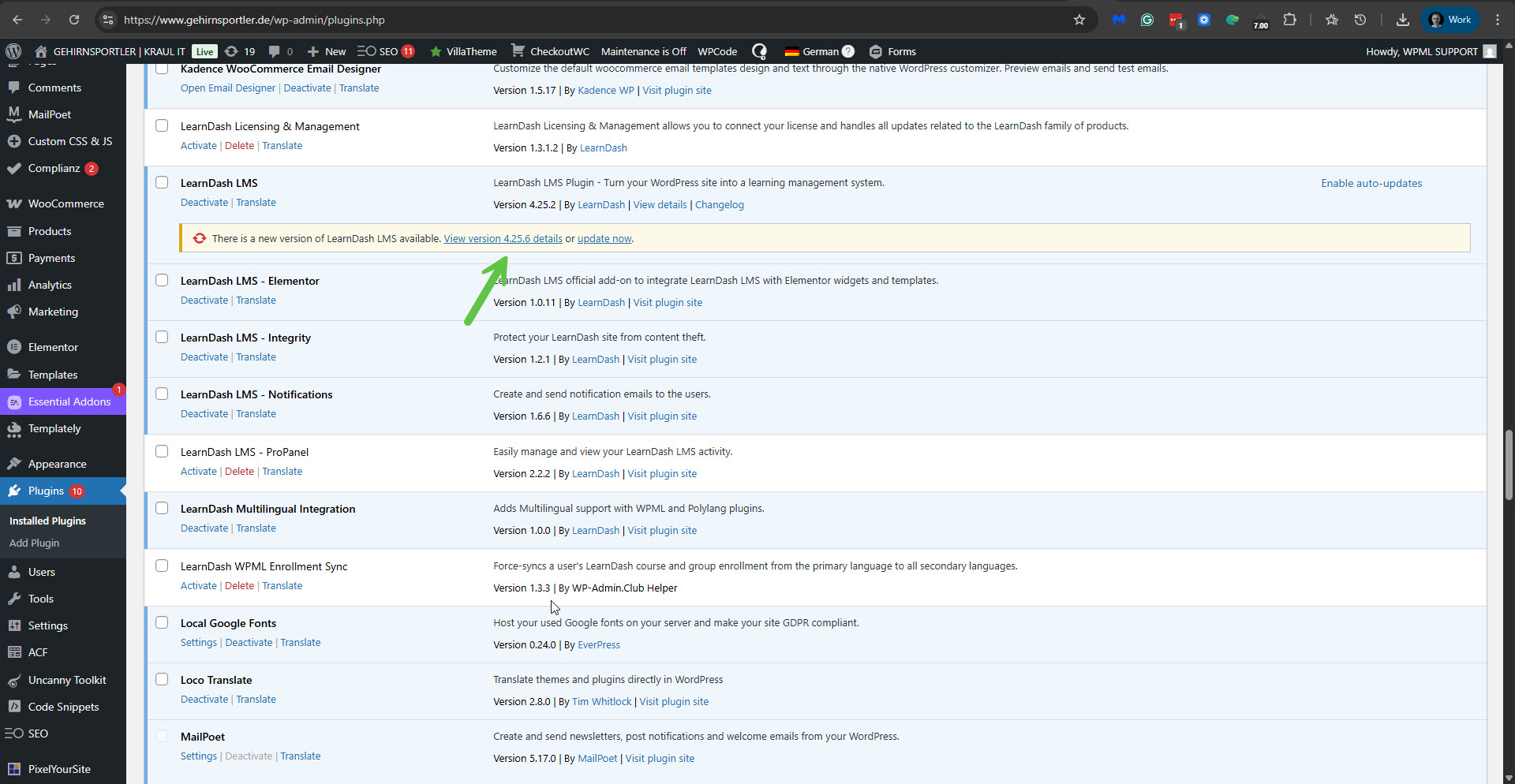 |
| November 17, 2025 at 3:16 pm #17584838 | |
|
Phill |
LearnDash is now up-to-date but the issue still persists. |
| November 18, 2025 at 11:36 am #17587787 | |
|
Phill |
LearnDash is up to date. The courses in draft are deliberately so as they are not ready for publishing. However, this does not relate to the issue we are seeing. If a user is enrolled in a published course, they are only able to access the primary language version (German) and not the secondary language (English) translation. For example we can use the Gehirnupdate 1, Gerhirnupdate 2 and Gehirnupdate 3 course for testing purposes. If a user is enrolled in one or more of these courses they should be able to access the course in both the primary and secondary languages. But this isn't the case, they are currently only able to access the primary language. FYI: The English translations of these 3 courses are - Brainupdate 1, Brainupdate 2 and Brainupdate 3. Thanks. |
| November 19, 2025 at 9:40 am #17590904 | |
|
Itamar WPML Supporter since 02/2016 Languages: English (English ) Timezone: Asia/Jerusalem (GMT+02:00) |
Hi, Thanks for adding details about your case. I was just dealing with another similar LeanDash issue, and from that, I discovered that your site is missing the LearnDash LMS - WooCommerce Integration addon. The Gehirnupdate 1 course, for example, is connected to the Gehirnupdate 1 product (hidden link). But I suspect that since you are not using the LearnDash LMS - WooCommerce Integration addon, you are experiencing the problem you reported. Can you please install the required LearnDash LMS - WooCommerce Integration addon and see if it helps? Please note that you will likely need to update the course, product, and their translations. Please let me know how it goes. Regards, |
| November 19, 2025 at 12:06 pm #17591515 | |
|
Phill |
We dont actually use WooCommerce to enrol users on courses. Instead, when a user buy a product via WooCommerce they are simply buying a membership via WishList Member. WishList Member then enrols the user on to the relevant course and group. I'll install the WooCommerce WPML integration but I honestly can't see how it would make a difference. |
| November 19, 2025 at 12:45 pm #17591737 | |
|
Phill |
I installed the LearnDash LMS - WooCommerce Integration plugin but it appears to make no difference. (Please see comment above about the enrolment method used on the site). |
| November 19, 2025 at 9:05 pm #17593560 | |
|
Itamar WPML Supporter since 02/2016 Languages: English (English ) Timezone: Asia/Jerusalem (GMT+02:00) |
Hi, Thanks for providing further information about your case. At the moment, I'm unsure whether it's only a compatibility issue between WPML and the LeanDash plugin, or whether a third-party plugin like WishList Members or another plugin is also involved. To continue, we need to replicate this issue on a fresh WordPress installation. Then I'll be able to escalate it to our compatibility team. For this, I created a test website with a clean WordPress install. You can access it through this link: hidden link With this link, you'll be directly logged in. Could you please check whether the issue is reproducible on a clean WordPress installation? I already configured WPML to have German as the default language and English as the second language. The LearnDash Pro plugin, with its WPML bridge plugin, is also installed. When everything is finished and you can replicate the problem, please let us know. Important! Do not import your site to the test site. We must replicate the problem on a fresh, clean WordPress installation. Regards, |
| November 20, 2025 at 11:11 am #17595199 | |
|
Phill |
Ok, just to make you aware that it'll likely be several days to replicate the existing sitesfunctionality. |
| November 20, 2025 at 11:56 am #17595387 | |
|
Phill |
Is it ok to import content from the existing site using the WordPress Import / Export feature along with the WPML migration tools? Otherwise, it's going to take a real long time to setup. |
| November 20, 2025 at 6:05 pm #17596882 | |
|
Itamar WPML Supporter since 02/2016 Languages: English (English ) Timezone: Asia/Jerusalem (GMT+02:00) |
Hi, You asked: "Is it ok to import content from the existing site using the WordPress Import / Export feature along with the WPML migration tools?" No, as this would miss the point of what we are trying to check. We want to see if and when WPML fails in the case you bring. The LeanDash plugin has many settings. Please configure your site to reproduce the problem, using only the minimum settings required to reproduce it on the test site. I already created an empty test course called DE WPML Course and translated it into English. The question is whether the problem occurs only with WPML and LearnDash. If a third-party plugin, like the WishList Member, is required, please let us know about it. You can install that third-party plugin on the test site, and we will check whether we can help on our end with what it creates. Otherwise, a cooperation of the authors of that plugin will be required. Please note that my weekends are Friday to Saturday. If you need further assistance, I'll be available to continue checking this issue and helping you next week. Regards, |
| November 25, 2025 at 2:21 pm #17608449 | |
|
Phill |
Ok, so we can remove all the external factors from that with this simple test process. Go to your user profile on the backend in WP, then under the primary language (German) in the "User Enrolled in Courses" section select any of the Gehirnupdate courses (Gehirnupdate 1, Gehirnupdate 2, Gehirnupdate 3) and click save. If you visit the relevant course on the frontend: hidden link Scroll down to the bottom of the page where you will see the lesson plan in the LearnDash Widget. Now select any lesson. You will now be taken to the lesson and will have full access to the course. If you now use the WPML language switcher to change the site language to the secondary language (English) you will see that you can no longer visit or view any of the courses lesson in the secondary language. Now go back to your user profile in the WP backend, use the WPML language selector in the WP admin bar to switch to the english "version" of your wp user profile. Again scroll down to the "User Enrolled in Courses" section and add the english translations of the courses (eg Brain Update 1, Brain Update 2, Brain Update 3). You can now go to the frontend of the site and view the relevant courses both in German (primary language) and English (secondary language). Likewise, if you were to go to your user profile and remove the courses under the German side of your profile, you would no longer have access to the German version of the course(s) and lessons whilst still retaining access to the English translated course(s).   |
| November 25, 2025 at 3:22 pm #17608755 | |
|
Itamar WPML Supporter since 02/2016 Languages: English (English ) Timezone: Asia/Jerusalem (GMT+02:00) |
Hi, Thanks for your detailed explanation of the problem. To proceed with this issue, it would be best if you could replicate it on the sandbox site. Then I will be able to esclate it to our compatibility team. In any case, please know that I'm unable to log into your site anymore. Please see the attached screenshot. Until we have a solution for this, I suggest you use the workaround you found and manually enroll the users in the courses in the other languages. Regards, 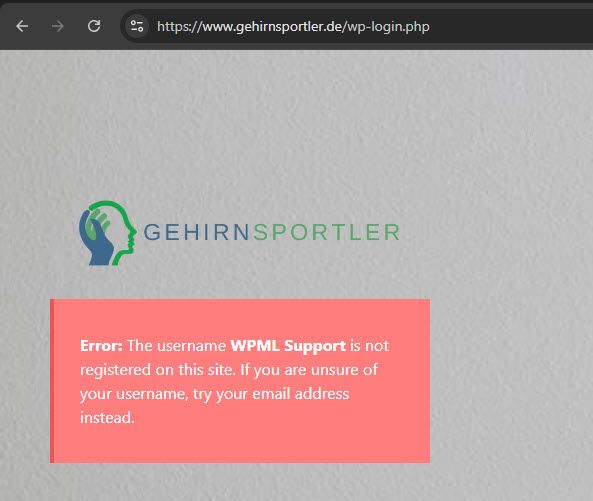 |
| November 26, 2025 at 1:11 pm #17612113 | |
|
Phill |
Hi, |
| November 26, 2025 at 2:00 pm #17612274 | |
|
Itamar WPML Supporter since 02/2016 Languages: English (English ) Timezone: Asia/Jerusalem (GMT+02:00) |
Hi, Not at all. However, you don't really need automatic translation, or real translations for that matter. You can copy the content from the original to the translation. Regards, |






