
This is the technical support forum for WPML - the multilingual WordPress plugin.
Everyone can read, but only WPML clients can post here. WPML team is replying on the forum 6 days per week, 22 hours per day.
| Sun | Mon | Tue | Wed | Thu | Fri | Sat |
|---|---|---|---|---|---|---|
| 10:00 – 14:00 | 10:00 – 14:00 | 10:00 – 14:00 | 10:00 – 14:00 | 10:00 – 14:00 | - | - |
| 16:00 – 20:00 | 16:00 – 20:00 | 16:00 – 20:00 | 16:00 – 20:00 | 16:00 – 20:00 | - | - |
Supporter timezone: Asia/Jerusalem (GMT+02:00)
Tagged: Bug
This topic contains 11 replies, has 0 voices.
Last updated by Itamar 6 days, 12 hours ago.
Assisted by: Itamar.
| Author | Posts |
|---|---|
| November 21, 2025 at 6:00 pm #17600262 | |
 thomasW-28 |
Background of the issue: Symptoms: Questions: |
| November 23, 2025 at 6:38 pm #17602550 | |
 Itamar WPML Supporter since 02/2016 Languages: English (English ) Timezone: Asia/Jerusalem (GMT+02:00) |
Hi, Could you please grant me access to your site and temporarily deactivate the maintenance page so I can see the problem? I'm enabling a private message for the following reply. |
| November 25, 2025 at 7:50 pm #17609669 | |
|
thomasW-28 |
Hi itamar, The site is still not launched yet so I can't turn off the maintenance page yet, do you still want access while we're working on it? Cheers, |
| November 26, 2025 at 8:06 am #17610275 | |
|
Itamar WPML Supporter since 02/2016 Languages: English (English ) Timezone: Asia/Jerusalem (GMT+02:00) |
Hi, Yes, that's an option. I can look around and see if I recognize the cause of the problem. A private message is enabled for the following reply. Regards, |
| November 26, 2025 at 2:46 pm #17612507 | |
|
thomasW-28 |
Quick update the site is now live without the maintenance page. |
| November 26, 2025 at 6:09 pm #17613036 | |
|
Itamar WPML Supporter since 02/2016 Languages: English (English ) Timezone: Asia/Jerusalem (GMT+02:00) |
Hi, and thanks for the access details. I can see the problem on your site. Can you please tell me how you created the login form at hidden link and hidden link? I thought it was created with the Kadence plugin, but when I go to Kadence -> Forms, I see no forms there. Regards, |
| November 26, 2025 at 8:58 pm #17613328 | |
|
thomasW-28 |
The login is created through formidable's user registration form in Formidable > Forms (at the bottom) > user registration hidden link <--- this is the guide for it. It's on the login page with a shortcode form formidable. In Formidable > Global Settigs > Registration > this is where the pages are called. |
| November 27, 2025 at 10:08 am #17614457 | |
|
Itamar WPML Supporter since 02/2016 Languages: English (English ) Timezone: Asia/Jerusalem (GMT+02:00) |
Hi, Thanks for further clarifying about this case. I'm consulting our second-tier supporters about it. When I have their reply, I'll update you here. If needed and our second-tier supporters ask for it, please allow me to take a copy of your site. For this, I must install a plugin like Duplicator or All-in-One Migration. Please let me know if you agree. Please note that my weekends are Friday to Saturday. If you need further assistance, I'll be available to continue checking this issue and helping you next week. Regards, |
| November 27, 2025 at 8:58 pm #17616792 | |
|
thomasW-28 |
Hi duplicator will work by all in one migration is banned on kinsta servers so you won't be able to use that. But yes you can clone the site. |
| November 30, 2025 at 3:02 pm #17620602 | |
|
Itamar WPML Supporter since 02/2016 Languages: English (English ) Timezone: Asia/Jerusalem (GMT+02:00) |
Hi, Our second-tier supporter reviewed the case and explained the following: They recommend testing the standard WordPress login page (wp-login.php). If logging in through the normal WordPress login works correctly across domains, then it’s very likely that the issue is specific to the Formidable Forms login process. WPML normally injects an iframe into the default WordPress login screen to handle cross-domain authentication. This mechanism ensures that all domains remain logged in. However, Formidable Forms does not include this iframe or an equivalent mechanism, which means its custom login form may not trigger cross-domain login properly. Our second-tier supporter, therefore, asked if you could please test the regular WordPress login workflow to confirm whether it behaves correctly across domains. |
| December 1, 2025 at 3:13 pm #17623119 | |
|
thomasW-28 |
Hi Itamar, I actually tested this as a debugging method before I turned off the login feature within Formidable and tested it and it did the same thing. If you have the cloned website that you mentioned, you can test this for sure (of course please not on the Live Site). But yes, this didn't solve the problem at all. Cheers, |
| December 2, 2025 at 8:31 pm #17628433 | |
|
Itamar WPML Supporter since 02/2016 Languages: English (English ) Timezone: Asia/Jerusalem (GMT+02:00) |
Hi, I've made several attempts to back up your site using the Duplicator plugin. Please see the attached screenshot. I tried to install the Pro version, and it is also banded. Can you please provide us with a package of your site? Regards, 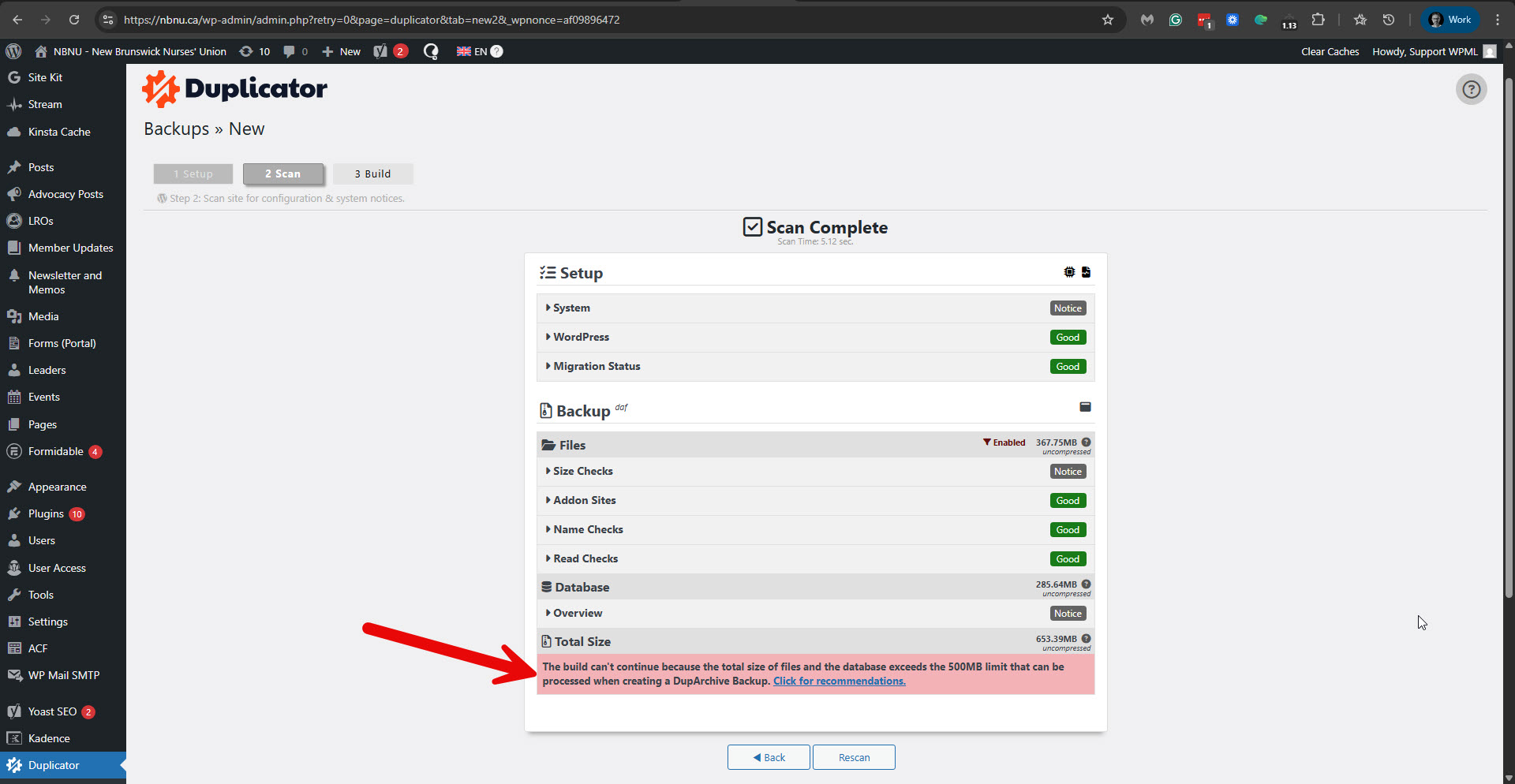 |






