
This is the technical support forum for WPML - the multilingual WordPress plugin.
Everyone can read, but only WPML clients can post here. WPML team is replying on the forum 6 days per week, 22 hours per day.
| Sun | Mon | Tue | Wed | Thu | Fri | Sat |
|---|---|---|---|---|---|---|
| - | 9:00 – 12:00 | 9:00 – 12:00 | 9:00 – 12:00 | 9:00 – 12:00 | 9:00 – 12:00 | - |
| - | 13:00 – 18:00 | 13:00 – 18:00 | 13:00 – 18:00 | 13:00 – 18:00 | 13:00 – 18:00 | - |
Supporter timezone: Asia/Singapore (GMT+08:00)
| Author | Posts |
|---|---|
| July 23, 2025 at 2:04 pm #17264336 | |
 T4ng |
Background of the issue: Symptoms: Questions: 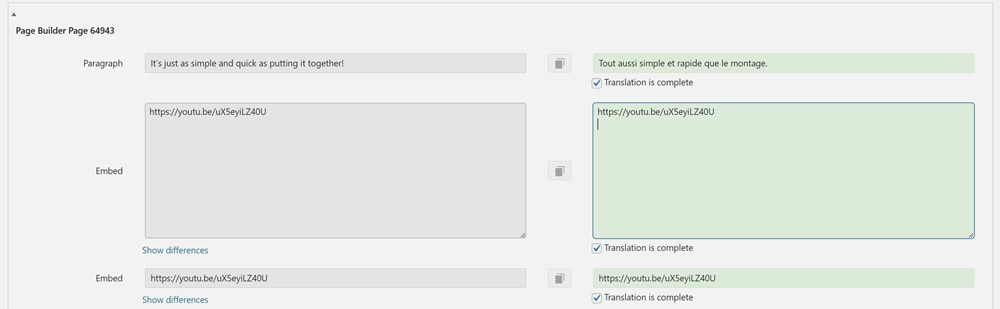 |
| July 25, 2025 at 2:08 am #17269771 | |
 Kor WPML Supporter since 08/2022 Languages: English (English ) Timezone: Asia/Singapore (GMT+08:00) |
Thanks for contacting us. Please try using the method here https://wpml.org/forums/topic/broken-youtube-video-block-after-translation/page/2/ to translate the embed video URL. As for the caption, did you have it included on the embed shortcode? If possible, please share the entire embed code here so that I can check. |
| July 25, 2025 at 3:29 pm #17271701 | |
|
T4ng |
Hi Kor, Actually, I am the one who started that topic. I thought it worked at first, but actually never did. We've tried both setting up this config from the interface, and from the code. It never worked. By the way, the setup you mention is in place, and obviously still doesn't work. I tested it with only WPML + string translation active + Storefront theme. hidden link Best Regards, 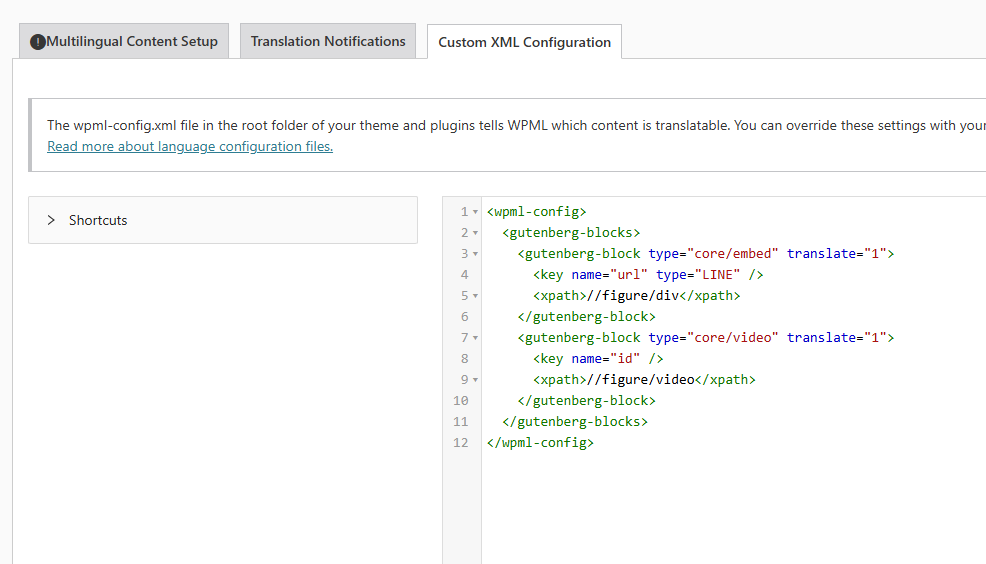 |
| July 28, 2025 at 2:15 am #17273576 | |
|
Kor WPML Supporter since 08/2022 Languages: English (English ) Timezone: Asia/Singapore (GMT+08:00) |
Thanks for your reply. My apologies for my confusion. I will need to closely examine your website. Therefore, I will require temporary access (WP-Admin and FTP) to a test site where the problem has been replicated, if possible. This will enable me to provide better assistance and determine if any configurations need to be modified. Please note that it is important to have a backup for security purposes and to prevent any potential data loss. You can use the UpdraftPlus plugin (https://wordpress.org/plugins/updraftplus/) to fulfill your backup requirements. Your upcoming reply will be treated with confidentiality and will only be visible to you and me. ✙ To resolve the issue, I may need your consent to deactivate and reactivate plugins and the theme, as well as make configuration changes on the site if necessary. This emphasizes the significance of having a backup. |
| July 28, 2025 at 7:24 am #17273889 | |
|
T4ng |
Hi Kor, Have you guys tried to replicate it on a clean install? Thanks |
| July 28, 2025 at 8:10 am #17274042 | |
|
Kor WPML Supporter since 08/2022 Languages: English (English ) Timezone: Asia/Singapore (GMT+08:00) |
Thanks for your reply. I've prepared a sandbox site here hidden link , and could you please replicate the issue over there so that I can check and escalate this for you? |
| July 28, 2025 at 12:20 pm #17274968 | |
|
T4ng |
I tried to replicate the issue on your test environment, and failed. So I did further testing on my local env. And it drilled down to the case where : Would sove the issue In our case, this was difficult to check, because we implemented it both from the code AND the admin > WPML > Setting > XML. If one of this step was missing, you can't notice a change. Anyways. I think I can now confirm the issue is caused by this WPML config since, adding this configuration + clearing WPML's cache on your test env makes the issue occur. The guilty configuration is: <wpml-config> I checked the previous ticket, and noticed a tiny difference with syntax of YOUR code config and ours: the <key> tags closing syntax. It's separate in yours, not in ours. <wpml-config> But I tested that as well, and it doesn't make any difference. As long as this setup is enabled, the video blocks can't be translated properly. I just added it and cleared the cache on the test env, so that you can test it. 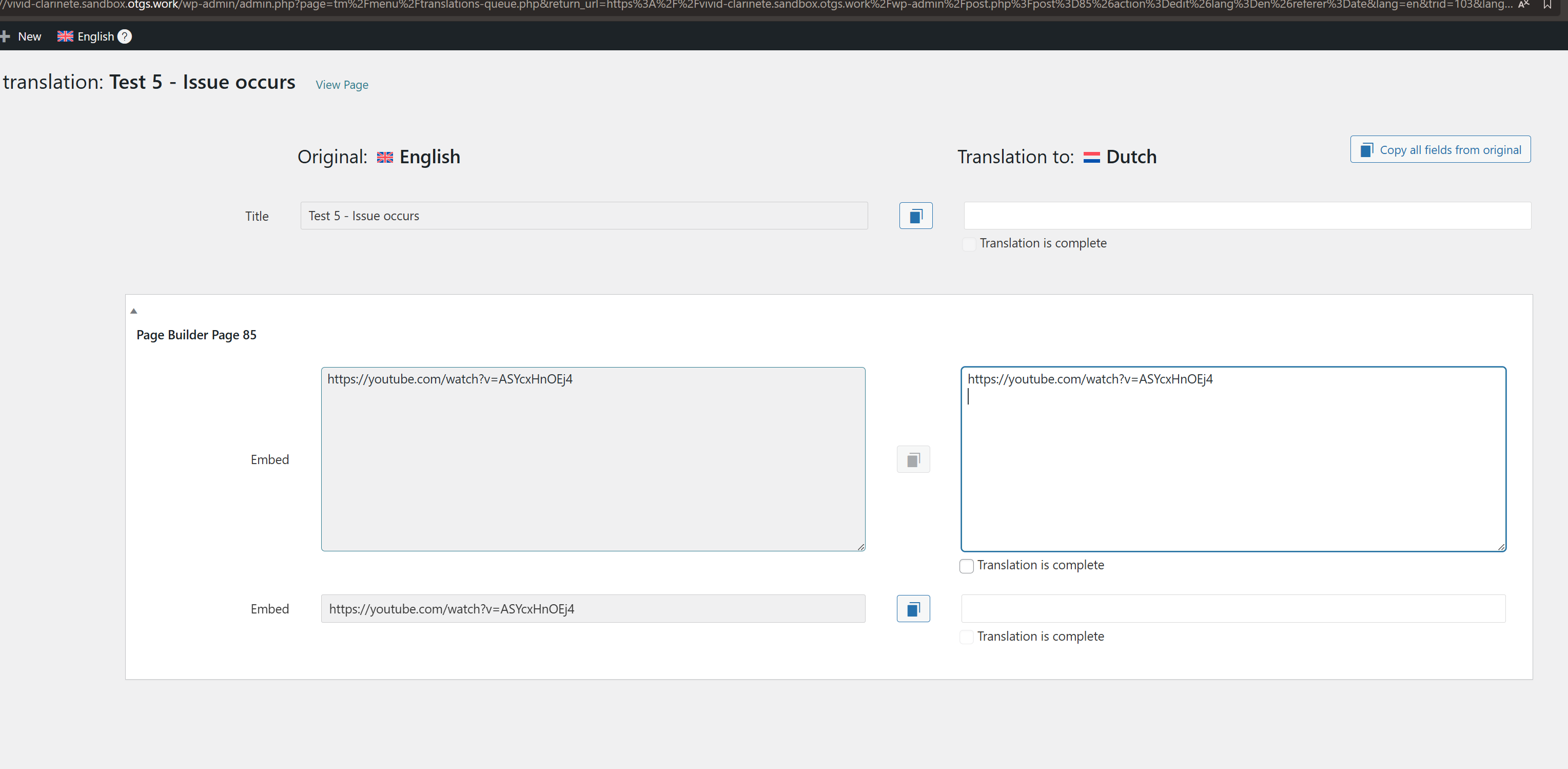 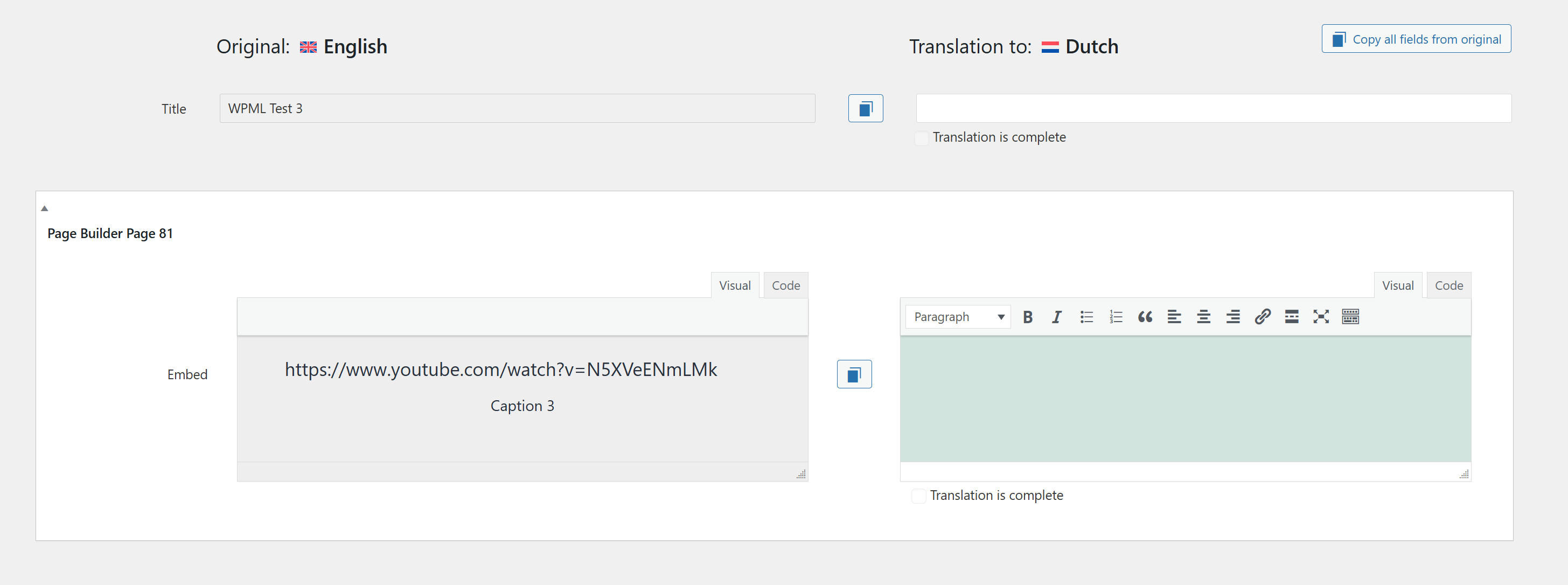 |
| July 28, 2025 at 2:23 pm #17275750 | |
|
Kor WPML Supporter since 08/2022 Languages: English (English ) Timezone: Asia/Singapore (GMT+08:00) |
Thanks for your reply. I’ve checked the test page where the issue can be replicated: hidden link After reviewing the source code, I can see that two embedded YouTube codes are being rendered, as shown in the attached screenshot. This appears to be coming directly from Gutenberg, and unfortunately, I don’t believe there’s anything we can do from the WPML side to change that. 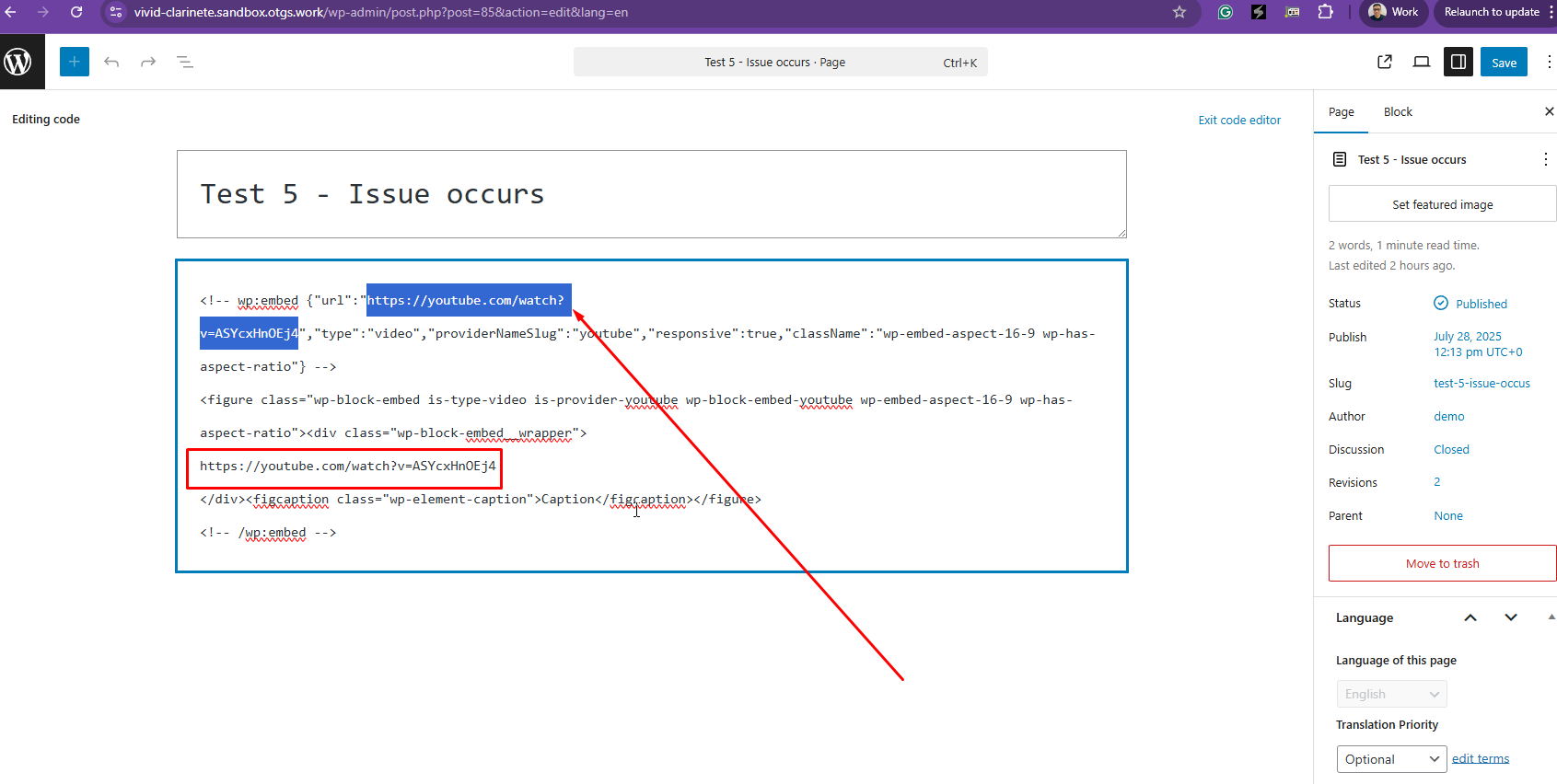 |
| July 28, 2025 at 2:35 pm #17275791 | |
|
T4ng |
I'm sorry, it looks like you didn't understand my feedback. What I found out, is that the custom setup, as advised in the post mentionned int #2, seems to be what causes the issue. So there's nothing to "fix", it seems I just need to get rid of this custom setting. Still, I don't understand why this setup was needed at some point, and why now it does break the content. |
| July 28, 2025 at 2:45 pm #17275820 | |
|
Kor WPML Supporter since 08/2022 Languages: English (English ) Timezone: Asia/Singapore (GMT+08:00) |
Thanks for your reply. I get what you mean now. I've adjusted the custom XML configuration code to the below. <wpml-config>
<gutenberg-blocks>
<gutenberg-block type="core/embed" translate="1">
<key name="url" type="LINE"></key>
<xpath>//figure/figcaption</xpath>
</gutenberg-block>
</gutenberg-blocks>
</wpml-config>
Could you check and see if it works correctly now? 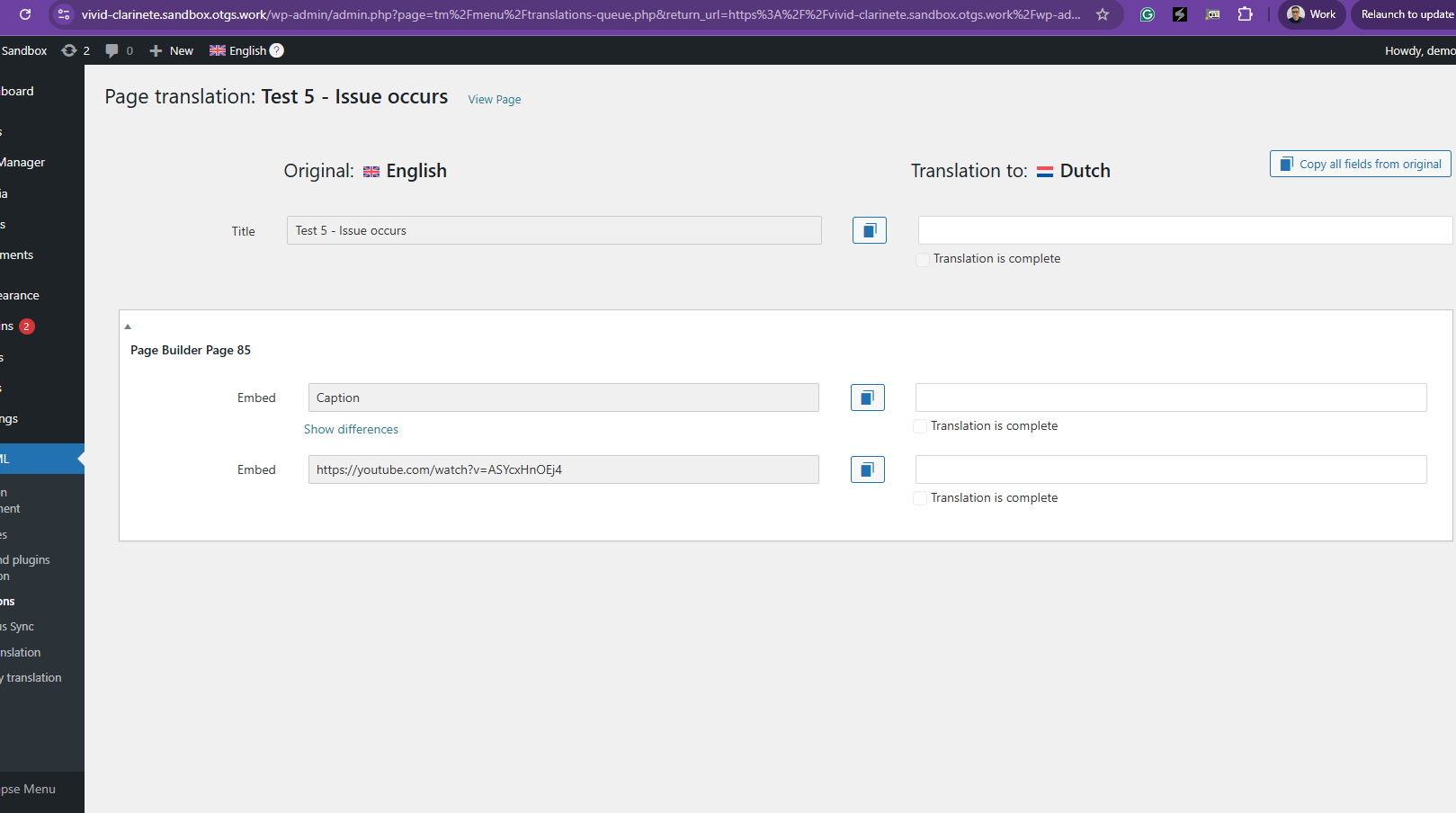 |
| July 28, 2025 at 2:55 pm #17275887 | |
|
T4ng |
This is a different issue. I was OK with how the caption displays in the editor. |
| July 28, 2025 at 2:58 pm #17275892 | |
|
Kor WPML Supporter since 08/2022 Languages: English (English ) Timezone: Asia/Singapore (GMT+08:00) |
Thanks for your reply. I mean, the custom XML configuration code that you applied earlier is incorrect. So, I've corrected it for you, and could you test this? |
| July 29, 2025 at 8:01 am #17277392 | |
|
T4ng |
Hi, Indeed, it seems to work and now shows separate segments for the URL and the caption. But I still don't get: - Why a custom setup is required for this native, and widely used block? - If it's necessary, and just a matter to keep the video and Caption in separate segments? - Why the custom configuration is different from the one that's been given on the other ticket? Overall, why not standardizing this setup if it's the way to go? Thanks 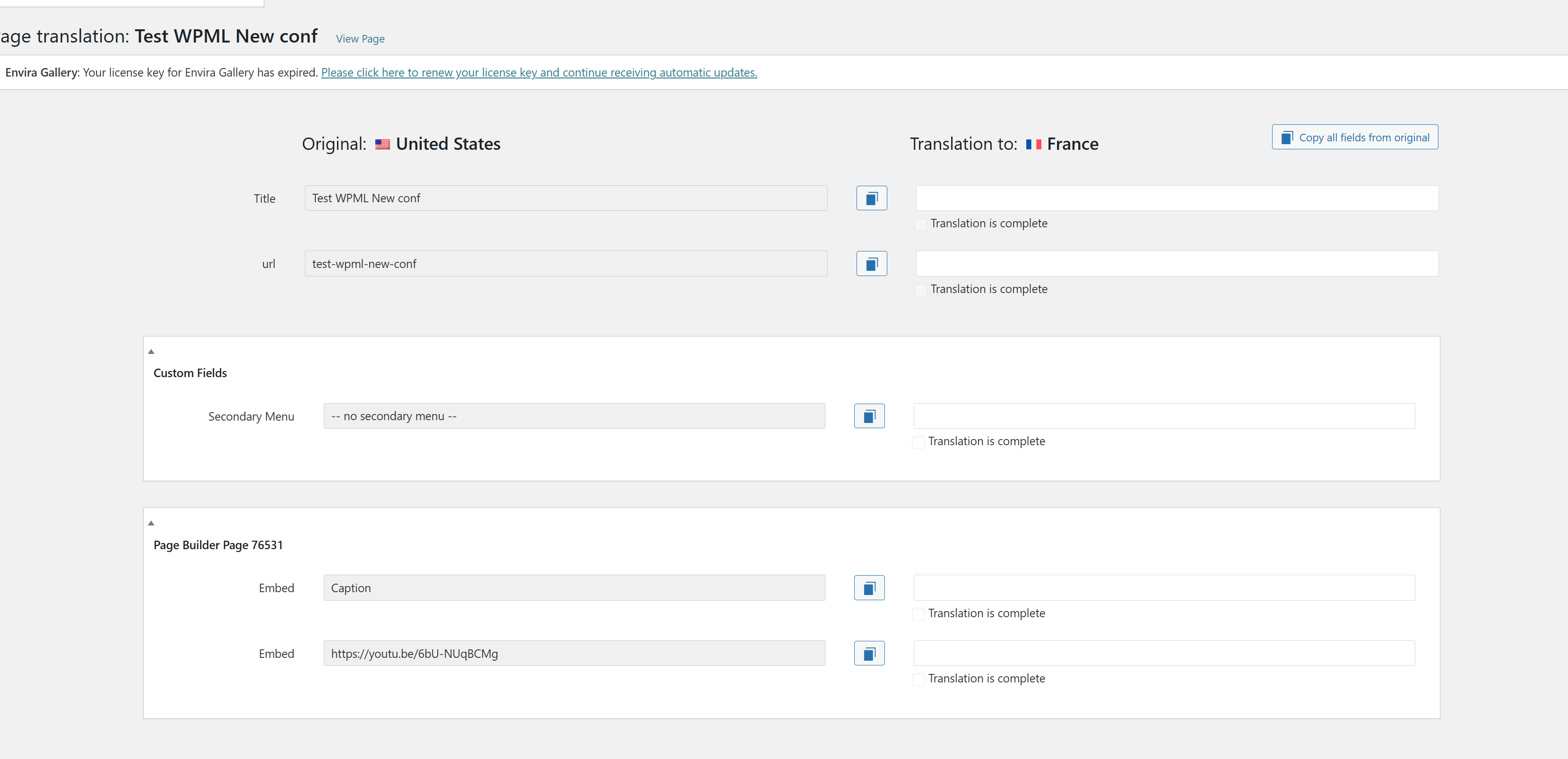 |
| July 29, 2025 at 8:11 am #17277448 | |
|
Kor WPML Supporter since 08/2022 Languages: English (English ) Timezone: Asia/Singapore (GMT+08:00) |
Thanks for your reply. Usually, URLs are translated automatically using the Advanced Translation Editor. https://wpml.org/faq/how-to-translate-links/ However, you wanted to translate the URL in the embed code, which is considered a custom request. So, you'll have to use the custom XML configuration to tell WPML that you need to translate these contents. |


The topic ‘[Closed] Youtube block’s url appears twice in translations, while caption is missing’ is closed to new replies.