


문제 개요
Repeater 애드온은 다른 필드 유형을 포함하도록 설계된 리피터 필드 유형을 제공합니다. 사용자가 리피터 내의 콘텐츠를 복제하려면 임시 해결 방법 섹션에 설명된 대로 스니펫을 추가하고 필드 이름을 주의해서 추가해야 합니다.
이 문제는 현재 다음 필드 유형에서 발생합니다:
- 이미지
- 파일
- 갤러리
- 택소노미
- 글 개체
- 페이지 링크
참고: 다른 모든 필드 유형에도 제공된 코드 스니펫을 사용할 수 있습니다. 유일한 차이점은 필드의 이름입니다. 즉, 이 스니펫을 사용하여 리피터 및 일반 필드 유형 모두의 복제 문제를 해결할 수 있습니다.
이러한 필드 유형에 대한 알려진 문제는 여기에서 확인할 수 있습니다.
임시 해결 방법
이 문제는 해결되었습니다. 최신 버전으로 업데이트하면 사이트에서 이 문제가 해결되므로, 아직 업데이트할 수 없는 경우에만 이 임시 해결 방법이 필요합니다.
복제가 제대로 작동하도록 functions.php 파일에 이 스니펫을 사용할 수 있습니다.
function wpml_fix_acf_duplication( $value_to_filter, $target_language, $meta_data ) {
  // Field names should be placed into following array.
  $fields = array(
     'taxonomy_field' => 'some_taxonomy_name',
     'repeater_field_0_repeater_taxonomy_field' => 'some_other_taxonomy_name',
     'repeater_field_1_repeater_taxonomy_field' => 'some_other_taxonomy_name',
     'repeater_field_0_repeater_child_0_repeater_child_taxonomy_field' => 'some_other_taxonomy_name',
     'repeater_field_0_repeater_child_1_repeater_child_taxonomy_field' => 'some_other_taxonomy_name',
     'repeater_field_1_repeater_child_0_repeater_child_taxonomy_field' => 'some_other_taxonomy_name',
     'repeater_field_1_repeater_child_1_repeater_child_taxonomy_field' => 'some_other_taxonomy_name'
  );


  if ( array_key_exists( $meta_data['key'], $fields ) ) {
		$value = maybe_unserialize( $value_to_filter );

		if ( is_array( $value ) ) {
			// If custom field value contain array of IDs to translate, usually used for gallery and taxonomy field types.
			$translated_ids = array();

			foreach ( $value as $v ) {
				$translated_ids[] = apply_filters( 'wpml_object_id', $v, $fields[ $meta_data['key'] ], true, $target_language );
			}

			return maybe_serialize( $translated_ids );
		} else {
			// If custom field value contain single ID to translate, usually used for image and file field types.
			$translated_id = apply_filters( 'wpml_object_id', $value, $fields[ $meta_data['key'] ], true, $target_language );

			return $translated_id;
		}
	}

	return $value_to_filter;
}
add_filter( 'wpml_duplicate_generic_string', 'wpml_fix_acf_duplication', 999, 3 );필드 이름(‘taxonomy_field’, ‘repeater_field_0_repeater_taxonomy_field’ 등)을 사이트에 있는 필드 이름으로 교체해야 합니다. 이를 수행하려면 다음 단계를 따르세요.
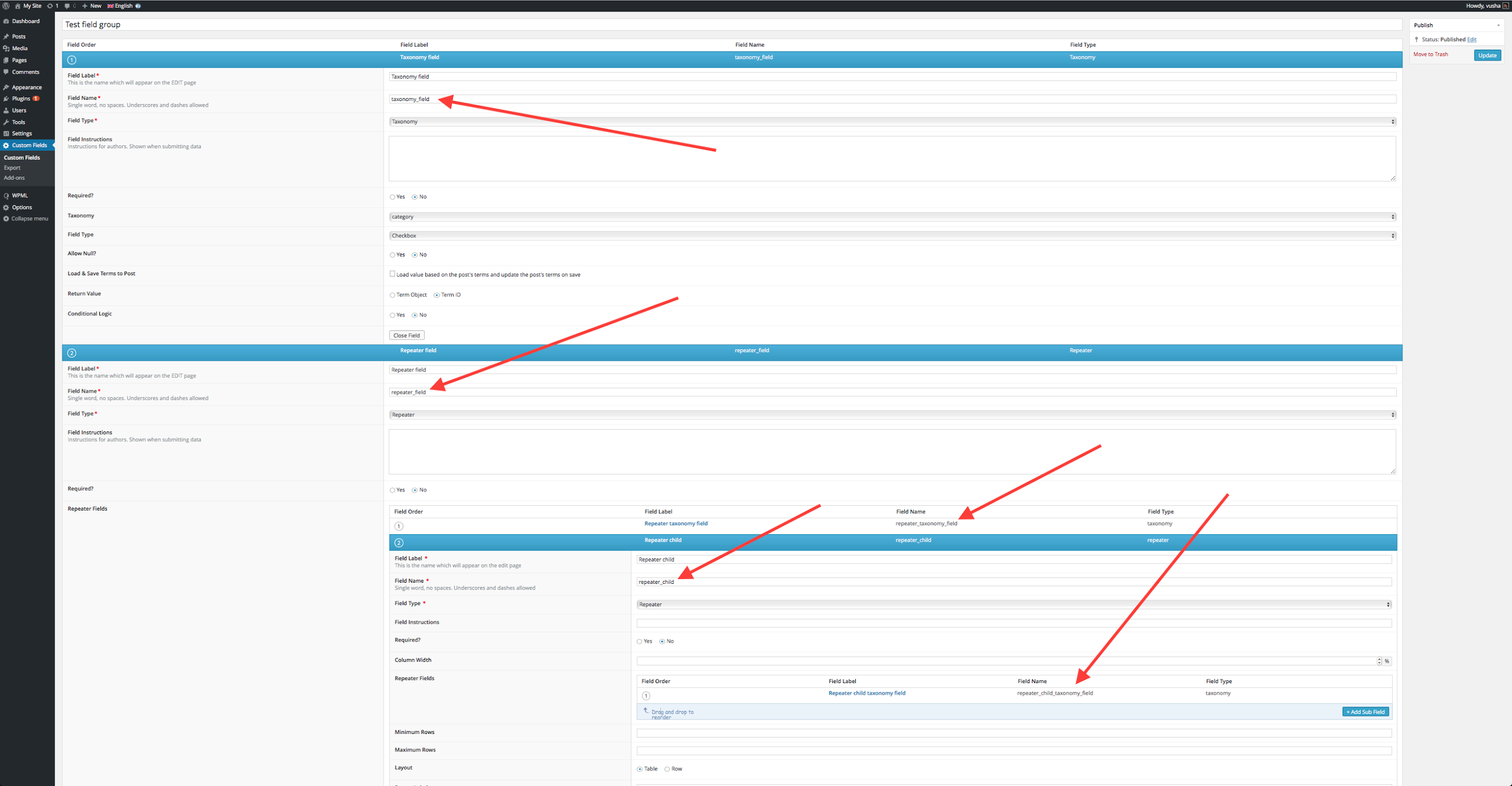
위의 예에서는 필드 그룹에 다음 항목이 있습니다.
– 택소노미 필드 1개
– 택소노미 필드가 있는 리피터 필드 1개 및 자체 택소노미 필드가 있는 또 다른 “하위” 리피터 필드 1개.
즉, 중첩은 다음과 같습니다.
Taxonomy
Repeater {
         Taxonomy
         Repeater Child {
                        Taxonomy
         }
}즉, 다음 이미지에 표시된 예에서와 같이 필요에 따라 필드를 설정해야 합니다.
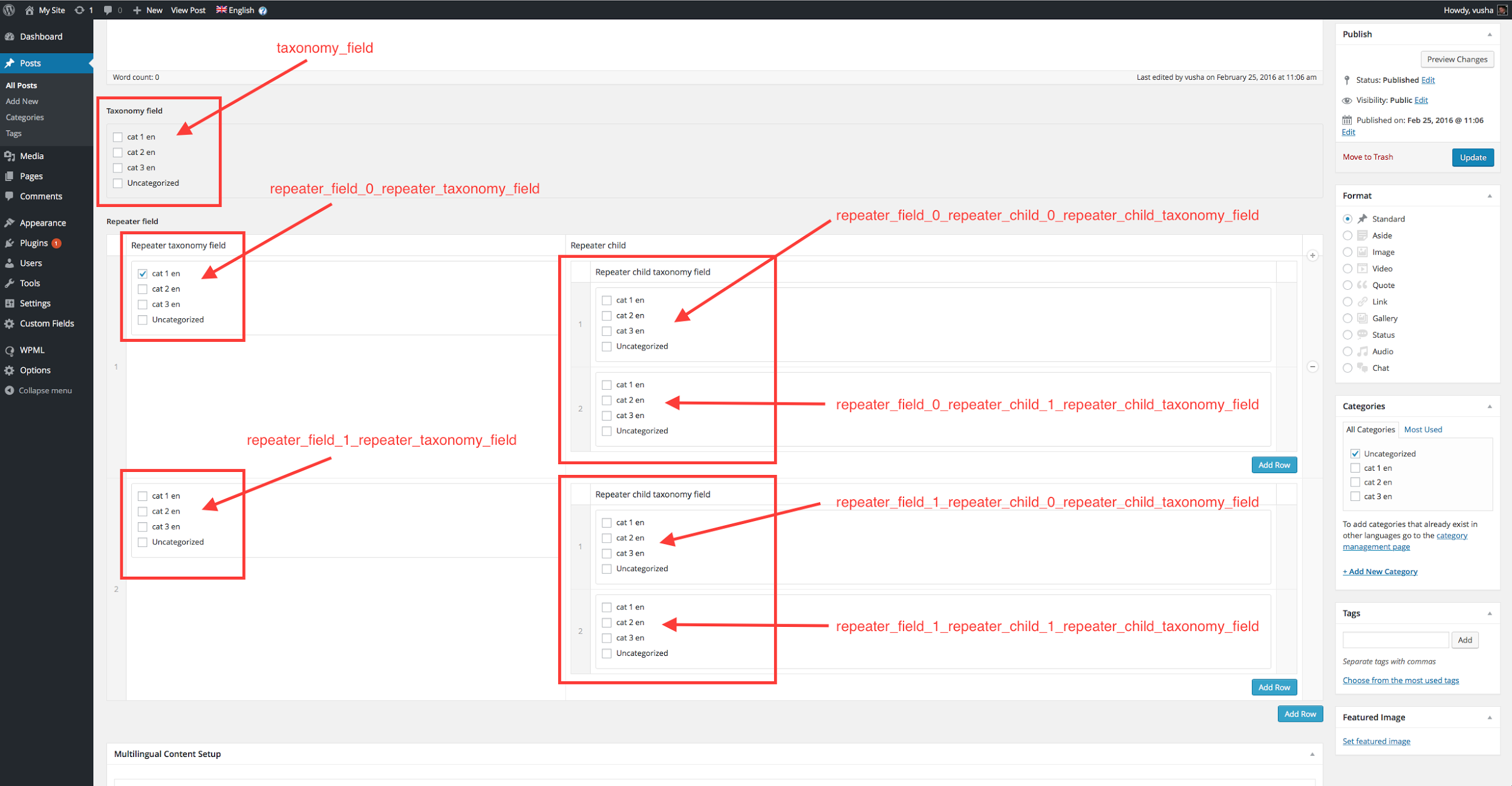
글, 페이지 또는 사용자 정의 필드를 사용하는 모든 글 유형을 편집할 때 해당 필드가 작동하는 것을 볼 수 있습니다. 다음 이미지는 이 예에서 어떻게 보이는지 보여줍니다.
참고: 배열의 key =>; value 쌍을 적절한 값으로 교체해야 합니다.
배열 키 교체:
키로 사용된 필드 이름을 주의 깊게 살펴보면 필드가 0부터 인덱싱된다는 것을 알 수 있습니다.
즉, 첫 번째 리피터는 0, 두 번째는 1이 됩니다. 이러한 리피터 번호는 밑줄을 사용하여 다른 하위 필드 유형과 구분되며, 다음과 같습니다. _0_, _1_, _2_…
예를 들어 첫 번째 리피터 내의 택소노미 필드 이름은 'repeater_field_0_repeater_taxonomy_field'이며, 이 이름을 위의 스니펫 배열에 넣습니다. 다음 세 가지 사항에 주의하세요.
- 배열 내부에 사용하는 모든 필드를 키로 넣고, 아래 나열된 유형 중 하나인지 확인합니다.
- 필드 이름의 형식이 올바르게 지정되었는지 확인합니다.
- 각 리피터 행마다 필드 이름이 개별적으로 추가되었는지 확인합니다. 즉, 10개의 리피터 행 이름이 있는 경우 다음과 같습니다. 'repeater_field_0_some_custom_field', 'repeater_field_1_some_custom_field', 'repeater_field_2_some_custom_field' … 마지막 'repeater_field_9_some_custom_field'까지 추가됩니다.
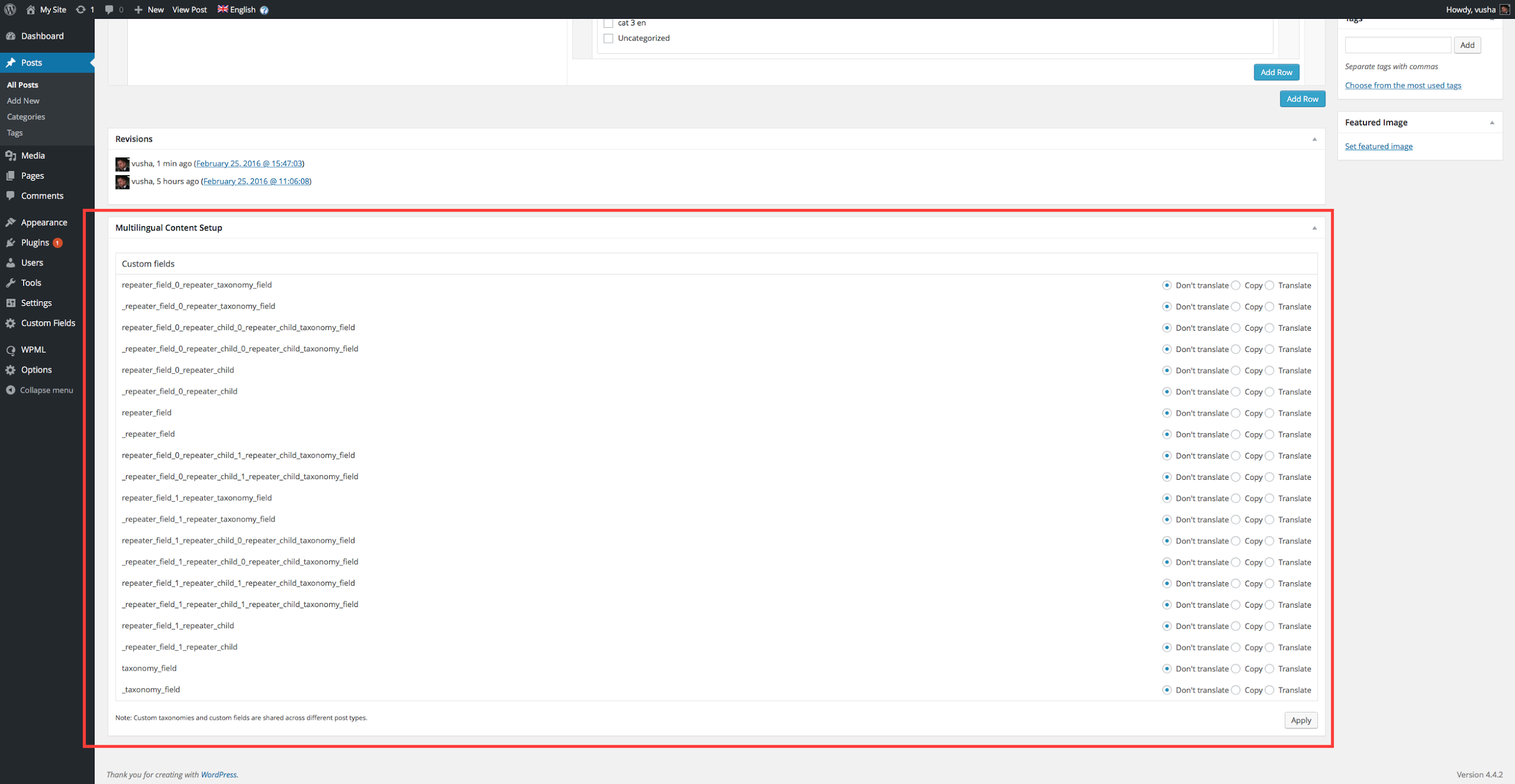
상황에 맞게 ‘some_taxonomy_name’, ‘some_other_taxonomy_name’ 등과 같은 값을 교체합니다. 이는 ID가 속한 요소의 유형입니다. 다음 중 하나일 수 있습니다. post, page, attachment, {custom post type key}, nav_menu, nav_menu_item, category, post_tag, {custom taxonomy key}
자세한 내용은 여기에서 훅 문서를 확인하세요.
