


了解如何使用 wpml-config.xml 文件注册自定义页面构建器内容以供翻译。注册字符串、媒体、页面构建器小工具、简码 ID 等。
本指南面向开发者,适用于构建主题和插件或向其网站添加自定义页面构建器代码的开发者。
如果您使用的是第三方页面构建器,并且无法翻译网站上的自定义小工具,请联系 WPML 支持。
需要生成 wpml-config.xml 文件?请访问我们关于使用 Multilingual Tools 插件自动生成配置文件的分步指南。
翻译字符串
让我们来看一个示例:您使用 Visual Composer 向页面添加了一个文本分隔符。该分隔符有一个标题,其简码如下所示:
[vc_text_separator title="Separator Title"]
为了翻译此文本分隔符的标题,您需要在 wpml-config.xml 文件中添加几行代码。这样,WPML 就能“知道”该分隔符的标题需要翻译。
以下代码是您在此情况下需要添加到 wpml-config.xml 文件中的示例。
将页面构建器简码添加到 wpml-config.xml 文件的示例
<wpml-config>
  <shortcodes>
    <shortcode>
        <tag>vc_text_separator</tag>
        <attributes>
            <attribute>title</attribute>
        </attributes>
    </shortcode>
  </shortcodes>
</wpml-config>
让我们了解一下上述示例的结构:
- 以 shortcodes 标签开头。网站中任何需要翻译的简码都应放在此标签下。
- 使用 shortcode 标签包装属于单个简码的所有标签。
- 使用名为 tag 的标签来定义简码的名称。在本例中为 vc_text_separator。如果需要,您可以向标签添加可选的自定义标签。这些标签将显示在高级翻译编辑器和经典翻译编辑器中的文本旁边。导出的 XLIFF 文件也包含这些标签。有关如何向标签和属性添加标签的信息,请参见下面的示例。
- 简码可以有一个或多个属性,因此您需要将它们包装在 attributes(复数)标签中,并使用 attribute(单数)标签来定义每个属性的标题。
页面构建器(有时)包含具有链接属性的设计元素。
您可以使用 link 选项使内部链接自动指向该文章的翻译版本:type="link"。
您可以将其与 encoding 属性一起使用。它处理各种页面构建器使用的特殊编码。encoding 属性通常特定于您使用的页面构建器。它接受以下值:
- base64 – Visual Composer 原始 HTML 简码。简码将 HTML 存储为 base64 字符串。
- vc_link – Visual Composer 的特殊链接格式。
- vc_values – 用于进度条、饼图和折线图小工具中值的特殊 Visual Composer 编码。
- av_link – Enfold 的特殊链接格式。
- allow_html_tags – 通常,HTML 标签会从简码属性中剥离。如果简码属性应允许 HTML 标签,请将 encoding 设置为 allow_html_tags。请谨慎使用此选项,因为在某些情况下允许 HTML 标签可能会弄乱格式,并可能引发安全问题。
添加简码链接属性的示例:type="link"
<wpml-config>
  <shortcodes>
    <shortcode>
            <tag>av_button</tag>
            <attributes>
                <attribute>label</attribute>
                <attribute type="link" encoding="av_link">link</attribute>
            </attributes>
    </shortcode>
  </shortcodes>
</wpml-config>
如果您考虑使用 urlencoded 简码,请务必阅读有关翻译 urlencoded 简码的页面。
添加标签和属性标签的示例
<wpml-config>
    <shortcodes>
        <shortcode>
            <tag label="My shortcode label">my_shortcode</tag>
            <attributes>
                <attribute label="Shortcode title">title</attribute>
            </attributes>
        </shortcode>
    </shortcodes>
</wpml-config>向标签和属性添加标签可让您在高级翻译编辑器或经典翻译编辑器中显示自定义标签。这有助于译者更好地理解字符串的上下文。
对字段进行分组以便更好地组织
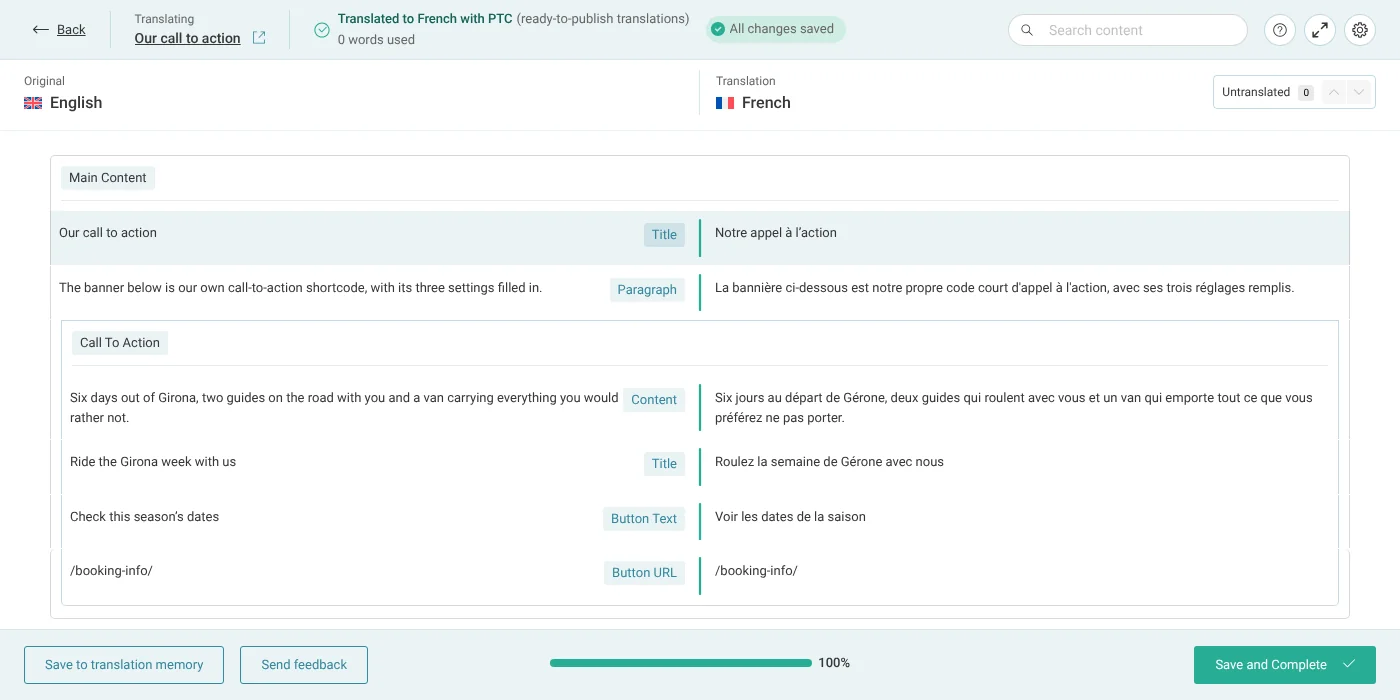
为了提高 XML 配置的清晰度和组织性,您可以在字段标签前加上组名作为前缀。请看这个 CTA 按钮的示例:
<wpml-config>
    <shortcodes>
        <shortcode>
            <tag label="Call To Action: Content">et_pb_cta</tag>
            <attributes>
                <attribute label="Call To Action: Title">title</attribute>
                <attribute label="Call To Action: Button Text">button_text</attribute>
                <attribute label="Call To Action: Button URL" type="link">button_url</attribute>
            </attributes>
        </shortcode>
    </shortcodes>
</wpml-config>
在此处,et_pb_cta 简码的每个属性都带有一个 Call To Action: 标签。WPML 不会将这些标签传递给高级翻译编辑器:译者会将每个属性视为一个独立的字段(分组在简码下),并通过每个字段包含的文本来区分它们。label 属性仍然是配置格式的一部分,且仍然值得设置:
翻译媒体
您可以使用 WPML 媒体翻译在页面构建器内容中为不同语言使用不同的图像。这是通过转换图像 ID 和图像 URL 来实现的。您必须“告诉”使用简码的页面构建器如何进行此转换。以下代码是您在此情况下需要添加到 wpml-config.xml 文件中的示例。
将页面构建器简码添加到 wpml-config.xml 文件以进行图像翻译的示例
<wpml-config>
  <shortcodes>
    <shortcode>
        <!-- Convert media IDs in `gallery_ids` attribute, and ignore the shortcode content -->
        <tag ignore-content="1">et_pb_gallery</tag>
        <attributes>
          <attribute type="media-ids">gallery_ids</attribute>
        <attributes>
    </shortcode>
    <shortcode>
        <!-- Convert the media URL in the content, translate some string attributes for `title` and `alt`, convert media URL in `src` attribute -->
        <tag type="media-url">et_pb_image</tag>
        <attributes>
          <attribute>title_text</attribute>
          <attribute>alt</attribute>
          <attribute type="media-url">src</attribute>
        </attributes>
    </shortcode>
  </shortcodes>
</wpml-config>
您可以使用以下值:
- ignore-content – 您可以在 tag 元素内使用它。此值为可选,可以是 0 或 1。您可以使用此属性来实现新媒体简码的向后兼容性。如果该值设置为 1,则不会处理简码内容。
- type – 您可以在 tag 元素内使用它。您还可以将包含媒体 URL 的简码内容用作 media-url 中的可选值。
- type – 您也可以在 attribute 元素内使用它。在这种情况下,它可以具有以下可选值之一:
- media-ids – 逗号分隔的媒体 ID 列表。
- media-url – 媒体的 URL
- link – 指向网站上的另一个页面,WPML 会自动将其转换为翻译页面的 URL
翻译区块属性中的媒体
您还可以将 media-url 和 media-ids 属性类型与 Gutenberg 区块一起使用,以翻译背景图像等媒体。这与简码的工作原理类似,但使用 <gutenberg-block> 元素和嵌套的 <key> 元素来定义 type="media-url" 和 type="media-ids"。
使用此元素可让我们的 WPML 媒体翻译附加组件翻译背景图像。
这适用于 Gutenberg 区块和 Divi 5。此 Divi 版本使用区块来存储内容,因此 <gutenberg-block> 元素可用于添加媒体翻译。
以下是为 Gutenberg 区块属性添加媒体翻译的示例:
<wpml-config>
  <gutenberg-blocks>
        <gutenberg-block type="divi/section" translate="1">
            <key name="module">
                <key name="decoration">
                    <key name="background">
                        <key name="desktop">
                            <key name="value">
                                <key name="image">
                                    <key name="url" type="media-url" />
                                </key>
                            </key>
                        </key>
                    </key>
                </key>
            </key>
        </gutenberg-block>
  </gutenberg-blocks>
</wpml-config>
翻译页面构建器小工具
WPML 允许您在语言配置文件中注册页面构建器小工具。有关详细信息,请参阅我们关于如何注册页面构建器小工具以供翻译的文档页面。
自动转换简码 ID
从 WPML 4.5.9 开始,您可以声明位于简码属性中的文章或分类法术语的 ID。然后可以在网站前端自动转换这些 ID。
从 WPML 4.8 开始,相同的逻辑扩展到存储在管理文本中的对象 ID,以及文章自定义字段和自定义分类法术语字段中的 ID。
例如,请看以下简码:
[foo_product_list product_ids="12,34,56"]
您可以通过以下配置声明 product_ids 属性包含文章 ID:
声明 product_ids 属性包含文章 ID
<shortcode>
    <tag ignore-content="1">foo_product_list</tag>
    <attributes>
        <attribute type="post-ids" sub-type="product">product_ids</attribute>
    </attributes>
</shortcode>
在前端,简码会自动转换为:
[foo_product_list product_ids="13,35,57"]
您可以使用以下配置属性:
- type – post-ids 或 taxonomy-ids
- sub-type(可选)– type 的特定实体(如果已知)。例如,来自 WooCommerce 的 Product 自定义文章类型的 product。如果未定义,将猜测特定实体。
ID 转换功能非常灵活,并尝试适应大多数可能的 ID 格式(单个 ID、ID 列表、序列化数组、JSON 编码数组)。
带有通配符的属性名称
一些简码将 ID 存储在许多名称相似的属性中,例如 include_category、include_portfolio_category 和 include_product_cat。一行 <attribute> 可以涵盖所有这些属性。在属性名称中放置 *:
声明所有 include_ 和 exclude_ 属性包含分类法 ID
<shortcode>
    <tag>fusion_post_cards</tag>
    <attributes>
        <attribute type="taxonomy-ids" exclude="include_product_skus">include_*</attribute>
        <attribute type="taxonomy-ids" exclude="exclude_product_skus">exclude_*</attribute>
    </attributes>
</shortcode>- * 匹配一个或多个字母、数字、_ 或 -。
- * 仅适用于 type="post-ids" 和 type="taxonomy-ids"。
- WPML 会精确匹配名称的其余部分。WPML 不接受在属性名称中使用正则表达式。
- exclude(可选)– 逗号分隔的完整属性名称列表。WPML 不会转换这些属性中的 ID。将其用于匹配名称但不包含 ID 的属性,例如 include_product_skus。
其他资源
要了解有关 wpml-config.xml 文件的更多信息,请访问语言配置文件指南。
有关使用 wpml-config.xml 文件自定义其他元素的信息,请访问我们的其他指南:
