
Эта тема решена. Вот описание проблемы и ее решения.
Problem:
You are using WordPress with WooCommerce and WPML, and you encounter issues in the Advanced Translation Editor where all images are treated as translatable content. This causes the page to be marked as "not fully translated" until every image item is manually confirmed. You face challenges with no option to bulk copy or confirm images, unnecessary consumption of translation credits, and duplicated image entries in the editor, leading to a slow translation workflow.
Solution:
Currently, it is not possible to exclude product images from appearing in the Advanced Translation Editor; this is the intended behavior to facilitate the translation of image-related content such as titles, alt text, and captions.
For further assistance, please visit our support forum at WPML Support Forum.
Это форум технической поддержки WPML – плагина для многоязычной WordPress.
Доступно для чтения всем, но только клиенты, купившие WPML, могут оставлять сообщения. Сотрудники WPML отвечают на сообщения форума 6 дней в неделю, 22 часов в сутки.
Помечено: Not WPML issue, WCML
Связанная документация:
Эта тема содержит 8 ответов, имеет 1 голос.
Последнее обновление: anatoliyB 1 день, 16 часов назад.
При содействии: Andrey.
| Автор | Сообщения |
|---|---|
| 13 декабря, 2025 в 2:27 пп #17661404 | |
 anatoliyB |
I am using WordPress with WooCommerce and WPML. In the Advanced Translation Editor, all images (Media / Image / Product Image) are treated as translatable content. I have several issues: 1) There is no option to bulk copy or bulk confirm images from the original language (like the "Copy all content" button that existed in the Classic Translation Editor). 2) Using "Translate automatically" consumes translation credits, but I do not need AI translation for images. I only want to reuse the original images without translating their titles or alt texts. 3) The same images appear multiple times in the editor: This results in duplicated work and a very slow translation workflow. My goal: Questions: Screenshots attached showing duplicated Media and Image entries in ATE.  |
| 13 декабря, 2025 в 4:50 пп #17661560 | |
 Andreas W. Сторонник WPML с 12/2018 Языки: Английский (English ) Испанский (Español ) Немецкий (Deutsch ) Часовой пояс: America/Lima (GMT-05:00) |
Hello, - Is there a way to disable image/media translation in the Advanced Translation Editor? - Is there a way to bulk copy or auto-approve images without using translation credits? As an alternative, you can also use the plugin "WPML Media Translation" which allows you to translate media information and also allows you to upload alternative media in second languages. Guide: - Is this duplication (Media vs Image) expected behavior, or can it be reduced? Best regards |
| 15 декабря, 2025 в 8:13 дп #17662881 | |
|
anatoliyB |
Hello Andreas, Thank you for the detailed reply. I would like to clarify my situation, because I believe there is a misunderstanding. I have already: There are no other options available in my WPML settings related to “translate media with the WPML Translation Editor”. After disabling automatic detection, I tested the following: Result: Previously, I had to click the “+” icon for each image to copy the image title. ----- Regarding image duplication: By “duplication” I do NOT mean duplication in the Media Library. In the editor, the same images appear twice: These are the same image files. From a user and workflow perspective, this feels like a design issue or limitation of the editor. ---- My actual goal is very simple: - I want to COMPLETELY remove images from the Advanced Translation Editor Images are not content that needs translation in my case. So my questions are: 1) Is it currently possible to fully exclude images from the Advanced Translation Editor? I want to be sure that I am not missing a hidden or undocumented setting, but based on my tests, it seems this behavior cannot be changed. Thank you for clarifying. |
| 15 декабря, 2025 в 12:15 пп #17664029 | |
 Andrey Сторонник WPML с 06/2013 Языки: Английский (English ) Русский (Русский ) Часовой пояс: Europe/Kyiv (GMT+02:00) |
Thank you for your feedback. This is Andrey, and I’ll be assisting you further.
It’s not possible to exclude product images from appearing in the Advanced Translation Editor (ATE).
This is not a limitation or a bug. It is the intended behavior, designed to make it easier to translate image-related content in your store (such as image titles, alt text, and captions) as part of the translation workflow.
To better understand this behavior, I’ll need a bit more information. Could you please share the exact steps to reproduce this on a fresh installation? For example, am I correct in assuming that the same image is being added in multiple places, such as: This would explain why the image appears multiple times in the translation editor. |
| 16 декабря, 2025 в 7:01 дп #17666118 | |
|
anatoliyB |
Hello Andrey, I found a product where the duplication issue is clearly reproducible. Product setup: Product URL: Issue in Advanced Translation Editor (ATE): This creates duplicated work because WPML requires confirming/translating every image item to complete the translation. Question: Additional info: Please let me know: Thank you. |
| 16 декабря, 2025 в 12:58 пп #17667566 | |
|
Andrey Сторонник WPML с 06/2013 Языки: Английский (English ) Русский (Русский ) Часовой пояс: Europe/Kyiv (GMT+02:00) |
Thank you for your feedback. I have done some tests according to the provided steps. Could you try the following steps? 1. Go to WPML → Settings → Media Translation 2. Disable "Automatically detect best options for translating image texts (alt, caption, title)" 3. Click on Setup manually and make sure the option "How to handle Media Library texts (alt, caption, title)" is disabled. Even if you see the option is disabled, please follow the steps further. 4. Edit your product "Dreamy Gingerbread Christmas Baby Dress" in the original language, make some slight changes to the description, and update the product. 6. Go to the translation editor. I suspect you should see the images only under the WooCommerce section. 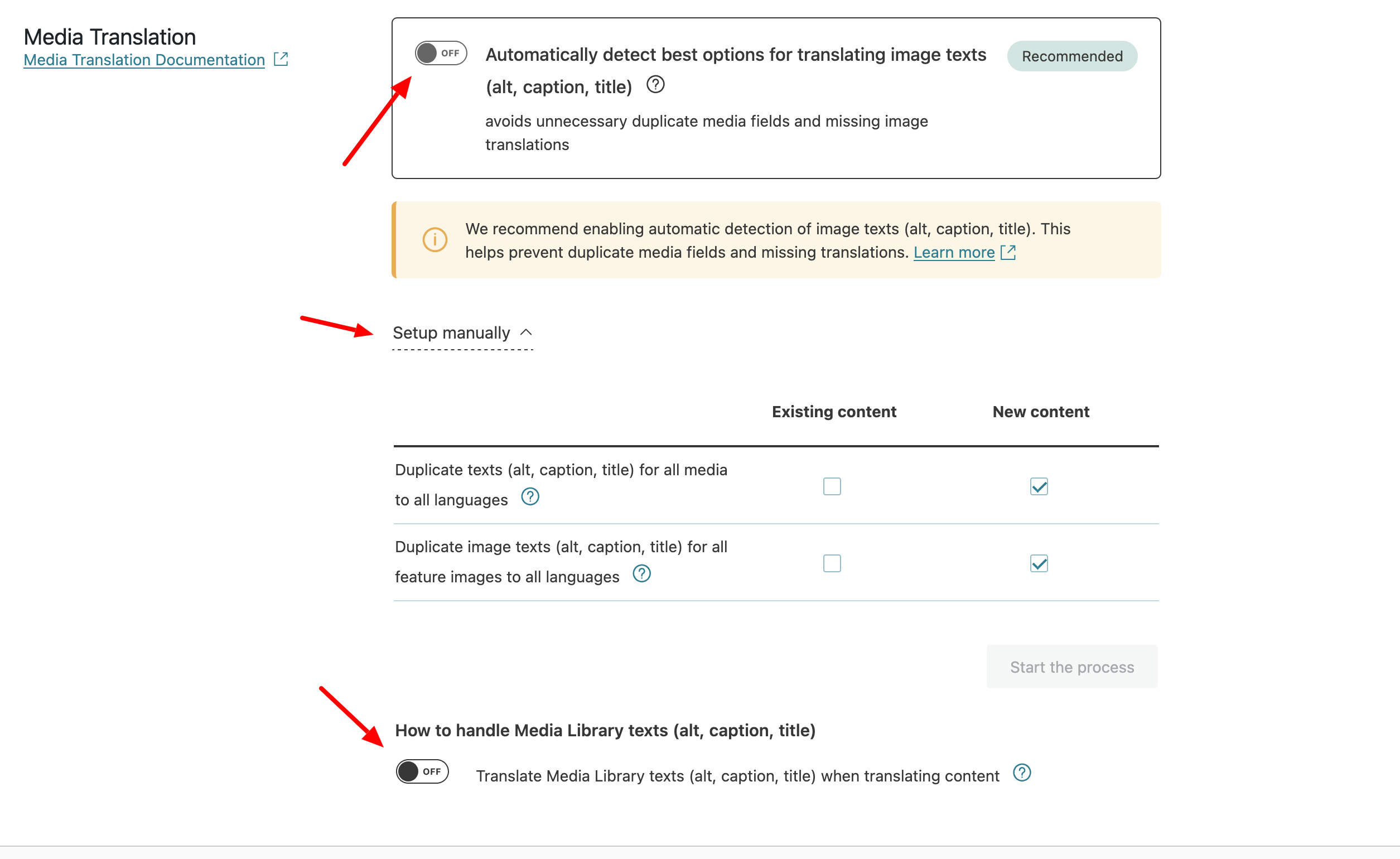 |
| 17 декабря, 2025 в 7:54 дп #17669898 | |
|
anatoliyB |
Hello, I followed your recommendations and reviewed all the Media Translation settings once again. The option “Automatically detect best options for translating image texts (alt, caption, title)” was already disabled before. However, the issue remains the same. So nothing has changed after disabling this option. Please let me know if there is anything else that can be checked or adjusted. 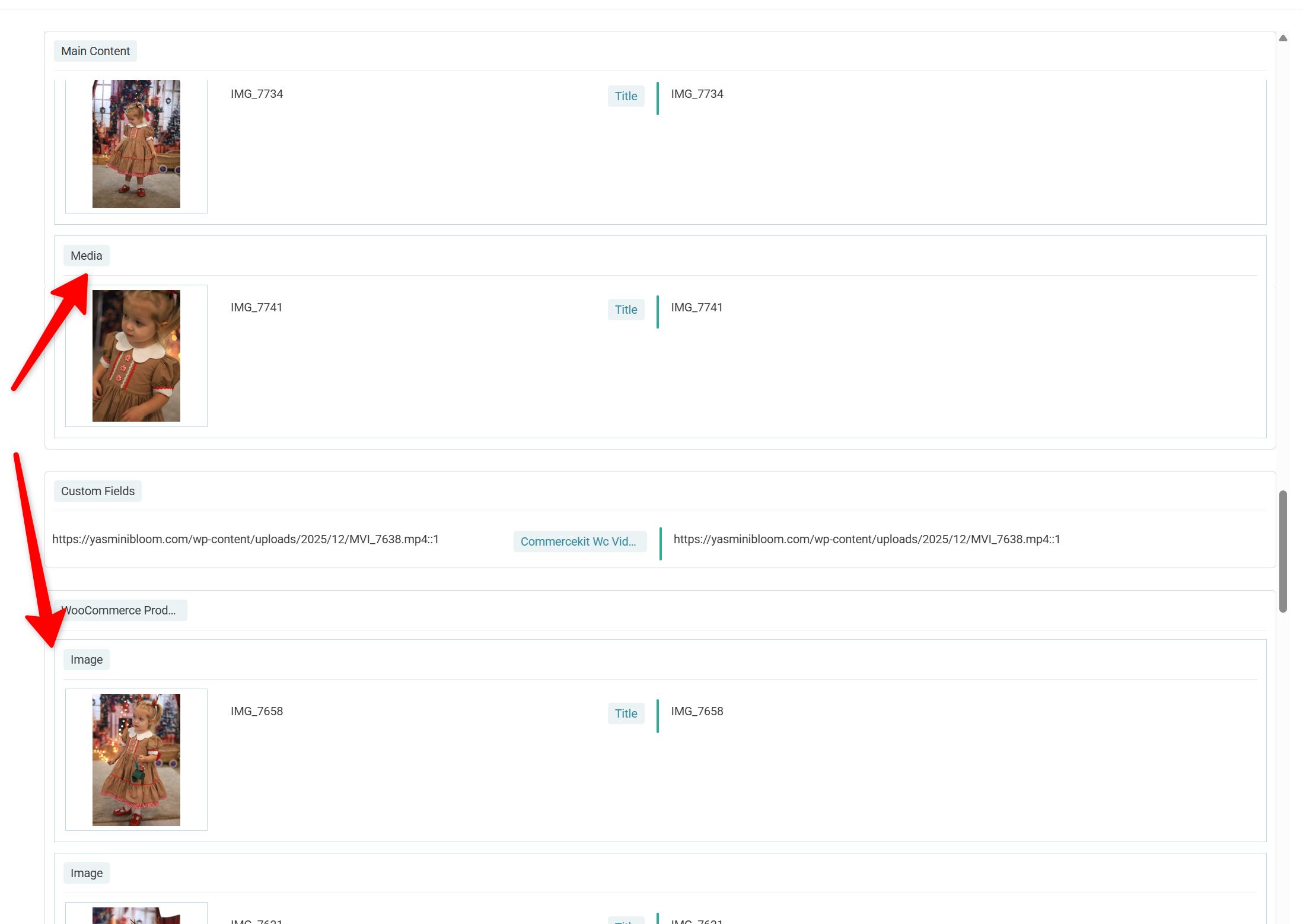 |
| 17 декабря, 2025 в 8:25 дп #17670046 | |
|
Andrey Сторонник WPML с 06/2013 Языки: Английский (English ) Русский (Русский ) Часовой пояс: Europe/Kyiv (GMT+02:00) |
I need to request temporary access (wp-admin and FTP) to your site—preferably to a test site where the problem has been replicated if possible—in order to be of better help. When you log in to leave your next reply, you will find the needed fields below the comment area. The information you will enter is private, meaning only you and I can see and access it. |
| 17 декабря, 2025 в 5:30 пп #17672191 | |
|
Andrey Сторонник WPML с 06/2013 Языки: Английский (English ) Русский (Русский ) Часовой пояс: Europe/Kyiv (GMT+02:00) |
Thank you for providing the staging site. I’ve reviewed it and tested it with the first product in the list: I followed the same steps I described here: After doing this, the images now appear only under the WooCommerce section. Previously, they were showing in both places. What I did specifically was: This forced the translation status to change to “needs review” (round icon), triggering a new translation job. I suspect that in your previous attempts, the changes you made did not trigger a translation status change, so the Advanced Translation Editor continued using the existing translation data.  |
| 18 декабря, 2025 в 7:53 дп #17673347 | |
|
anatoliyB |
Yes, if I save the product with changes and then restore everything as it was, the translations are updated. Before that, I made changes to the text and saved it immediately. Although the global settings were already correct. There is currently no repeat image group. Unfortunately, it is not possible to remove images from the translation. This is inconvenient and adds unnecessary work. |