


WPML for WooCommerce 5.5.3 — Improved Link Handling and More
WCML 5.5.3 focuses on how links work across languages, from category and account pages to Shop page links.

 7 minutes
We just released WPML Multilingual & Multicurrency for WooCommerce 5.5.6. This release focuses on performance. It targets one of the most frequent complaints we hear from store owners. Saving a variable product in the WooCommerce editor has been slow once your catalog has many variations and many languages. This release fixes that.
When you save a product, WPML Multilingual & Multicurrency for WooCommerce (WCML) keeps every translation in sync with the original. That work covers prices, attributes, stock, variations, and other related data.
On a single-product, single-language site, that work is invisible. On a store with 100 variations in 7 languages, the same save quietly runs hundreds of database updates. Most of those updates are for translation data that didn’t actually change.
This made sense as a safety guarantee. It ensured nothing ever fell out of sync. But it also meant that fixing a typo paid the same cost as importing a brand-new product. Stores with large catalogs felt it. Many of you told us.
WCML 5.5.6 changes that.
We’ve added a new setting called Variation translation sync on product save. It has two modes.
WCML keeps doing what it does today. Every save synchronizes every variation in every language. This is the strongest guarantee that translations stay aligned with the source.
Complete sync remains the default after you upgrade. Your site doesn’t change unless you choose otherwise.
In this mode, saving from the WooCommerce editor only synchronizes the variations you actually edited.
We tested on a product with 9 variations translated into 19 languages, measuring the full save cycle — from clicking Save to the editor being usable again. Updating only the product description, WCML + WPML’s contribution dropped from 2.08s to 1.42s, a 32% reduction. WooCommerce and WordPress were unaffected. The total save time went from 5.52s to 4.86s — a 12% improvement overall.
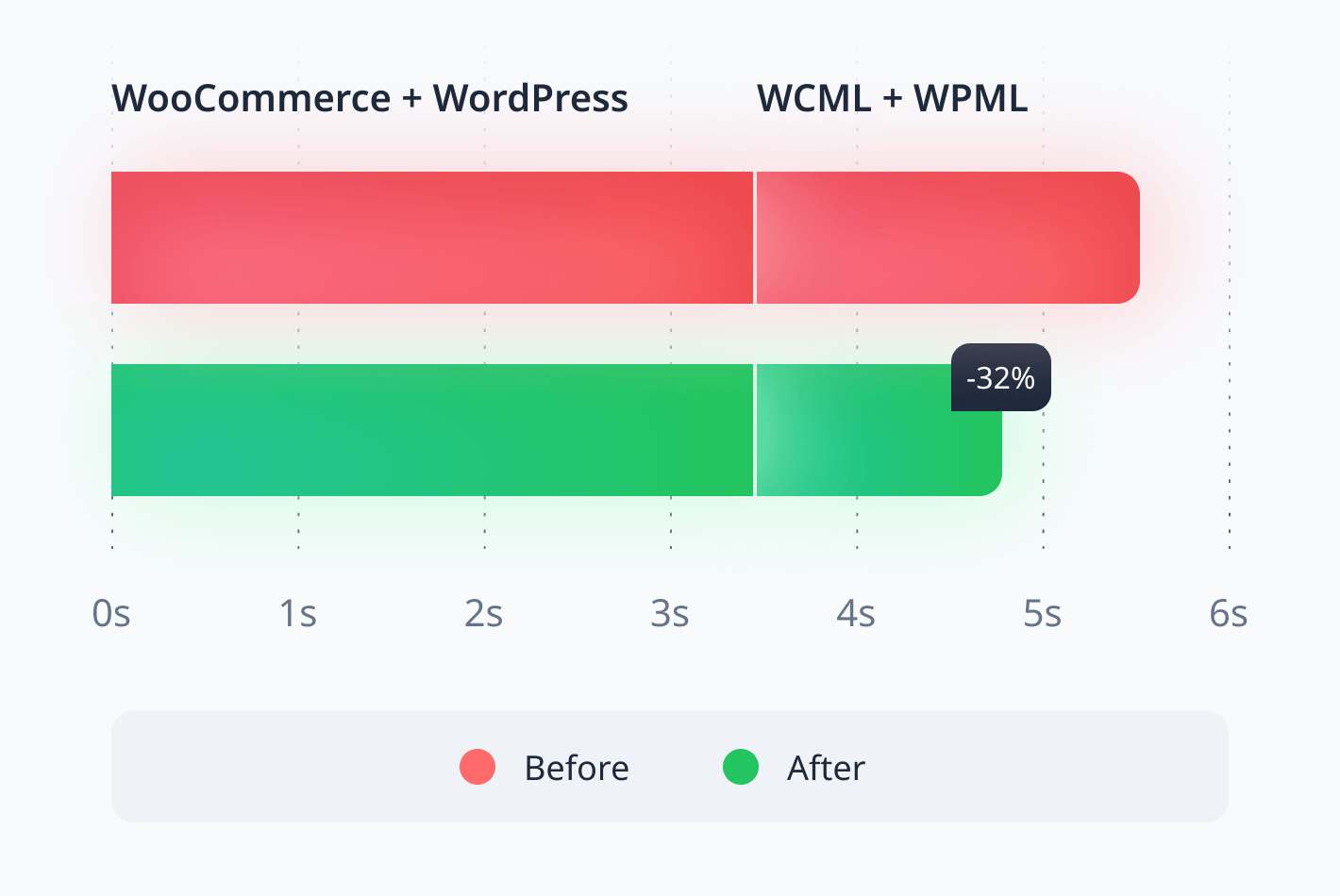
Your results will vary depending on WooCommerce, your theme, your host, and your other plugins. Stores with large catalogs and many languages will see the biggest gains.
We know this is the first question. There are two safety nets.
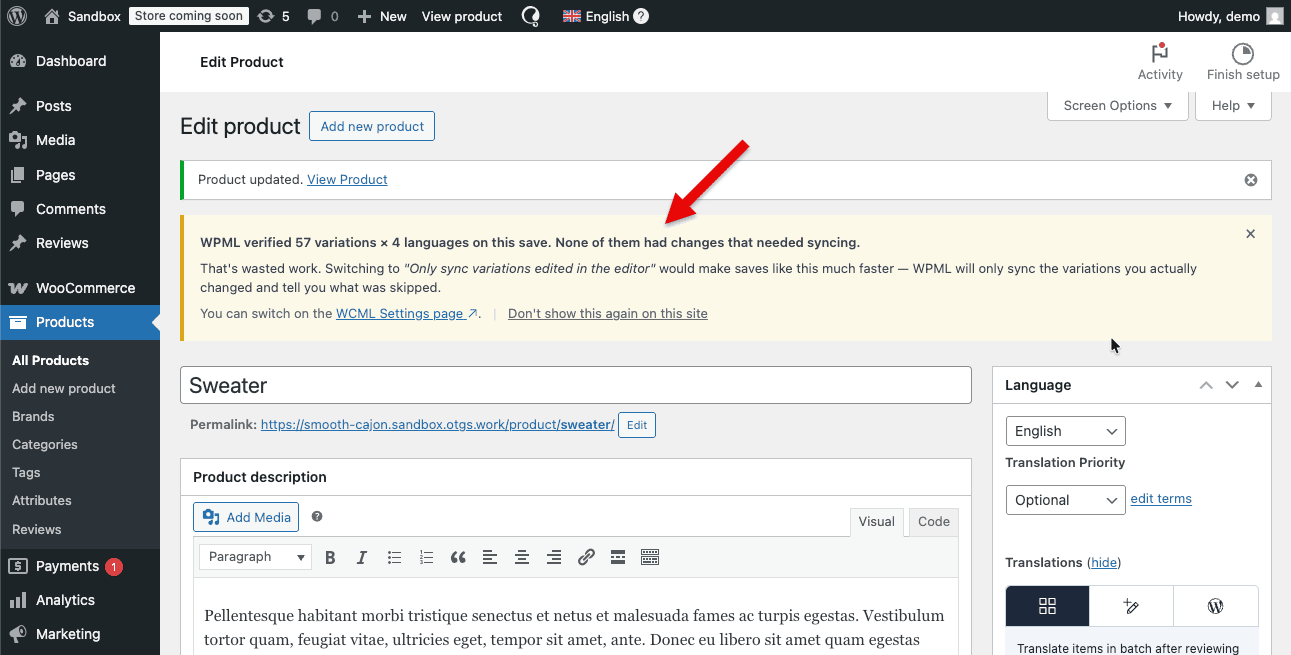
After-save notice. When editor scoped sync is on, every save shows you a notice. It lists how many variations were skipped. It also gives you a one-click button: Force update all variation translations. This way, a full sync is always one click away, you don’t have to switch modes to get it.
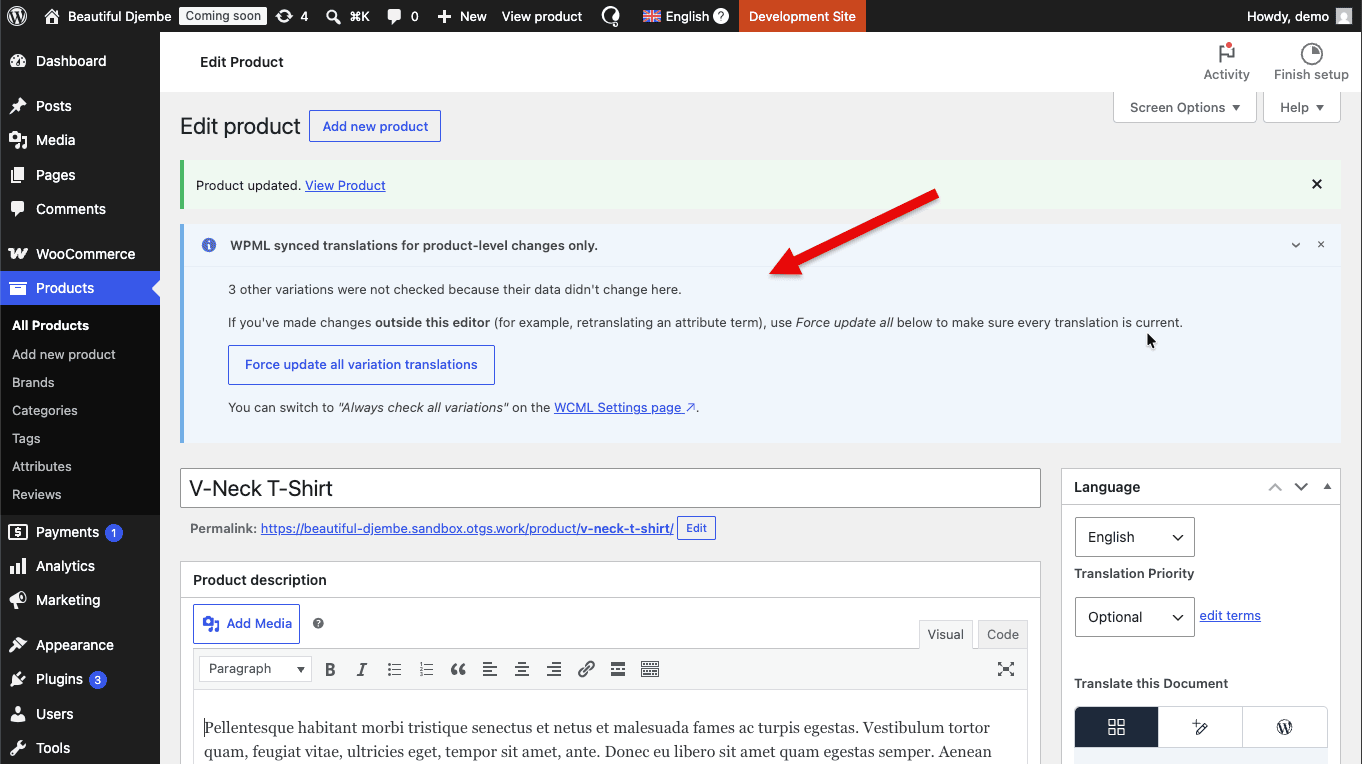
A nudge when Complete sync is doing wasted work. If you stay on Complete sync, we watch for saves that did a lot of work without actual changes. When we see that pattern, we suggest switching modes. The nudge only appears on large products. We use a threshold of variations × languages ≥ 120. Below that, the cost isn’t noticeable. We don’t bother you.
Editor scoped sync only affects saves from the WooCommerce product editor. That’s the screen where you feel the slowness.
It does not change:
Translator workflows are not affected.
After updating, go to WPML → Settings → WCML. You will see the Variation translation sync on product save option. Switch it to Only sync variations edited in the editor and click Save changes.
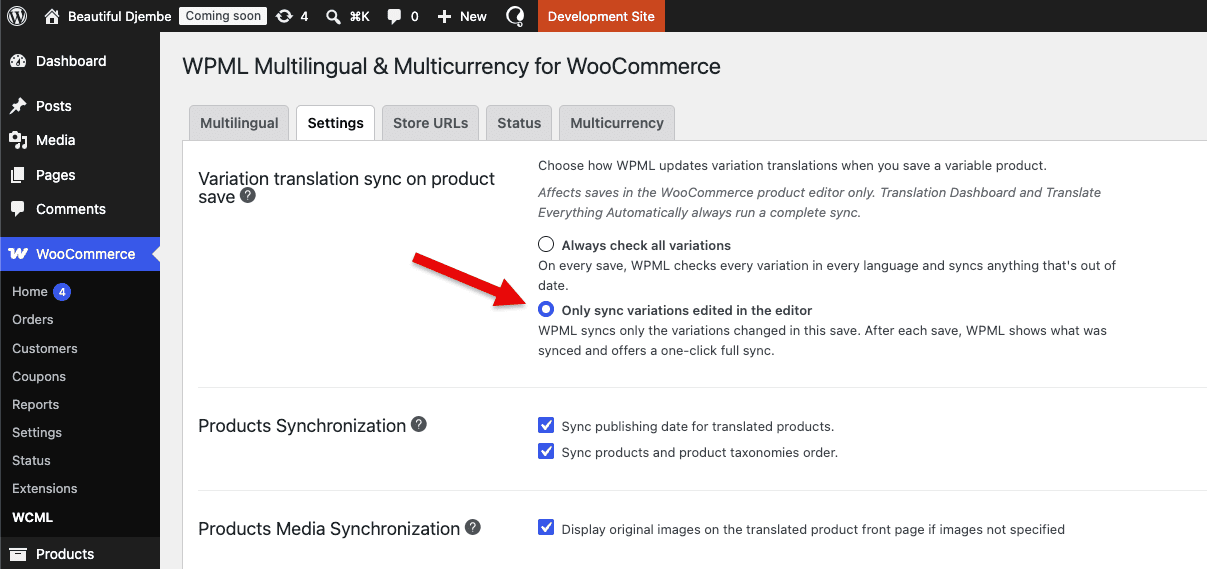
Save any product to confirm the after-save notice appears.
Many of you use a persistent object cache like Redis or Object Cache Pro. With those caches, product pages with many reviews will load noticeably faster after this update.
We changed how WCML handles the product review cache. Previously, it cleared part of your object cache on every product view. Now it works with your object cache instead of clearing it.
WCML used to recalculate cart totals on every page a logged-in shopper visited. That included product pages, account pages, and shop archives. It happened even when nothing about the cart had changed.
From this release, we recalculate only when the currency, the exchange rates, or the cart contents have actually changed. On every other page, WCML stays out of the way.
WooCommerce already fires one cart-refresh request at the start of each shopping session. That request keeps the mini-cart accurate.
WCML was firing a second request on every page load. It fired even when the cart was empty.
That second request is gone in 5.5.6. Fewer background requests. Less load on your server.
We simplified how translated product gallery images are handled.
Previously, the work was done twice. Once when the product was saved or translated. Then again on every page view. The page-view pass has been removed. The data saved when you translated the product is now trusted as the source of truth.
The result on your site is the same. Fewer queries get you there.
Some of you reported very slow loading on single product pages with hundreds of variations. We investigated. WooCommerce 10.4.x had a performance issue of its own that significantly amplified the slowdown. WooCommerce 10.7 has since fixed it.
If you’ve seen this on your store, update to WooCommerce 10.7 or later together with WCML 5.5.6. That’s the fastest path forward.
Some stores let secondary languages fall back to the default language when a product hasn’t been translated yet. On those stores, variations on an untranslated product used to disappear from the dropdown. They now stay visible. They fall back to the default language, as the setting promises.
You add a new attribute to a product that’s already translated. You expect the Filter by attribute counts on the translated shop page to reflect the change. They didn’t, until this release. The original-language shop updated. The translated shop didn’t.
WCML now clears the right WooCommerce cache after syncing attributes to translations. Both shops stay in agreement.
You can place the [currency_switcher] shortcode more than once on the same page. For example, in the header and again in the footer. The loading spinner used to appear only on the last switcher. From this release, it appears on all of them when a customer changes currency.
WooCommerce 10.8 is scheduled for release on Tuesday, 26 May 2026. We tested WCML 5.5.6 against it. Our release is timed for the day after. The version you install is the one we’ve verified against the released WooCommerce build.
As usual, we’re rolling out this release gradually. If you’d like to update right away:
We’d love to hear how editor scoped sync behaves on your store. We’re especially interested if you have a large catalog with many variations and many languages. Drop a comment below or open a ticket in our support forum. Let us know what you measure.
WCML 5.5.3 focuses on how links work across languages, from category and account pages to Shop page links.
There is a critical compatibility issue in the upcoming WooCommerce 10.3 release that causes miscalculation of product variation prices.
We just released WooCommerce Multilingual 5.5.0! This major version brings better usability, improved performance, and a few new feature requests.