[Chiuso] problema con traduzione menu wordpress con wpml. errore di sincronizzazione
Questo è il forum di assistenza tecnica di WPML, il plug-in multilingue di WordPress.
La sua lettura è permessa a tutti, ma la pubblicazione è riservata esclusivamente ai clienti di WPML. Il team di WPML risponde sul forum 6 giorni su 7, 22 ore su 24.
Contesto del problema:
Per un cliente ho sviluppato il sito link nascosto. Tutto bene ed il cliente è contento. Sto seguendo la documentazione ufficiale di WPML e sto cercando anche su StackOverflow altri programmatori a cui sia già successa la stessa cosa.
Sintomi:
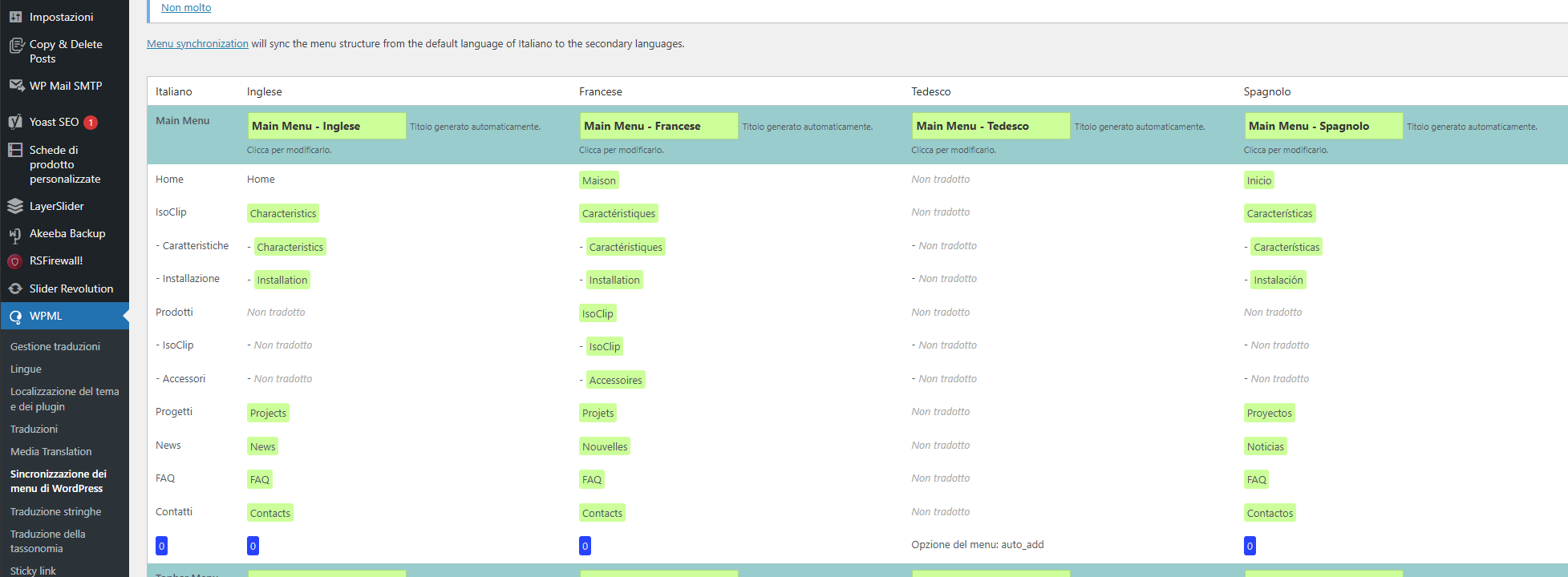
La sincronizzazione dei menu multilingua su una voce e le sue sottovoci (prodotti e sue 2 sottovoci) viene tradotta correttamente in italiano ed in francese. Invece in inglese ed in spagnolo la sincronizzazione mi dice che non esiste nulla.
Domande:
Come mai la sincronizzazione dei menu multilingua non funziona correttamente in inglese ed in spagnolo?
To reduce the waiting time, I took this ticket and responded in English. Please let me know if you're okay with it or if you want to continue the conversation in Italian language. I will check and forward this ticket to one of our Italian-speaking supporters to assist you in the Italian language.
I understand the issue you're facing with menu synchronization. Typically, the menu synchronization feature checks whether the pages or taxonomies added to the menu have been translated into other languages. If they have been translated, the feature updates the menu in the other languages accordingly.
In your case, it’s possible that the pages or taxonomies linked to the main menu haven’t been translated into the English and Spanish versions. This could be why the menu language switcher isn't updating the menu in these languages. Could you please check and make sure that the pages/taxonomies attached to the menu has been translated into English and Spanish?
If the pages or taxonomies have been translated but the menu sync feature still can't detect them, please follow these steps to see if they help:
1. Go to WPML > Support > Troubleshooting.
2. Under the "Cleanup" section, select Pages from the dropdown and click on "Synchronize post taxonomies".
3. After that, you may also want to try the following options (optional):
- Clear the cache in WPML.
- Assign translation status to duplicated content.
- Set language information.
- Fix post type assignment for translations.
4. Finally, clear the caches from your site and browser, and then try synchronizing the menu again.
Please let me know how it goes. I will be happy to help if you need further assistance in this matter.
HI
no problem to speak in English
so I tried to do everything you suggested and unfortunately the PRODOTTI menu remains translated only into ITALIAN. I was wrong. both ENGLISH, FRENCH and SPANISH are not translated. this for the main voice.
FRENCH, on the other hand, only translates the submenus.
I would add that this is the only menu connected to woocommerce and all its plugins for wmpl are installed but the PRODOTTI menu does not translate with the change of language selector, not even if I translate it manually into MANUAL STRINGS in WPML.
HI
I noticed something and fixed it
woocommerce products were not translated into all languages.
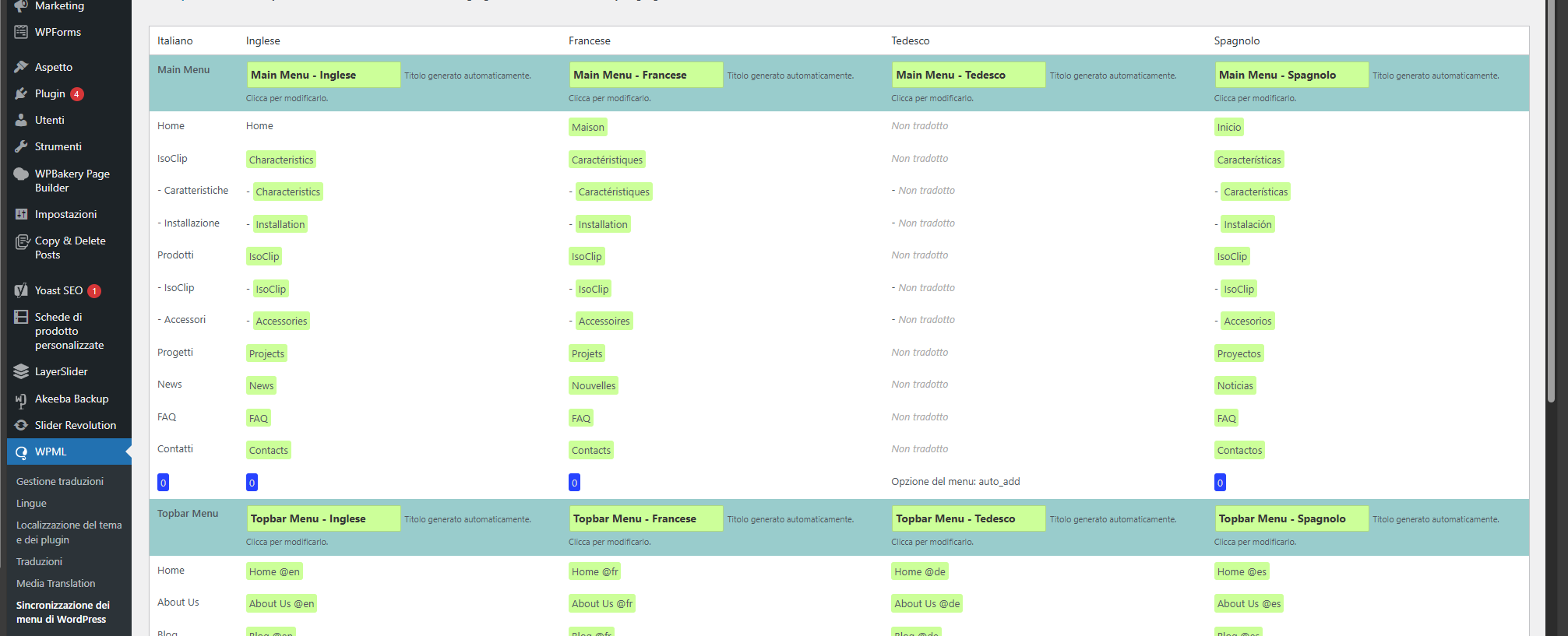
Once this is done, as you can see, the submenus are translated both into ENGLISH, FRENCH and SPANISH (see attached image) and the links lead to the right product page for each language.
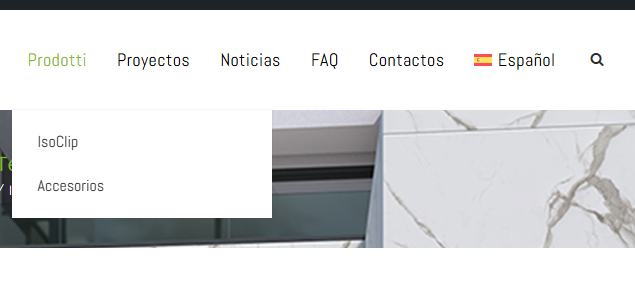
The only thing that has remained is the PRODOTTI menu which continues to remain fixed only in ITALIAN.
How do I translate it for each language?
Thank you
Good work
fabio
HI
as you can see from the string translation and the wmpl synchronization menu I have translated PRODUCTS into all languages, and synchronization has added all menus and submenus.
except that PRODUCTS is not translated.
what's missing?
Thank you
Good work
fabio
I'm happy to hear that the issue with the menu is mostly resolved!
Regarding the menu item "Prodotti," You should first complete the synchronization and then review what appears in the translated menu. If the default name "Prodotti" still appears in the translation, you'll need to navigate to WPML > String Translation and search for "Prodotti." There might be another instance of this name. If found, you can add the translation by clicking the "+" icon.
Alternatively, you can manually update the name of the menu item in other languages. Once synchronization is complete, go to Appearance > Menus, and click on the pencil icon associated with the language to access the translated menu and update the translated menu item as needed.
Please let me know if that helps or if you need further assistance in this matter. I will be happy to help.
Best regards,
Prosenjit
L'argomento '[Chiuso] problema con traduzione menu wordpress con wpml. errore di sincronizzazione' è chiuso a nuove risposte.