
Este es el foro de soporte técnico de WPML, el plugin multilingüe de WordPress.
Todas las personas pueden leerlo pero solo los clientes de WPML pueden ingresar comentarios. El equipo de WPML responde en los foros 6 días a la semana, 22 horas por día.
Etiquetado: Compatibility
Este tema contiene 8 respuestas, tiene 0 voces.
Última actualización por leeC-2 hace 2 días, 6 horas.
Asistido por: Claudio Palacios.
| Autor | Publicaciones |
|---|---|
| febrero 12, 2026 a las 11:49 #17816707 | |
 leeC-2 |
I am translating this website and it uses the LearnDash plugin, the documentation states I should install an add on for multilingual support between WPML and LearnDash which I have done. When I go into a lesson and click to translate with the advanced translator, I only get the Lesson title and first Heading, the rest of the page content does not appear. How do I translate this? Is there an additional setting I have missed? Thank you in advance! 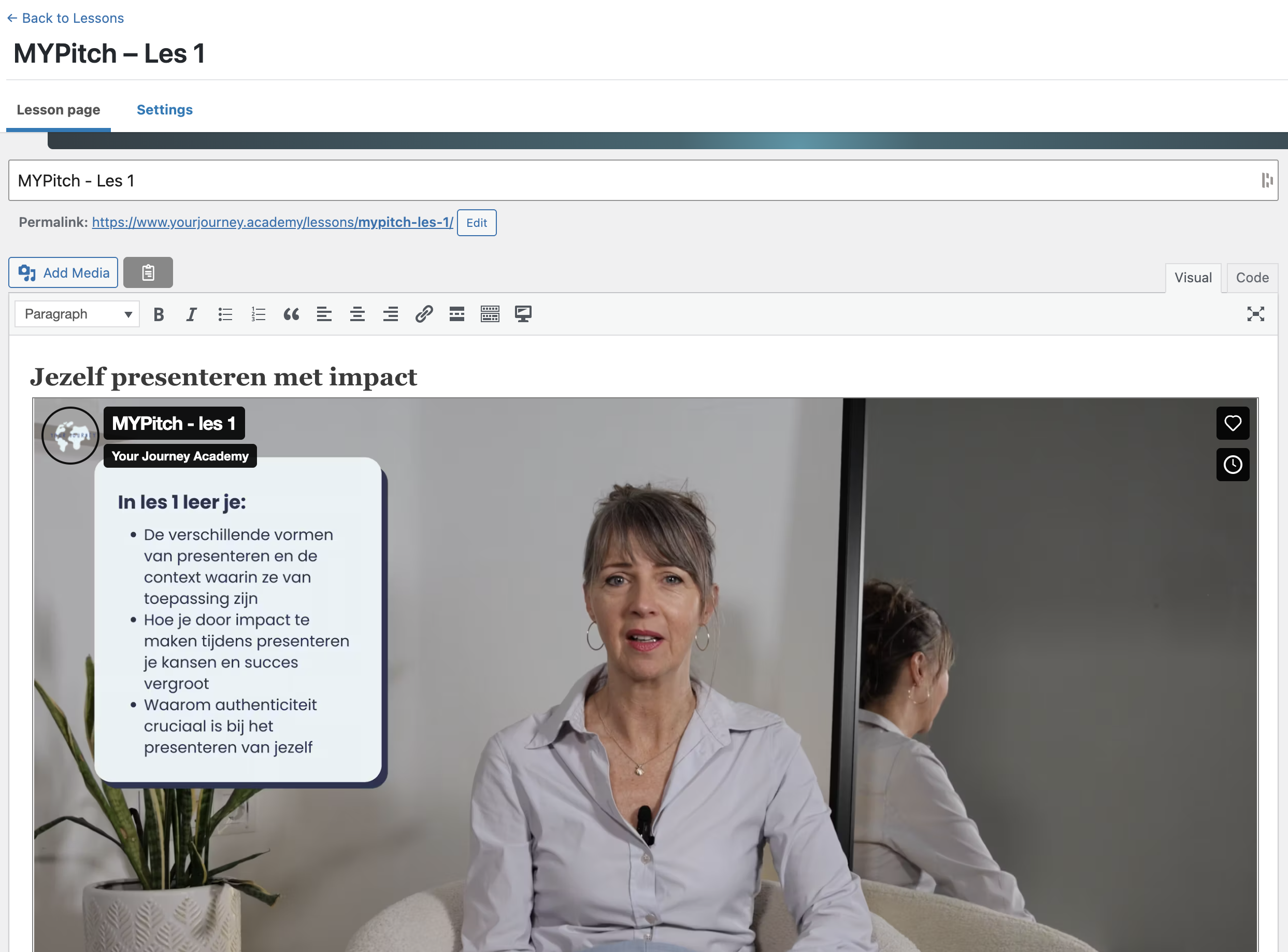   |
| febrero 12, 2026 a las 15:20 #17817551 | |
 Claudio Palacios Colaborador Idiomas: Inglés (English ) Zona horaria: America/La_Paz (GMT-04:00) |
Hi, This information will help speed up the investigation. |
| febrero 12, 2026 a las 15:50 #17817677 | |
|
leeC-2 |
Hi Claudio, Thanks for your reply. In answer to your questions - 1. Yes the lessons are built in the default wp editor, Elementor is installed on the site but the pages are not build inside the Elementor editor. 2. It seems to be across all lessons, at least all that I have checked. I see that some have multiple headings to translate in the translation editor but no other content. Please let me know if you need anything else from me! Thanks, |
| febrero 12, 2026 a las 19:55 #17818743 | |
|
Claudio Palacios Colaborador Idiomas: Inglés (English ) Zona horaria: America/La_Paz (GMT-04:00) |
Hi Natalie, Thank you for the clarification — that helps a lot. Could you please provide temporary administrator access to the site so I can investigate further? Once I have access, I’ll begin the investigation right away. Kind regards, Claudio |
| febrero 25, 2026 a las 13:21 #17851651 | |
|
Claudio Palacios Colaborador Idiomas: Inglés (English ) Zona horaria: America/La_Paz (GMT-04:00) |
Hi, |
| febrero 25, 2026 a las 13:49 #17851765 | |
|
Claudio Palacios Colaborador Idiomas: Inglés (English ) Zona horaria: America/La_Paz (GMT-04:00) |
Hi Natalie, Thank you for your patience. I’ve reviewed the staging site and the WPML–LearnDash configuration, and I noticed that the current setup differs from the recommended configuration for full compatibility with WPML’s Advanced Translation Editor. This guide outlines the correct configuration steps required for LearnDash content to be fully translatable with WPML. You can also find the LearnDash integration details here: https://wpml.org/plugin/learndash-lms/ Please review these steps and let me know once done. Kind regards, |
| febrero 26, 2026 a las 17:13 #17857658 | |
|
leeC-2 |
Hi Claudio, thanks for your reply. Im not sure what it is I haven't done correctly. I followed these instructions and the plugin is already installed, I understand how to connect the lessons to the courses. But the problem is when I click to make the translation of the lesson and open the translation editor I only see a few lines in the translation editor not the whole page content. It doesn't say anything that I can see in the instructions on how to translate the lesson page content, only to send for translation, and connect the lesson to a course. So how do I make all the content to be translated show in the translation editor, or, on the other hand does the translation editor not work for this and do I have to remake the page on the other language side rather than using the translation editor? |
| febrero 27, 2026 a las 20:42 #17861102 | |
|
Claudio Palacios Colaborador Idiomas: Inglés (English ) Zona horaria: America/La_Paz (GMT-04:00) |
Hi Natalie, Thank you for the clarification — I understand the confusion. I’m still actively investigating this on the staging site to determine why the full lesson content is not being detected by the Advanced Translation Editor. I’ll get back to you as soon as I have a concrete update. Kind regards, |
| marzo 2, 2026 a las 19:08 #17866177 | |
|
Claudio Palacios Colaborador Idiomas: Inglés (English ) Zona horaria: America/La_Paz (GMT-04:00) |
Hi Natalie, Thanks for the detailed follow-up — and now I see exactly what’s going on. Paste this into the Custom XML Configuration box (WPML → Settings → Custom XML Configuration):
<wpml-config>
  <gutenberg-blocks>
    <gutenberg-block type="core/shortcode" translate="1" label="Shortcode block (HTML content)">
      <xpath>//h3</xpath>
      <xpath>//h4</xpath>
      <xpath>//p</xpath>
      <xpath>//a</xpath>
      <xpath>//button</xpath>
      <xpath type="link">//a/@href</xpath>
    </gutenberg-block>
  </gutenberg-blocks>
</wpml-config>
Let me know once you’ve applied this or if you need help. Kind regards, Claudio |
| marzo 3, 2026 a las 15:34 #17869253 | |
|
leeC-2 |
Hi Claudio, after a few adjustments to the code that seems to be working. Thanks for your help on this, hopefully that should be the problem resolved now! Natalie |