Ce sujet est résolu. Voici une description du problème et de la solution.
Problem:
You are experiencing an issue with the String Translation table on your site after installing WPML, which could potentially become a critical issue in the future.
Solution:
If your site is new and has no translated content, we recommend resetting WPML and setting it up again. Please follow these steps:
1. Ensure you back up your database and website.
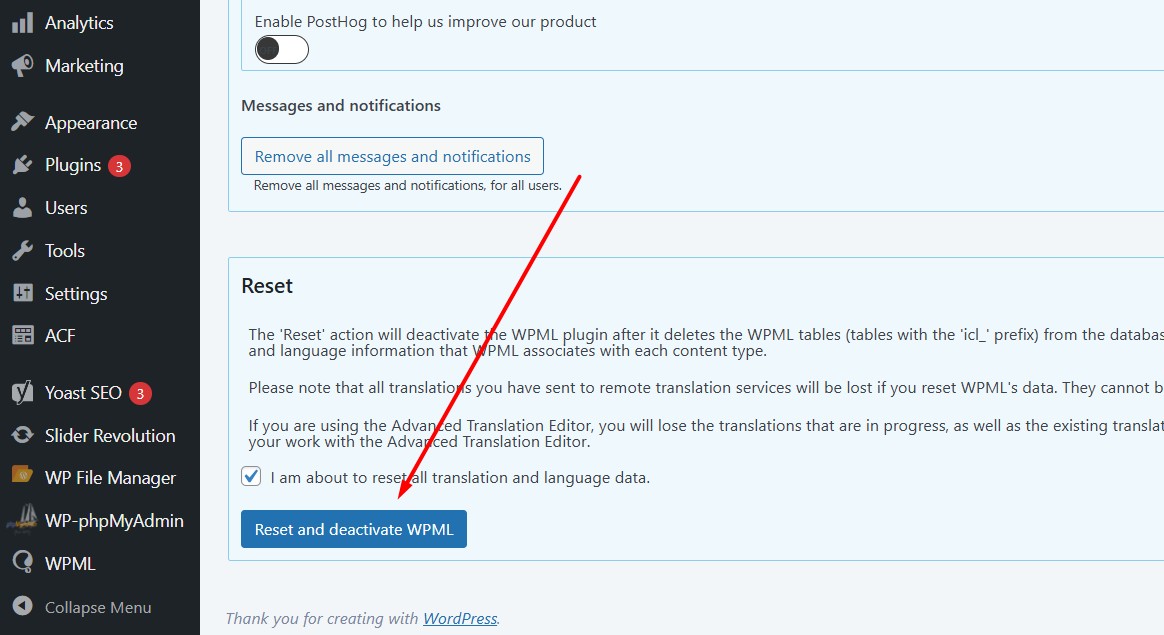
2. Navigate to WPML >> Support >> Troubleshooting (the link is at the bottom of the support page).
3. Click on "Reset and deactivate WPML" then delete the plugin.
4. After deleting all WPML data and related plugins, reinstall the WPML plugins.
For more detailed instructions, please visit: WPML Reset Documentation
If this solution does not resolve your issue or if it seems irrelevant due to being outdated or not applicable to your case, we highly recommend checking related known issues at https://wpml.org/known-issues/, verifying the version of the permanent fix, and confirming that you have installed the latest versions of themes and plugins. If the problem persists, please open a new support ticket at WPML Support Forum.
Il s'agit du forum d'assistance technique de WPML, le plug-in multilingue pour WordPress.
Il est accessible à tous, toutefois seuls les clients de WPML peuvent y publier leurs messages. L'équipe du WPML répond sur le forum 6 jours par semaine, 22 heures par jour.
Ce sujet contient 1 réponse, a 0 voix.
Dernière mise à jour par Il y a 1 semaine et 1 jour.
Assisté par: Noman.