
Este es el foro de soporte técnico de WPML, el plugin multilingüe de WordPress.
Todas las personas pueden leerlo pero solo los clientes de WPML pueden ingresar comentarios. El equipo de WPML responde en los foros 6 días a la semana, 22 horas por día.
| Sun | Mon | Tue | Wed | Thu | Fri | Sat |
|---|---|---|---|---|---|---|
| - | 8:00 – 12:00 | 8:00 – 12:00 | 8:00 – 12:00 | 8:00 – 12:00 | 8:00 – 12:00 | - |
| - | 13:00 – 17:00 | 13:00 – 17:00 | 13:00 – 17:00 | 13:00 – 17:00 | 13:00 – 17:00 | - |
Zona horaria del soporte: Europe/Vienna (GMT+02:00)
Etiquetado: Bug
Este tema contiene 13 respuestas, tiene 0 voces.
Última actualización por Lucas Vidal de Andrade hace 2 días, 17 horas.
Asistido por: Lucas Vidal de Andrade.
| Autor | Publicaciones |
|---|---|
| marzo 18, 2026 a las 11:09 #17907657 | |
 lluisS-5 |
Hi guys, Today I detect that our WPML don't show the new versions for update, it seems that detect the license correctly but it stucks on 4.6.12 version, this our enterprise site that is on production with 4 languagues activated, can you give me your recomendation to update it and don't broke anything? Thanks in advance, Miquel 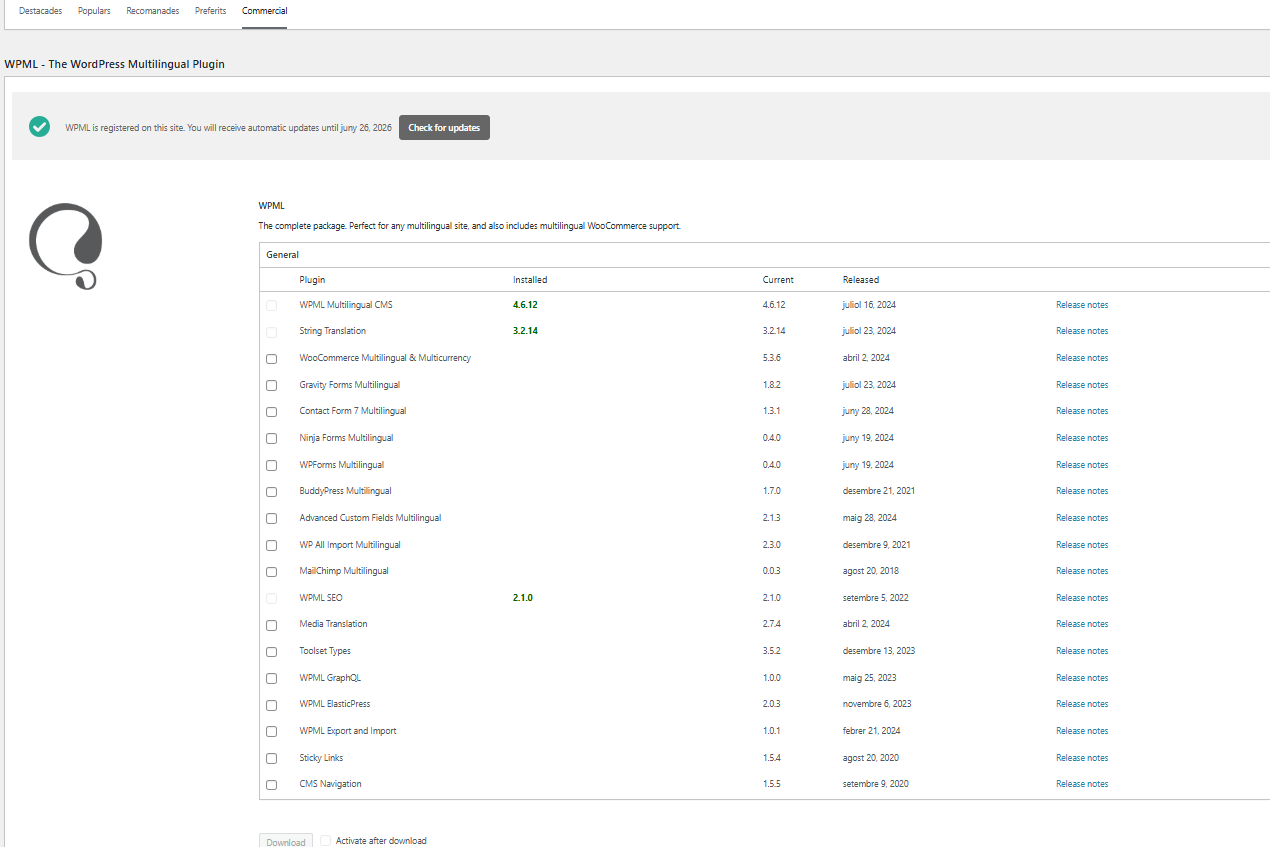 |
| marzo 19, 2026 a las 08:19 #17909959 | |
 Lucas Vidal de Andrade Partidario de WPML desde 11/2023 Idiomas: Inglés (English ) Español (Español ) Alemán (Deutsch ) Portugués, Brasil (Português ) Zona horaria: Europe/Vienna (GMT+02:00) |
Hello there, In this case, you can re-register your sitekey and check again: 1. Go to wpml.org/account/sites and remove the website from the list; That should do the trick. Let me know how it goes. In case that does not solve it, you can manually update WPML by downloading and uploading the latest version from here: |
| marzo 20, 2026 a las 08:27 #17912891 | |
|
lluisS-5 |
Good morning Lucas, I tried with a new key, clean cache and request updates from commercial tab and wait that night with no luck. This is our enterprise site, it is safe to upload the new version manually above the one that is running right now? I will make an update but as it has some languages and it is a production site I will know the best practice to do the update manually to try to solve the updates problem. Thanks in advance, Miquel 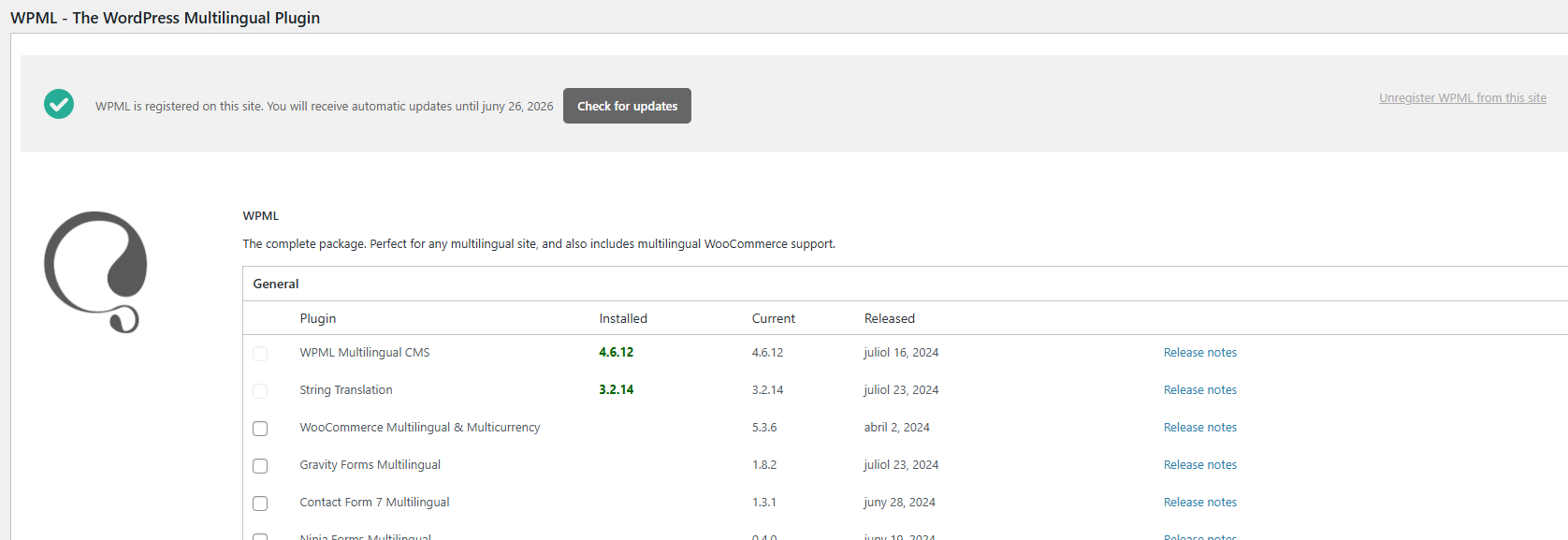 |
| marzo 20, 2026 a las 09:52 #17913184 | |
|
Lucas Vidal de Andrade Partidario de WPML desde 11/2023 Idiomas: Inglés (English ) Español (Español ) Alemán (Deutsch ) Portugués, Brasil (Português ) Zona horaria: Europe/Vienna (GMT+02:00) |
Hello Miquel, What happens when you click on "Check for updates"? This button should trigger the new versions to show. Now, to update the plugins manually, you can make a full website backup and follow these steps: 1. Go to https://wpml.org/account/downloads/; That's it. Make sure that you have a website backup, and there should be no issues. Let me know how it goes. |
| marzo 23, 2026 a las 10:19 #17917940 | |
|
lluisS-5 |
Good morning Lucas, Now on backend after manual update it says that we have last version but it shows the current one as older version, I attach you an image of it. Is that normal? On frontend it seems that all is running properly except out stores markers, after update due to a problem with the REST request, I don't know if could be something retalet to WPML manual update, I am trying to figure it out right now. Thanks, Miquel 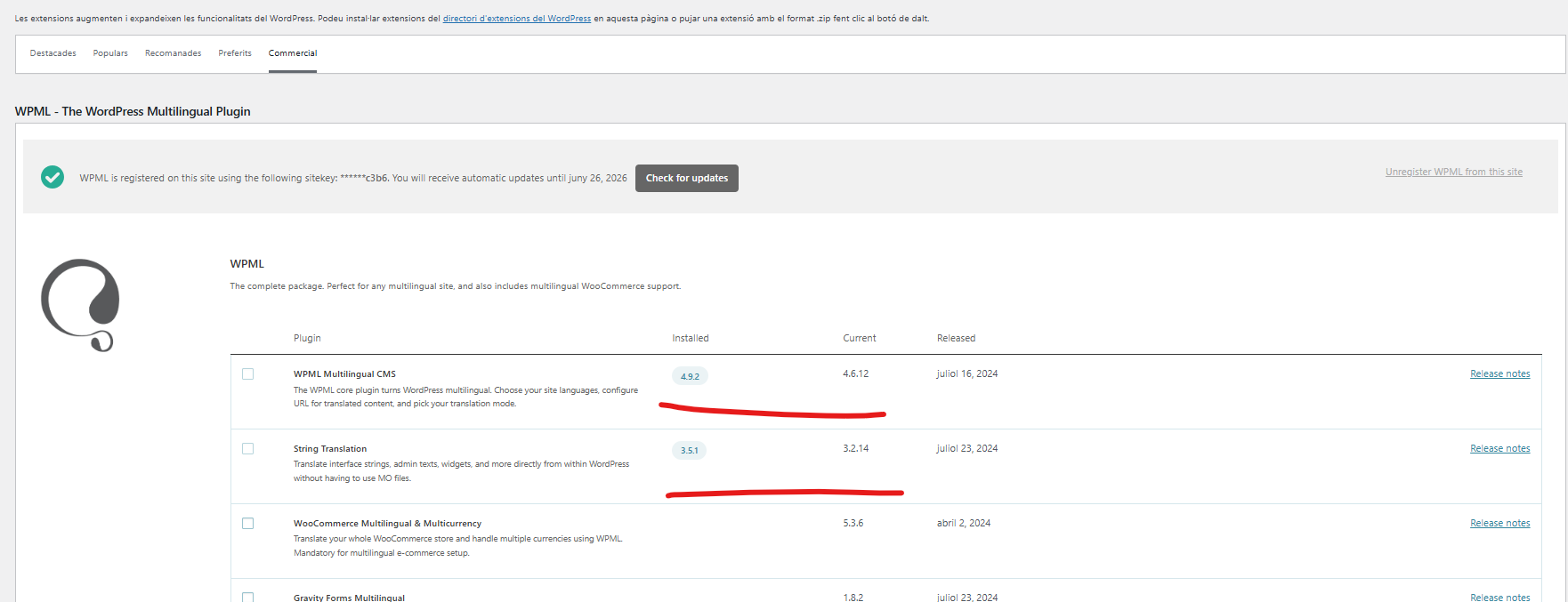 |
| marzo 23, 2026 a las 17:16 #17919734 | |
|
Lucas Vidal de Andrade Partidario de WPML desde 11/2023 Idiomas: Inglés (English ) Español (Español ) Alemán (Deutsch ) Portugués, Brasil (Português ) Zona horaria: Europe/Vienna (GMT+02:00) |
Hello there, Actually you should see the latest release version on the "Current" column. If you want, I can check that on your website. I would like to look at this directly on your site. For this I would need temporary access (WP-Admin and FTP) to your site, preferably to a test/staging site where the problem has been replicated if possible. The required fields can be found below the comments section. The information you enter is private, i.e. only you and I can see it and have access to it. I may need to replicate your website locally. To do this, I need to temporarily install a plugin called "Duplicator" or "All in One WP Migration" on your website. This will allow me to create a copy of your website and content. Once the issue is resolved, I will delete the local website. Let me know if this works for you. IMPORTANT Please make a backup copy of the site files and database before giving us access. - If you do not see the wp-admin/FTP fields, this means your post and site login details are being made PUBLIC. DO NOT post your website details if you do not see the required wp-admin/FTP fields. If you do not, ask me to enable the private box. The private box looks like this: enlace oculto |
| marzo 25, 2026 a las 09:42 #17925463 | |
|
Lucas Vidal de Andrade Partidario de WPML desde 11/2023 Idiomas: Inglés (English ) Español (Español ) Alemán (Deutsch ) Portugués, Brasil (Português ) Zona horaria: Europe/Vienna (GMT+02:00) |
Hello there, I downloaded a copy of your website, updated both WPML Multilingual CMS and WPML String Translation manually, and didn't have any issues - REST API was working, and I could edit pages with no errors. In this case, please create a staging website where the issue is reproduced. Please explain in detail how the issue happens and how I can reproduce it. You can use a plugin to achieve that, or reach out to your hosting support, and they might be able to help you creating a staging website. Please send me the link to it here, when you are done. Thank you for the cooperation on this matter. You can keep the same user you've already shared on staging, so I can access it directly. |
| marzo 25, 2026 a las 11:41 #17926116 | |
|
lluisS-5 |
Good morning Lucas, Can you explain the update procedure that you do it on your local copy. When I try to update it manually on the site that you accessed: - I deactivate 3 WPML plugin from the WP > Plugins After that is when I detected that the our store map markers didn't load and when I tried to edit some pages and it give me an error that was not able to access. If you can explain exactly how you update it on your duplicated site I will try to do it again like. Thanks in advance, Miquel |
| marzo 25, 2026 a las 11:49 #17926136 | |
|
Lucas Vidal de Andrade Partidario de WPML desde 11/2023 Idiomas: Inglés (English ) Español (Español ) Alemán (Deutsch ) Portugués, Brasil (Português ) Zona horaria: Europe/Vienna (GMT+02:00) |
Hello Miquel, I simply downloaded them from the link I shared, and uploaded them directly via Plugins > Add New. It's not necessary to deactivate any plugins, you can simply upload them and follow the steps WP provides so the actual version is replaced with the uploaded one. If you cannot upload them because of the size, please reach out to your hosting support, and ask them to increase the upload size limits. Let me know if it works this way. Don't forget to always have a backup in hand. |
| marzo 25, 2026 a las 16:09 #17927118 | |
|
lluisS-5 |
Hello Lucas, I do it without deactivate as you do it and the 3 plugins updates with no problem! But in commercial tab still appears current version 4.6.12 and the Installed 4.9.2. I attach you an image and if you need you can still access to WP backend with your credentials. Miquel 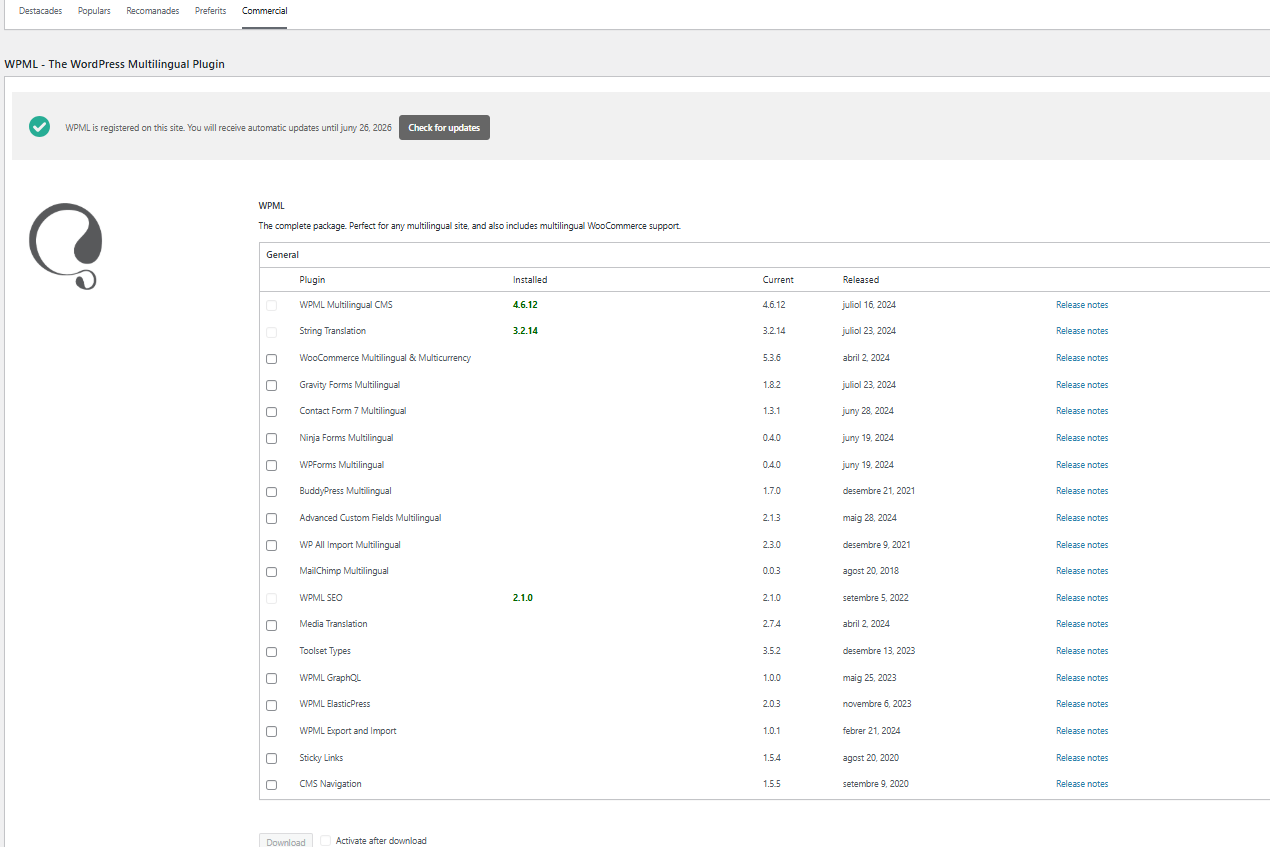 |
| marzo 26, 2026 a las 08:52 #17928131 | |
|
Lucas Vidal de Andrade Partidario de WPML desde 11/2023 Idiomas: Inglés (English ) Español (Español ) Alemán (Deutsch ) Portugués, Brasil (Português ) Zona horaria: Europe/Vienna (GMT+02:00) |
Hello Miquel, In this case, it's best to re-register the website. Please follow these steps: 1. Go to wpml.org/account/sites and remove the website from the list; This has no impact on your translations. Let me know if that solves the issue. |
| marzo 27, 2026 a las 10:10 #17931527 | |
|
lluisS-5 |
Good morning Lucas, I followed your instructions and configured the new site key in the commercial tab. However, it still shows version 4.6.12 as the current version, even though I manually installed 4.9.2. I’m not sure if this could cause any issues. If you think it’s safe, we can wait for the next update and see what happens. Thanks in advance, |
| marzo 27, 2026 a las 11:25 #17931987 | |
|
Lucas Vidal de Andrade Partidario de WPML desde 11/2023 Idiomas: Inglés (English ) Español (Español ) Alemán (Deutsch ) Portugués, Brasil (Português ) Zona horaria: Europe/Vienna (GMT+02:00) |
Hello Miquel, Thanks for sharing. This should not cause any issues, it's just outdated information being shown. The core WPML and other relevant WPML plugins themselves are now in the latest version, as they should be. I'll download a copy of your website to make tests and isolate this issue. I'll let you know once I have new information. Thanks for your patience, |
| marzo 27, 2026 a las 11:45 #17932113 | |
|
Lucas Vidal de Andrade Partidario de WPML desde 11/2023 Idiomas: Inglés (English ) Español (Español ) Alemán (Deutsch ) Portugués, Brasil (Português ) Zona horaria: Europe/Vienna (GMT+02:00) |
I have escalated this ticket, to get a second opinion. At the moment, there seem to be no issues with WPML, so everything should be working fine. I'll let you know once I have new information. Thank you. |
