[Gelöst] Blank root page when using utm parameters
Dieses Thema ist gelöst. Hier finden Sie eine Beschreibung des Problems und der Lösung.
Problem: When accessing a URL with UTM parameters on a site using the WPML and the Avada Theme, only a blank page is displayed. Solution: The issue was identified within the Event Calendar plugin. To resolve it, follow these steps: 1. Access the site's filesystem using FTP or your hosting file manager. 2. Navigate to
5. Save the changes and test the URL with UTM parameters again.
If this solution does not resolve your issue, or if it seems outdated or irrelevant to your case, we recommend opening a new support ticket. Additionally, we highly recommend checking related known issues at https://wpml.org/known-issues/, verifying the version of the permanent fix, and confirming that you have installed the latest versions of themes and plugins. For further assistance, please visit our support forum at WPML Support Forum.
Dies ist das technische Support-Forum für WPML – das mehrsprachige WordPress-Plugin.
Mitlesen können alle, doch nur WPML-Kunden können hier Fragen veröffentlichen. Das WPML-Team antwortet im Forum an 6 Tagen pro Woche, 22 Stunden am Tag.
The root page functions completely normally. But as soon as I call the url with utm parameters, only a blank page is displayed. Is this a known WPML issue? Or a known conflict with the Avada Theme?
I understand the issue you're experiencing. I checked the root page and found that it returns a 404 error when any parameter is added to the URL, not just UTM parameters.
Could you please check if the issue persists when the WPML plugin is disabled? Keeping the plugin disabled, add any parameter to the URL after the main domain and see if the problem still occurs.
The page cannot be found with parameters in the url, that's right. The problem also only occurs when WPML is activated.
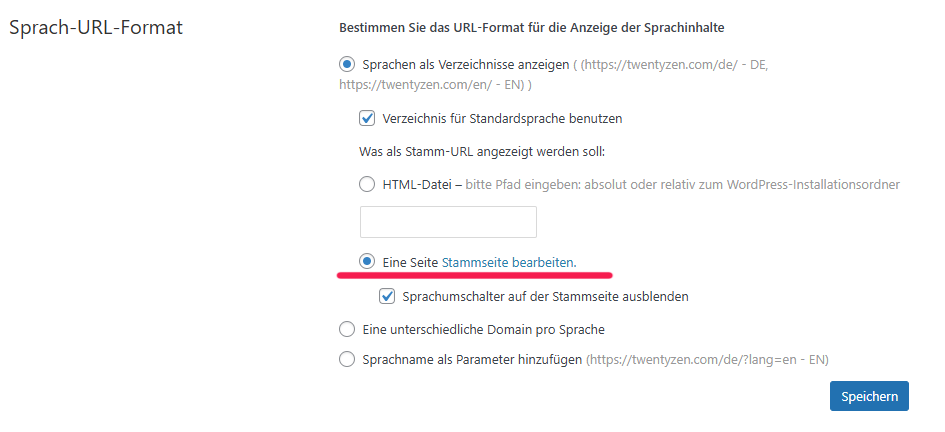
I think the problem is that the root page does not "physically" exist in WordPress, but can only be accessed via WPML (see picture below). So the question remains, why does the URL work without parameters, while the page with parameters cannot be found?
The root page does exist, but it is kept hidden. If you go to "WPML > Languages" and click on the "Edit root page" link, the root page will load with a unique ID in the URL bar. This indicates that it is available in the database but hidden in the pages section. It is possible that the query parameters are not configured to work on the root page, which is why the page returns a 404 error.
For further investigation, I kindly request you to try replicating the issue on our sandbox site. The autologin URL to our sandbox is provided below.
- versteckter Link
The WPML and its addons are already installed in the sandbox. Please complete the setup, and if any additional plugins are required to replicate the issue, install them as well.
Once the plugins are set up, configure the sandbox to match the settings on your main site and try to recreate the issue.
If you're able to do so, please let me know. I will take a closer look and assist you accordingly.
Please let me know the update. I will be happy to help if you need further assistance in this matter.
Hi again,
I found out which plugin is causing the error, it is the Events Calendar Plugin, I just hadn't considered it until now because events should have nothing to do with the root page...
There are some reported bugs regarding wpml and events calendar, but I could not find the reference to the root page. Do you have more insights?
I have checked our system and found no reports regarding issues with the Root page when using the Events Calendar plugin. To determine if the issue is specific to your site or a widespread problem, could you please try replicating it on our sandbox? Since the previous sandbox I shared has expired, I am including the link to a new sandbox site below.
- versteckter Link
The WPML and its addons are already installed in the sandbox. Please complete the setup. Once done, install the Events Calendar plugin, configure both WPML and the Events Calendar as you have on your site, and check if you can reproduce the issue.
If the issue is successfully recreated, please let me know. I will then take a look and escalate the issue to our 2nd tier team for further investigation if required.
Looking forward to your response and appreciate your cooperation in this matter.
Hi,
i now found the cause: in events calendar settings the option "Integrate events in main blog loop" leads to this error. I deactivated it now.
Can WPML do something to resolve this conflict?
Best regards
Our dev team has investigated the issue and found a workaround. The problem was primarily caused by a function within the code of the Event Calendar plugin. Please follow the steps below to solve the issue:
1. Using FTP or your hosting file manager, access the filesystem of your site.
2. Navigate to `/wp-content/plugins/the-events-calendar/src/Tribe/`.
3. Open the `Query.php` file.
4. Replace the following code on line 577 :