Saltar al contenido Saltar a la barra lateral

Este es el foro de soporte técnico de WPML, el plugin multilingüe de WordPress.

Todas las personas pueden leerlo pero solo los clientes de WPML pueden ingresar comentarios. El equipo de WPML responde en los foros 6 días a la semana, 22 horas por día.

Este tema contiene 5 respuestas, tiene 3 voces.

Última actualización por Noman hace 1 mes, 3 semanas.

Asistido por: Noman.

Autor Publicaciones
febrero 14, 2026 a las 21:56 #17822928

joaquimP-2

Voy a traducir con ATE productos, y quiero poder tener control sobre la URL de producto para adecuarla a como quiero.
gracias,

febrero 15, 2026 a las 12:53 #17823500

Noman

Hi,

Thank you for contacting WPML Support. I am going to reply to this in English, if you still need Spanish support please let me know.

You should be able to customize/translate the product slug yourself by following the below steps:

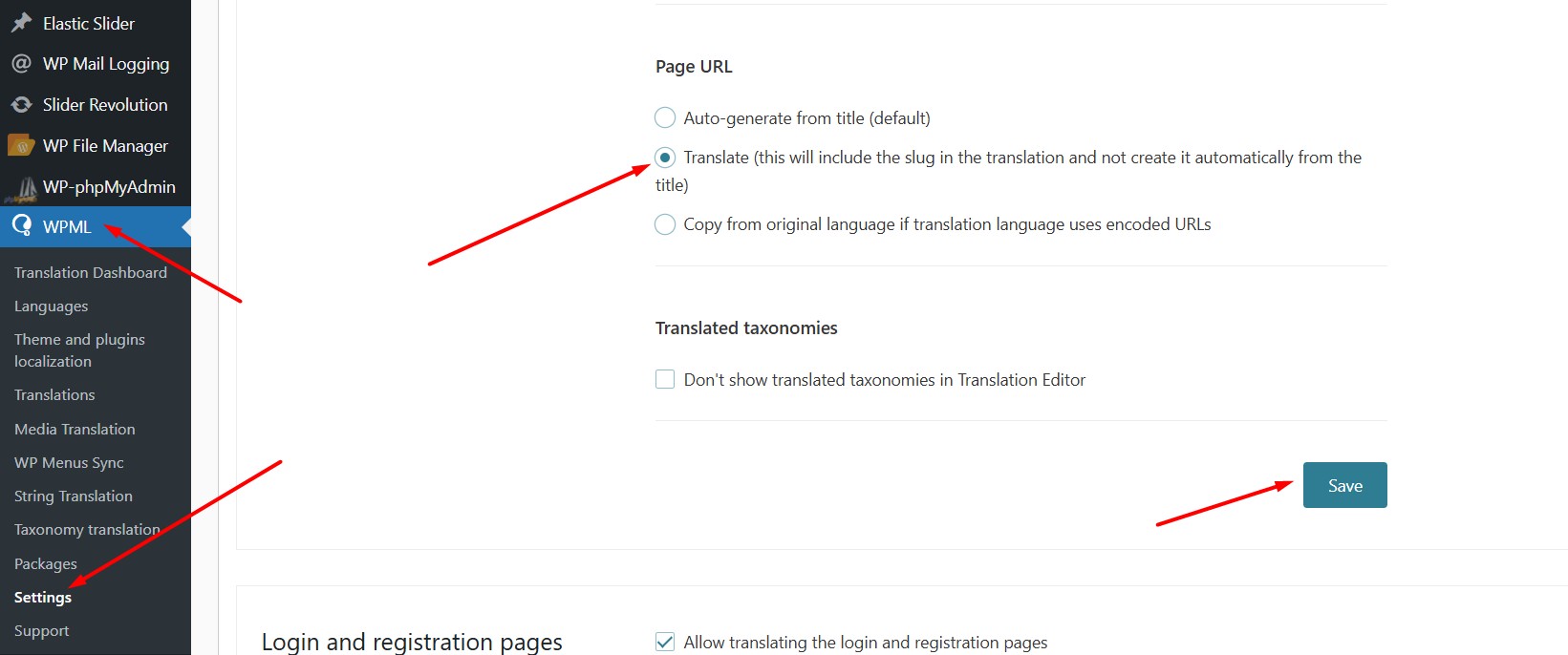
1. Go to WPML >> Settings >Translated documents options.

2. Choose the option "Translate (this will include the slug in the translation and not create it automatically from the title)".

3. Make a small modification to the original language product, save it, and navigate to the WPML translation editor for the slug translation.

Here is a doc for more details:
https://wpml.org/documentation/getting-started-guide/translating-page-slugs/#translate-page-post-url-slug

Please let me know if this resolves the issue or if you need further assistance with this issue.

Thank you

Translate slug.jpg
febrero 15, 2026 a las 18:48 #17823807

joaquimP-2

thank you,
And for existing translation product how can I edit the url?
I tested editing one existing in ATE but url did not appeared.

thanks

febrero 16, 2026 a las 10:54 #17825354

Noman

For existing products, could you please try the below procedure:

1. Please open the default language product in Edit mode.
2. Make a small change, for example, add a space or + sign in your product title.
3. Update the product by pressing the “Update” button.
4. Now, please remove that small change that did in step #2.
5. Update the product again.
6. Now, please try to open the translated page in WPML Translation Editor and see if product slug is available for translation.

Kindly let me know the results,
Thank you

febrero 22, 2026 en 18:14 #17841302
joaquimP-2

Is working fine.
Just for information, In some products I would need the URL be updated also with same as tittle. This is possible with the default config? Translate URL?

thanks

Los hilos nuevos creados por Noman y vinculados a este se encuentran a continuación:

https://wpml.org/es/forums/topic/product-slug-translation-3/

febrero 22, 2026 a las 20:45 #17841411

Noman

Glad to hear it’s working fine now.

For URL update for some products, I have created a new ticket here: https://wpml.org/es/forums/topic/product-slug-translation-3/

If the product slug translation issue is solved, kindly mark this ticket as resolved and we will continue working on the above ticket for it.

Thank you for your cooperation