
Resolved
Reported for: WPML Multilingual CMS 4.9.0
Resolved in: WPML Multilingual CMS 4.9.3
Overview of the issue
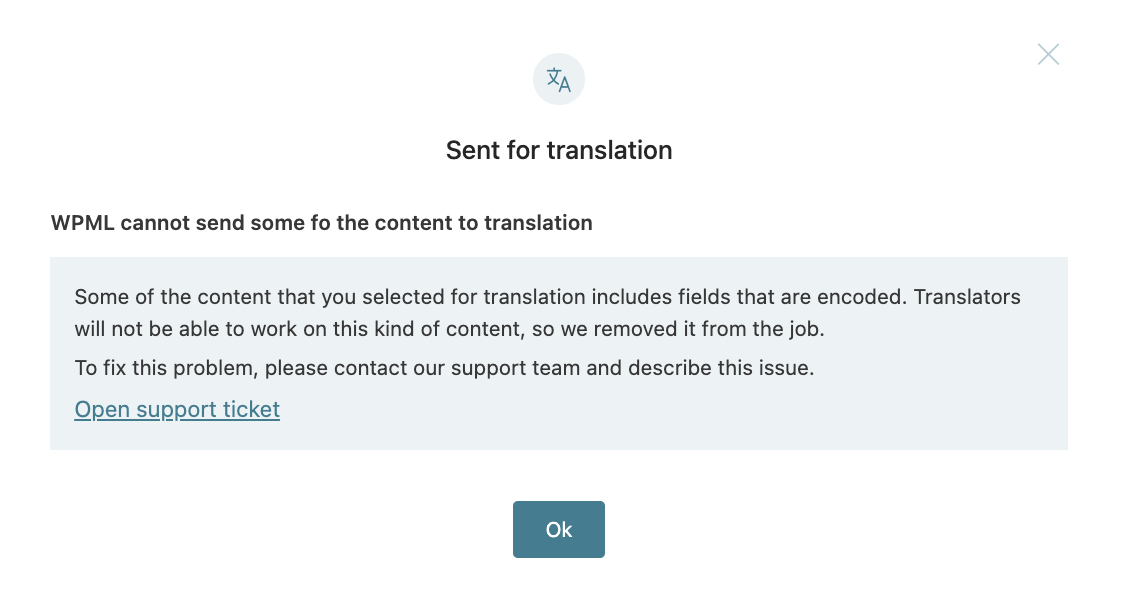
When you try to send content for translation from WPML > Translation Dashboard, the job may fail to be created if the page contains base64-encoded strings.
You will see a notice indicating that some encoded strings were removed from the translation job. However, despite the wording of the message, the translation job is not created at all.
Workaround
Until this issue is resolved, you can avoid the problem by:
- Sending content for translation directly from the post edit screen, or
- Sending content from the post list screen using the + icon.
It also works if your content is being translated with Translate Everything Automatically.
No, it doens’t works. If I downgrade with the prev version I will resolve the issue? Can I downgrade?
Hi,
Did you try to follow the workaround provided? You need to go to “Pages” (or Post or any other custom post type) and use the “+” in the icon.
But the workaround does not enable auto translation, right?
Hi Emanuel,
Once you click the “+” icon, you’ll be redirected to the Advanced Translation Editor (ATE), where automatic translation is available.
If automatic translation has been deactivated, you can click the “Automatic translation” button at the top of the editor.
Please note that this issue should be permanently fixed in WPML 4.10. However, I can’t share an ETA at the moment.
Emanuel,
Good news! The fix has been included in version 4.9.3, which we just released today.
You can find the changelog here: https://wpml.org/download/wpml-multilingual-cms/?section=changelog