This thread is resolved. Here is a description of the problem and solution.
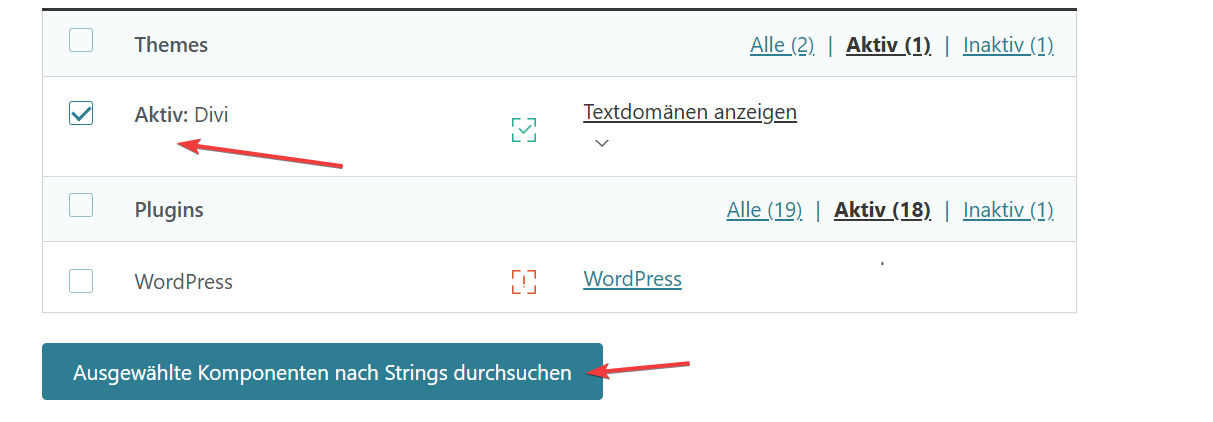
Problem: If you're experiencing issues where Divi-specific UI elements (e.g., backend menu items and labels in the Visual Builder) are displayed in English instead of German, despite both user language and site language being set to German, and the Divi .mo files being present, the issue might be related to how Divi translations are loaded with WPML enabled. Solution: We recommend checking the following settings in your WordPress User Profile: 1. Ensure your User Language is set to German (de_DE). 2. Disable the checkbox that sets the admin language as the editing language. If these settings are correct and the issue persists, it might be necessary to rescan the Divi theme to ensure all translatable strings are correctly detected and registered. This can be done under WPML's theme and plugin localization settings.
Please note that this solution might be irrelevant if it's outdated or not applicable to your specific case. We highly recommend checking related known issues at https://wpml.org/known-issues/, verifying the version of the permanent fix, and confirming that you have installed the latest versions of themes and plugins. If the problem continues, please open a new support ticket at WPML support forum.
This is the technical support forum for WPML - the multilingual WordPress plugin.
Everyone can read, but only WPML clients can post here. WPML team is replying on the forum 6 days per week, 22 hours per day.
The WordPress backend and WPML content are correctly displayed in German (de_DE), but Divi-specific UI elements (e.g. backend menu items like "Divi - Support Center" and labels in the Visual Builder) are shown in English.
Key observations:
User language and site language are both set to German
Divi .mo files (de_DE) are present
The issue only affects Divi UI elements (backend + Visual Builder), not content
A similar system with comparable setup works correctly (all German)
If we disable the WPML Plugins, all DIVI labels are shown in the correct language.
Enable WPML, labels are english instead of german
Delete WPML Cache does not resolve problem
Other cache plugins are disabled or uninstalled
We suspect an issue with how Divi translations are loaded in the admin/Visual Builder context (possibly JS/i18n or WPML interaction).
Could you please advise where this mismatch might come from?
Please note that the Divi Visual Builder interface is shown in the language of the editing session, not necessarily the site language. This behavior is expected.
For WP backend menus items and etc to appear in German, please check the following:
- Go to your User Profile in WordPress
- Make sure your User Language is set to German (de_DE)
- Disable checkbox set admin language as editing language
Since you mentioned that everything works correctly when WPML is disabled, it should also work with WPML enabled if the language settings are aligned properly.
If the issue still persists, let me know and we’ll continue investigating further.
user languages and system languages are correct (de_DE).
Something is wrong with Divi/WPML in this system.
Divi Builder for example shows german labels for a few seconds, then a reload happens and labels are english.
If wpml is disabled this does not happen, no reload, divi shows german labels.
The labels in wordpress dashboard for Divi and its submenu items are english from the beginning, without reload.
The whole WordPress system is displayed in german, also other plugins, only Divi and the submenu items are english.
Disable WPML, divi is also german.
I searched for differences to other systems with Divi and WPML but can not find a setting that is responsible for this behaviour.
The content translations are correct, ATE works as expected.
- Please backup the site files and database before providing us access.
- If you have a staging site where the problem can be reproduced, it is better to share access to the staging site.
Could you clarify why this step was required or what caused the issue in the first place? It wasn’t necessary on other systems, so I’d like to understand what’s different here.
WPML relies on scanning the theme and plugins to detect and register translatable strings. If, for any reason (e.g. initial setup, updates, or differences in environment), the scan was not completed or some strings were missed, some added, changed position in code etc, they won’t be available for translation / be translated correctly.
By rescanning the Divi theme, WPML was able to properly detect and register those missing strings.
As for why it worked on other systems without this step, it can depend on factors such as, when WPML and the theme were installed/activated / updated, if auto rescan / update translation was done etc.
So while it’s not always required, in some cases a manual rescan ensures all strings are correctly registered.
Ok, LIVE has still problems, logging in and out, DIVI labels are english again.
One difference between a similar system and the not working system:
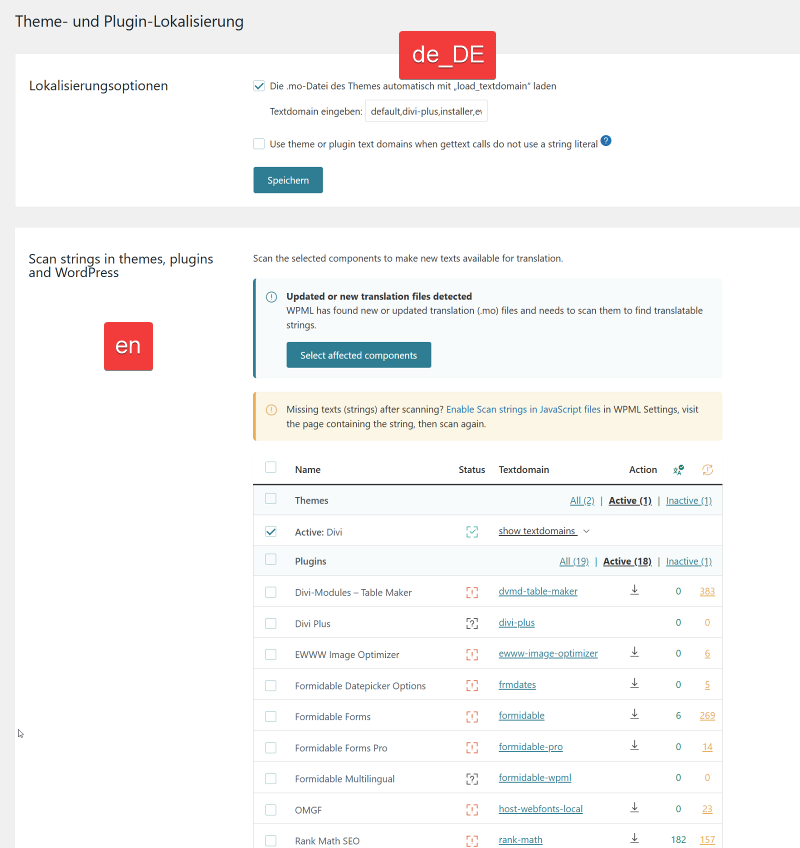
In other functional systems, under "WPML -> String in Themes, Plugins,....", DIVI has no strings registered.
In the system with wrong translation are strings registered for DIVI (see last screenshot).
Could the problem be caused by WPML trying to load its own translated strings for DIVI instead of the supplied translations from DIVI itself?
It should not be necessary to translate strings of plugins if these are already provided by the plugin authors.
If it worked before and now not anymore it’s likely not just related to the DIVI scan. You’re right normally strings don’t need to be translated if translation already exist and should work fine.
Since the behavior is inconsistent, it’s more likely caching or a session-related issue.
You can try and go to WPML > Support > Troubleshooting > Generate MO files > Go back to String translation and click to generate.
If issue still happens I’d suggest trying to again reproduce it on staging as it would be safer for me to check there. If not possible, I can then check production carefully and see what might be issue.
I just noticed in LIVE that some parts of WPML are translated while others are not (see attached screenshot, top is german, bottom is english, same screen) in addition to DIVI.
I cleared the WPML cache again and tried a few different approaches. Now, it seems the labels consistently retain their German translations.
I also observed a change in behavior in the frontend DIVI Builder:
On the first page load, labels display in English.
After a reload, the labels switch to German.
Previously, when the language was incorrect, the behavior was the opposite.
I need to identify the root cause or isolate the error so that this does not happen again in the future without external influence. Is there a known bug that could cause this?
Unfortunately, I cannot pinpoint when the issue first appeared; it was reported by the customer. However, it has worked correctly in the past, as it does on other pages.
At the moment, it appears to be working correctly again, and I will continue to monitor it. However, I have not yet been able to fully determine what triggers this behavior or how it can be reliably prevented.
There is no known WPML bug that would cause this kind of inconsistent language switching on its own. This is most commonly related to translation files (.mo files) not being fully up to date or not properly loaded/saved.
This can happen if:
- Translation files were not regenerated after updates
- Some translations are stored in outdated .mo files
- There is a mismatch between database strings and compiled translation files
That’s why I previously suggested regeneratingMO translation files and re-scan of theme, and update translation files if needed, it should fix this kind of issues.