
This is the technical support forum for WPML - the multilingual WordPress plugin.
Everyone can read, but only WPML clients can post here. WPML team is replying on the forum 6 days per week, 22 hours per day.
| Sun | Mon | Tue | Wed | Thu | Fri | Sat |
|---|---|---|---|---|---|---|
| - | 8:00 – 13:00 | 9:00 – 13:00 | 9:00 – 13:00 | 8:00 – 12:00 | 8:00 – 12:00 | - |
| - | 14:00 – 17:00 | 14:00 – 18:00 | 14:00 – 18:00 | 13:00 – 17:00 | 13:00 – 17:00 | - |
Supporter timezone: Europe/Zagreb (GMT+01:00)
Tagged: Exception
This topic contains 14 replies, has 0 voices.
Last updated by Bruno Kos 1 month ago.
Assisted by: Bruno Kos.
| Author | Posts |
|---|---|
| January 15, 2026 at 5:12 am #17731693 | |
 laurentB-52 |
Hello, We are using WPML with a static homepage. Our default language is English. However, we are experiencing incorrect homepage redirections across languages. Concrete examples: 1) In French: 2) In English: This creates inconsistent behavior across languages: We would like to understand: Thank you for your assistance. |
| January 15, 2026 at 7:59 am #17731895 | |
 Bruno Kos WPML Supporter since 12/2018 Languages: English (English ) German (Deutsch ) French (Français ) Timezone: Europe/Zagreb (GMT+01:00) |
Hi, I am checking hidden link, can you tell me where is "Accueil" within the menu? Also, can you please provide me with the debug information, so that I can get a better idea of your setup? https://wpml.org/faq/provide-debug-information-faster-support/ Enter this data into the Add debug info box below. |
| January 16, 2026 at 4:19 am #17735644 | |
|
laurentB-52 |
Thank you for your message. The issue occurs when clicking on “Accueil ” from internal pages, not directly from the homepage. For example: From this English page: So the “Accueil” menu item does not consistently redirect to the correct homepage according to the active language. Thanks Alice 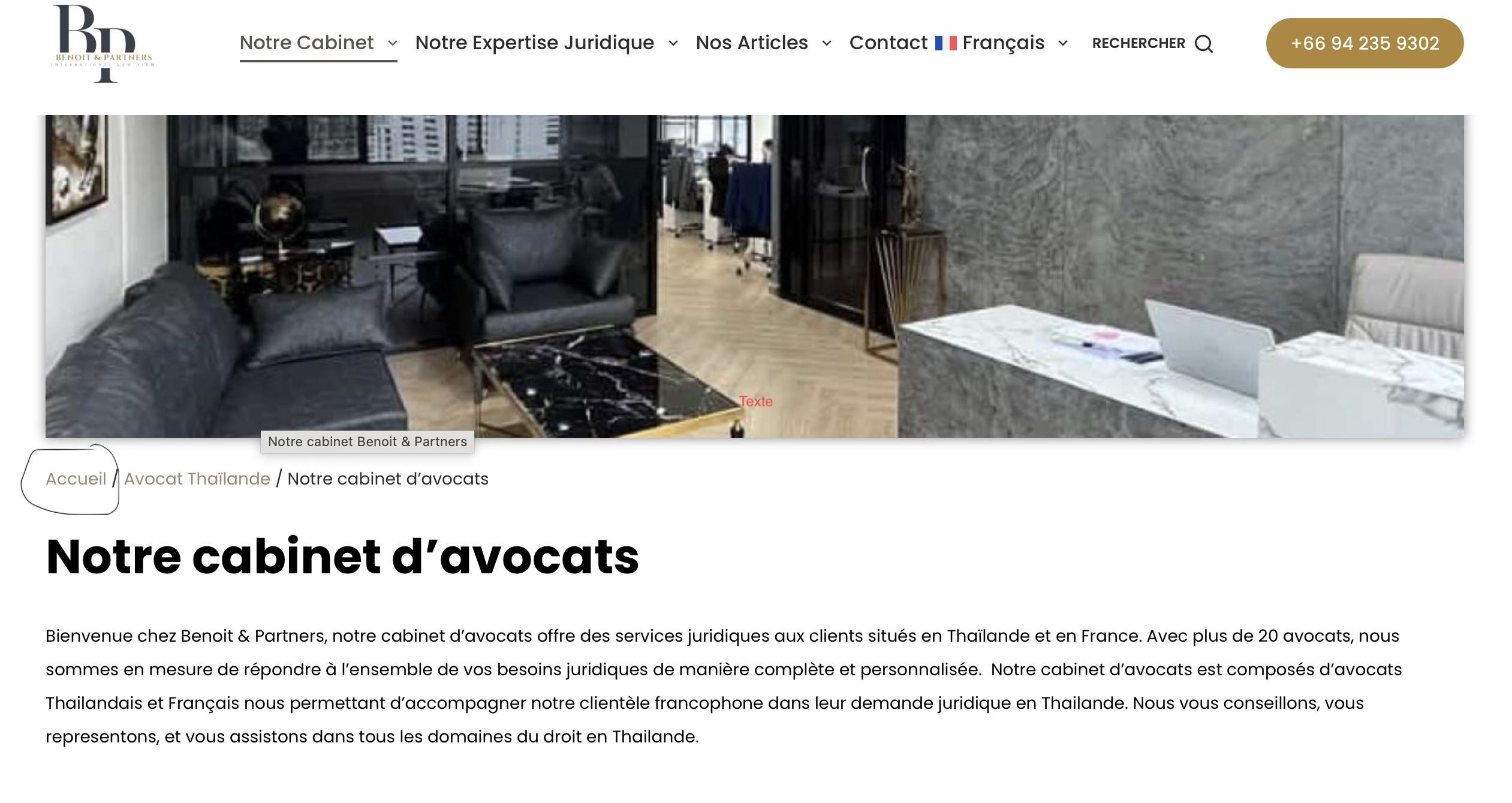  |
| January 16, 2026 at 8:03 am #17735877 | |
|
Bruno Kos WPML Supporter since 12/2018 Languages: English (English ) German (Deutsch ) French (Français ) Timezone: Europe/Zagreb (GMT+01:00) |
I see, so this is in fact an issue with breadcrumb URL? Is it Elementor breadcrumb feature or maybe some other plugin, such as the one from the Yoast SEO? Would you be willing to provide me with WordPress credentials so I could investigate the issue directly? I marked your next reply as private so that you can safely add credentials. |
| January 19, 2026 at 2:21 pm #17742914 | |
|
Bruno Kos WPML Supporter since 12/2018 Languages: English (English ) German (Deutsch ) French (Français ) Timezone: Europe/Zagreb (GMT+01:00) |
Can you make me site administrator? It would seem I have editor or author privileges only, so I can't access and of the WPML settings. |
| January 20, 2026 at 2:16 am #17744428 | |
|
laurentB-52 |
Sorry, now it's good! |
| January 20, 2026 at 8:00 am #17744800 | |
|
Bruno Kos WPML Supporter since 12/2018 Languages: English (English ) German (Deutsch ) French (Français ) Timezone: Europe/Zagreb (GMT+01:00) |
I am unable to find a pattern on why this happens. I would like to test this on my localhost server to exclude possible server caching issue or other possible causes. To help troubleshoot this issue more efficiently, I would like to use a tool called Duplicator (hidden link) to create a temporary diagnostic copy of the website. Using this tool, I will generate a lightweight “package” of the site that contains only the database and essential files. All media files (images, videos, etc.) will be excluded to keep the package small and secure. This package will be used only in a secure local testing environment to reproduce the problem and analyze it in detail. This allows me to test fixes safely without touching or impacting your live website in any way. Your production site will not be modified, slowed down, or affected during this process. You can find more information about this process here: Let me know if this is ok! |
| January 21, 2026 at 4:58 am #17748826 | |
|
laurentB-52 |
Hey, yes, that’s fine. You can proceed. Thank you |
| January 21, 2026 at 11:08 am #17749983 | |
|
Bruno Kos WPML Supporter since 12/2018 Languages: English (English ) German (Deutsch ) French (Français ) Timezone: Europe/Zagreb (GMT+01:00) |
I’m checking this with our second-tier team and will keep you updated. |
| January 22, 2026 at 2:25 am #17752337 | |
|
laurentB-52 |
Thank you! |
| January 26, 2026 at 6:33 am #17760937 | |
|
Bruno Kos WPML Supporter since 12/2018 Languages: English (English ) German (Deutsch ) French (Français ) Timezone: Europe/Zagreb (GMT+01:00) |
Can you try this? TRUNCATE TABLE `kc4_yoast_indexable`; TRUNCATE TABLE `kc4_yoast_indexable_hierarchy`; Because it contains invalid data. |
| January 27, 2026 at 3:02 am #17764788 | |
|
laurentB-52 |
Hi, Thanks for your message. |
| January 27, 2026 at 10:42 am #17766263 | |
|
Bruno Kos WPML Supporter since 12/2018 Languages: English (English ) German (Deutsch ) French (Français ) Timezone: Europe/Zagreb (GMT+01:00) |
Hi, You can follow the steps below. Please make sure you complete the backup step before doing anything else, as this change is not reversible without a backup. 1. Create a database backup 2. Install the Adminer plugin 3. Open Adminer and select the database 4. Run the SQL queries TRUNCATE TABLE `kc4_yoast_indexable`; TRUNCATE TABLE `kc4_yoast_indexable_hierarchy`; Then click Execute. If you get an error saying the tables do not exist, look for Yoast tables in the database and replace the “kc4_” prefix with your actual table prefix (for example, wp_). Check a few pages on the site to confirm the correct language URLs are being generated. If anything looks wrong, restore the database backup you created in step 1. If you are still not comfortable doing this, let me know and I will be happy to assist. Make sure to have database backup using plugins such as or UpdraftPlus or similar before allowing me to make such changes. 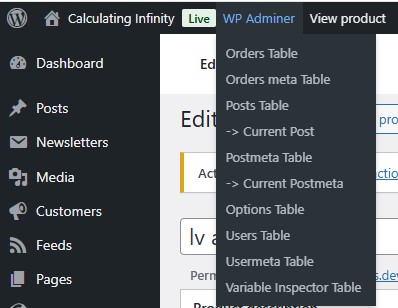 |
| February 2, 2026 at 2:19 am #17782143 | |
|
laurentB-52 |
Hi, Thanks for the instructions. Once the backup is done as recommended, we are fine with letting you apply the fix and then check the whole process to ensure everything is working correctly. Please let us know how you would like us to proceed. |
| February 2, 2026 at 10:38 am #17783278 | |
|
Bruno Kos WPML Supporter since 12/2018 Languages: English (English ) German (Deutsch ) French (Français ) Timezone: Europe/Zagreb (GMT+01:00) |
I recommend a full database backup of the WordPress site. A full database backup is the safest option because it allows a complete restore if needed and avoids any risk of missing related tables or data dependencies. Backing up only specific tables is not recommended in this case. Preferred way to create the backup (either option is fine): 1. Hosting control panel (preferred) OR 2. Plugin-based backup Once the full database backup is completed and confirmed, you can grant access and I will apply the fix directly. If anything unexpected occurs, the database can be restored immediately from the backup. |





The topic ‘[Closed] Homepage and menu association issue across languages’ is closed to new replies.