
This is the technical support forum for WPML - the multilingual WordPress plugin.
Everyone can read, but only WPML clients can post here. WPML team is replying on the forum 6 days per week, 22 hours per day.
| Sun | Mon | Tue | Wed | Thu | Fri | Sat |
|---|---|---|---|---|---|---|
| - | - | 9:00 – 18:00 | 9:00 – 18:00 | 9:00 – 18:00 | 9:00 – 18:00 | 9:00 – 18:00 |
| - | - | - | - | - | - | - |
Supporter timezone: America/Lima (GMT-05:00)
Tagged: Exception
This topic contains 11 replies, has 0 voices.
Last updated by Andreas W. 6 months, 1 week ago.
Assisted by: Andreas W..
| Author | Posts |
|---|---|
| October 16, 2025 at 7:47 pm #17492296 | |
 axae |
Background of the issue: Symptoms: Questions: |
| October 16, 2025 at 8:14 pm #17492343 | |
 Andreas W. WPML Supporter since 12/2018 Languages: English (English ) Spanish (Español ) German (Deutsch ) Timezone: America/Lima (GMT-05:00) |
Hello, I would like to offer to take a closer look and request temporary access (wp-admin and FTP) to the website to investigate the issue further. The required fields are located below the comments section when you log in to leave the next reply. The information you provide is private, meaning only you and I can see and access it. IMPORTANT I may need to install a plugin called "All In One WP Migration" to create a copy of the website so I can investigate the issue further. However, I would also be very grateful if you could provide a staging site or a copy of the website from your server for this purpose. If you have any questions about creating such a staging site, you can consult your hosting provider. Please note that WPML must also be registered on this staging site at https://wpml.org/account/websites/. If you are unable to provide such a copy of the website for testing, please let me know on this ticket. The private reply form looks like this: Click "I still need assistance" the next time you reply. Video: Please note that we are required to request this information individually on each ticket. We are not permitted to access any credentials that were not specifically submitted on this ticket using the private response form. Best regards, |
| October 16, 2025 at 8:54 pm #17492447 | |
|
Andreas W. WPML Supporter since 12/2018 Languages: English (English ) Spanish (Español ) German (Deutsch ) Timezone: America/Lima (GMT-05:00) |
According to WPML > Support the current PHP MEMORY LIMIT on the server is 128 MB, and the site is using at least 120 MB of memory. I would suggest asking the hosting support to change the PHP MEMORY LIMIT to 256 MB or higher. In the meantime, I will try to take a local copy of the site and test if I can replicate the error on a virtual server. If this error only occurs on specific products, please name me an exact example. 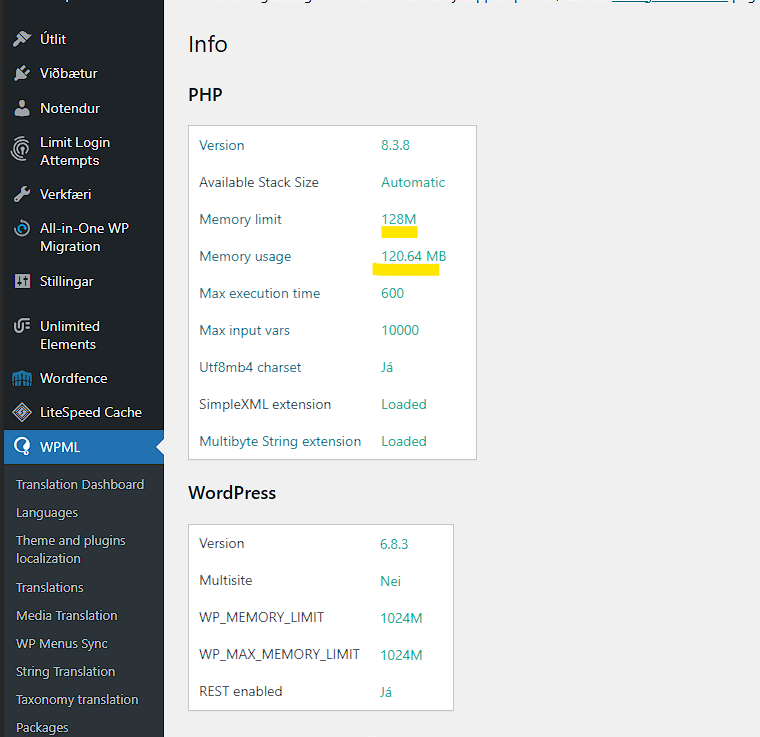 |
| October 16, 2025 at 9:08 pm #17492468 | |
|
axae |
Hi Andreas, This isn’t a memory issue. Our server PHP memory_limit is 1024M. Proof: I’ve already confirmed this back and forth with our hosting provider. Thanks, |
| October 16, 2025 at 10:11 pm #17492532 | |
|
Andreas W. WPML Supporter since 12/2018 Languages: English (English ) Spanish (Español ) German (Deutsch ) Timezone: America/Lima (GMT-05:00) |
On a local copy of your site, the only WCML-related error that I can find is: PHP Warning: Undefined property: WCML_Custom_Files_UI::$twig in C:\laragon\www\lopia\wp-content\plugins\woocommerce-multilingual\inc\template-classes\class-wcml-templates-factory.php on line 64 This happened, for example, when editing and updating the product "Íslensk lopapeysa". Updating WCML to the latest available version 5.5.2.1 solves this issue. Note that WPML Multilingual CMS 4.8.3 is also already available. Please update our plugins and test again. |
| October 16, 2025 at 10:38 pm #17492570 | |
|
axae |
Hi Andreas, Thanks for checking locally. Just to clarify our path so far: - We originally ran WCML 5.5.2.1 on PHP 8.4 and got a fatal on product save: On your local copy you mentioned only seeing a warning that disappears on Could you please re-test specifically for this fatal on your side with WCML If there’s a hotfix/patch around `managePostParent()` or the callbacks used Thanks, |
| October 16, 2025 at 11:05 pm #17492575 | |
|
Andreas W. WPML Supporter since 12/2018 Languages: English (English ) Spanish (Español ) German (Deutsch ) Timezone: America/Lima (GMT-05:00) |
Hi Steingrímur, Thank you for your feedback! On my local copy, I tested with both variable products: I can not confirm the error here when updating the original products on the WordPress Editor testing with PHP 8.3.16. The debug.log shows only some Deprecated Notices: [16-Oct-2025 23:03:01 UTC] PHP Deprecated: Creation of dynamic property WC_Product_Variable::$ID is deprecated in C:\laragon\www\lopia\wp-includes\post.php on line 2879 [16-Oct-2025 23:03:01 UTC] PHP Deprecated: Creation of dynamic property WC_Product_Variable::$filter is deprecated in C:\laragon\www\lopia\wp-includes\post.php on line 2884 [16-Oct-2025 23:03:01 UTC] PHP Deprecated: Creation of dynamic property WC_Product_Variable::$ID is deprecated in C:\laragon\www\lopia\wp-includes\post.php on line 2879 [16-Oct-2025 23:03:01 UTC] PHP Deprecated: Creation of dynamic property WC_Product_Variable::$filter is deprecated in C:\laragon\www\lopia\wp-includes\post.php on line 2884 [16-Oct-2025 23:03:08 UTC] PHP Deprecated: Creation of dynamic property WC_Product_Variable::$ID is deprecated in C:\laragon\www\lopia\wp-includes\post.php on line 2879 [16-Oct-2025 23:03:08 UTC] PHP Deprecated: Creation of dynamic property WC_Product_Variable::$filter is deprecated in C:\laragon\www\lopia\wp-includes\post.php on line 2884 [16-Oct-2025 23:03:09 UTC] PHP Deprecated: Creation of dynamic property WC_Product_Variable::$ID is deprecated in C:\laragon\www\lopia\wp-includes\post.php on line 2879 [16-Oct-2025 23:03:09 UTC] PHP Deprecated: Creation of dynamic property WC_Product_Variable::$filter is deprecated in C:\laragon\www\lopia\wp-includes\post.php on line 2884 It would be ideal if you could set up a staging site and provide me access, so that I can investigate further. Best regards |
| October 17, 2025 at 3:53 pm #17494733 | |
|
Andreas W. WPML Supporter since 12/2018 Languages: English (English ) Spanish (Español ) German (Deutsch ) Timezone: America/Lima (GMT-05:00) |
Could you please provide me with the exact steps about how to replicate the error? What I did on the staging after enabling WP DEBUG and set WP MEMORY LIMIT in wp-config.php: define( 'WP_DEBUG', true ); define( 'WP_DEBUG_LOG', true ); define( 'WP_DEBUG_DISPLAY', true ); define( 'WP_MEMORY_LIMIT', '256M' ); Steps: 1) Edited title, content, and short description on original variable products Errors: [17-Oct-2025 15:51:55 UTC] PHP Deprecated: Creation of dynamic property WC_Product_Variable::$ID is deprecated in /var/www/virtual/lopia.is/lopia-is.staging-word.press/htdocs/wp-includes/post.php on line 2879 [17-Oct-2025 15:51:55 UTC] PHP Deprecated: Creation of dynamic property WC_Product_Variable::$filter is deprecated in /var/www/virtual/lopia.is/lopia-is.staging-word.press/htdocs/wp-includes/post.php on line 2884 [17-Oct-2025 15:51:55 UTC] PHP Deprecated: Creation of dynamic property WC_Product_Variable::$ID is deprecated in /var/www/virtual/lopia.is/lopia-is.staging-word.press/htdocs/wp-includes/post.php on line 2879 [17-Oct-2025 15:51:55 UTC] PHP Deprecated: Creation of dynamic property WC_Product_Variable::$filter is deprecated in /var/www/virtual/lopia.is/lopia-is.staging-word.press/htdocs/wp-includes/post.php on line 2884 I can still not confirm the reported error. |
| October 17, 2025 at 4:49 pm #17494789 | |
|
axae |
Hi Andreas, It was a mess to get the stage page up and I turned off security and then had to turn off all plugins to get in, but not until I had set Object Cache = OFF, then I was finally able to log in to the stage page. I don't see anything unusual on the stage page now when I go through the process myself but after downgrading the WCML plugin, most things seemed to be fixed but it was still not possible to use the price button for all sizes in variable products and so I went the other way of entering prices for all sizes i.e. bulk. So when I thought this had become bearable, I see the posts with the 69 error and then the new owner of the page, i.e. the one I was making the website for, is inserting text into the English version but she still isn't following my advice, to insert first in Icelandic and then translate… so after a long process, I'm not sure now how the error occurs with her. I followed the instructions on both WPML and Woocoomerce regarding clearing the cache, etc. If the site now works on Stage without problems, i.e. the problem was only limited to editing products, it is only related to Live web now. When I now go to lopia.is and change a product from simple to a product with variations, and I'm in Generate variation, and then I want to enter a price, there's something stuck there unless I enter a price with bulk. And if I change this product back to simple + save, an error occurs. This is the product: hidden link Best regards, |
| October 17, 2025 at 5:48 pm #17495009 | |
|
Andreas W. WPML Supporter since 12/2018 Languages: English (English ) Spanish (Español ) German (Deutsch ) Timezone: America/Lima (GMT-05:00) |
Thank you for your feedback! When reporting an issue, please always try to provide exact steps. You said: "I am trying to save a product in WooCommerce while WooCommerce Multilingual & Multicurrency (WCML) is active." Now you said: "I'm in Generate variation, and then I want to enter a price, there's something stuck there unless I enter a price with bulk" You mean the required "Regular price field" inside each variation? I gave this a test on the staging, but had no issue with creating a new original variable product. Example: Can you please confirm if you can replicate the issue on the staging site? Also, not necessary that the staging should be an exact copy of the current production site, to be able to replicate the issue and debug it. Also, note that WPML's plugins are not updated on the staging site, and WPML is not registered. --- I then made another visit to your live site, created a new original variable product as a draft, and tried to generate variations, and here I can actually see an issue with the UI, which switches to the wrong tab after generating the variations, but the variations are actually generated, and I have no issue with entering prices. Working example: Also, I can confirm that the staging is not the exact same version as your live site. Do you mind if I enable WP DEBUG on the live site to confirm if I can still trigger the reported error? |
| October 17, 2025 at 6:36 pm #17495041 | |
|
axae |
Hi Andreas, The problem caused me to go through a process of actions, the main thing according to the WPML and Woocommerce guide book, then I downgraded the plugins to an older version, PHP from 8.4 down to 8.2 and later back to 8.3 and the problem was not appearing as it does now. It complicates the matter to explain it to you exactly. Then I handed over the site to the owner and she is fixing the text and inserting prices, she talked about "crash" and having to log in again, but I haven't had to do that myself and so I'm not sure what exactly is what, but there is an error and a bug going on. Before I downgraded WCML to an older version, I first deactivated the plugin, went through the process of cleaning and fixing as recommended. I can confirm that it was not a problem to insert prices for all variation products at once in the latest version of the plugin but is now present in the previous version, etc. If we enter a price and save for a simple product, everything is fine. If we take the same product and enter sizes and prices for all sizes, a bug appears, if I save back to a simple product, something crashes. That's the best explanation I can give right now. Now there is no problem on hidden link but the problem is still on the Lopia.is main page. The only thing that has changed is that there was a problem with bringing up the stage page and I first disconnected all plugins, especially the security plugin and finally ObjectCache.php to off, and then the stage page finally worked. This may be a problem with the hosting provider regarding the stage page, but now changing products on the stage page works, but the problem remains unresolved on the main page, lopia.is I can confirm that there is a problem on lopia.is and not on the stage page at the moment. And I didn't know I had to do a special register for WPML on the staging page, but that can be fixed. I'm waiting for updates while I look into the issue and after performing a downgrade. You can enable WP DEBUG. Best regards, |
| October 17, 2025 at 9:02 pm #17495271 | |
|
Andreas W. WPML Supporter since 12/2018 Languages: English (English ) Spanish (Español ) German (Deutsch ) Timezone: America/Lima (GMT-05:00) |
I can still not confirm the issue on the live site, as the mentioned error does not appear inside the debug.log after editing original products, including their product variations, or after generating variations on an original product. |







The topic ‘[Closed] WCML fatal on save_post: ‘Array callback must have exactly two elements’ (Post.php:69)’ is closed to new replies.