Background of the issue:
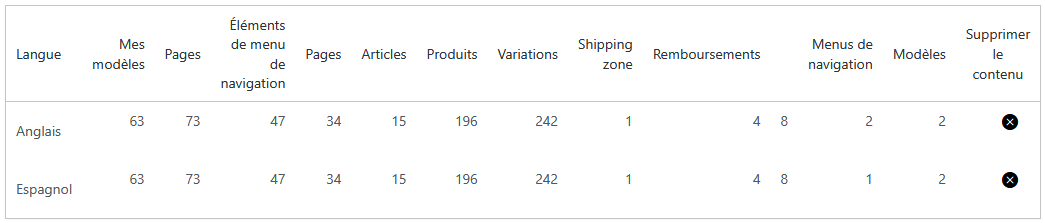
I am trying to permanently remove the Spanish (es) and English (en) languages from WPML. Both languages were removed from WPML → Languages, and then I tried to delete all their translations using the delete (X) button.
Symptoms:
WPML starts deleting some elements but gets stuck every time, always at the same numbers. The deletion never completes. WPML deletes only part of the translations and then stops permanently. The remaining translation counters for ES and EN never decrease. Both languages stop at exactly the same numbers (pages, posts, products, variations, menus, templates, etc.). WPML does not show any error, but it never finishes the process.
Questions:
Why does WPML get stuck when trying to delete translations permanently?
How can I ensure that all translations for ES and EN are completely removed from the database?
Languages: English (English )Spanish (Español )German (Deutsch )
Timezone: America/Lima (GMT-05:00)
Hello,
Your server currently has a timelimit of 300 seconds, which means that if deleting the languages takes longer than 5 minutes, the server will cancel the operation.
Could this be the reason for the issue?
If so, please ask your hosting support team to set the PHP TimeLimit to a higher value on the server, or simply run the option various times, which should also solve the issue.
If this does not solve the problem, please let us know.
Thank you very much for your reply and for the suggestions.
I can confirm that the issue was not caused by the PHP timeout.
Even after increasing the limit from 300 to 600 seconds, the deletion process still stopped at the exact same counters for both ES and EN, with no further progress.
This behavior was identical in every attempt, so it was clearly not a timeout scenario.
In the meantime, I have resolved the problem by manually cleaning the remaining orphaned entries in the database.
After removing those records, WPML was finally able to complete the deletion.