This thread is resolved. Here is a description of the problem and solution.
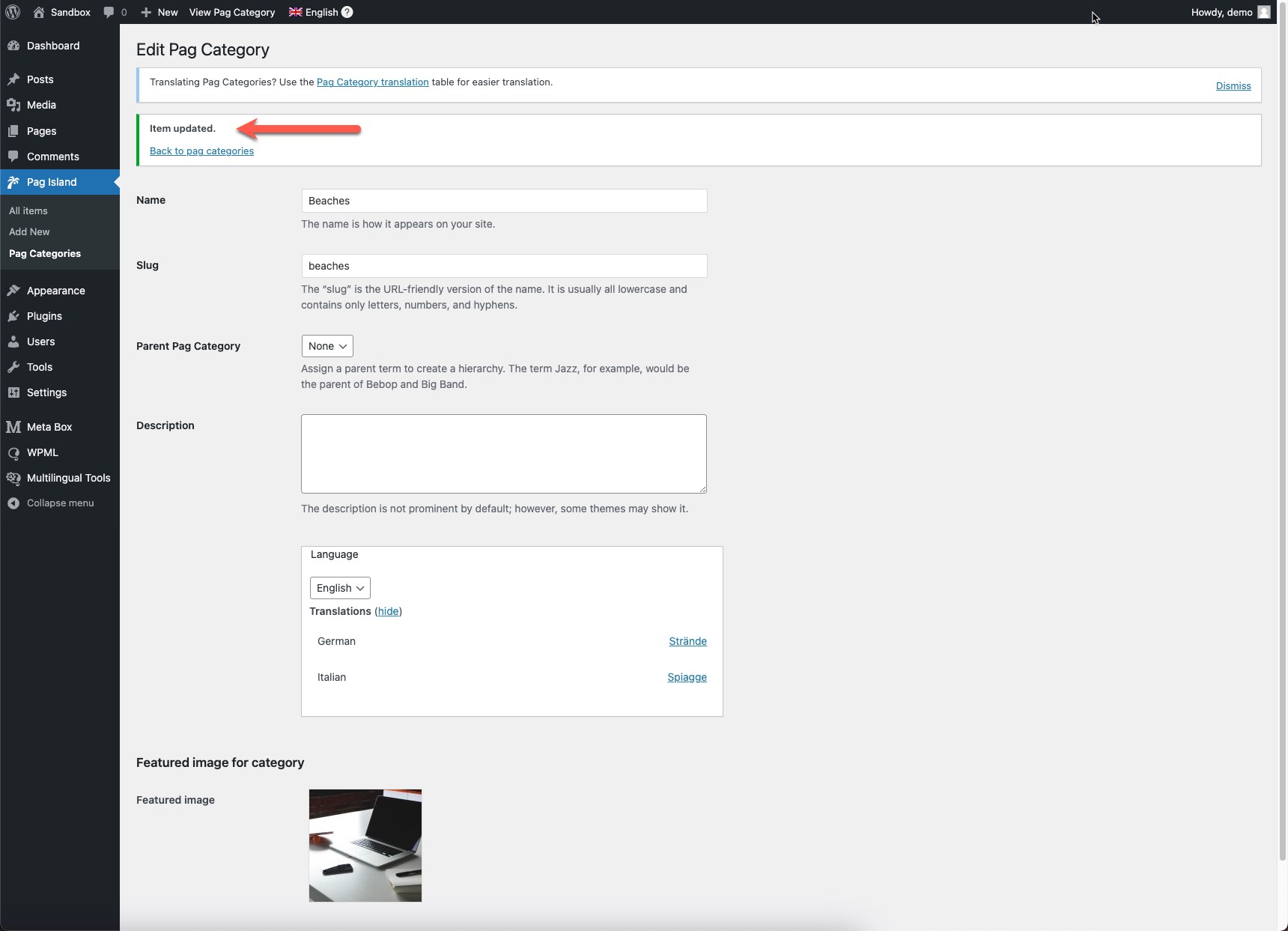
Problem: The client needed a solution where they could upload a category image using a Metabox custom field on the default language, and have that image automatically duplicated across other languages without the need to upload the same image for each language. Solution: 1. We advised the client to ensure that at least one image is added to a category in the default language to see the field in the settings page. 2. Once an image is added to a category, the field should appear correctly in the settings. 3. We asked the client to look for a specific message indicating that the settings have been updated, as shown in the screenshot we provided. 4. After seeing the message, the client should update the settings one more time to ensure the changes take effect.
Please note that this solution might not be relevant to your situation due to it being outdated or not applicable to your case. If this is the case, we highly recommend checking the related known issues, verifying the version of the permanent fix, and confirming that you have installed the latest versions of themes and plugins. If you still need assistance, please do not hesitate to open a new support ticket in the WPML support forum.
This is the technical support forum for WPML - the multilingual WordPress plugin.
Everyone can read, but only WPML clients can post here. WPML team is replying on the forum 6 days per week, 22 hours per day.
Please, find the whole explanation with screensharing on following link: hidden link
Also, I wish to provide solution for the client where he can upload the category image (created by Metabox custom field) just on default language, but that image will be duplicated (will appear) on other languages as well. So, he don't need to upload the same image for the same categories for other languages.
1- Delete the translated custom field posts
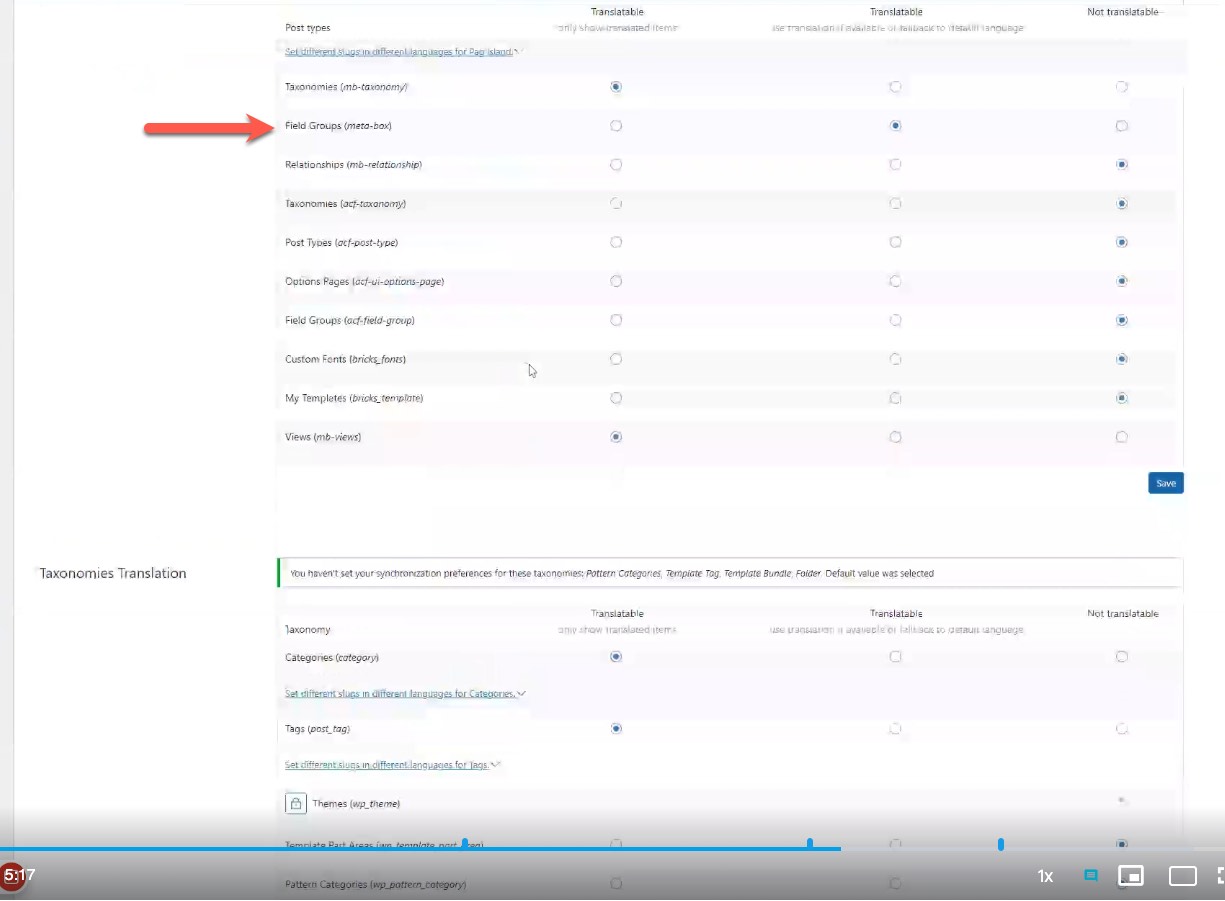
2- Go to WPML-> Settings-> Post Type Translaslation section
3- Set the Custom Field post type to "Not Translated"
4- Go to WPML-> Settings-> Custom Term Meta Translaslation section
5- Set the Featured image field to "Copy"
6- Edit the default language categories and update them
7- Check the translated categories
Hi Osama,
Thank you very much for your feedback.
However, I wasn't able to understand what exactly I have to do. Let me explain. Here are your instructions:
1- Delete the translated custom field posts
2- Go to WPML-> Settings-> Post Type Translaslation section
3- Set the Custom Field post type to "Not Translated"
4- Go to WPML-> Settings-> Custom Term Meta Translaslation section
5- Set the Featured image field to "Copy"
6- Edit the default language categories and update them
7- Check the translated categories
My questions:
"1- Delete the translated custom field posts."
I guess you mean I have to delete Custom post field - not "custom field posts" - which could mean I have to delete custom posts (I apologize, English is not my native language, so maybe I am writing something wrong).
2- Go to WPML-> Settings-> Post Type Translaslation section
3- Set the Custom Field post type to "Not Translated"
I guess I have to create again the same Custom post field, right? Otherwise, something is wrong regarding topics number 2 and 3.
The rest of the topics from the list are also not understandable to me, due to using "custom field posts" term in text, and as I previously said - it seems to me something is missing.
Could you please, write again step by step explanation, but maybe more carefully?
1- Go to WPML-> Settings-> Post Type Translaslation section
2- Set the post type (meta-box) to "Not Translated"
3- Go to WPML-> Settings-> Custom Term Meta Translaslation section
4- Set the Featured image (featured-image-categories) field to "Copy"
5- Edit the default language categories and update them
6- Check the translated categories
If that didn't fix the issue, please log in to this sandbox site and install the "Meta Box" plugin. (hidden link)
After that, please create a test post type, taxonomy, and field. Add a test taxonomy with an image to replicate the issue.
Thank you very much for your feedback.
I am very "scary" about step 2 you wrote in your message 😉
I mean, this one: Set the post type (meta-box) to "Not Translated"
Please, check why is that so: hidden link
If you think I may do that and that won't break any of previously created Custom Post types and Custom fields and Taxonomy for those Custom Post types - I will do that.
However, please check the video explanation.
The post type I mean is the one in the attached screenshot.
If you are not comfortable changing the translation preferences, please replicate the issue on the sandbox site to debug it without affecting your live site.
Hi Osama,
Thank you very much. Your screenshot helped me.
Regarding this:
"If you are not comfortable changing the translation preferences, please replicate the issue..." - it's not the problem to change some settings, I am just asking you if you are sure that changing "Field Groups (meta-box)" from "Translatable" to "Non translatable" won't messed up things on existing Post types, and their Custom fields. That's the question 😉
And, this is not something I can test on sandbox, because sandbox installation doesn't have all those posts types and fields.
I'm not sure if it won't affect the existing data, but we will be able to test the correct translation preference on the sandbox so you can replicate it on your site.
However, please back up your site or test on a staging site to ensure the safety of your data.
Thank you for your feedback.
I spent some time playing with various options, and discovered I WOULD have issues if I changed "Field Groups (meta-box)" from "Translatable" to "Non translatable".
However, I also discovered why I had duplicate Image field for languages other then English. And, I fixed that. Now, I wish to proceed with the following 2 steps:
3- Go to WPML-> Settings-> Custom Term Meta Translaslation section
4- Set the Featured image (featured-image-categories) field to "Copy"
However, there is no "Featured image (featured-image-categories)" field in WPML settings, as you described. It's just missing. Very weird.
That's why I install Metabox in Sandbox you provided in the previous message, so you can test everything and see for yourself.
Could you please check why newly created taxonomy custom fields for Category images is not visible in WPML settings (in the sandbox Site)?
Thank you very much.
Ok, I added one Pag Island category and add also Featured image to English version of that category. But, the image is not duplicated to other categories. I mean, you have to add it manually to every language. My first question and problem explanation was exactly related to that issue.
Please, check the Sandbox Site and all the settings. I think everything is setup as you explained, but still doesn't work as it should be.
Thank you very much.
So, the solution is to update the featured images twice, as it seems. I mean, the first time you have to upload (or to change) the image, and click to Update button, and after that you have to click to Update button again.
Isn't that a bit strange?
I mean, don't get me wrong, it's not the problem to click on the same button twice, but this is the first time I come to such situation in WordPress. I believe this is kind of issue.
Do you have some logical explanation for such a behaviour?
P.S. For instance, I have on my Site a few other fields, which automatically updates values (those values are in input fields) on all languages, after you update value on default language. This is how things should work (I mean, it's logically if you click to Update, the value would be updated). There is no point to click two times.