
This thread is resolved. Here is a description of the problem and solution.
Problem:
If you're trying to amend language settings in the WooCommerce plugin and encounter issues with the line
__( 'License Key', '%TEXTDOMAIN%' ),
where '%TEXTDOMAIN%' is used unexpectedly by the plugin author.
Solution:
We recommend the following steps as a temporary workaround:
1. Navigate to
WPML_ST_Translations_File_Registration::save_file_info
in
/wp-content/plugins/wpml-string-translation/classes/translations-file-scan/wpml-st-translations-file-registration.php
.
2. Add the following condition just before the line
$file_path_pattern = $this->get_file_path_pattern( $file_path, $original_domain );
:
			if (strpos($file_path, "%",) == true){
				$file_path = str_replace('%', '%%', $file_path);
			}
Please ensure to back up your database before making any changes.
This solution might be outdated or not applicable to your specific case. We highly recommend checking related known issues at https://wpml.org/known-issues/, verifying the version of the permanent fix, and confirming that you have installed the latest versions of themes and plugins. If the issue persists, please open a new support ticket.
This is the technical support forum for WPML - the multilingual WordPress plugin.
Everyone can read, but only WPML clients can post here. WPML team is replying on the forum 6 days per week, 22 hours per day.
Tagged: Exception
This topic contains 9 replies, has 0 voices.
Last updated by Andrey 2 months, 1 week ago.
Assisted by: Andrey.
| Author | Posts |
|---|---|
| December 15, 2025 at 4:03 pm #17665297 | |
 stianV-5 |
I need to be able to start this part of the UI to amend some language in the Woocommerce plugin 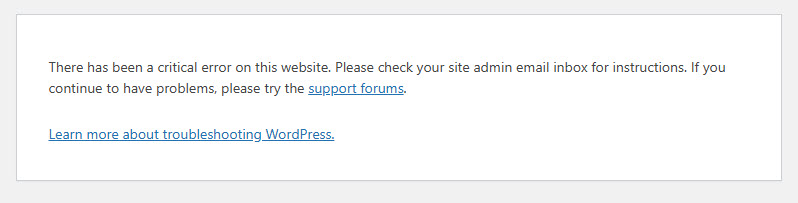 |
| December 15, 2025 at 7:58 pm #17665654 | |
 Andrey WPML Supporter since 06/2013 Languages: English (English ) Russian (Русский ) Timezone: Europe/Kyiv (GMT+02:00) |
Thank you for contacting WPML support. To better understand your situation, could you please enable debugging, replicate the issue, and share the full error message from your debug.log file? Here are the steps: define( 'WP_DEBUG', true ); define( 'WP_DEBUG_LOG', true ); define( 'WP_DEBUG_DISPLAY', false ); 2. Replicate the error. |
| December 15, 2025 at 8:42 pm #17665730 | |
|
stianV-5 |
administration/debug/debug-wordpress/">Debugging in WordPress for more information. (This message was added in version 3.1.0.) in /var/www/vhosts/termikk.no/httpdocs/wp-includes/functions.php on line 6131 health-check domain was triggered too early. This is usually an indicator for some code in the plugin or theme running too early. Translations should be loaded at the init action or later. Please see Debugging in WordPress for more information. (This message was added in version 6.7.0.) in /var/www/vhosts/termikk.no/httpdocs/wp-includes/functions.php on line 6131 woo-vipps domain was triggered too early. This is usually an indicator for some code in the plugin or theme running too early. Translations should be loaded at the init action or later. Please see Debugging in WordPress for more information. (This message was added in version 6.7.0.) in /var/www/vhosts/termikk.no/httpdocs/wp-includes/functions.php on line 6131 woocommerce domain was triggered too early. This is usually an indicator for some code in the plugin or theme running too early. Translations should be loaded at the init action or later. Please see Debugging in WordPress for more information. (This message was added in version 6.7.0.) in /var/www/vhosts/termikk.no/httpdocs/wp-includes/functions.php on line 6131 health-check domain was triggered too early. This is usually an indicator for some code in the plugin or theme running too early. Translations should be loaded at the init action or later. Please see Debugging in WordPress for more information. (This message was added in version 6.7.0.) in /var/www/vhosts/termikk.no/httpdocs/wp-includes/functions.php on line 6131 woo-vipps domain was triggered too early. This is usually an indicator for some code in the plugin or theme running too early. Translations should be loaded at the init action or later. Please see Debugging in WordPress for more information. (This message was added in version 6.7.0.) in /var/www/vhosts/termikk.no/httpdocs/wp-includes/functions.php on line 6131 woocommerce domain was triggered too early. This is usually an indicator for some code in the plugin or theme running too early. Translations should be loaded at the init action or later. Please see Debugging in WordPress for more information. (This message was added in version 6.7.0.) in /var/www/vhosts/termikk.no/httpdocs/wp-includes/functions.php on line 6131 health-check domain was triggered too early. This is usually an indicator for some code in the plugin or theme running too early. Translations should be loaded at the init action or later. Please see Debugging in WordPress for more information. (This message was added in version 6.7.0.) in /var/www/vhosts/termikk.no/httpdocs/wp-includes/functions.php on line 6131 woo-vipps domain was triggered too early. This is usually an indicator for some code in the plugin or theme running too early. Translations should be loaded at the init action or later. Please see Debugging in WordPress for more information. (This message was added in version 6.7.0.) in /var/www/vhosts/termikk.no/httpdocs/wp-includes/functions.php on line 6131 woocommerce domain was triggered too early. This is usually an indicator for some code in the plugin or theme running too early. Translations should be loaded at the init action or later. Please see Debugging in WordPress for more information. (This message was added in version 6.7.0.) in /var/www/vhosts/termikk.no/httpdocs/wp-includes/functions.php on line 6131 health-check domain was triggered too early. This is usually an indicator for some code in the plugin or theme running too early. Translations should be loaded at the init action or later. Please see Debugging in WordPress for more information. (This message was added in version 6.7.0.) in /var/www/vhosts/termikk.no/httpdocs/wp-includes/functions.php on line 6131 woo-vipps domain was triggered too early. This is usually an indicator for some code in the plugin or theme running too early. Translations should be loaded at the init action or later. Please see Debugging in WordPress for more information. (This message was added in version 6.7.0.) in /var/www/vhosts/termikk.no/httpdocs/wp-includes/functions.php on line 6131 woocommerce domain was triggered too early. This is usually an indicator for some code in the plugin or theme running too early. Translations should be loaded at the init action or later. Please see Debugging in WordPress for more information. (This message was added in version 6.7.0.) in /var/www/vhosts/termikk.no/httpdocs/wp-includes/functions.php on line 6131 health-check domain was triggered too early. This is usually an indicator for some code in the plugin or theme running too early. Translations should be loaded at the init action or later. Please see Debugging in WordPress for more information. (This message was added in version 6.7.0.) in /var/www/vhosts/termikk.no/httpdocs/wp-includes/functions.php on line 6131 woo-vipps domain was triggered too early. This is usually an indicator for some code in the plugin or theme running too early. Translations should be loaded at the init action or later. Please see Debugging in WordPress for more information. (This message was added in version 6.7.0.) in /var/www/vhosts/termikk.no/httpdocs/wp-includes/functions.php on line 6131 woocommerce domain was triggered too early. This is usually an indicator for some code in the plugin or theme running too early. Translations should be loaded at the init action or later. Please see Debugging in WordPress for more information. (This message was added in version 6.7.0.) in /var/www/vhosts/termikk.no/httpdocs/wp-includes/functions.php on line 6131 |
| December 15, 2025 at 8:45 pm #17665731 | |
|
stianV-5 |
It is also strange that it says that WooCommerce Multilingual & Multicurrency is not installed, while it in the plugins list is both installed and active. Tried reinstalling this but cannot figure out how to using the OTGS installer 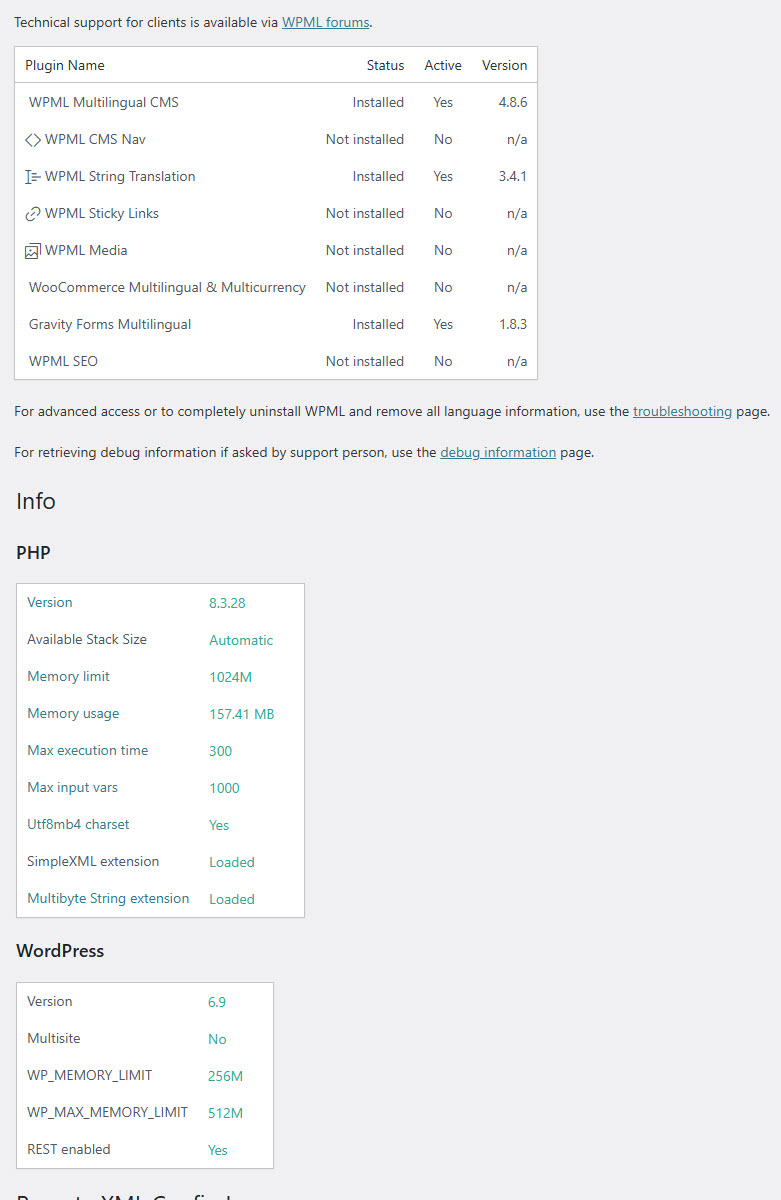 |
| December 16, 2025 at 2:21 pm #17668036 | |
|
Andrey WPML Supporter since 06/2013 Languages: English (English ) Russian (Русский ) Timezone: Europe/Kyiv (GMT+02:00) |
Thank you for your feedback. The issue happens because of this: [15-Dec-2025 20:41:18 UTC] PHP Fatal error: Uncaught ValueError: Unknown format specifier "t" in /var/www/vhosts/termikk.no/httpdocs/wp-content/plugins/wpml-string-translation/classes/translations-file-scan/wpml-st-translations-file-registration.php:100
Stack trace:
#0 /var/www/vhosts/termikk.no/httpdocs/wp-content/plugins/wpml-string-translation/classes/translations-file-scan/wpml-st-translations-file-registration.php(100): sprintf()
#1 /var/www/vhosts/termikk.no/httpdocs/wp-content/plugins/wpml-string-translation/classes/translations-file-scan/wpml-st-translations-file-registration.php(65): WPML_ST_Translations_File_Registration->save_file_info()
#2 /var/www/vhosts/termikk.no/httpdocs/wp-includes/class-wp-hook.php(343): WPML_ST_Translations_File_Registration->cached_save_mo_file_info()
#3 /var/www/vhosts/termikk.no/httpdocs/wp-includes/plugin.php(205): WP_Hook->apply_filters()
#4 /var/www/vhosts/termikk.no/httpdocs/wp-includes/l10n.php(769): apply_filters()
#5 /var/www/vhosts/termikk.no/httpdocs/wp-content/plugins/wpml-string-translation/classes/MO/JustInTime/MO.php(100): load_textdomain()
#6 /var/www/vhosts/termikk.no/httpdocs/wp-content/plugins/sitepress-multilingual-cms/vendor/wpml/collect/src/Illuminate/Support/Collection.php(228): WPML\ST\MO\JustInTime\MO->WPML\ST\MO\JustInTime\{closure}()
#7 /var/www/vhosts/termikk.no/httpdocs/wp-content/plugins/wpml-string-translation/classes/MO/JustInTime/MO.php(96): WPML\Collect\Support\Collection->each()
#8 /var/www/vhosts/termikk.no/httpdocs/wp-content/plugins/wpml-string-translation/classes/MO/JustInTime/MO.php(78): WPML\ST\MO\JustInTime\MO->loadTextDomain()
#9 /var/www/vhosts/termikk.no/httpdocs/wp-content/plugins/wpml-string-translation/classes/MO/JustInTime/MO.php(50): WPML\ST\MO\JustInTime\MO->load()
#10 /var/www/vhosts/termikk.no/httpdocs/wp-includes/l10n.php(196): WPML\ST\MO\JustInTime\MO->translate()
#11 /var/www/vhosts/termikk.no/httpdocs/wp-includes/l10n.php(307): translate()
#12 /var/www/vhosts/termikk.no/httpdocs/wp-content/plugins/kadence-blocks/vendor/vendor-prefixed/stellarwp/uplink/src/Uplink/Admin/License_Field.php(84): __()
#13 /var/www/vhosts/termikk.no/httpdocs/wp-content/plugins/kadence-blocks/vendor/vendor-prefixed/stellarwp/uplink/src/Uplink/Admin/Provider.php(106): KadenceWP\KadenceBlocks\StellarWP\Uplink\Admin\License_Field->register_settings()
#14 /var/www/vhosts/termikk.no/httpdocs/wp-includes/class-wp-hook.php(339): KadenceWP\KadenceBlocks\StellarWP\Uplink\Admin\Provider->admin_init()
#15 /var/www/vhosts/termikk.no/httpdocs/wp-includes/class-wp-hook.php(365): WP_Hook->apply_filters()
#16 /var/www/vhosts/termikk.no/httpdocs/wp-includes/plugin.php(522): WP_Hook->do_action()
#17 /var/www/vhosts/termikk.no/httpdocs/wp-admin/admin.php(180): do_action()
#18 {main}
thrown in /var/www/vhosts/termikk.no/httpdocs/wp-content/plugins/wpml-string-translation/classes/translations-file-scan/wpml-st-translations-file-registration.php on line 100
I suspect that one of your translation files (from your theme or a plugin) contains incorrect data — most likely a broken or missing placeholder. For example, the original string may include a placeholder like some string %s, but the translation stored in the .mo file contains something like translated some string % or is missing the placeholder entirely. When the placeholder doesn’t match, it can trigger warnings or even fatal errors, depending on how the string is used. If looking further at that specific line #12 /var/www/vhosts/termikk.no/httpdocs/wp-content/plugins/kadence-blocks/vendor/vendor-prefixed/stellarwp/uplink/src/Uplink/Admin/License_Field.php(84): __() I can assume that the particular string is located on line 84 in /plugins/kadence-blocks/vendor/vendor-prefixed/stellarwp/uplink/src/Uplink/Admin/License_Field.php. Can you check this line to see what the text is about? Maybe, then you can identify the .mo translation file of the Kadence Blocks plugin and remove it from the files. But first, I would check if the plugin is up to date. If not, update it first, as it may already be fixed.
That's fine. It will be fixed in future releases, and this does not affect functionality. |
| December 16, 2025 at 10:12 pm #17669285 | |
|
stianV-5 |
OK this was the string ... so i renamed the MO file with MO_bak and tried again and the same crash happened. 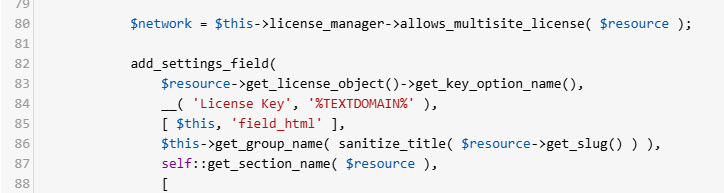 |
| December 16, 2025 at 10:14 pm #17669304 | |
|
stianV-5 |
So I reenabled logging and here are the results: [16-Dec-2025 22:13:15 UTC] PHP Notice: Function _load_textdomain_just_in_time was called incorrectly. Translation loading for the woo-vipps domain was triggered too early. This is usually an indicator for some code in the plugin or theme running too early. Translations should be loaded at the init action or later. Please see Debugging in WordPress for more information. (This message was added in version 6.7.0.) in /var/www/vhosts/termikk.no/httpdocs/wp-includes/functions.php on line 6131 woocommerce domain was triggered too early. This is usually an indicator for some code in the plugin or theme running too early. Translations should be loaded at the init action or later. Please see Debugging in WordPress for more information. (This message was added in version 6.7.0.) in /var/www/vhosts/termikk.no/httpdocs/wp-includes/functions.php on line 6131 woo-vipps domain was triggered too early. This is usually an indicator for some code in the plugin or theme running too early. Translations should be loaded at the init action or later. Please see Debugging in WordPress for more information. (This message was added in version 6.7.0.) in /var/www/vhosts/termikk.no/httpdocs/wp-includes/functions.php on line 6131 woocommerce domain was triggered too early. This is usually an indicator for some code in the plugin or theme running too early. Translations should be loaded at the init action or later. Please see Debugging in WordPress for more information. (This message was added in version 6.7.0.) in /var/www/vhosts/termikk.no/httpdocs/wp-includes/functions.php on line 6131 |
| December 16, 2025 at 10:18 pm #17669305 | |
|
stianV-5 |
This goes too slow in our communication... because your replies does not go into my inbox... any other way we can approach this for a more time sensitive resolution? |
| December 17, 2025 at 10:48 am #17670528 | |
|
Andrey WPML Supporter since 06/2013 Languages: English (English ) Russian (Русский ) Timezone: Europe/Kyiv (GMT+02:00) |
Thank you for sharing the additional info. The issue comes to this line: __( 'License Key', '%TEXTDOMAIN%' ), What the plugin author does with '%TEXTDOMAIN%' is unexpected. I have found out that it has already been reported to our team. As a temporary workaround, please use the following steps: 1. Go to \WPML_ST_Translations_File_Registration::save_file_info in /wp-content/plugins/wpml-string-translation/classes/translations-file-scan/wpml-st-translations-file-registration.php 2. Add this condition: if (strpos($file_path, "%",) == true){
$file_path = str_replace('%', '%%', $file_path);
}
3. Just before this line: $file_path_pattern = $this->get_file_path_pattern( $file_path, $original_domain ); Before making any changes, please ensure that you back up your database first. |
| December 17, 2025 at 12:27 pm #17670836 | |
|
stianV-5 |
This did the trick Andrey, thank you very much... do I have to remember to remove this code at some point in the future? |
| December 17, 2025 at 2:45 pm #17671607 | |
|
Andrey WPML Supporter since 06/2013 Languages: English (English ) Russian (Русский ) Timezone: Europe/Kyiv (GMT+02:00) |
Thank you. The code will be removed once the plugins are updated. You will know if you encounter the same problem and need to access the page, as there is a workaround. |