Background of the issue:
I am trying to display BetterDocs 'docs' or posts both in the frontend and backend. The post count indicates there should be multiple posts, but they are not showing. Deactivating and activating the WPML plugin temporarily resolves the issue until new posts are published. The issue is visible on the homepage in the BetterDocs widgets. The issue is not specific to BetterDocs as it also occurs in the backend. Link to a page where the issue can be seen: hidden link
Symptoms:
Posts are not showing in both frontend and backend despite the post count indicating multiple posts. The issue reoccurs after publishing new posts.
Questions:
Why are the posts not showing in BetterDocs despite the post count indicating they should?
Why does deactivating and activating WPML temporarily resolve the issue?
- IMPORTANT STEP! Create a backup of your website. Or better approach will be to test this on a copy/staging version of the website to avoid any disruption of a live website.
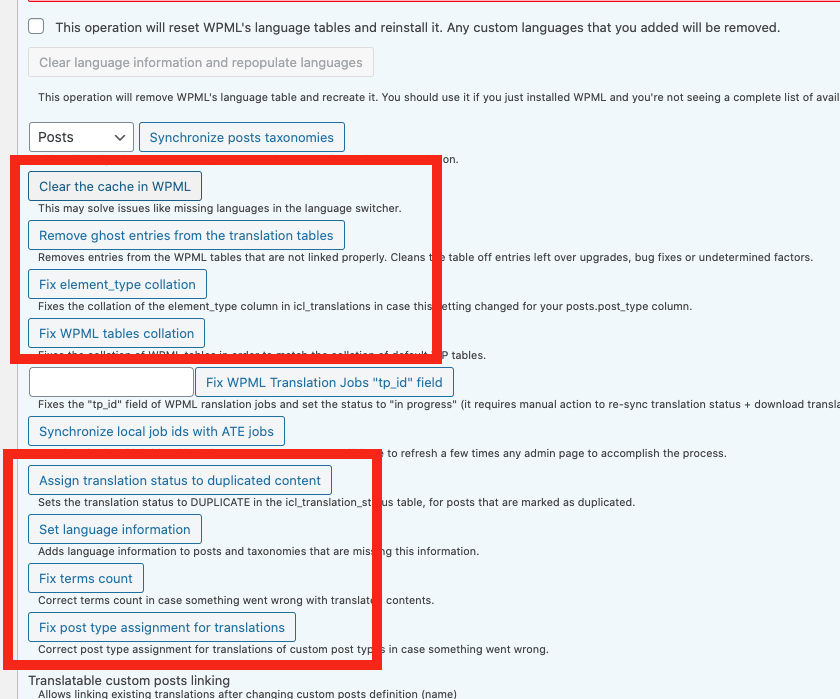
- Go to "WordPress Dashboard > WPML > Support > Troubleshooting (link)".
- Click the buttons annotated in the screenshot below one by one and wait for each button process to finish: https://wpml.org/wp-content/uploads/2020/10/7206941-buttons.png
I increased the memory limit but that did not help.
In the troubleshooting options the "set language information" button solves the issue momentarily(like deactivating and activating the WPML plugin), but as soon as a new post is published or translated the issue happens again.
Thank you for the updates. Sorry for the late response because of the weekend. We hope you are following the steps suggested in this documentation - hidden link
Please update the newly created post after a minor edit in the content (to refresh the translation settings), and then its translation after that make sure you are getting the expected or not.
--
Thanks!
Bigul
The topic ‘[Closed] Posts now showing when using BetterDocs’ is closed to new replies.