Background of the issue:
I am trying to use the PowerPack Modal Box (PowerPack Addon for Beaver Builder) to display additional information for custom post types such as Branchen (Industries) and Referenzen (References) on my multilingual site. These modals are opened by clicking a custom element inside Beaver Builder Content Grids. The posts are fully translated in WPML, and the correct translated content is displayed when opening the posts individually. The Modal Box template uses: [wpbb post:content]. Link to a page where the issue can be seen: hidden link
Symptoms:
The modal box always displays the German (default language) content, even though the user is on a translated page (e.g., Hungarian). The post is fully translated in WPML, and the single post page displays the correct language version. This issue affects multiple post types, not just one. Titles, metadata, and categories are displayed correctly in the translated language inside the grid, but only the content inside the modal is wrong. The modal consistently loads the German version of the post, regardless of the active language.
Questions:
Why does the modal box display the German content instead of the translated version?
How can I ensure the modal loads the translated post content matching the page language?
Languages: English (English )German (Deutsch )French (Français )
Timezone: Europe/Zagreb (GMT+01:00)
hidden link
Here is the sandbox. Please let me know if you’re able to reproduce the issue. If you can, share the test page you used so I can review it, confirm the behavior, and escalate it to our compatibility team for further investigation.
Hello,
i trued recreating the module (link: hidden link) but we used custom code to design the content grid. I, for some reason, could not add custom code to the powerpack element but added the code below.
Languages: English (English )German (Deutsch )French (Français )
Timezone: Europe/Zagreb (GMT+01:00)
Thanks for the update. I checked the sandbox page you created here: hidden link
I still need a few details to understand what exactly did not work.
1. What exactly failed when you tried adding your custom code?
You mentioned that on the live site you use custom code to design the content grid, but in the sandbox you were not able to add custom code to the PowerPack element.
Could you clarify where this custom code normally exists (PowerPack settings, Beaver Builder HTML module, theme/child theme file, Code Snippets plugin, or a custom module)?
Also, what happens in the sandbox when you try to add it? Is an option missing, is there an error, or does the module simply not accept the code? If needed, I can enable File Manager or Code Snippets so you can add the same code you use on the live site.
2. The test page is not translated yet.
Currently, the sandbox page exists only in the default language, so I cannot test the modal behavior on a translated URL. Please translate the test page as well. Without a translated version, I cannot reproduce the issue or escalate it.
Let me know once the code and translation are added so I can proceed with testing.
Regarding the custom code:
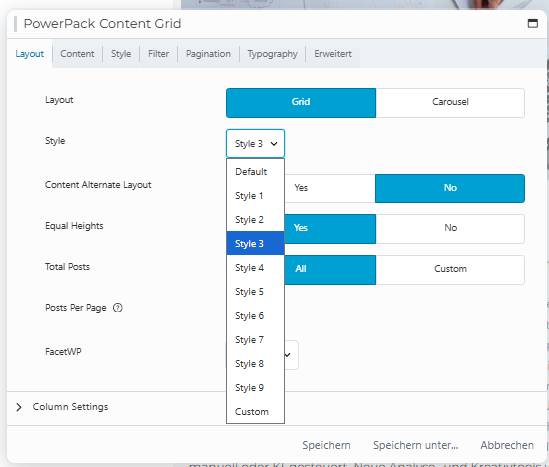
On our live site, the PowerPack module includes an additional style option called “Custom”, where we insert our own layout/code. This option is currently missing in the sandbox environment, which is why I wasn’t able to recreate our exact setup.
I’ve attached a screenshot showing how it looks on our end.
I’ve also added the translation for the test page so you can now check the modal behavior on the translated version.
Languages: English (English )German (Deutsch )French (Français )
Timezone: Europe/Zagreb (GMT+01:00)
Hi,
To properly investigate the issue, could you please let me know if it’s possible to enable or add the “Custom” style option for the PowerPack module in the sandbox environment? That would allow me to recreate your exact setup.
If that’s not possible, would you be willing to provide temporary WordPress admin and FTP credentials so I can investigate the issue directly?