[Resolved] String translation is different from theme translation.
This thread is resolved. Here is a description of the problem and solution.
Problem: The client is experiencing a discrepancy between string translation and theme translation, suspecting it might be related to previously active LiteSpeed caching. Solution: We recommend following the previously suggested steps despite the concerns about LiteSpeed caching, as we have not found any direct connection between LiteSpeed caching and the issue at hand. It is crucial to take a full backup of the site (both files and database) before proceeding to ensure that you can revert to the original state if necessary. After applying the steps, if any unexpected issues arise, we advise you to contact us for further troubleshooting.
Please note that this solution might be outdated or not applicable to your specific case. We highly recommend checking related known issues at https://wpml.org/known-issues/, verifying the version of the permanent fix, and confirming that you have installed the latest versions of themes and plugins. If the issue persists, please open a new support ticket at WPML support forum.
This is the technical support forum for WPML - the multilingual WordPress plugin.
Everyone can read, but only WPML clients can post here. WPML team is replying on the forum 6 days per week, 22 hours per day.
Could you please provide more details about what exactly isn’t working as expected? It would be very helpful if you could also upload a few screenshots so I can better understand the issue.
If the problem is related to a missing or incorrect string translation, you can try locating it in WPML → String Translation and adding or correcting the translation there.
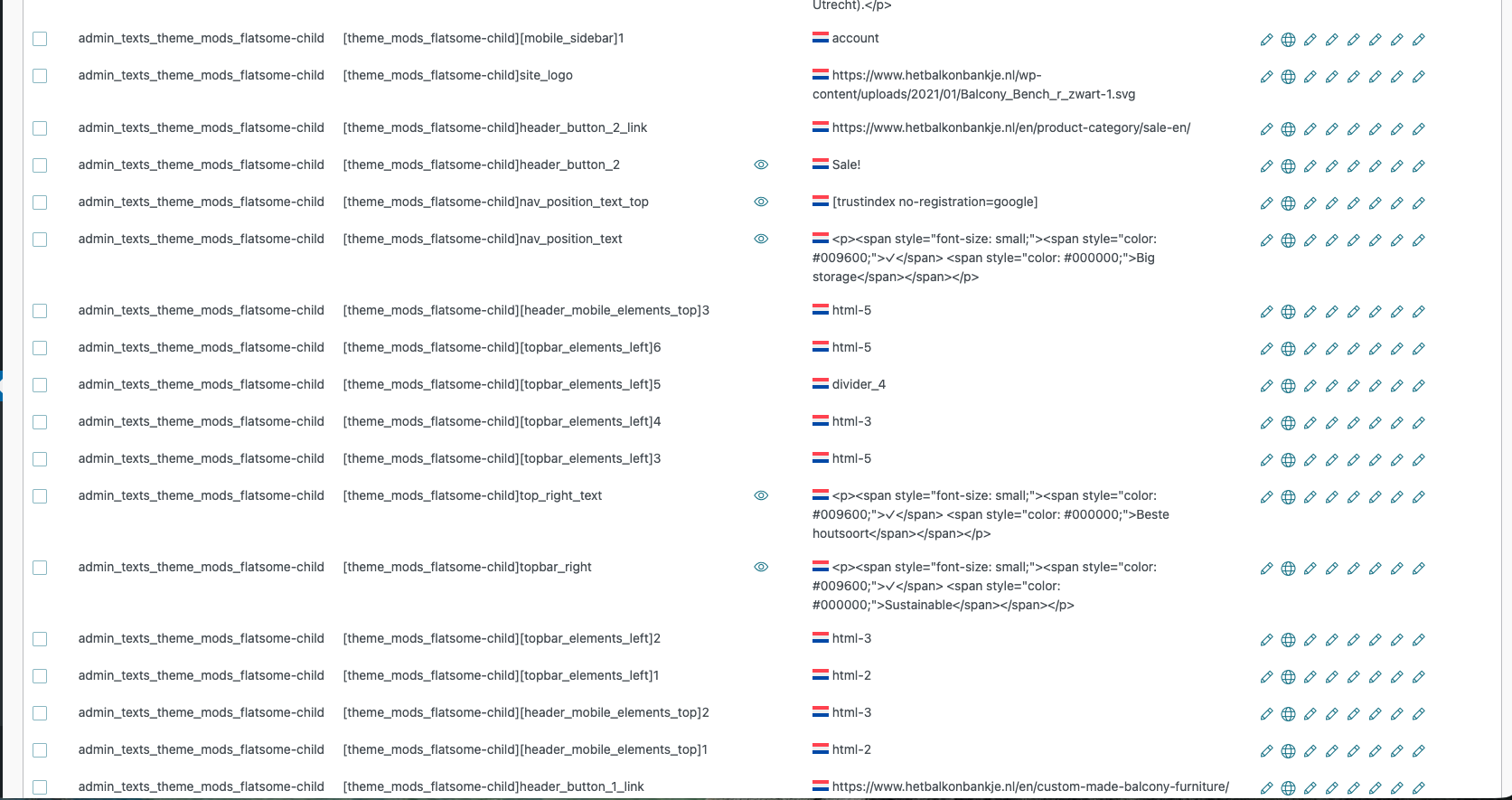
Many strings in the WPML string translation page show the English translated string values. However the native Dutch string values should be shown here as these values are entered in the WordPress customizer settings.
Luckily on the pages / positions where the string values are show they appear correct in the native dutch language. And not in the english translated string values.
Attached three screenshots.
Two of the WPML string translation screen showing the theme's translated customizer settings
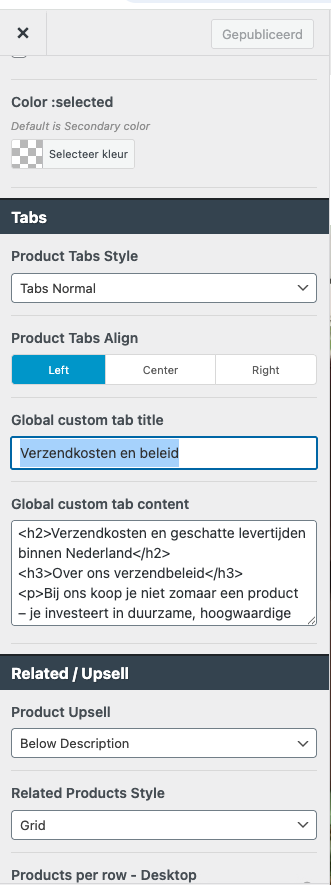
One example of the WordPress customizer settings.
How can I get the correct native Dutch string values back on the WPML string translation page, and NOT the english string values.
Domain shown in the screenshot of the WPML string translation page: admin_texts_theme_mods_flatsome-child (35)
Examples shown there:
[theme_mods_flatsome-child]tab_title: has string value 'Shipping and Delivery'. This should be Verzendkosten en beleid.
[theme_mods_flatsome-child]header_button_2_link: shows the translated url to English.
Thank you for the explanation and the screenshots.
You’re referring to strings that come from the theme options and from the text you entered in the WordPress Customizer.
Most themes and plugins are originally written in English and then translated into other languages. However, text added via the WordPress Customizer can be entered in any language first. In your case, WPML currently treats the entire text domain as Dutch, which is why the strings appear this way in String Translation.
To fix this, I recommend the following steps:
1. Go to WPML → String Translation.
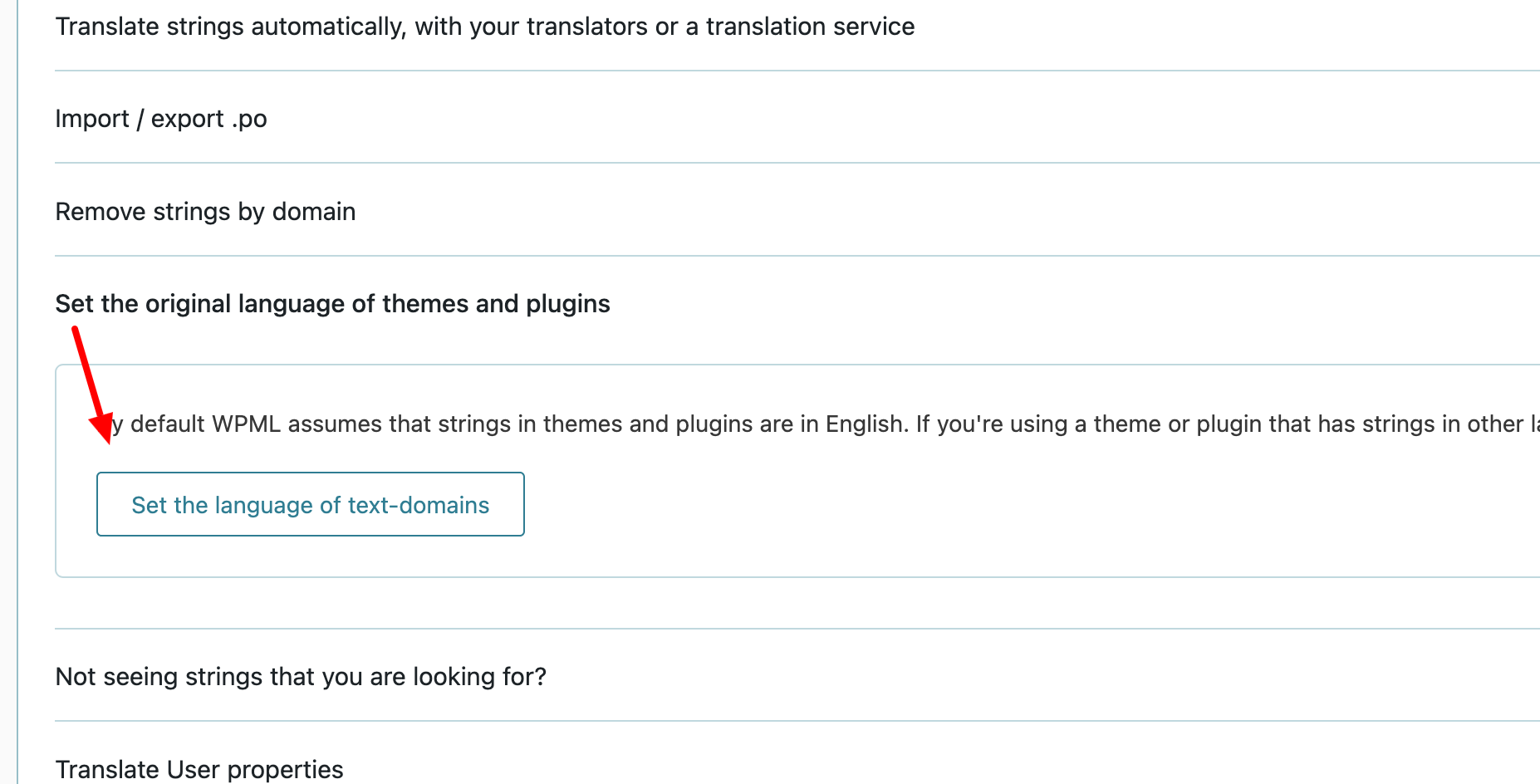
2. Scroll down and open the “Set the original language of themes and plugins” section.
3. Click “Set the language of text domains” and set the entire domain to English.
4. After this, you should see the translations displayed correctly.
Regarding the text that was originally entered in Dutch via the WordPress Customizer: if, after the change above, you now see that Dutch text listed under English, you have two possible approaches:
Option 1:
Re-enter the text in English in the Customizer, save it, and then translate it properly via WPML → String Translation.
Option 2:
Change the original language only for the affected strings:
1. Go to WPML → String Translation.
2. Select the relevant strings in the table.
3. Use “Change the language of selected strings” and set their language to Dutch.
I’ve attached screenshots to illustrate these steps for your reference.
Thanks so far. However, I work a lot on the website and this was always displayed correctly.
I did have Litespeed caching active a few days ago and removed it. Maybe is has to do something with this? but what?
And what is also strange in the provided examples;
is that the custom tab title: [theme_mods_flatsome-child]tab_title (for on the woocommerce product page, which is entered in Dutch in the WordPress customizer) shows in English on the WPML string translation page (marked with a Dutch flag). This was never the case before.
Yet the custom tab content: [theme_mods_flatsome-child]tab_content shows the correct Dutch string value entered in the WordPress customizer.
With this extra feedback: would you still say I have to try your previous feedback? Because these issues I'm facing were not the case before and I don't want to mess up string translation values.
Thank you for your feedback and for the additional details.
I did have Litespeed caching active a few days ago and removed it. Maybe is has to do something with this? but what?
I haven’t encountered any cases where LiteSpeed caching directly causes this issue. I also checked our internal notes and couldn’t find any known or reported problems related to LiteSpeed in this context, so I can’t confirm that it’s connected.
With this extra feedback: would you still say I have to try your previous feedback? Because these issues I'm facing were not the case before and I don't want to mess up string translation values.
Yes, at this point I would still recommend following the steps I mentioned in my previous message. Unfortunately, there isn’t an alternative approach to adjust this. To be on the safe side, please make sure to take a full backup of your site (files and database) before proceeding. This way, you can safely test the steps without risking your existing data.
If you notice anything unexpected after trying this, please let me know and we’ll continue troubleshooting.