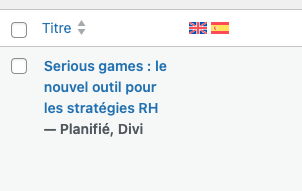
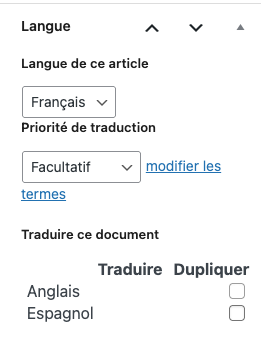
Background of the issue:
I am trying to use the WPML backoffice to manage translations, but I can't see the translation icons or select the translation mode (WordPress mode or WPML module).
Symptoms:
The translation icons are missing, and I can't select the translation mode on the pages. In an article I can't click to translate in the right-hand menu.
Questions:
Why are the translation icons not visible?
How can I select the translation mode if the options are not appearing?
In the past we have seen similar issues caused by backend optimization plugins, for example the ones that allow you to optimize the look of the admin area.
Do you happen to use any 3rd party plugins that allow you to edit the look of the backend?
If you have access to a staging site you could try the following suggestion:
1) Take a full backup of your site and database before proceeding. It is highly advised to try these on a dev or staging site first, so your live site isn't compromised.
2) Deactivate all plugins except WPML and String Translation.
3) Switch to a standard theme like 2024.
4) Check for the issue if it still happens.
5) Then start activating plugins one by one while keep checking for the issue. This way you 'll be able to pinpoint a conflict when & where it starts creating the problem.
6) If after activating all plugins you see that it still works fine, then switch to your theme and see if that's causing it.
NOTE: Do not perform this without an a recent backup.
Tout fonctionnait correctement, puis j'ai installé WPML Media Traduction, est-ce que cela pourrait être pour cela ? J'ai testé de désactiver le plugin et de le réactiver mais cela ne change rien. D'autre part voici mes extentions installées, pouvez-vous vérifier si l'une d'entre elle peut poser problème ? Mon collègue n'a pas le même problème d'affichage, comment est-ce possible ? :
atec Cache APCu
Better Search Replace
Cloudflare
Code Snippets
Complianz Privacy Suite (GDPR/CCPA) premium
Divi Filter
Divi Pixel
Embed Optimizer
Image Placeholders
Image Prioritizer
Modern Image Formats
Optimization Detective
Performance Lab
Preload LCP Image
Redirection
Site Kit de Google
Traduction de chaînes de caractères Wpml
UpdraftPlus - Sauvegarde/Restauration
Wordfence Security
WordPress Importer
WP Activity Log
WP Crontrol
WP Mail SMTP
WP Rocket
WPML Multilingual CMS
WPML SEO
Yet Another Related Posts Plugin (YARPP)
Yoast SEO
If you go to Users -> Add a new user as an admin and login using that user does it work ok?
Also, please go to WPML->Translation management->Translators and add yourself as a translator with access to all language pairs.
Let me know your results, please.
If the new user account works OK, go to your User Profile->Edit and scroll to the bottom and share with my your user capabilities (you might be missing some causing this behavior)
I tried adding a new administrator and with this new account I have no problem, I can see all the WPML icons. It's very strange. Is my normal account likely to work again in the future? Thanks