
This is the technical support forum for WPML - the multilingual WordPress plugin.
Everyone can read, but only WPML clients can post here. WPML team is replying on the forum 6 days per week, 22 hours per day.
| Sun | Mon | Tue | Wed | Thu | Fri | Sat |
|---|---|---|---|---|---|---|
| - | 8:00 – 13:00 | 9:00 – 13:00 | 9:00 – 13:00 | 8:00 – 12:00 | 8:00 – 12:00 | - |
| - | 14:00 – 17:00 | 14:00 – 18:00 | 14:00 – 18:00 | 13:00 – 17:00 | 13:00 – 17:00 | - |
Supporter timezone: Europe/Zagreb (GMT+01:00)
Tagged: Exception
This topic contains 8 replies, has 0 voices.
Last updated by Bruno Kos 2 days, 6 hours ago.
Assisted by: Bruno Kos.
| Author | Posts |
|---|---|
| December 5, 2025 at 12:26 pm | |
 Debby |
We have one post that's stuck on "translation assigned to local translator" for the Polish and Spanish translations hidden link |
| December 5, 2025 at 1:33 pm #17638764 | |
 Bruno Kos WPML Supporter since 12/2018 Languages: English (English ) German (Deutsch ) French (Français ) Timezone: Europe/Zagreb (GMT+01:00) |
I’ve attempted several troubleshooting steps on my end, but none have resolved the issue. I also added 5,000 credits to the site and triggered the automatic translation. In our system, the translations show as successfully completed, but for some reason they are not being returned to your website. Could you please follow the steps below? ### 1. Enable WordPress Debug Mode Please edit the wp-config.php file and add the following lines just before the line that says define( 'WP_DEBUG', true ); define( 'WP_DEBUG_LOG', true ); define( 'WP_DEBUG_DISPLAY', false ); ### 2. Reproduce the Issue To do this: * Open: hidden link ### 3. Check the Debug Log After reproducing the issue, please locate the debug.log file here: /wp-content/debug.log Kindly send us the most recent ~20 lines from the log (no need to share the entire file). Please remove or censor any sensitive information. ### 4. If No Log Is Generated If the debug.log file does not show anything, please run two additional checks: * Test with only the WPML plugins activated to see whether another plugin is causing a conflict. Let me know once you’ve completed these steps or if you need help with any part of the process. |
| December 8, 2025 at 11:14 am #17643524 | |
|
Debby |
I wanted to start with the proposed solution above, but I see that the icons are now stuck in the rotating position. Is this something that needs to be fixed first? 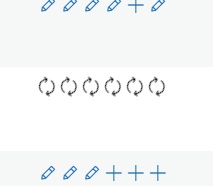 |
| December 8, 2025 at 12:18 pm #17643745 | |
|
Debby |
Please find the debug information below: [08-Dec-2025 12:17:17 UTC] PHP Notice: Function _load_textdomain_just_in_time was called incorrectly. Translation loading for the rsfv domain was triggered too early. This is usually an indicator for some code in the plugin or theme running too early. Translations should be loaded at the init action or later. Please see Debugging in WordPress for more information. (This message was added in version 6.7.0.) in /srv/www/websites/omni-aqua-bv/www.iwc-international.com/website/wp-includes/functions.php on line 6131 rsfv domain was triggered too early. This is usually an indicator for some code in the plugin or theme running too early. Translations should be loaded at the init action or later. Please see Debugging in WordPress for more information. (This message was added in version 6.7.0.) in /srv/www/websites/omni-aqua-bv/www.iwc-international.com/website/wp-includes/functions.php on line 6131 rsfv domain was triggered too early. This is usually an indicator for some code in the plugin or theme running too early. Translations should be loaded at the init action or later. Please see Debugging in WordPress for more information. (This message was added in version 6.7.0.) in /srv/www/websites/omni-aqua-bv/www.iwc-international.com/website/wp-includes/functions.php on line 6131 rsfv domain was triggered too early. This is usually an indicator for some code in the plugin or theme running too early. Translations should be loaded at the init action or later. Please see Debugging in WordPress for more information. (This message was added in version 6.7.0.) in /srv/www/websites/omni-aqua-bv/www.iwc-international.com/website/wp-includes/functions.php on line 6131 rsfv domain was triggered too early. This is usually an indicator for some code in the plugin or theme running too early. Translations should be loaded at the init action or later. Please see Debugging in WordPress for more information. (This message was added in version 6.7.0.) in /srv/www/websites/omni-aqua-bv/www.iwc-international.com/website/wp-includes/functions.php on line 6131 |
| December 8, 2025 at 12:52 pm #17644023 | |
|
Bruno Kos WPML Supporter since 12/2018 Languages: English (English ) German (Deutsch ) French (Français ) Timezone: Europe/Zagreb (GMT+01:00) |
These icons indicate that the translations were actually published and are now only pending updates, which suggests that the issue somehow resolved itself. Can you click on any of these, mark it as completed, and tell me whether it turns into the pencil icon (which indicates that the translation was successfully completed)? These logs wouldn’t have anything to do with the error, though—they’re only PHP notices. |
| December 10, 2025 at 1:25 pm #17652392 | |
|
Debby |
The icons keep on spinning (refreshing translation status) and don't turn into the gear icon...so no possibility to edit the translation. |
| December 10, 2025 at 2:01 pm #17652608 | |
|
Bruno Kos WPML Supporter since 12/2018 Languages: English (English ) German (Deutsch ) French (Français ) Timezone: Europe/Zagreb (GMT+01:00) |
Since the debug logs don’t show anything that would explain this behavior, and all other post translations on the site appear to be working correctly, this is most likely an isolated database-level issue affecting only this specific post. Unfortunately, that kind of one-off corruption is extremely difficult (and sometimes impossible) to fully reproduce. At this point, the most reliable workaround would be the following: 1. Create a brand-new post using the exact same content as the original. * No new credits should be used, as WPML’s translation memory will automatically reuse the existing translations. This approach avoids the corrupted translation job entirely and should restore normal translation behavior immediately. Let me know if you agree with this and if yes, let me know once you’ve tried this and if it works. |
| December 10, 2025 at 4:40 pm #17653270 | |
|
Debby |
Thanks for your suggestions. I made a new post with the standard WordPress editor, and now the gear icon keeps showing '(...) translation assigned to local translator, while the translation is marked as completed. Your suggestion of creating a brand-new post using the exact same content as the original gives the same result, unfortunately. |
| December 11, 2025 at 6:47 am #17654443 | |
|
Bruno Kos WPML Supporter since 12/2018 Languages: English (English ) German (Deutsch ) French (Français ) Timezone: Europe/Zagreb (GMT+01:00) |
Can you check now? Given that it has not worked for new posts either, I found that the issue was in fact related to the connection key your website has with our external translation system. I've updated the keys so that these match and resent this post through translation editor, it should work properly now. |




