
This is the technical support forum for WPML - the multilingual WordPress plugin.
Everyone can read, but only WPML clients can post here. WPML team is replying on the forum 6 days per week, 22 hours per day.
| Sun | Mon | Tue | Wed | Thu | Fri | Sat |
|---|---|---|---|---|---|---|
| - | 9:00 – 13:00 | 9:00 – 13:00 | 9:00 – 13:00 | 9:00 – 13:00 | 9:00 – 13:00 | - |
| - | 14:00 – 18:00 | 14:00 – 18:00 | 14:00 – 18:00 | 14:00 – 18:00 | 14:00 – 18:00 | - |
Supporter timezone: Europe/Kyiv (GMT+03:00)
Tagged: Exception
This topic contains 13 replies, has 1 voice.
Last updated by Andrey 1 day, 9 hours ago.
Assisted by: Andrey.
| Author | Posts |
|---|---|
| March 27, 2026 at 3:13 pm #17932831 | |
 lobkeB |
Hi, |
| March 27, 2026 at 3:25 pm #17932855 | |
|
lobkeB |
There are no fields related to Yoast SEO in 'Custom Field Translation'. On all my translated websites, only category pages, the default dutch language appears. 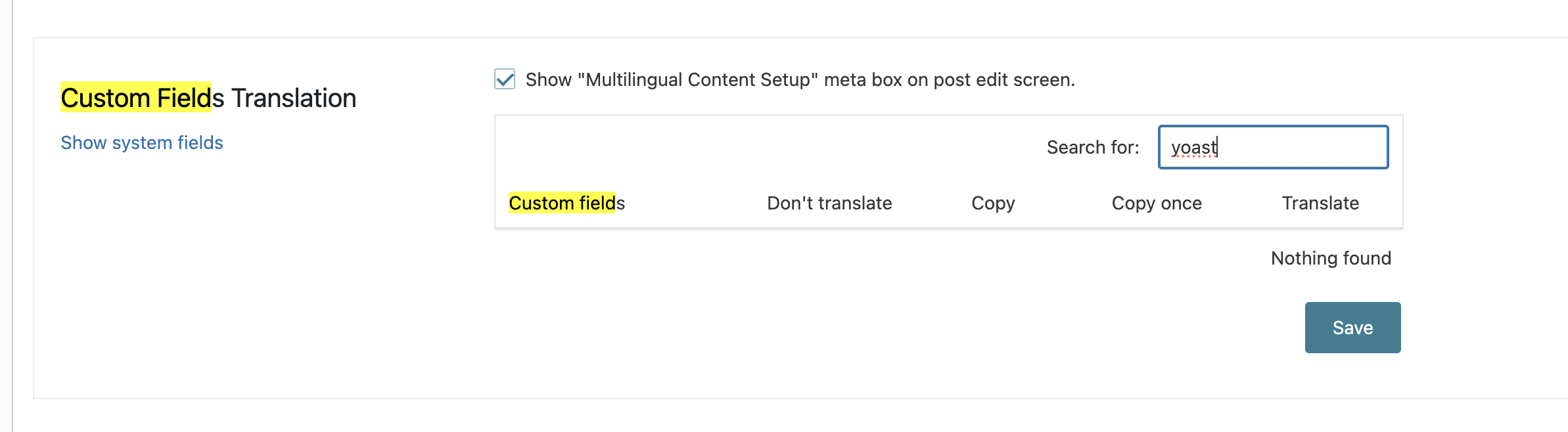 |
| March 30, 2026 at 7:10 am #17935219 | |
|
lobkeB |
For example on the category page hidden link instead of the english, de dutch meta title and description are shown. |
| March 30, 2026 at 7:18 am #17935270 | |
|
lobkeB |
According to your documentation, translated taxonomy SEO metadata should be handled via WPML → Translation Dashboard → Yoast SEO → Term Meta, and translating it there may overwrite previous manual translations. In our setup, only a single bulk item called “Term Meta” is available there. We cannot select individual product categories separately. Because we already manually filled the localized Yoast SEO title and meta description in many translated product categories, we are hesitant to run this bulk translation action on live, as it may overwrite existing manual translations. Could you confirm the safest way to fix this without overwriting all manually entered category SEO metadata? |
| March 30, 2026 at 2:56 pm #17937236 | |
|
lobkeB |
I created a PHP snippet, so it looks like it is resolved. But it is not, just to inform you. It is just a work around for now. |
| March 31, 2026 at 3:30 pm #17940619 | |
 Andrey WPML Supporter since 06/2013 Languages: English (English ) Russian (Русский ) Timezone: Europe/Kyiv (GMT+03:00) |
Thank you for contacting WPML support. Since the issue has been resolved using your workaround, I cannot see it on the frontend. To better understand how this can be fixed without the workaround, I would need to reproduce the issue. Would it be possible for you to set up a staging site where the problem is still present, so we can investigate further? That said, if your current snippet works well for your use case, you can continue using it. I’ve set my next reply as private so you can provide the necessary details. |
| April 7, 2026 at 9:45 am #17953301 | |
|
lobkeB |
Hi Andrey, Thanks for your answer. On this url hidden link you can see the issue. Because I did not put this url in the snippet code. In the attachment you 2 print screens:   |
| April 7, 2026 at 11:30 am #17953941 | |
|
Andrey WPML Supporter since 06/2013 Languages: English (English ) Russian (Русский ) Timezone: Europe/Kyiv (GMT+03:00) |
Thank you for the explanation. Have you tried editing the English category, making a small change to the description, and then saving it again? This can help trigger an update. |
| April 7, 2026 at 11:53 am #17954031 | |
|
lobkeB |
Yes, I have tried that. On my staging environment WMPL SEO 2.2.4 was installed, it worked correctly. Now I updated the plugin to 2.2.5 and the meta goes wrong. So the issue is WMPL SEO 2.2.5 for sure. Luckily I kept a zip version of 2.2.4 on my desktop so I can put it back. You want the login credentials of my staging website to unbug this issue? |
| April 7, 2026 at 11:58 am #17954044 | |
|
Andrey WPML Supporter since 06/2013 Languages: English (English ) Russian (Русский ) Timezone: Europe/Kyiv (GMT+03:00) |
This is quite interesting—I’ve set my next reply as private. Please let me know if I have your permission to create a copy of your site so I can run some tests locally. Also, could you let me know how I can temporarily disable the snippet you used to fix the issue? You can download the previous plugin versions from your WPML.org account → Downloads section. |
| April 9, 2026 at 1:42 pm #17959584 | |
|
Andrey WPML Supporter since 06/2013 Languages: English (English ) Russian (Русский ) Timezone: Europe/Kyiv (GMT+03:00) |
Thank you for providing the details. I’ve looked at this further and was able to resolve the issue on your staging site using the following steps: After completing these steps, everything appears to be working correctly now.  |
| April 15, 2026 at 5:05 pm #17972111 | |
|
lobkeB |
Hi Andrey, sorry for my late reply. I don't receive wpml updated messages in my inbox anymore... Anyhow, it is not working on my staging environment. You did the steps 'live' on my staging website, right? I don't see it is working. |
| April 16, 2026 at 7:56 am #17973070 | |
|
Andrey WPML Supporter since 06/2013 Languages: English (English ) Russian (Русский ) Timezone: Europe/Kyiv (GMT+03:00) |
Hi, I did this on the staging site. I will check it and let you know. |
| April 17, 2026 at 2:31 pm #17977120 | |
|
Andrey WPML Supporter since 06/2013 Languages: English (English ) Russian (Русский ) Timezone: Europe/Kyiv (GMT+03:00) |
I have escalated this issue to our team for further investigation. In the meantime, please use WPML SEO version 2.2.4 as a temporary workaround. |





