Home›Support›English Support›[Resolved] ATE: Execution Expired. Usually this error happens when xliff is too big
[Resolved] ATE: Execution Expired. Usually this error happens when xliff is too big
This thread is resolved. Here is a description of the problem and solution.
Problem: If you're experiencing issues with ATE where it opens but gets stuck loading, and eventually displays an 'Execution Expired' error, this might be due to specific translation units containing large sections of encoded data. This problem was identified when the ATE failed to load the homepage, despite other pages working correctly. Solution: We recommend checking any content-heavy sections on your page for encoded data. For instance, if you have custom CSS in blocks like sliders where images are embedded directly as encoded (base64) data, update this to use a standard image URL from your Media Library. This change should reduce the size of the translation unit, allowing the page to be sent to ATE without issues. After making these adjustments, please attempt to send the page to translation again.
If this solution does not resolve your issue or seems outdated, we highly recommend checking related known issues, verifying the version of the permanent fix, and confirming that you have installed the latest versions of themes and plugins. If problems persist, please open a new support ticket.
This is the technical support forum for WPML - the multilingual WordPress plugin.
Everyone can read, but only WPML clients can post here. WPML team is replying on the forum 6 days per week, 22 hours per day.
ATE opens but is stuck loading, after some time error "Execution Expired. Usually this error happens when xliff is too big..." is displayed.
(this is the home page of the website)
How to troubleshot the ATE not working?
The log in admin.php?page=wpml-tm-ate-log does not show relevant information.
Is there another log where the reason would be visible?
Tried the same translation in a copy of the site with latest WPML Versions, same problem, ATE does not load.
Tested some other pages of the site, ATE seems to work as expected, not every page is affected.
Languages: English (English )Spanish (Español )Italian (Italiano )
Timezone: Europe/Madrid (GMT+02:00)
Hi there!
This is Paola and I hope you are well!
Please let me know a page to see the issue.
I would like to request temporary access (wp-admin and FTP) to your site to take a better look at the issue. You will find the needed fields for this below the comment area when you log in to leave your next reply. The information you will enter is private which means only you and I can see and have access to it.
**IMPORTANT**
- Please make a backup of the site files and database before providing us access.
- If you do not see the wp-admin/FTP fields this means your post & website login details will be made PUBLIC. DO NOT post your website details unless you see the required wp-admin/FTP fields. If you do not, please ask me to enable the private box.
The private box looks like this: hidden link
We would prefer that debugging is carried out directly on the current web hosting environment. Running the analysis on a different setup may lead to changed parameters, making it harder to identify the root cause.
It would already be very helpful if you could provide specific guidance on where to look for this type of error. In many cases, these issues occur under time pressure, and contacting support is not always feasible.
On smaller sites, we have sometimes worked around the issue by deleting the affected post and recreating it. However, this approach is only practical if it is faster than performing a proper analysis.
Could you please outline:
- which areas or components you would check in this case,
- what types of content we should review that are known to cause such issues, and
- respond to my initial questions regarding possible size limits of the XLIFF files?
Languages: English (English )Spanish (Español )Italian (Italiano )
Timezone: Europe/Madrid (GMT+02:00)
This error typically occurs when the XLIFF file generated for translation becomes too large for the Automatic Translation Engine to process within the allowed time. In our experience, one of the most common causes is the presence of numerous empty or redundant HTML tags in the page's source code, things like empty <span>, <div>, or inline styling tags that don't contain visible content but still get picked up and included in the translation package, inflating its size significantly.
To investigate this properly, we'd need to take a closer look at the page's underlying code to identify whether there are unnecessary tags contributing to the issue. With your permission, I'd like to duplicate the homepage so we can safely inspect and troubleshoot without affecting the live content. This way we can strip out any redundant markup on the copy and confirm whether that resolves the error.
as written April 15, 2026 at 1:51 pm, it is a staging/dev site, you are free to test and change content as you like, it will not affect the LIVE version of this website.
Languages: English (English )Spanish (Español )Italian (Italiano )
Timezone: Europe/Madrid (GMT+02:00)
Our second-tier support team has reviewed this in detail and identified where the problem is coming from.
The XLIFF file itself is not particularly large, so the issue is not related to the overall size. Instead, the problem is caused by specific translation units that are extremely long and contain large sections of encoded data, which can break the translation workflow in ATE.
They pinpointed a clear example on your homepage:
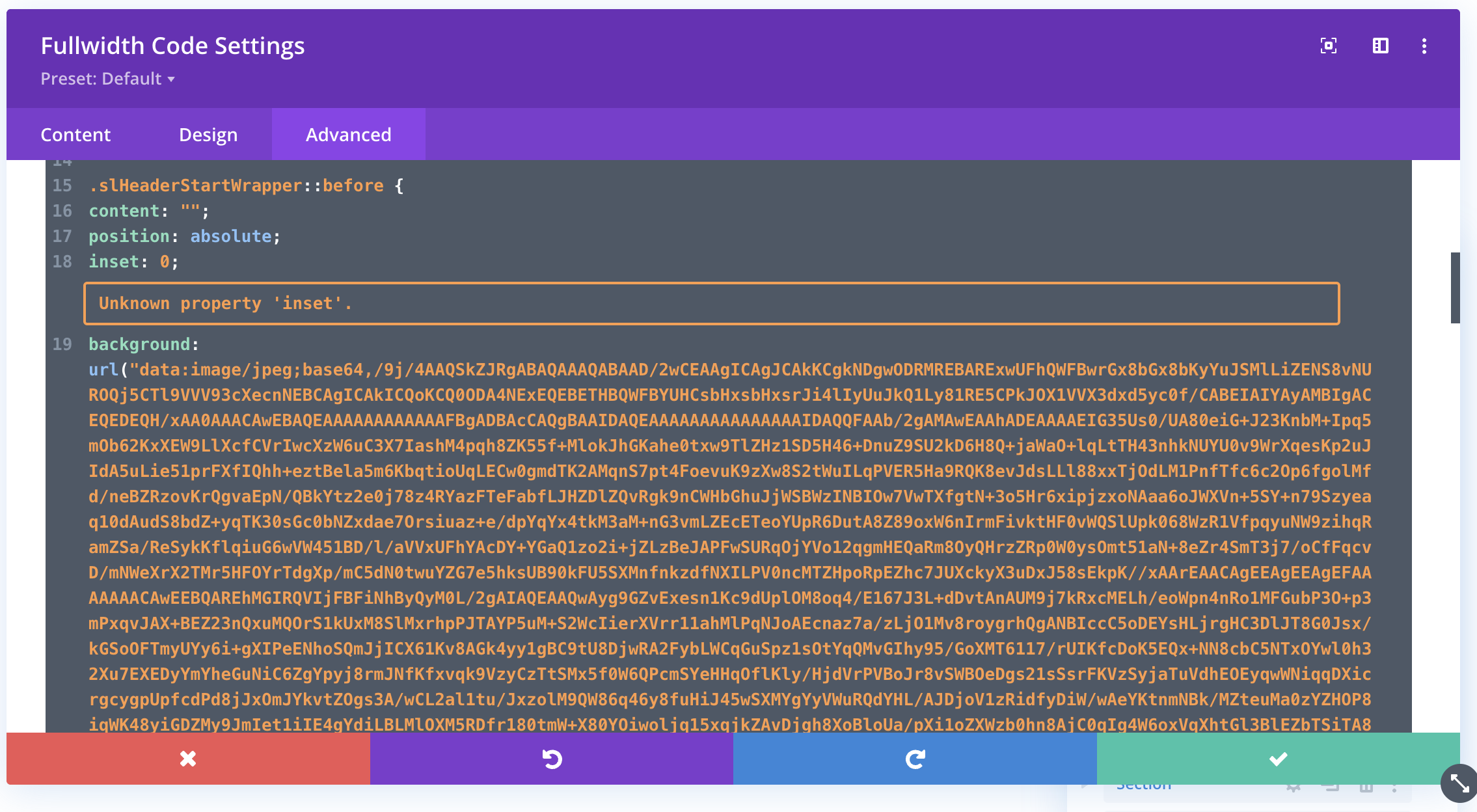
There is a content-heavy section with multiple code blocks used to insert sliders, including one called “Slider Header Start Code Sommer.” Please see attached image.
In the Advanced settings of that block, custom CSS has been added where a background image is embedded directly as encoded (base64) data instead of being referenced via a URL.
This creates a very large translation unit and is very likely the source of the issue.
Recommended solution
Please update that CSS to use a standard image URL (for example, from your Media Library) instead of embedding the image as encoded data.
This should reduce the size of the translation unit and allow the page to be sent to ATE without issues.
They also noticed a few other areas with large amounts of content (including encoded data), but this was the most critical case. Fixing this may already be enough to resolve the issue.
Once done, please try sending the page to translation again and let me know the result.
Thank you for the explanation. These were hidden elements intended for later use. After removing them from the page and keeping them only in the Divi Library, ATE is working properly again.
It would be very helpful if the error reporting could be improved to provide a clearer explanation of the underlying cause, rather than only displaying a message such as "XLIFF too large".