Skip to content Skip to sidebar

This thread is resolved. Here is a description of the problem and solution.

Problem:
The client was experiencing issues with ACF field strings in Bricks being auto-translated by WPML, which was breaking the content. Specifically, headings and class names were being incorrectly translated, causing display issues on multilingual pages.
Solution:
We recommended the client to check the solutions from here: https://wpml.org/forums/topic/wpml-auto-translating-acf-variables-inside-bricks-builder/#post-17328592

We also recommended the client to check the error log to identify any specific issues with ACF fields containing both text and functions. By separating these elements and addressing other ACF/Bricks/WPML related issues, the client managed to resolve the problems. Additionally, if the issue persists, we suggest checking the translation settings and ensuring that the XLIFF files are correctly applied. For unresolved issues, we recommend sharing a backup of the wp-content folder and database for further analysis.

Please note that this solution might be outdated or not applicable to your specific case. We highly recommend checking the related known issues, verifying the version of the permanent fix, and confirming that you have installed the latest versions of themes and plugins. If the problem persists, please open a new support ticket.

This is the technical support forum for WPML - the multilingual WordPress plugin.

Everyone can read, but only WPML clients can post here. WPML team is replying on the forum 6 days per week, 22 hours per day.

Tagged: 

This topic contains 3 replies, has 1 voice.

Last updated by pkm 1 month ago.

Assisted by: Shekhar Bhandari.

Author Posts
December 10, 2025 at 7:35 pm #17653755

pkm

I've been having multiple issues with ACF fields strings in Bricks being auto-translated in WPML and breaking content. You can see. good exmple of it on these pages:
- hidden link
- hidden link

If you scroll down to where the main listings start, under day 1 you'll see the heading says "{acf_itinerario_dias_repetidor_itinerario_dia_encabezamiento}" in Spanish.

I've tried adding the code here with super inconsistent results:
https://wpml.org/forums/topic/wpml-auto-translating-acf-variables-inside-bricks-builder/

Sometimes I can get this to work if I don't go back to the Translation Dashboard and choose to re-translate the template. But then it starts keeping buttons and other items in English. If I choose to re-translate and overwrite the issue comes right back.

I will note that this mostly happens on Bricks items that are headings, etc. vs rich text fields.

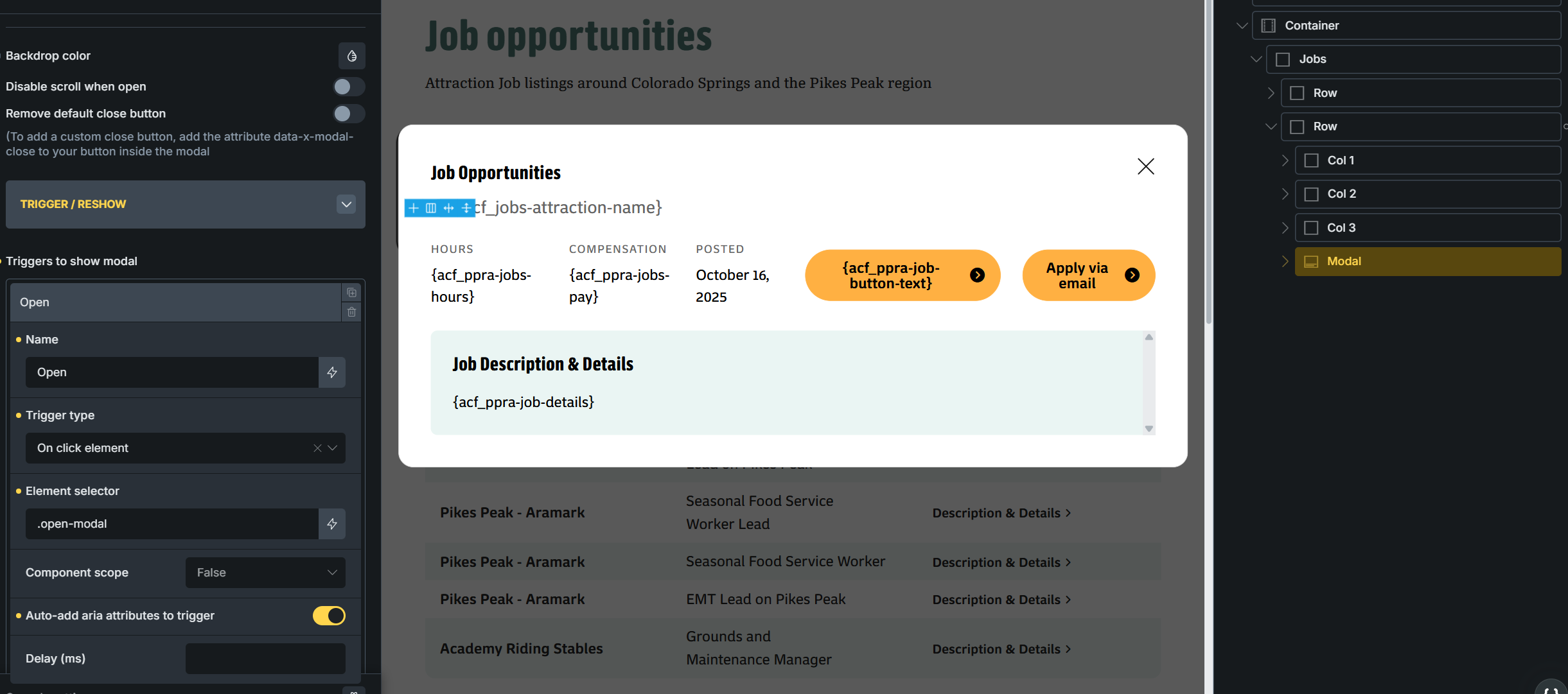
Also I have had class names translated by WPML as well. You can see in the attached screenshot where there is a class .open-modal assigned. In the Spanish version this was being translated.

Should we just be editing the spanish versions in bricks? Won't that break the link between the English and Spanish pages?

This has been extremely frustrating for something I thought was just supposed to work.

Thanks!
Chris

December 12, 2025 at 9:26 pm #17660786

pkm

I should clarify that these ACF templte tags are in a template for a custom post type. I've added the code from your other forums and I can see in the log that the filter is running, so I know it works, but it's not impacting the front-end.

December 15, 2025 at 12:16 pm #17664031

Shekhar Bhandari
WPML Supporter since 03/2015

Languages: English (English )

Timezone: Asia/Kathmandu (GMT+05:45)

Hello there,

Let me check directly on the site.

To debug this issue further, I would need to check your site settings once, for this I would need temporary access (wp-admin and ftp) to your site.

So could you please provide me with those details, you will find the needed fields for this below the comment area when you log in to leave your next reply.
hidden link

This info is private and available to you and WPML supporters only.
Read more about this: https://wpml.org/purchase/support-policy/privacy-and-security-when-providing-debug-information-for-support/

Note:
Backup your sites before providing the credentials or if possible provide credentials for the test site

Look forward to your reply.

Thanks

December 16, 2025 at 6:25 am #17666089

Shekhar Bhandari
WPML Supporter since 03/2015

Languages: English (English )

Timezone: Asia/Kathmandu (GMT+05:45)

Hello there,

For some templates the translations aren't being saved with the messages "The XLIFF file could not be applied to the content of the job ID" hidden link

So it's not working, To get a better understanding, I suggest sharing a backup of your wp-content folder and your database. You can zip the files and send them to me via Google Drive. With these, I can set up a local copy of your site and take a closer look at the issue.

Look forward to your reply.

Thanks

December 17, 2025 at 12:50 am #17669373

pkm

I didn't know there was an error log. After looking into that log there were issues with ACF fields having both text and functions in them (ex. Day {x_loop_index:1}). By splitting those out and looking for a few other ACF/Bricks/WPML issues everythign is fixed now.

Thank you!
Chris