I really need to escalate the urgency of this issue.
This ticket has been open since 10 September and, during that time, several WPML updates (4.8.2, 4.8.3, 4.8.4, 4.8.5) have been released without resolving the problem. On 3 October and 20 October, I was informed that the issue was fixed and waiting for release, but from my side nothing has changed – the characters are still broken and translations are still not usable.
Because of this, my client has been waiting for translations for a very long time and is now understandably very unhappy. “Waiting for release” is no longer an acceptable answer for us.
I need you to provide:
A clear and specific date when the fix will be available (or the exact upcoming version number that will include it).
Confirmation that this particular bug is indeed included in that release.
If the fix is not coming very soon, a temporary workaround or patch that I can apply directly to this site so we can finally deliver translations to the client.
I appreciate your help so far, but please treat this as a priority and come back with a concrete timeline or a practical workaround, not just a generic “pending release” status.
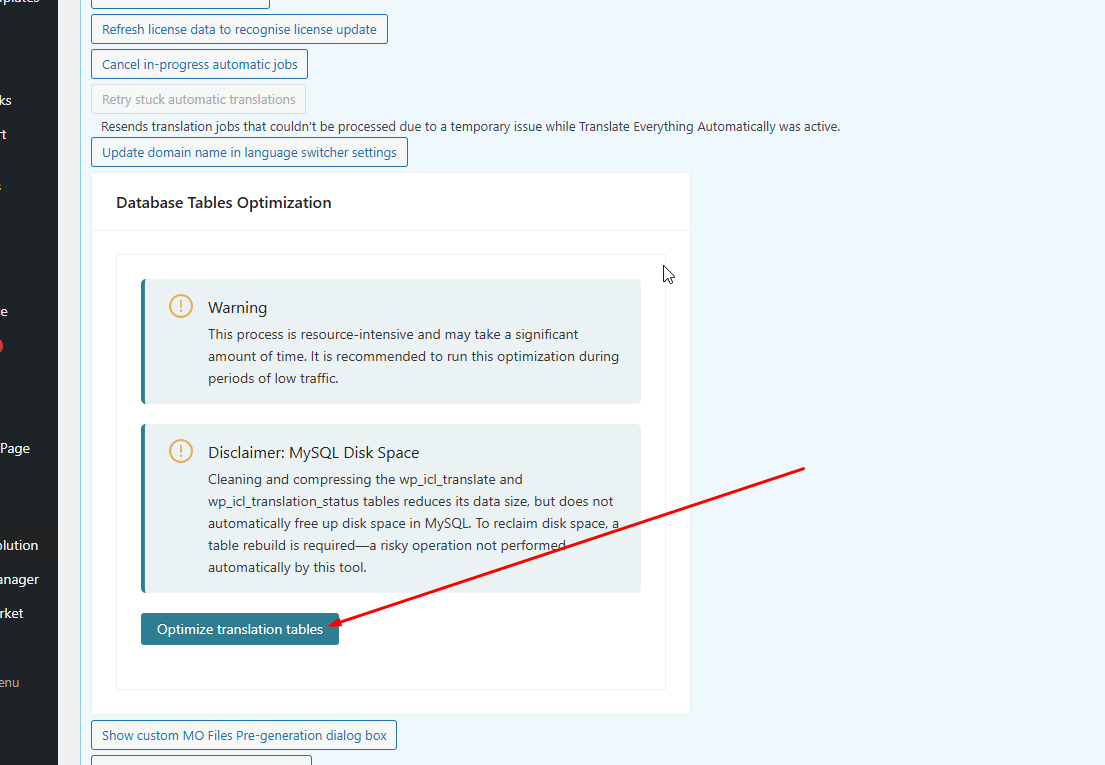
Thanks for your patience and my apologies for the double response. I have another feedback from our devs and could you please backup and run the "migration" option in WPML > Support > Troubleshooting Link > Click on Optimize translation tables as shown in the attached screenshot.
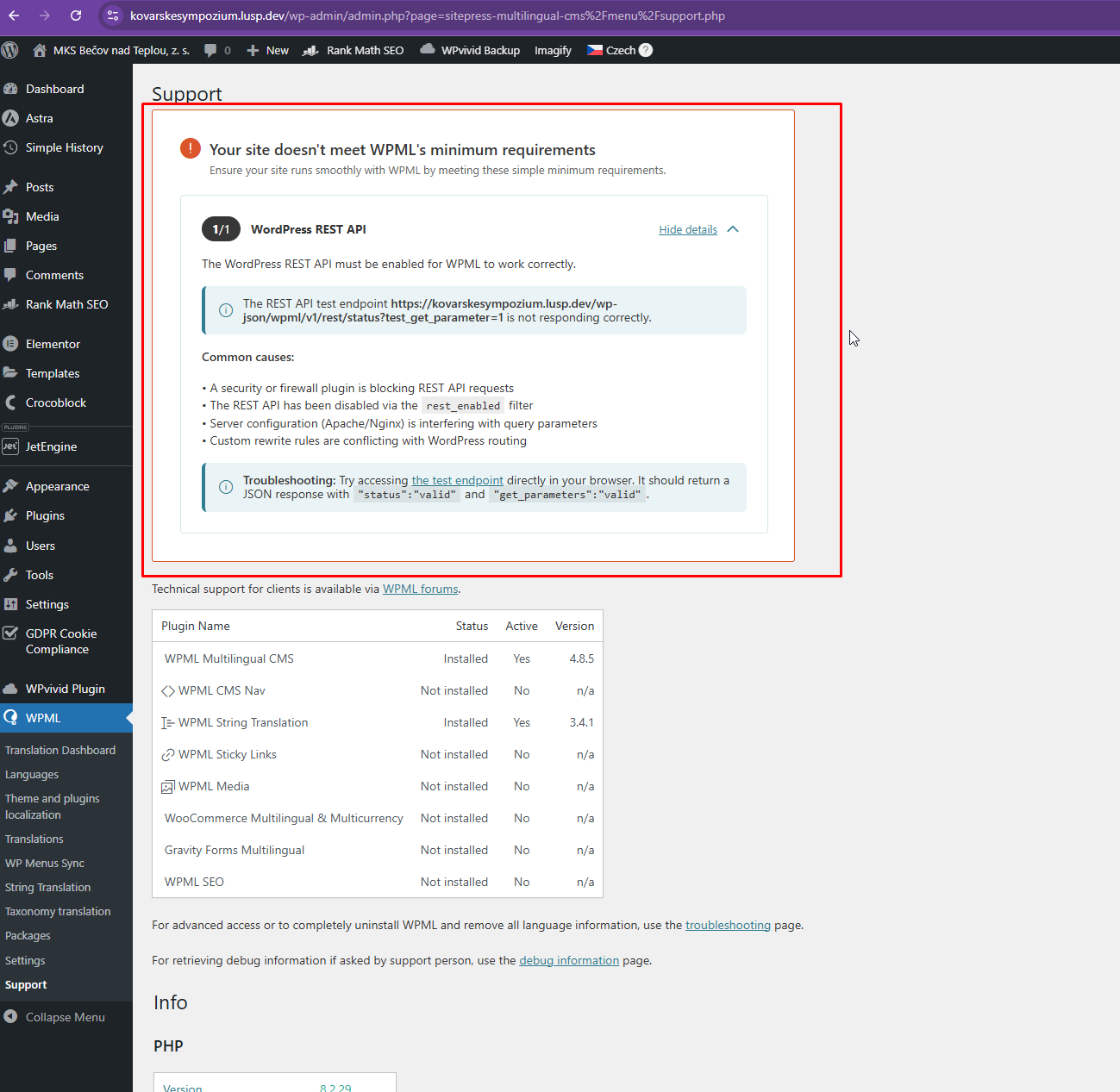
Thanks for your patience. We noticed that the REST API is not enabled on your staging site as shown here hidden link . Could you please fix it or contact your hosting provider about this?
Once this is fixed, please let me know, and we'll recheck.
thank you for the update. Since this issue has been ongoing since 10 September and has already been escalated multiple times, could you please provide a clear timeline for when I can expect a final resolution?
At this stage, I really need:
A specific date or WPML version number in which the fix will be released,
Confirmation that this bug is included in that release,
Or, if the fix is still not imminent, a temporary workaround or patch that I can apply right away.
My client has been waiting for translations for more than two months, and I need to give them a concrete update. I would really appreciate a more precise estimate rather than waiting indefinitely for further escalation.
Thanks for your message, and I completely understand the need for a clear and actionable update, especially with your client waiting.
Our 2nd Tier Support retested the issue and confirmed that it is resolved after updating WPML to version 4.8.5 and running the Database Optimization tool from WPML → Support → Troubleshooting. In the environment where we reproduced the problem, the site was originally running WPML 4.8.1 and the optimization tool only appeared after updating and installing the missing String Translation add-on. Once updated and the optimization process was completed, the issue was fixed.
Are you able to revert the Website to where WPML 4.8.1 was used earlier? This is the steps we can follow if you can revert the Website.
1.Update WPML to version 4.8.5 or later
2.Make sure String Translation is installed and active
However, I’m not able to revert the website back to WPML 4.8.1 — I do not have the installation file for that version, and this option is simply not available to me.
Also, the Database Optimization tool is not visible in my installation of WPML 4.8.5. I have already used it once in the past when it was available, but it did not resolve the issue.
Since your team has full access to the testing/staging site’s admin (hidden link Username: wpml), could you please perform the required fix directly there using whatever internal method or tools you confirmed work on your side?
Once you apply the solution on the staging site, I will replicate the exact steps on the live website.
At this point, I need a simple, actionable solution — not a rollback that I cannot perform.
Thank you for your help, and I appreciate your cooperation in resolving this quickly.
Thanks for your patience. I have some feedback from our 2nd Tier Support and this is what they mentioned below. Could you perform the tasks mentioned?
I’ve reviewed the issue and it looks like some of the data has been compressed multiple times, which is causing problems on the site.
To resolve this, I created a small tool that works correctly during testing. However, when I run the same tool on the live site, it stops due to an error and I’m unable to see what that error is.
Even though I checked the WordPress settings, the server itself has error logging disabled. I confirmed this by running a phpinfo check, which shows that error logging is turned off.
To continue, please ask your hosting provider to enable PHP error logging. Once this is enabled, I’ll be able to see the error and complete the fix.
Error Details
=============
An error of type E_ERROR was caused in line 166 of the file /www/hosting/lusp.dev/kovarskesympozium/wp-content/plugins/icl-translate-fix/icl-translate-fix.php. Error message: Uncaught Error: Call to undefined function gzuncompress() in /www/hosting/lusp.dev/kovarskesympozium/wp-content/plugins/icl-translate-fix/icl-translate-fix.php:166
Stack trace:
#0 /www/hosting/lusp.dev/kovarskesympozium/wp-content/plugins/icl-translate-fix/icl-translate-fix.php(52): ICL_Translate_Field_Data_Fix->run_fix()
#1 /www/hosting/lusp.dev/kovarskesympozium/wp-includes/class-wp-hook.php(324): ICL_Translate_Field_Data_Fix->render_tools_page()
#2 /www/hosting/lusp.dev/kovarskesympozium/wp-includes/class-wp-hook.php(348): WP_Hook->apply_filters()
#3 /www/hosting/lusp.dev/kovarskesympozium/wp-includes/plugin.php(517): WP_Hook->do_action()
#4 /www/hosting/lusp.dev/kovarskesympozium/wp-admin/admin.php(260): do_action()
#5 /www/hosting/lusp.dev/kovarskesympozium/wp-admin/tools.php(40): require_once('...')
#6 {main}
thrown
I hope, that it helps. Let me know please.
The topic ‘[Closed] Broken characters (like “x?Ž…”)’ is closed to new replies.