[Resolved] Changing the default language of a page
This thread is resolved. Here is a description of the problem and solution.
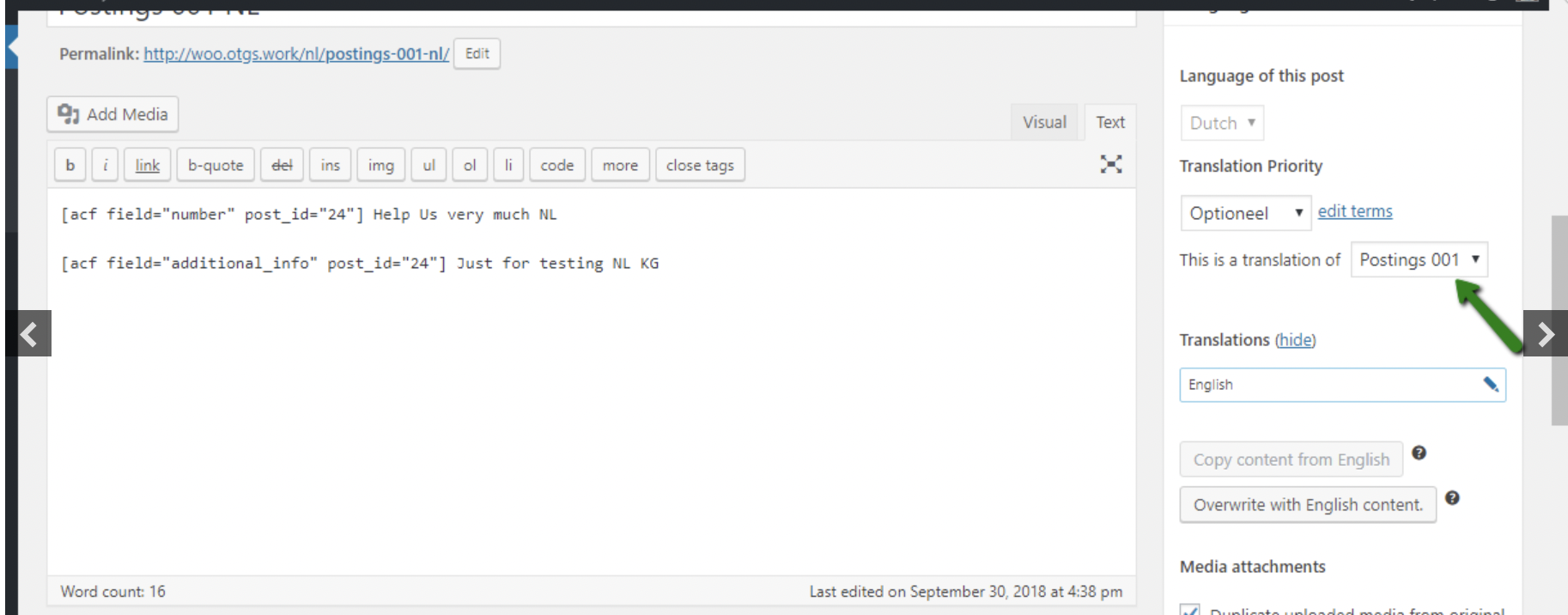
Problem: The client wanted to change the original language of a post from Swedish to English to facilitate translations into German and French. They encountered issues where changes in the Swedish page did not prompt update symbols for English or French versions, and the advanced translation editor did not recognize previous translations after the language switch. Solution: We recommended the following steps after ensuring a site backup: 1) Open the post for edit in Danish. 2) Choose 'none' for 'This is the translation of' field in the 'Language' widget. 3) Update the post. 4) Open the English post (original post of Danish) for edit. 5) Connect it to the English post from the 'Language' widget. 6) Set Danish as the original language. 7) Check the posts in the frontend to see if the expected result is achieved. Additionally, if the 'Translation needs update' message and symbol do not appear after edits, the client should change the language at the top first, then go to 'Pages', and then click 'edit' or 'edit with Divi'. For further issues where the advanced translation editor does not find old existing translations, a new support ticket was created: here.
Please note that this solution might be outdated or not applicable to your specific case. We highly recommend checking related known issues at https://wpml.org/known-issues/, verifying the version of the permanent fix, and confirming that you have installed the latest versions of themes and plugins. If the issue persists, please open a new support ticket here.
This is the technical support forum for WPML - the multilingual WordPress plugin.
Everyone can read, but only WPML clients can post here. WPML team is replying on the forum 6 days per week, 22 hours per day.
I would like to change the translation original from Swedish to English before translating the pages to German andFrench as I am sure that google translate and my colleagues work better with English.
This is what my colleague shared in that ticket that is now archived as it is 2 years old:
"
Hello,
Welcome to the WPML support forum. I will do my best to help you to resolve these issues.
Please try the following steps after a site backup and let me know your feedback.
1) Open the post for edit in Danish
2) Choose *none* for *This is the translation of* field of *Language* widget(on the right side of the screen)
3) Update the post
4) Then open the English post(original post of Danish) for edit
6) Then connect it to the English post(from the Language widget)
7) Set Danish as the original language
8) Visit the posts in the frontend and check you are getting the expected result or not
Please check the attached images for more details.
"
I also attached the images he added to that ticket.
I hope that you will find it helpful.
Also, here are some other existing tickets related to the same issue (I created this custom search URL for you): hidden link..69i57j69i58.7221j0j4&sourceid=chrome&ie=UTF-8
My issue is resolved now. Thank you! This is a bit of a workaround that should be handled better in the future. What if my translators only speak English and I want to edit the page in Swedish myself?
So I tried what I wrote above and followed the instructions.
Original Swedish is now Original English.
Then I translated the English to French. It all worked fine.
Then I did an edit in the Swedish page through divi visual editor.
But there is no update symbol for the english or french sides.
I go to the english side and click on edit Swedish translation - nothing happens.
As far as I know, the "Translation needs update" message and symbol only show up when you made an edit to the default language page.
If you change the language at the top first (to swedish for example) > then go to "Pages" > then click "edit" or "edit with Divi", does that work fine?
I understand, hoping for a better release in the future where it's easier to change default language. When we later have four languages it's going to be really tough!
Feedback to developers and pre-sales information: For us who work with smaller languages, such as Swedish and have many translators who help us in the company it would be good to be told the risk about having our native language as the default (for example Swedish). I did not understand that only the native language show up in the advanced translator and therefore my colleagues will not be able to understand how to translate.
For developers: in the advanced translator it would be nice to be able to chose the original language to a language the translator understands.
Hi again, now I have done this, but the advanced translation editor does not remember the old translation so it looks like there are no translation available. HELP - I do not wish to change it all again!
New threads created by Mihai Apetrei and linked to this one are listed below: