
This is the technical support forum for WPML - the multilingual WordPress plugin.
Everyone can read, but only WPML clients can post here. WPML team is replying on the forum 6 days per week, 22 hours per day.
| Sun | Mon | Tue | Wed | Thu | Fri | Sat |
|---|---|---|---|---|---|---|
| - | 13:00 – 18:00 | 13:00 – 18:00 | 13:00 – 18:00 | 13:00 – 18:00 | 13:00 – 18:00 | - |
| - | 20:00 – 23:00 | 20:00 – 23:00 | 20:00 – 23:00 | 20:00 – 23:00 | 20:00 – 23:00 | - |
Supporter timezone: Asia/Singapore (GMT+08:00)
This topic contains 24 replies, has 0 voices.
Last updated by Kor 1 month, 2 weeks ago.
Assisted by: Kor.
| Author | Posts |
|---|---|
| January 19, 2026 at 5:51 am #17740943 | |
 adriO |
Hi, |
| January 19, 2026 at 8:22 am #17741297 | |
 Kor |
Thanks for contacting us. I've checked our system and I can see that you've used 182272 credits for translations on hidden link . Please navigate to WPML > Translation Dashboard > Translation Tools > Automatic translation usage reports > Click on "Create Report". Then, download the CSV file and you'll be able to see how many credits are being used for translation on your Website. Could you check and let me know how it goes? As for the "translated page and post shows me a messed up layout", could you share the URL of the page/post in question here so that I can check? |
| January 19, 2026 at 4:03 pm #17743370 | |
|
adriO |
Hi Kor, For instance on: hidden link There are 1388 credits used for the nl_fr translation and also 1388 credits for the nl_de translation. However, the page does only show the dutch (nederlands) product page. No translated pages available. When looking around this is happening to most of my pages /posts/products. I'm puzzled. This way it turns out to be a very expensive test..... You are not able to visit the page mentioned above as it is a protected staging site. If needed I will be happy to provide you with credentials. If so, is there an option to send these to you in a private message (or such)? I hope to hear soon. Adri |
| January 19, 2026 at 6:17 pm #17743868 | |
|
Kor |
Thanks for your reply. Yes, I will require temporary access (WP-Admin and FTP) to a test site where the problem has been replicated, if possible. This will enable me to provide better assistance and determine if any configurations need to be modified. Please note that it is important to have a backup for security purposes and to prevent any potential data loss. You can use the UpdraftPlus plugin (https://wordpress.org/plugins/updraftplus/) to fulfill your backup requirements. Your upcoming reply will be treated with confidentiality and will only be visible to you and me. ✙ To resolve the issue, I may need your consent to deactivate and reactivate plugins and the theme, as well as make configuration changes on the site if necessary. This emphasizes the significance of having a backup. |
| January 20, 2026 at 1:19 pm #17746608 | |
|
Kor |
Thanks for your patience. I can see the translations showing complete, but in the backend, it shows this error message "There is an issue with automatic translation that needs your attention." Let me check with our 2nd Tier Support and I will come back to you once I've feedback. 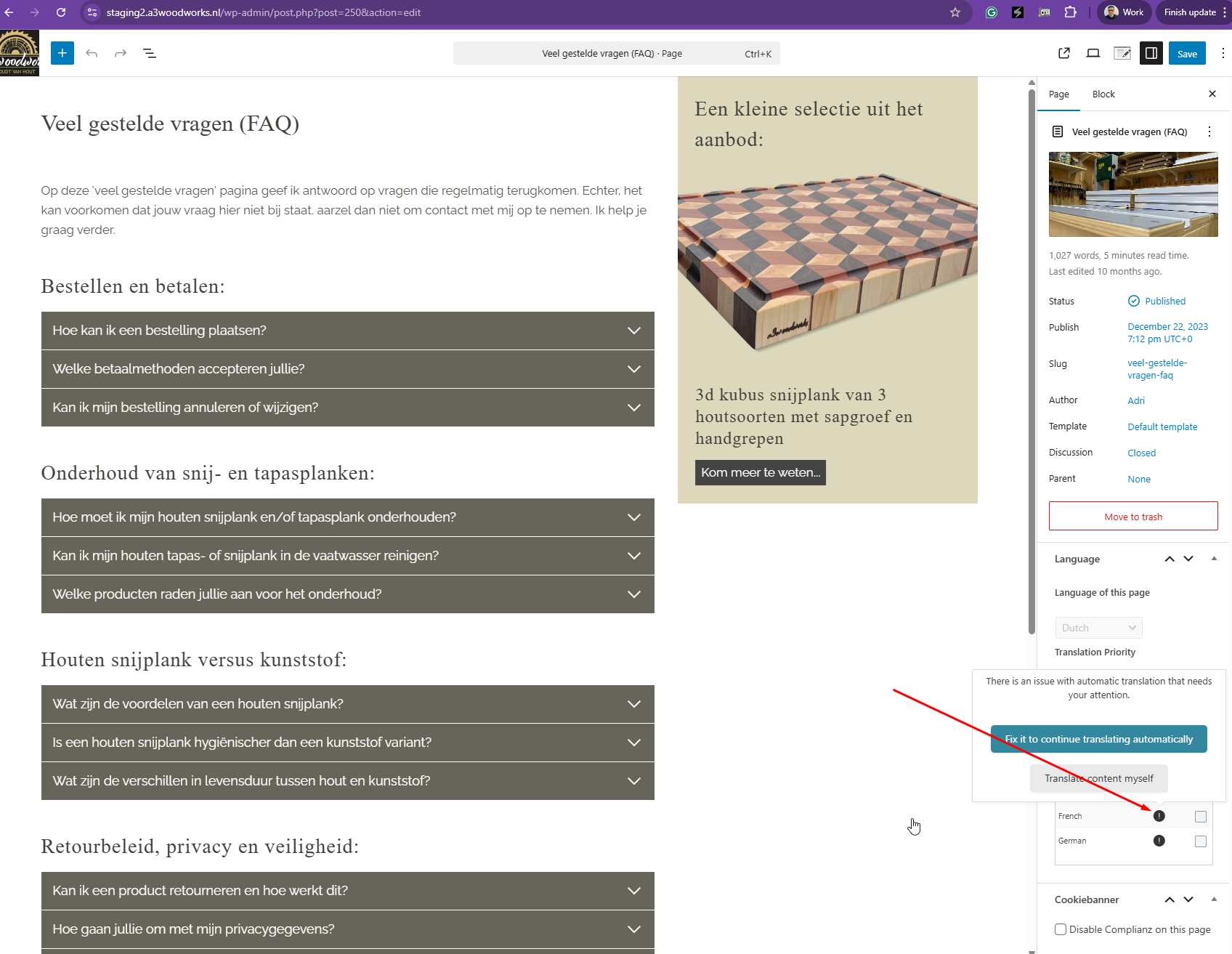 |
| January 20, 2026 at 3:10 pm #17747163 | |
|
adriO |
Hey Kor, I am a patient guy so I understand that second tier have to take their time. However, on Thursday morning 07:00 hrs (UTC + 1) I have a presentation for a site I'm rebuilding. This client was working with an different kind of CMS, totally unfriendly and I won the bet to rebuild it. One of my arguments was that translating the website was a breeze. That is what my appointment on Thursday is all about. I hope you can speed things up. Best regards, Adri |
| January 20, 2026 at 3:58 pm #17747370 | |
|
Kor |
Thanks for your patience. While preparing a report, I noticed that most of the pages and posts are translated. Did you do anything on your end just now? Anyway, I paused the Translate Everything Automatically while checking the site. |
| January 20, 2026 at 4:13 pm #17747452 | |
|
Kor |
Ok, the issue can still be seen on your products. Let me double-check before I report this. |
| January 20, 2026 at 4:18 pm #17747470 | |
| adriO |
Hey Kor, Again, thanks and I hope to hear soon. Adri New threads created by Kor and linked to this one are listed below: https://wpml.org/forums/topic/some-strings-are-not-translated-3/ |
| January 20, 2026 at 4:31 pm #17747494 | |
|
Kor |
Thanks for your reply. Since the pages and posts are showing fine, I'm going to report the missing translations for your products. As for the strings that are not translated, I've split the ticket here https://wpml.org/forums/topic/some-strings-are-not-translated-3/ so that we can follow up. |
| January 20, 2026 at 4:47 pm #17747524 | |
| adriO |
Hey Kor, The header of the translated pages is missing. This also happens for the FAQ page and all the pages in the most right column of the footer. So, your help is still much needed as I don't know what to do about it. BTW the headers are mosly build with Kadence Elements, a very powerful addition to the Kadence theme. You can find them in: Appearance -> Kadence -> Elements. Again, I hope to hear soon...... New threads created by Kor and linked to this one are listed below: https://wpml.org/forums/topic/headers-are-not-showing-correctly-on-translated-pages/ |
| January 20, 2026 at 5:00 pm #17747603 | |
|
adriO |
Also, there is one product translated in German and one in french. In the uploaded image you can see that some strings on the single product page is still in Dutch. Maybe wise to also address this in your investigation for the products.  |
| January 20, 2026 at 5:02 pm #17747624 | |
|
Kor |
Thanks for your reply. Sorry about that, I only checked the translations in the backend and didn’t verify the frontend. I can now see the issue with the broken headers. I’ve split this into a separate ticket here https://wpml.org/forums/topic/headers-are-not-showing-correctly-on-translated-pages/ For this ticket, we will continue focusing on the missing translations for your products and also the strings that you mentioned in your last reply. |
| January 21, 2026 at 9:44 am #17749552 | |
|
Kor |
Thanks for your patience. I’ve checked, and it looks like all translations are already stored in the translation memory. The translations appear to have lost sync, possibly due to a server issue while the translation process was running. Because of this, we just need to manually resync the translations here hidden link , and everything should work correctly. To resync : I’ve triggered the translation for this product All translations were loaded directly from the translation memory without using any additional credits. After that, I clicked the Complete Translation button, and the product is now fully translated, as shown in the attached screenshot. As for the strings you mentioned, I believe it's coming from the Woo Templates that I mentioned on your other ticket here https://wpml.org/forums/topic/some-strings-are-not-translated-3/ . Once the templates are translated, they should display the correct language afterwards. 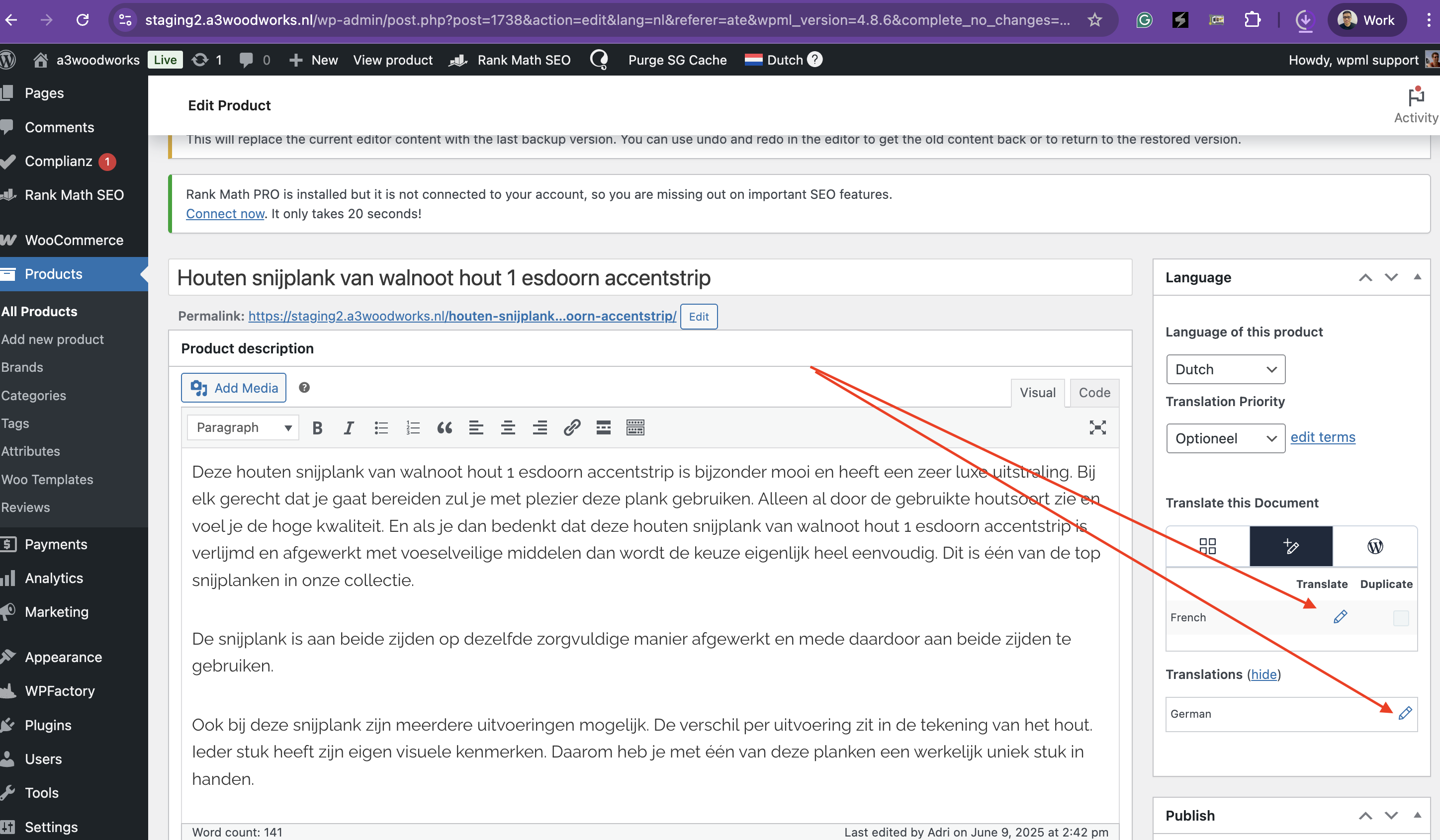 |
| January 21, 2026 at 2:31 pm #17750872 | |
| adriO |
Hi, You are right, a lot of translations are in the database and following your pointers shows the translations. However, it is still very messy and incomplete. A bunch of strings are not translated and has to be reviewed by hand. I noticed that in some blogposts. Ok, I am able to translate them by hand using Google Translate. The reason I gave WPML a chance again was that WPML claims to translate without hassle and with much better results than Google translate or what ever competing plugin. What to do about that? Second, the products are still a big mess. I translated the Single Product Template to french and German but the pages are shown with the default Woocommerce template and without the header. The header image is in the template so that's to be expected when the Kadence Woo-template is not loaded. Next are not all images linked correctly in the variations. The main variation image is shown but the gallery images for each and every variation are not. They remain the same as the default product gallery. Header images (from Kadence elements) are not showing on translated pages, posts, archive pages or products. Short: nowhere. Sadly, the history repeats itself. Years ago I purchased a lifetime subscriptions but I abandoned WPML due to very poor performance. I paid 217.80 € for this ultimate poor result..... Please WPML get your act together and provide me with a working solution. I am about to loose my client over it. And Kor, believe me, it is not personal. I'm just frustrated. Working two days now to get it fixed and still no good result. New threads created by Kor and linked to this one are listed below: https://wpml.org/forums/topic/product-variation-not-displaying-the-correct-images/ |
The topic ‘[Closed] Credits are gone, almost nothing is translated’ is closed to new replies.