Skip to content Skip to sidebar

This thread is resolved. Here is a description of the problem and solution.

Problem:
You are trying to publish translations of your latest blog post, but when reviewing the translation to finally publish it, you encounter an error message stating "There was an error in applying translation". The blog post remains in draft in Translation Management.
Solution:
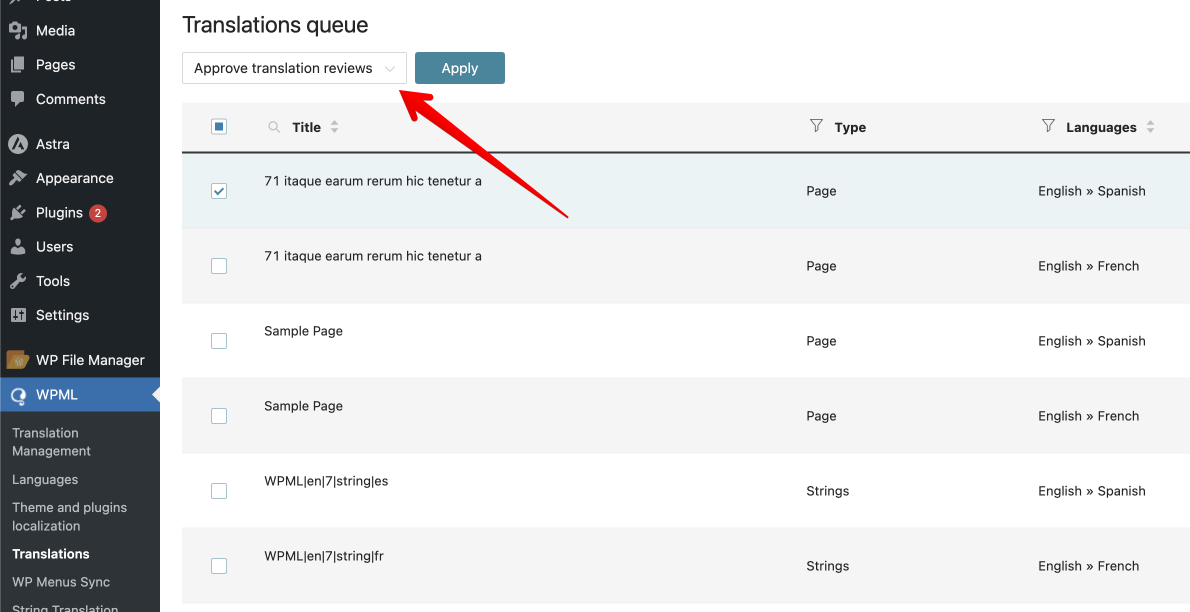
We recommend going to WPML > Translations > Select the jobs > Approve the translation and see if this resolves the issue.

If this solution does not apply to your case, or if it seems outdated, please check related known issues at https://wpml.org/known-issues/, verify the version of the permanent fix, and confirm that you have installed the latest versions of themes and plugins. If issues persist, we highly recommend opening a new support ticket for personalized assistance.

This is the technical support forum for WPML - the multilingual WordPress plugin.

Everyone can read, but only WPML clients can post here. WPML team is replying on the forum 6 days per week, 22 hours per day.

Tagged: 

This topic contains 1 reply, has 2 voices.

Last updated by Long Nguyen 1 year, 8 months ago.

Assisted by: Long Nguyen.

Author Posts
June 5, 2024 at 3:43 am #15704685

evaM-17

I am trying to: get the translations published of my latest blog post, but when trying to review the translation to finally publish it, I get the error message "There was an error in applying translation". The blogpost remains in draft in Translation Management ('Vertaalbeheer' in Dutch)

Link to a page where the issue can be seen: hidden link

I noticed in the documentation this seems to be a known issue, but hope there's a solution in the meantime. (https://wpml.org/errata/there-was-an-error-in-applying-translation-a-new-job-is-created-when-user-is-reviewing-a-job-that-has-status-needs-update/)

Kindly advise to solve this issue.

Scherm­afbeelding 2024-06-05 om 05.40.09.png
Scherm­afbeelding 2024-06-05 om 05.39.40.png
Scherm­afbeelding 2024-06-04 om 19.18.13.png
June 5, 2024 at 4:47 am #15704737

Long Nguyen
WPML Supporter since 02/2022

Languages: English (English ) Vietnamese (Vietnamese )

Timezone: Asia/Ho_Chi_Minh (GMT+07:00)

Hi Eva,

Thank you for contacting WPML support, I’m happy to help you with this issue.

I suggest you go to WPML > Translations > Select the jobs > Approve the translation and see if it helps.

If it still happens with new jobs, I would like to request temporary access (wp-admin and FTP) to your site to take a better look at the issue. It would be better to have a testing site where the issue is replicated. Your next reply is set to private to share the info.

❌ IMPORTANT: Please backup your database and website before proceeding ❌
You can use this plugin to create the backup: https://wordpress.org/plugins/duplicator/
✙ I would need your permission to de-activate and re-activate Plugins and the Theme to change configurations on the site if needed. This is also a reason the backup is critical.

Looking forward to your reply.
Thanks

Translations ‹ Sandbox — WordPress 2024-06-05 11-44-39.png
June 5, 2024 at 8:27 am #15705636

evaM-17

Thanks for your reply. I checked your advice "WPML > Translations > Select the jobs > Approve the translation", but I couldn't do it this way, which was part of the problem. The translation job didn't show in translations.

I found almost by accident another way to approve the translations from within the post.

By this, my issue is resolved.