
This is the technical support forum for WPML - the multilingual WordPress plugin.
Everyone can read, but only WPML clients can post here. WPML team is replying on the forum 6 days per week, 22 hours per day.
| Sun | Mon | Tue | Wed | Thu | Fri | Sat |
|---|---|---|---|---|---|---|
| - | 8:00 – 12:00 | 8:00 – 12:00 | 8:00 – 12:00 | 8:00 – 12:00 | 8:00 – 12:00 | - |
| - | 12:00 – 16:00 | 12:00 – 16:00 | 12:00 – 16:00 | 12:00 – 16:00 | 12:00 – 16:00 | - |
Supporter timezone: Europe/Zagreb (GMT+01:00)
Tagged: Exception
| Author | Posts |
|---|---|
| March 18, 2026 at 6:46 pm #17909131 | |
 mahmoodR |
the language switcher op posts shows to admin only and dose not show to visitors while Litespeed cache plugin active 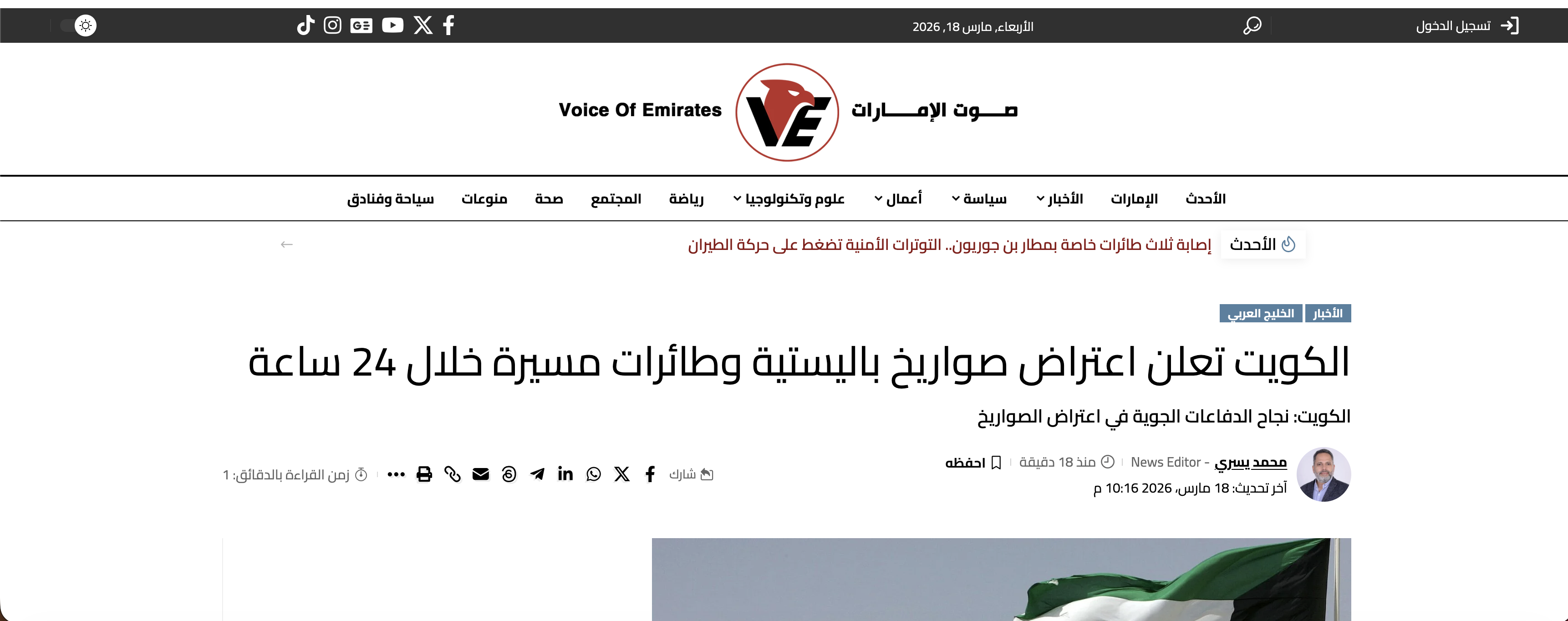 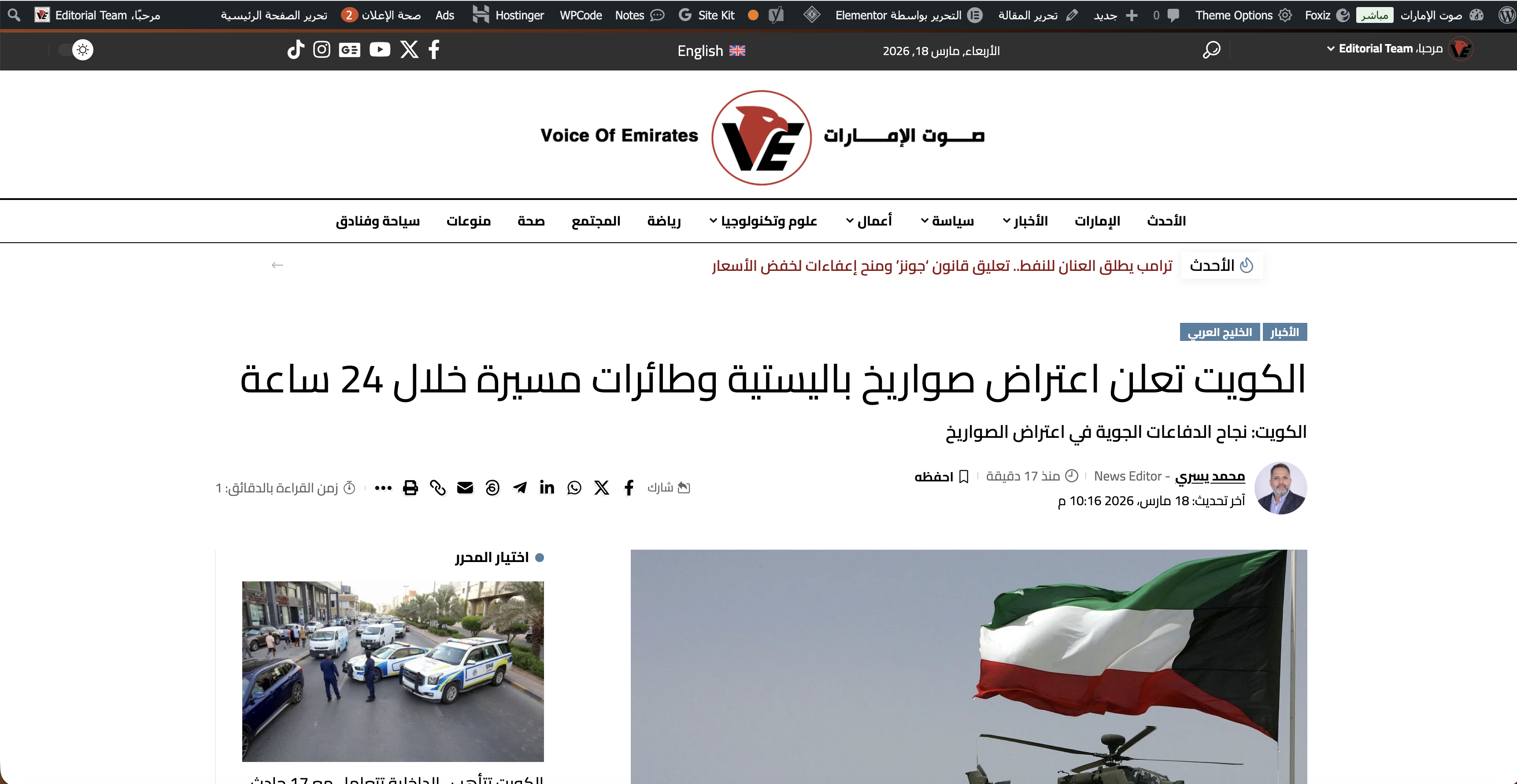 |
| March 18, 2026 at 9:38 pm #17909439 | |
|
mahmoodR |
Hi, I wanted to share an update on the issue. I was able to narrow it down to LiteSpeed Cache Object Cache. After the recent LiteSpeed Cache update to version 7.8.0.1, the WPML language switcher stopped appearing on single Arabic posts for non-admin / logged-out users. At the same time, it was still showing correctly on the English /en/ single posts. I tested several things, and the key finding is this: So at this point, the switcher is working again after turning Object Cache OFF. This makes it seem like the problem may be related to how cached objects/transients are being stored or served across languages, especially for the default Arabic language pages. Please let me know if this points to a known compatibility issue with LiteSpeed Object Cache, or if there is anything specific you want me to test next. Best,   |
| March 20, 2026 at 6:08 am #17912678 | |
 Dražen Supporter Languages: English (English ) Timezone: Europe/Zagreb (GMT+01:00) |
Hi Mahmood, Thank you for the detailed update, that’s very helpful. In general, this setup should work fine, so what you’re describing does sound like a caching-related issue rather than a core WPML problem. From your findings, it seems likely that visitors are being served a cached version of the page where the language switcher is missing, especially when Object Cache is enabled. Could you please try the following to confirm: - Clear the Object Cache from LiteSpeed Cache - Purge all other caches (page cache, browser cache, CDN if used) - Then test again in an incognito/private window while logged out Please let me know the results after clearing all caches, and we’ll take it from there. Kind regards, |
| March 23, 2026 at 4:56 am #17917023 | |
|
mahmoodR |
Hi Dražen, Sorry for may late reply, I've just seen your message, I've tried all those options, still did not solve the issue, the problem is with Object Cache is enabled always, and this happens only with WPML language switcher not anything els. If this issue can be resolved, it will be great. Otherwise, I will have to keep it disabled. Thanks, |
| March 23, 2026 at 7:26 am #17917136 | |
|
Dražen Supporter Languages: English (English ) Timezone: Europe/Zagreb (GMT+01:00) |
Hi Mahmood, Thanks for getting back to me and for testing this further. If possible, please provide admin access so I can have a look and try to see what is wrong, if I do not find anything I will escalate further. Also, since this is a production site, I recommend creating a full backup before sharing access, but I will be also extra careful. Once I have access, I’ll take a closer look at the issue with the WPML language switcher and Object Cache. Looking forward to your reply. Regards, |
| March 23, 2026 at 9:52 am #17917624 | |
|
Dražen Supporter Languages: English (English ) Timezone: Europe/Zagreb (GMT+01:00) |
Hi Mahmood, Thank you for sharing the login details. I’ve enabled Object Cache and tested the site in a private window. The WPML language switcher is working correctly on my end as a visitor. I’ve also recorded a short video for reference, please check the link below. - hidden link Could you please check again on your side? It’s possible that you are still seeing cached content from before. Try testing on another device if possible. Let me know how it goes. Regards, |
| March 23, 2026 at 8:52 pm #17919899 | |
|
mahmoodR |
Thanks for testing Drazon, That is correct, but the weird is the home page in both English and Arabic the switcher appears, also in English posts appears, the issue is only on the Arabic posts the switcher does not appear we create the post first in Arabic as the default site language and then we translate it in English, all is good on English post, but when switching to Arabic the switcher disappear from the Arabic post page. please check my screen recording here: hidden link I've disabled the Object Cache not to confuse my site visitors, please enable it again if you would like to test it again. Thanks, |
| March 24, 2026 at 7:34 am #17920277 | |
|
Dražen Supporter Languages: English (English ) Timezone: Europe/Zagreb (GMT+01:00) |
Hi Mahmood, Thank you for the video, I can clearly see the issue from your recording. I tried to reproduce this on my side, but the language switcher is still showing correctly for me. Image attached. Just to confirm I’m testing the same scenario: Am I missing any additional steps to reproduce the issue exactly as you’re seeing it? Please let me know, and I’ll continue testing from there. Regards,  |
| March 24, 2026 at 8:13 am #17920366 | |
|
mahmoodR |
Thanks Dražen, I've just check that from my side and yes the same post you've opened is ok with me too but not all posts. I've kept the Object Cache enabled. Can you please check the post in the following link in a private/incognito window, and try to switch between both Arabic and English while you are in the same post? If the switcher is showing for you in both languages, then the issue is from my side. hidden link Thanks, |
| March 24, 2026 at 9:28 am #17920615 | |
|
Dražen Supporter Languages: English (English ) Timezone: Europe/Zagreb (GMT+01:00) |
Hi Mahmood, Thank you for sharing the link and the additional details. I’ve looked into this further and it reminds me of a similar case we had, where the issue was caused by a hosting-related MU plugin (in that case on Hostinger, related to their preview domain setup). It was interfering with how WPML handles language switching. You can see the reference here: In the end, the issue was resolved on the hosting side / disabeling plugin. We also shared with hosting partner and they are aware of this. In your case, I would suggest we try next: - If possible, temporarily disable Hostinger Preview Domain (for example by renaming that plugin file/folder) After that, please test again and see if the language switcher works correctly on Arabic posts. Alternatively, you can also contact your hosting provider and ask them to check / disable this part if possible. If you have a staging site available, feel free to share access and I can perform these checks and test it further on your behalf. Let me know how it goes. Regards, |
| March 25, 2026 at 9:49 am #17925477 | |
|
Dražen Supporter Languages: English (English ) Timezone: Europe/Zagreb (GMT+01:00) |
Hello Mahmood, Thank you for the update. Apologies if my previous explanation was not clear. I was referring to the must-use plugin (mu-plugin). Since these plugins cannot be disabled from the WordPress admin, you would need to access the server and temporarily disable it by renaming its folder (for example, from plugin-name to plugin-name-disabled). Alternatively, your hosting provider can assist with this. I also attempted to check further on your dev site, but I couldn’t find the same posts/pages we were reviewing on the live site, so I’m not sure how to properly verify the issue there. Please try and let me know if it still happens and I will check further. Regards, 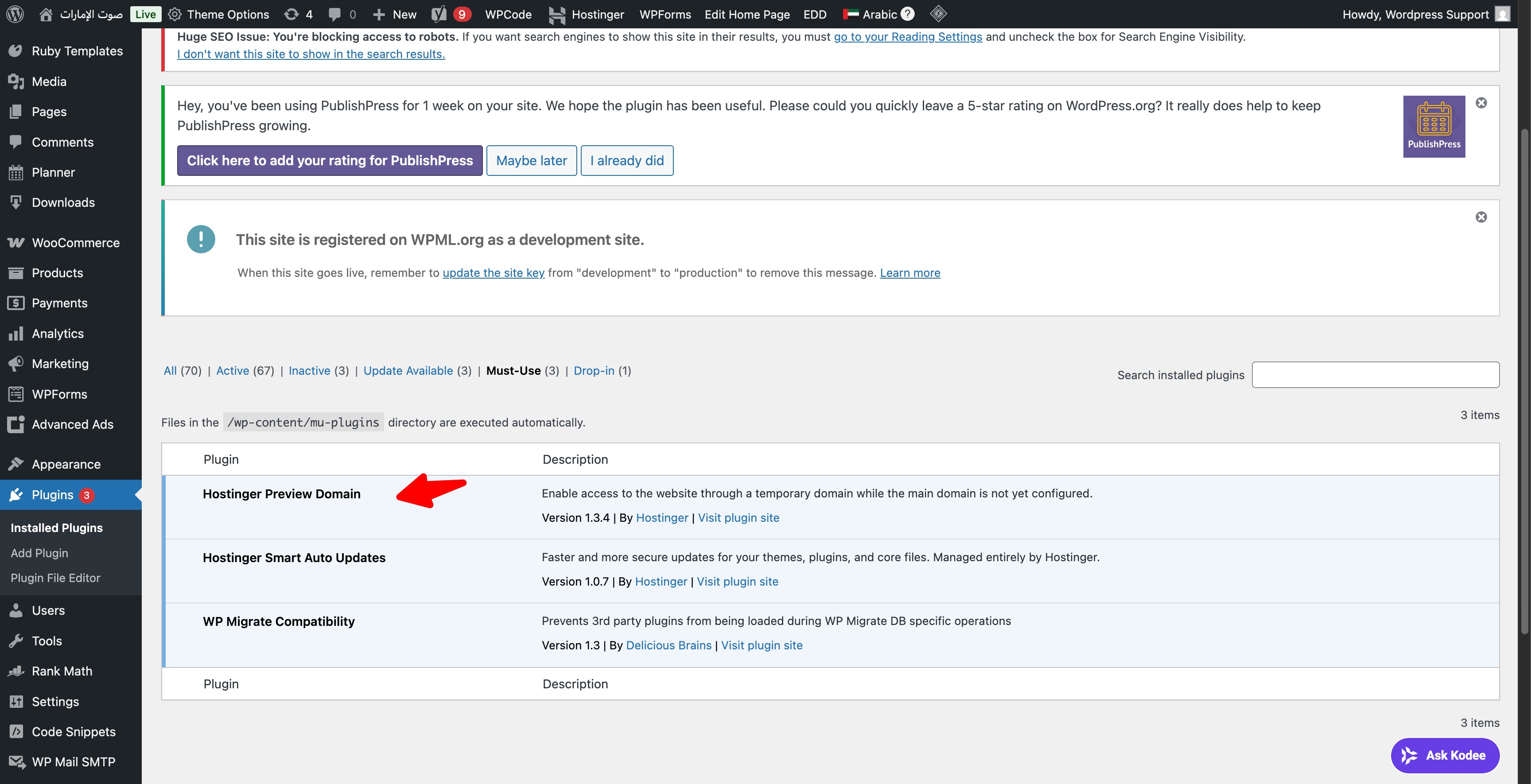 |
| March 25, 2026 at 10:12 am #17925590 | |
|
mahmoodR |
Thanks Dražen for the clarification, I've deactivated the same in must-use plugin but still no changes, about the staging site, sorry it is not updated with the lates posts yet, it takes much time for me to do that due to huge number of posts in the production site. I have cleared all caches from the site and server, you can check the latest posts on the site from your side the switcher is not showing on Arabic posts as before even after deactivating the Domain Preview plugin. What I noticed is some of posts shows and lots of them no, I don't know how? maybe it shows on posts published while the Object Cache disabled or what? Thanks, 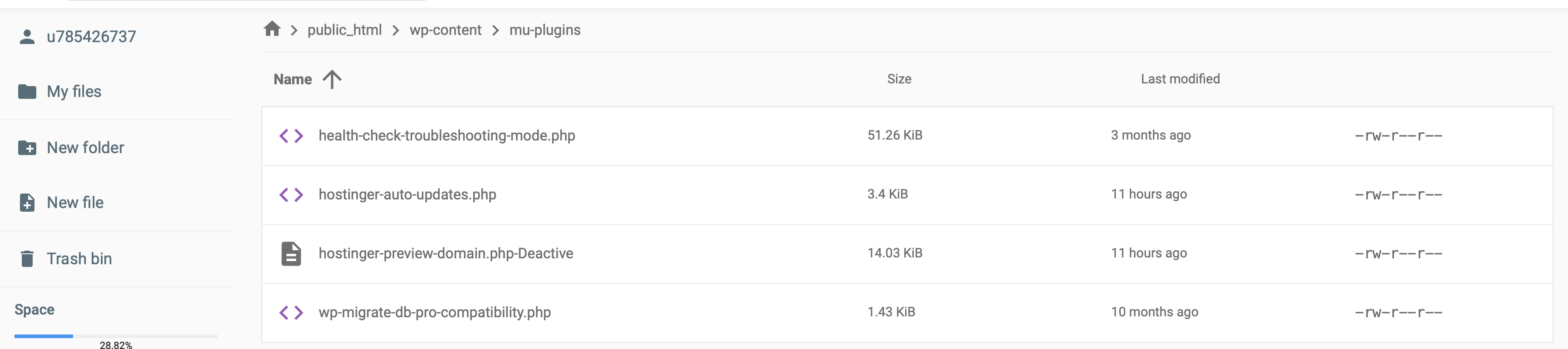 |
| March 25, 2026 at 11:25 am #17926026 | |
|
Dražen Supporter Languages: English (English ) Timezone: Europe/Zagreb (GMT+01:00) |
Hello Mahmood, Thank you for the update, no worries. I’ll continue investigating this further on my side. In the meantime, could you please confirm if it’s okay for me to temporarily disable plugins and switch themes on the dev site for testing purposes? Also, could you share an URLs where the issue occurs on dev? I checked some of the latest posts, but I wasn’t able to reproduce the missing language switcher. Regards, |
| March 25, 2026 at 11:33 am #17926072 | |
|
mahmoodR |
hi Dražen, It is better to work on the staging site because the site is a news site, and I don't want to be interrupted anytime. I will try to update the staging/dev site and let you know when it is ready to investigate so you can deactivate anything there rather than the production site. Thanks, |
| March 25, 2026 at 1:31 pm #17926485 | |
|
Dražen Supporter Languages: English (English ) Timezone: Europe/Zagreb (GMT+01:00) |
Hello Mahmood, That sounds like a good plan, I agree it’s best to proceed on the staging site to avoid any impact on the live news site. Please let me know once the staging/dev site is updated and ready, and I’ll continue the investigation there. I’ll make any necessary tests (including disabling plugins/themes) only on staging. Looking forward to your update. Regards, |






