Background of the issue:
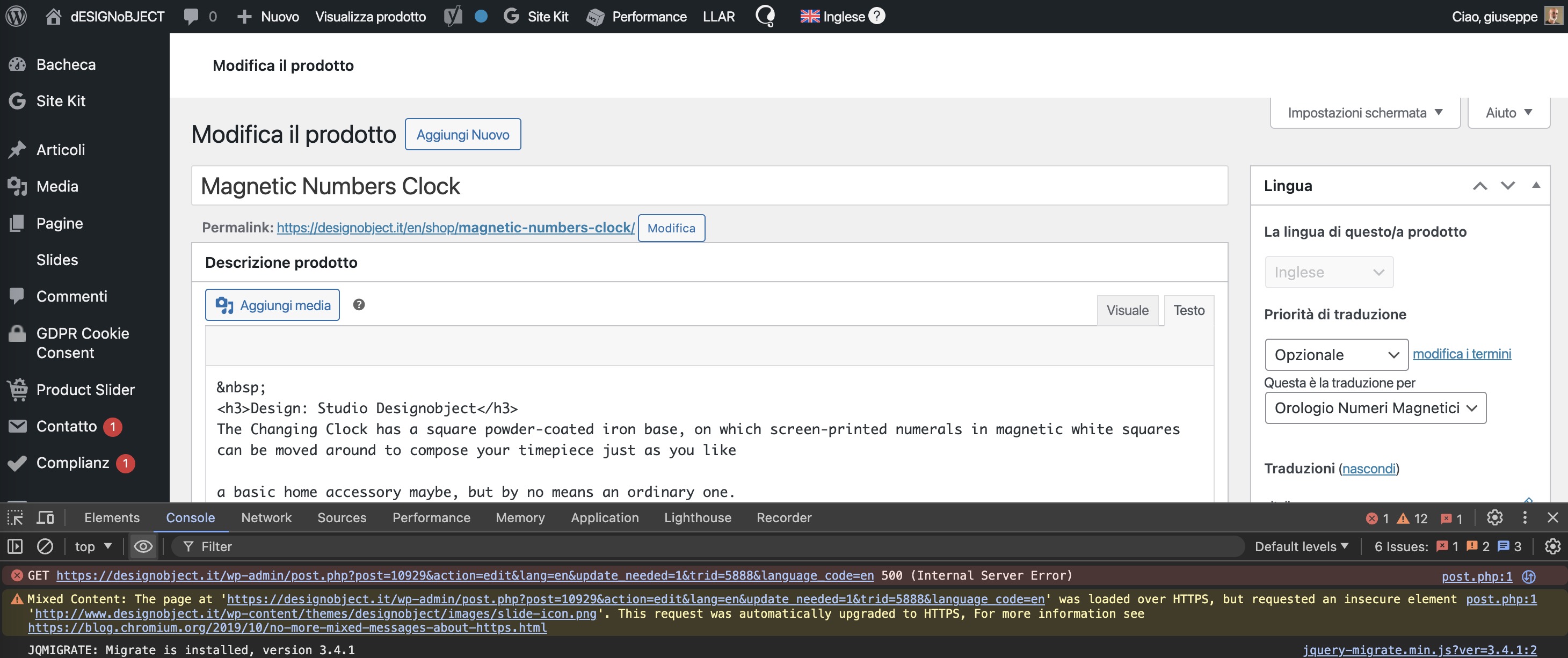
I am trying to manage a product translation but I get this error and the product admin page is broken: Uncaught TypeError: array_key_first(): Argument #1 ($array) must be of type array, string given in /home2/XXXXX/public_html/wp-content/plugins/google-listings-and-ads/src/Product/ProductHelper.php:615 Stack trace: #0 /home2/XXXXX/public_html/wp-content/plugins/google-listings-and-ads/src/Product/ProductHelper.php(615): array_key_first('a:4:{i:4213;a:1...') #1 /home2/XXXXX/public_html/wp-content/plugins/google-listings-and-ads/src/Admin/MetaBox/ChannelVisibilityMetaBox.php(127): AutomatticWooCommerceGoogleListingsAndAdsProductProductHelper->get_validation_errors(Object(WC_Product_Variable)) #2 /home2/XXXXX/public_html/wp-content/plugins/google-listings-and-ads/src/Admin/MetaBox/AbstractMetaBox.php(107): AutomatticWooCommerceGoogleListingsAndAdsAdminMetaBoxChannelVisibilityMetaBox->get_view_context(Object(WP_Post), Array) #3 /home2/XXXXX/public_html/wp-admin/includes/template.php(1456): AutomatticWooCommerceGoogleListingsAndAdsAdminMetaBoxAbstractMetaBox->handle_callback(Object(WP_Post), Array) #4 /home2/XXXXX/public_html/wp-admin/edit-form-advanced.php(716): do_meta_boxes(Object(WP_Screen), 'side', Object(WP_Post)) #5 /home2/XXXXX/public_html/wp-admin/post.php(206): require('/home2/XXXXX...') #6 {main} I've wrote to the google listing and ads support but they told it must be a wpml issue. I'm using that plugin on other websites even with WPML installed and I don't see this bug.
Symptoms:
The product admin page is broken and I get an error: Uncaught TypeError: array_key_first(): Argument #1 ($array) must be of type array, string given.
Questions:
Why am I getting this error when managing a product translation?
How can I fix the broken product admin page?
I understand the issue you're having. From the error log, I can see that the error is originating from a file within the Google Ads and Listings plugin. Since the issue specifically occurs while editing the translated product manually, it may be due to missing translation support or another underlying cause.
To determine if the issue is specific to your site or a widespread problem, I kindly request you to try replicating the issue in our sandbox. The autologin link to our sandbox is provided below.
- hidden link
The WPML plugin and its addons are pre-installed on the sandbox. Please complete any remaining setup steps. Then, install the Google Listing and Ads plugin, complete the setup as your main site, and try to replicate the issue.
If you encounter the same issue on the sandbox site, let me know. I will review it and advise you on the next steps.
The primary goal of using the sandbox site is to isolate the issue in a controlled environment, which removes any server or external factors that might be influencing the behavior on the main site.
Please let me know the update. I will be happy to help if you need further assistance in this matter.
Hi I forgot to mention, we used the plugin https://wordpress.org/plugins/qtranslate-to-wpml-export/ to migrate from qtranslate, so I suppose that plugin could have broke somethign in this products and some other similar ones?
We cannot reproduce the same environment on your sandbox since qtranslate is not supported by wordpress anymore.
I understand that the content was imported using the qTranslate WPML Importer. However, have you tried replicating the issue using the Google Listing and Ads plugin on the sandbox environment? As mentioned, we want to see if the issue can be replicated in a minimal environment in the sandbox.
Since the content has been migrated from qTranslate, there is a chance that some values in the secondary language are not correctly formatted, causing a fatal error while editing the translated product. The stack trace clearly indicates that one of the arguments receives a 'String' instead of an 'Array,' which leads to the issue.
At this point, it would also be beneficial to get in touch with the Google Listing and Ads team and inquire about how the data should be formatted with the qTranslate plugin. Based on their input, we can take further steps to resolve the issue.
Let me know the update. I will be happy to help if you need further assistance in this matter.
I could try to reset the google ads and listing data about that specific product to see if it helps. As you said the plugin is expecting an array but it's getting a php serialized object as a string, so maybe there is something that has broken the data serialization in there.
I've tried to update the sandbox but the process is long and requires connecting with my wordpress and google account, but I don't want to get sync data from that sandbox.
Hello There,
I hope you're doing well. Sorry for the delay in responding due to the weekend.
I understand the situation. It might be best to reset the Google Ads and listing data for that product and re-add them. The data for this particular product aren't correctly formatted, which is the main cause of the fatal error.
So, please give it a try and let me know how it goes. I will be happy to help if you need further assistance or clarification.
Best regards,
Prosenjit
The topic ‘[Closed] Product translation error’ is closed to new replies.