Home›Support›English Support›[Resolved] Since today, the site is missing the logo, except for the English original
[Resolved] Since today, the site is missing the logo, except for the English original
This thread is resolved. Here is a description of the problem and solution.
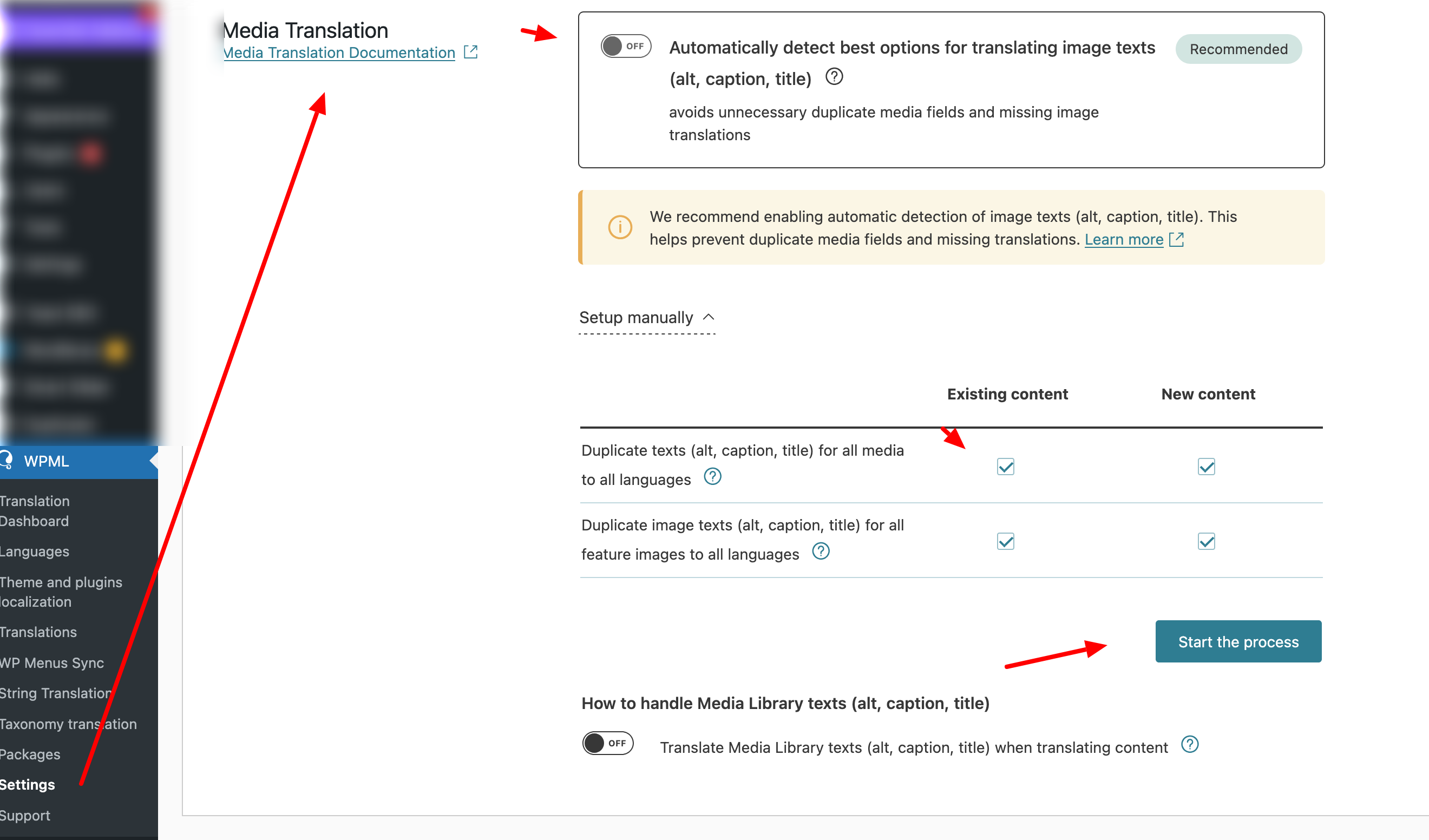
Problem: The client reported that the logo was missing on translated pages of their website, showing only on the original English page. Instead of the logo, a placeholder appeared. Solution: We updated WPML to version 4.8.3 on the client's staging site.To resolve the issue, we navigated to WPML → Settings → Media Translation, deactivated the 'Automatically detect best options for translating image texts' option, ran the duplication of existing images across languages, and then reactivated the automatic option.
If this solution does not resolve your issue, or if it seems outdated, we recommend opening a new support ticket. We also advise checking the related known issues, verifying the version of the permanent fix, and confirming that you have installed the latest versions of themes and plugins. For further assistance, please visit our support forum.
This is the technical support forum for WPML - the multilingual WordPress plugin.
Everyone can read, but only WPML clients can post here. WPML team is replying on the forum 6 days per week, 22 hours per day.
Background of the issue:
I am trying to ensure that the visual appearance of the translations is identical to the original, including the logo. The issue can be seen on this page: hidden link
Symptoms:
Since today, the site is missing the logo on all pages except for the English original. Instead of the logo, I see a placeholder.
Questions:
Why is the logo missing on the translated pages?
How can I make the logo appear on all language versions of the site?
It might be due to some recent changes in the template, for example. Did you recently update your layout or perhaps the header? Could you provide more details on how you added the logo to the site?
To my knowledge, we did not make any changes to the header in recent days. We use the Elementor toolkit. WPML is not supposed to interfere with the visual appearance of the translated pages, is it?
And even we were to make changes to the template, shouldn't those changes be reflected faithfully by the translation as by the original?
P.S.: I just checked: The header template (which is where the logo is) was last modified 2 months ago.
Just for good measure, I cleaned the WPML cache, the page cache and the redis cache, all to no avail.
We use the Elementor toolkit. WPML is not supposed to interfere with the visual appearance of the translated pages, is it?
Could you please provide a bit more detail about this?
To investigate this further, I’ll need temporary access (wp-admin and FTP) to your site — preferably to a staging or test site where the issue can be reproduced.
When you log in to post your next reply, you’ll find the required fields below the comment area. The information you enter will remain private, meaning only you and I will have access to it.
Just to be sure: I did NOT install any new plugins lately on both sites. And both sites ARE equally affected. What may have happened is that some plugins auto-updated lately. But I wouldn't be able to say which, unfortunately.
I've now also set up sftp access to the dev site. Unfortunately I cannot edit the private message. When I click "edit", no editor opens, instead, the page seems to reload. If you need ftp access, please provide another secret form for me to enter the details.
First of all, I’d like to let you know that I’ve updated WPML on your staging site to version 4.8.3, which was just released.
I have a theory about what might have happened. The WPML plugin doesn’t physically duplicate or delete image files between languages — it only duplicates the metadata to point to the same image (for example, to your logo in the translated language). It’s possible that an image optimization plugin, or another plugin on your site with similar features, could have interfered with the translated images while someone was working on the site.
In the latest WPML update, our development team added improvements to handle similar edge cases, providing additional protection to prevent missing images.
Of course, this is still just a hypothesis. If you notice this issue happening again in the future, we’ll need a way to replicate it to understand exactly what’s causing it and to prevent it from happening again.
To fix the problem, I went to WPML → Settings → Media Translation, temporarily deactivated the “Automatically detect best options for translating image texts” option, ran the option to duplicate the existing images across languages, and then re-enabled the automatic option.