
This is the technical support forum for WPML - the multilingual WordPress plugin.
Everyone can read, but only WPML clients can post here. WPML team is replying on the forum 6 days per week, 22 hours per day.
| Sun | Mon | Tue | Wed | Thu | Fri | Sat |
|---|---|---|---|---|---|---|
| - | 8:00 – 13:00 | 9:00 – 13:00 | 9:00 – 13:00 | 8:00 – 12:00 | 8:00 – 12:00 | - |
| - | 14:00 – 17:00 | 14:00 – 18:00 | 14:00 – 18:00 | 13:00 – 17:00 | 13:00 – 17:00 | - |
Supporter timezone: Europe/Zagreb (GMT+02:00)
Tagged: Exception
This topic contains 14 replies, has 2 voices.
Last updated by Bruno Kos 1 year, 6 months ago.
Assisted by: Bruno Kos.
| Author | Posts |
|---|---|
| October 10, 2024 at 10:06 am | |
 johnR-17 |
Background of the issue: Symptoms: I added 3 images. On images 1 and 2 you see the backend and you can see it are the same types of fields. On image 3 you see the output. Only the title is translated and item no. 3 and items 1 and 2 are still in dutch Questions: 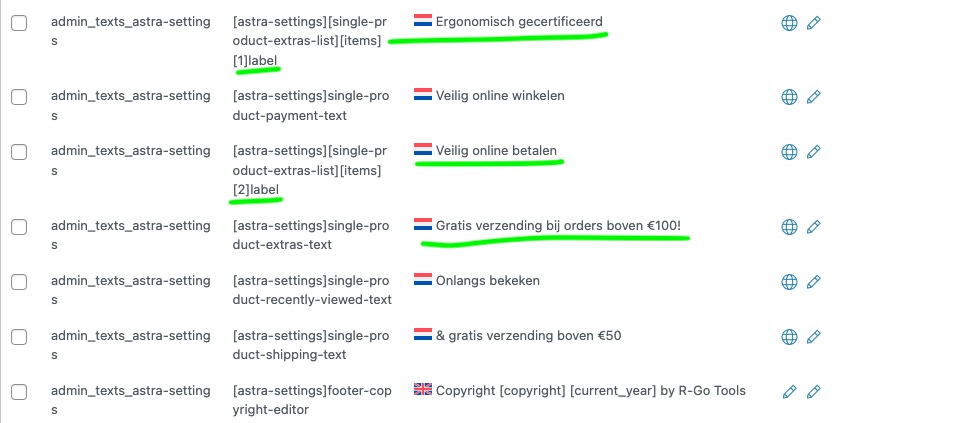 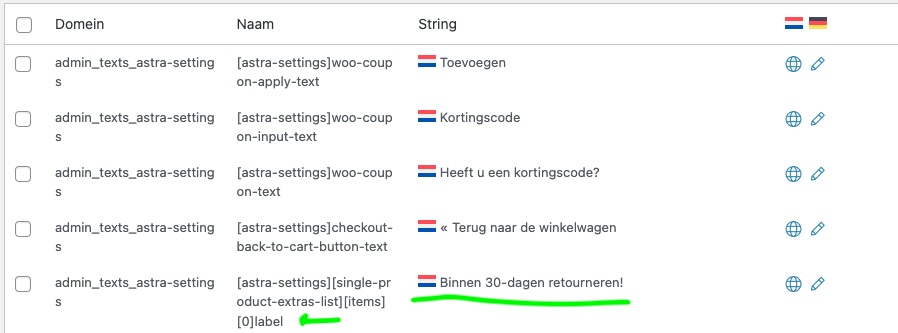 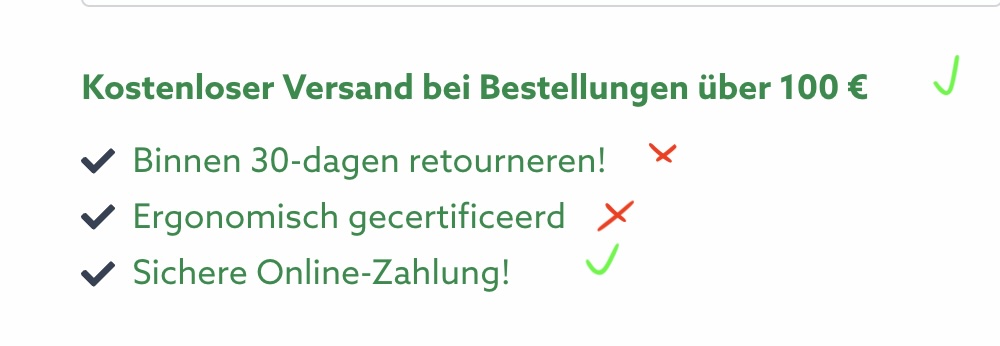 |
| October 10, 2024 at 11:25 am #16274516 | |
 Bruno Kos WPML Supporter since 12/2018 Languages: English (English ) German (Deutsch ) French (Français ) Timezone: Europe/Zagreb (GMT+02:00) |
To troubleshoot this problem, I'll install the Duplicator plugin and generate packages for further debugging purposes. I'll ensure to exclude all media files to maintain a minimal package size. You can find more information about the process here: [link](https://wpml.org/faq/provide-supporters-copy-site/). Please confirm if this approach is acceptable to you. |
| October 17, 2024 at 7:51 am #16298596 | |
|
johnR-17 |
Sorry for the wait. I was on course. Yes please do so. |
| October 17, 2024 at 8:17 am #16298677 | |
|
Bruno Kos WPML Supporter since 12/2018 Languages: English (English ) German (Deutsch ) French (Français ) Timezone: Europe/Zagreb (GMT+02:00) |
This has been escalated to our 2nd tier team team and may take some debugging time, I'll get back to you as soon as I have any news or questions for you. |
| October 22, 2024 at 5:09 am #16314940 | |
|
Bruno Kos WPML Supporter since 12/2018 Languages: English (English ) German (Deutsch ) French (Français ) Timezone: Europe/Zagreb (GMT+02:00) |
Could you tell me what is generating those specific strings? We've set up a local copy of the site, and the page layout is slightly different. Most importantly, those strings are not being output on our end. There were some notices during the installation process regarding a few database tables that couldn't be installed. |
| October 22, 2024 at 8:19 am #16315609 | |
|
johnR-17 |
You need to scan the theme. It is in the admin_texts_astra-settings (see image). I also have a problem with "Levering 1-3 dagen" message. This is a string from the plugin admin_texts_plgfyest_all_rules This string is also not translated on the frontend, while I see the changes on backend.  |
| October 22, 2024 at 11:09 am #16316938 | |
|
Bruno Kos WPML Supporter since 12/2018 Languages: English (English ) German (Deutsch ) French (Français ) Timezone: Europe/Zagreb (GMT+02:00) |
Not sure why it has not showed in our localhost test, let me see, I will keep you posted. |
| October 24, 2024 at 6:28 am #16324306 | |
|
Bruno Kos WPML Supporter since 12/2018 Languages: English (English ) German (Deutsch ) French (Français ) Timezone: Europe/Zagreb (GMT+02:00) |
The issue is related to the code found in the Astra Pro plugin, specifically in the file: `astra\wp-content\plugins\astra-addon\addons\woocommerce\classes\class-astra-ext-woocommerce-markup.php` at line 1156. The relevant part of the code is: if ( isset( $extras_list['items'] ) ) {
// We are assuming that the user won't add more than 10 extra items.
$translatable_item_labels = array(
_x( '%astra%', 'Extras item 1', 'astra-addon' ),
_x( '%astra%', 'Extras item 2', 'astra-addon' ),
_x( '%astra%', 'Extras item 3', 'astra-addon' ),
_x( '%astra%', 'Extras item 4', 'astra-addon' ),
_x( '%astra%', 'Extras item 5', 'astra-addon' ),
_x( '%astra%', 'Extras item 6', 'astra-addon' ),
_x( '%astra%', 'Extras item 7', 'astra-addon' ),
_x( '%astra%', 'Extras item 8', 'astra-addon' ),
_x( '%astra%', 'Extras item 9', 'astra-addon' ),
_x( '%astra%', 'Extras item 10', 'astra-addon' ),
);
}
To translate these texts, you can't use the typical method for admin text strings. Instead, you need to: 1. Scan the Astra Pro plugin under the `astra-addon` text domain. We tested this solution on our local site, and it resolved the issue. Can you try? |
| October 24, 2024 at 11:28 am #16325816 | |
|
johnR-17 |
I managed to translate those items indeed. But now items that were translated are back to dutch again. Could scanning the astra-addon domain overwrite these? |
| October 24, 2024 at 11:49 am #16325908 | |
|
Bruno Kos WPML Supporter since 12/2018 Languages: English (English ) German (Deutsch ) French (Français ) Timezone: Europe/Zagreb (GMT+02:00) |
I see, do you mean this happens? If so, you can apply this workaround? |
| October 24, 2024 at 2:12 pm #16326875 | |
|
johnR-17 |
Did you install wp-adminer? |
| October 25, 2024 at 6:39 am #16329161 | |
|
Bruno Kos WPML Supporter since 12/2018 Languages: English (English ) German (Deutsch ) French (Français ) Timezone: Europe/Zagreb (GMT+02:00) |
Yes, we installed WP-Adminer to check the values stored in the wp_options table and the string translation tables directly. If the translation issue has been resolved and everything is working as expected now, you can delete the plugin. |
| October 25, 2024 at 11:59 am #16330482 | |
|
Bruno Kos WPML Supporter since 12/2018 Languages: English (English ) German (Deutsch ) French (Français ) Timezone: Europe/Zagreb (GMT+02:00) |
Another thing, we are working on reproducing the issue on a sandbox site to escalate further, but we couldn’t locate the "Extras" setting in the Customizer that’s adding the problematic text. It seems that this option might be coming from a plugin or setting that isn’t currently part of the default setup. Could you please check and install any additional plugin or setting that enables this "Extras" option? That would help ensure the sandbox site matches your environment as closely as possible. Here’s the sandbox link: |
| October 31, 2024 at 2:12 pm #16351975 | |
|
johnR-17 |
i am currently checking the website and most things seem to be translated at this point. I will check it again next week (we are shortstaffed at the moment). |
| November 4, 2024 at 6:01 am #16358765 | |
|
Bruno Kos WPML Supporter since 12/2018 Languages: English (English ) German (Deutsch ) French (Français ) Timezone: Europe/Zagreb (GMT+02:00) |
Ok, let me know if you have any questions or require my help on the matter. |





The topic ‘[Closed] String translations not showing up on frontend. Some do and some don't’ is closed to new replies.