If I go to Products > All Products and then delete the page in English, is the page going to "re-create" itself afterwards?
Do I just have to delete the page with the English flag, then go back to the French flag and click on the pencil to translate it again and then the English product page will be "re-created" automatically?
Please note that I am not using the Advanced Translation Editor but the "old" one.
Concerning the "bug", as explained before, this issue appeared after the plugin update.
I know it because I carefully verify every page of my website in every language after each plugin update.
I don't know how it is possible that only the WP Bakery Page Builder content of the page disappeared (and only in English) but that's what happened with the plugin update.
Please inform the developers that this issue happened after a plugin update.
The Classic Translation Editor does not have any translation memory, which means you would need to translate the product again.
Regarding escalation to development:
I can only escalate an issue if we can confirm a bug that is replicable on your site. I created a new test product and was not able to confirm the issue.
Test product: hidden link
This is why I recommended earlier to recreate the product using the same content and settings and verify if the issue is replicable.
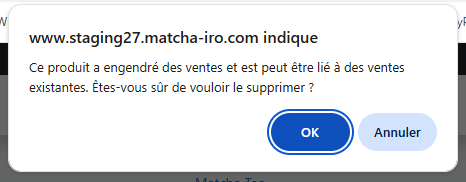
I tested your solution : I went to Products > All Products and then delete the product page in English. But I received a message from WordPress saying "This product has generated sales and may be linked to existing sales. Are you sure you want to delete it?" (see the attached screenshot).
I still deleted it but I was not sure if it deleted the sales of this product in English.
I checked in Statistics - Products for this product (with the French flag) and the sales were the same on my staging website (where I deleted the product in English) than on the live website. However, I did the same check with the English flag and the sales were 0 on my staging website (vs another figure on my live website).
I was surprised that the statistics were not the same if I chose the French or the English flag (I thoufht that I would find all the sales for all languages with each flag) but by looking at those figures, it seems that the English sales of this product disappeared when deleting the product.
So that is an issue and I would prefer not to do that on my live website.
So do you have another solution for getting back the English page without having to delete the English page in Products > All Products and then delete the product page in English?
Is it for example possible to just delete all the English translations of this product (without deleting the entire English product page) and then afterwards re-translate to make the English page re-appear?
I was referring to deleting the translated products and translating the product again.
This should not affect sales as long as you do not delete the original product.
WooCommerce sales data is always tied to the original product ID in the default language. Translations are linked copies that provide localized content, but they don’t carry independent sales history.
As long as you don’t delete the original product in the default language, sales and orders remain safe. Deleting and re‑translating the localized product is a valid way to fix damaged content.
Alternative:
Since the issue was not replicable on a new product, recreate the entire product, translate, and publish it.
Keep the old product and its translation as private products so that you keep its statistics.