Apologies for the inconvenience caused due to the delay.
I accessed the staging site and navigated to **WPML -> Themes and Plugin Localization** to scan the WooCommerce plugin. However, the process gets stuck. I reviewed the error logs but couldn't find anything useful. Could you please check if you can complete this scan or identify any issues in the server logs?
Additionally, I tried using the Duplicator plugin, but it’s unable to create a package. Downloading the files via FTP would take considerable time. If you have access to the server’s cPanel, could you zip the **wp-content** folder and create a database backup, then place them in the FTP folder so I can download them from there?
I have escalated the issue to our 2nd tier supporter and we noticed recently that a similar issue was reported which is now escalated to our developers.
As a workaround, can you try the following and see if it helps.
Go to WPML->Themes and Plugin Localization and disable the option "Automatically load the theme's .mo file using 'load_textdomain' " or remove woocommerce text domain from it.
I already tested this on the staging site and it's working for me.
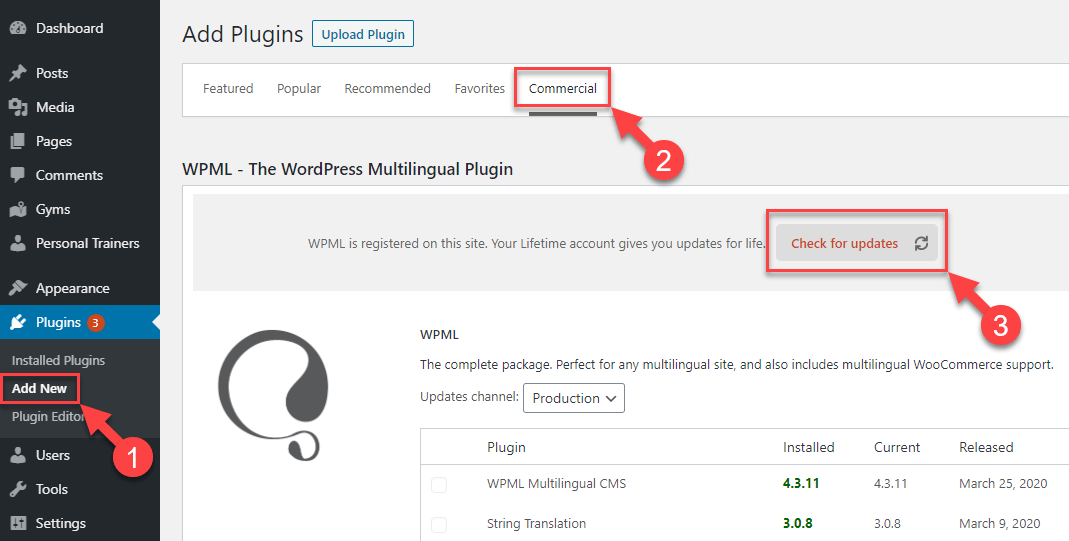
We've recently rolled out a new version of WPML plugins. Could you please update your plugins to the latest version and inform me if it resolves the issue?
Our WPML updates are distributed gradually. If your websites haven't received this update yet, please be patient, and you should see it within a few days.