We are using the Salient theme together with WPML and automatic translation via Pay-As-You-Go (PTC).
We are experiencing issues when translating content built with Salient — both Global Sections and regular pages.
Issue 1 – Encoded fields error
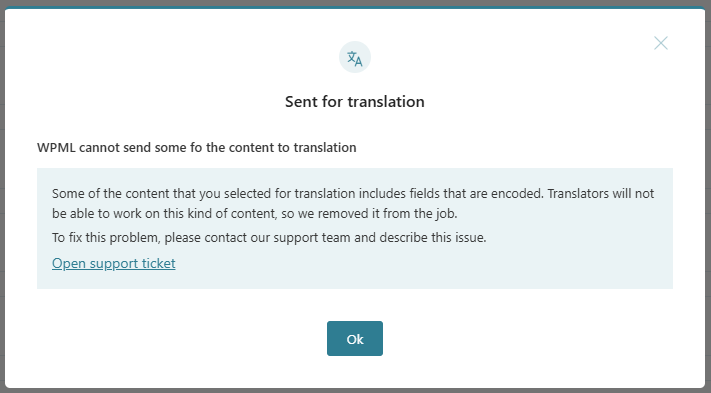
When trying to translate certain Global Sections and some regular pages, we receive the following error:
"Some of the content that you selected for translation includes fields that are encoded. Translators will not be able to work on this kind of content, so we removed it from the job."
This does not happen on all content, only specific Global Sections and some pages.
We would like to understand:
- Why this encoded fields error occurs
- What causes certain Salient fields to be treated as encoded
- How we can properly configure WPML to translate this content
Issue 2 – Translated footer not displaying on English version
We have translated the footer (which is built as a Salient Global Section).
However, on the English version of the website, the Norwegian footer is still displayed instead of the translated version.
Could you please advise:
- If there are specific WPML settings required for Salient Global Sections?
- If Global Sections need to be duplicated or manually assigned per language?
- Whether this could be related to the encoded fields issue?
Please let us know if you need access credentials or further technical details.
and try to send it for translation, we receive the following error:
"Some of the content that you selected for translation includes fields that are encoded. Translators will not be able to work on this kind of content, so we removed it from the job."
Could you please help us identify what is causing this encoded fields error and how we can resolve it?
If possible, feel free to adjust the configuration directly.
I was able to reproduce the issue on a fresh setup, and it appears to be a compatibility issue with the page builder. I have escalated this to our compatibility team for further testing.
I will update you as soon as I receive feedback from them.
Our compatibility team reviewed the issue and recommends using the Text Editor module instead of the Raw HTML module within global sections. Please switch to the Code tab and paste your HTML there (reference: hidden link
), then test to see if this resolves the problem.
Please let us know how it goes — we look forward to your reply.