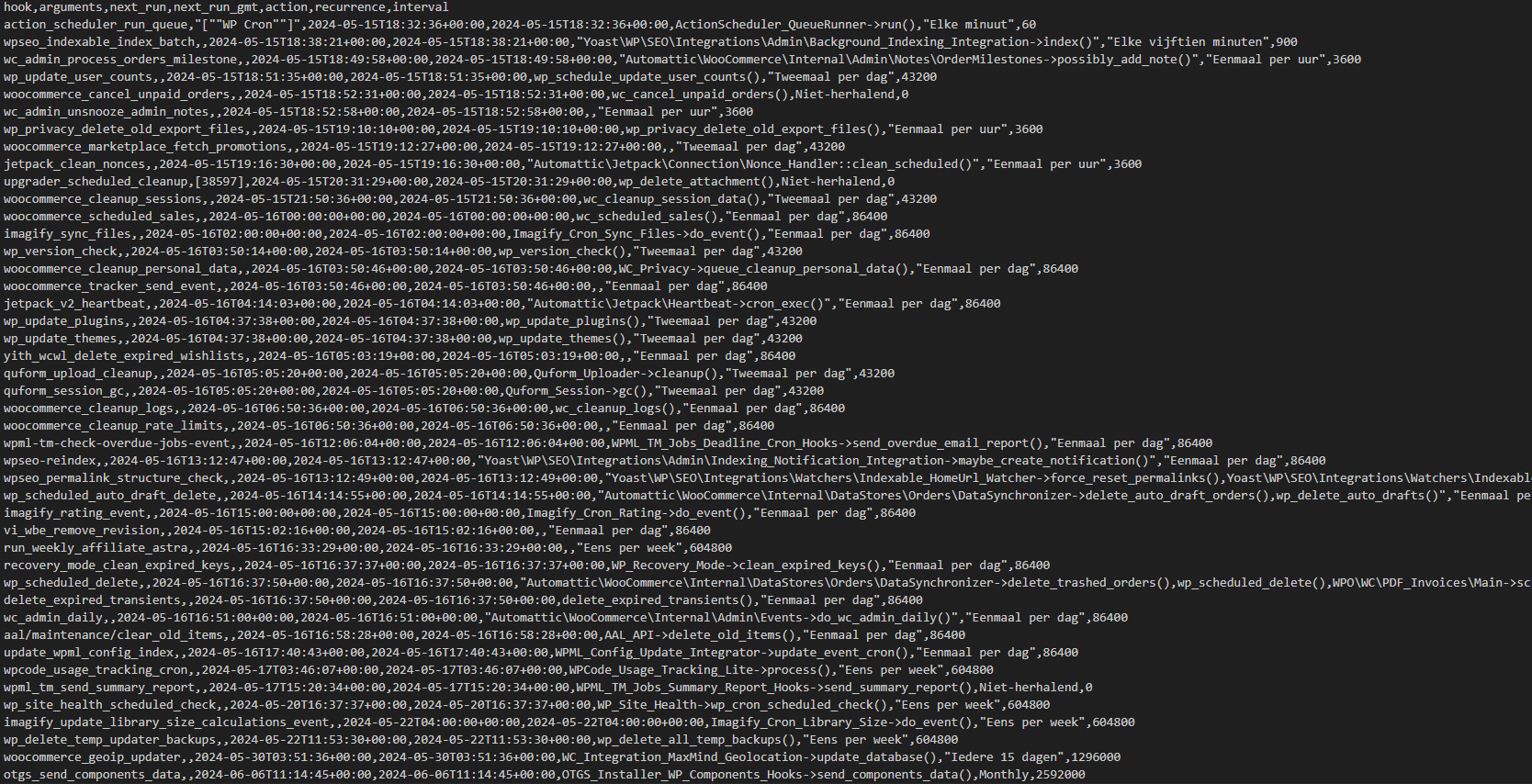
I have rerun Yoast optimization and installed the activity log. Unfortunately it is not clear what is causing the issues by viewing the activity log. The new broken category is not shown. I have exported the cron jobs from the website. Can I share the file with you?
The team checked the file you shared and what is needed for you is:
- Leave active the mentioned plugin on the site hidden link
- Fix the issue by running data optimization (Yoast optimization option)
- Leave the site and inform me when the issue happens again.
After, we will check the plugin's logs and try to find out the possible action that causes the issue to replicate.
Which plugin do you mean? The problem does not come back on the staging website (because nothing is happening here). I still have the activity log plugin active, but previously it did not show anything when the problem occured again.
We would need to check the activity log plugin (on the production site since the issue is happening only there). The support from the 2nd tier team will check after the issue happens again.
We would need access to the WP-Admin of the productions site. Please create an administrator user and share it with me.
* Your next reply is set to private so you can provide the access.
The issue was reported at 1:41 AM GMT on 28th May, and the team checked the activities before this time. What they found out that might be causing the issue are the following:
- Updated this product in FR hidden link while the original language is not FR. However, (this is not clear if you used the ATE or WP editor).
- Placed an order
- Created a new category "Papiers à rouler aromatisés" in FR again the original language is NL.
- Created a new brand "Futurola" in FR
Can you please check these actions?
Also, why are you creating categories in FR or updating FR products?
The information shared is from the activity log plugin.
Did you notice if there is an exact time frame when the issue happens?
Also, you mentioned that the issue happened only in the sub-categories of the category "Mashrooms", is that correct or is it happening in other categories as well?
Unfortnately I'm unable to recreate the issue. I'm not noticing an exact time frame. It is not that my client only has 5 categories. I cannot manually check 266 categories every hour to see if it is still working. I hope you can understand that.
The issues is also happening with parent categories. Please explain to me how you exactly find out that updating a product is causing this issue (how can I see this). Can't we make a debug log (asking for the 5th time) that checks when and what is changing the meta description/title. The values are wrong in the database so this seems like an easy thing to do? Here are some new categories with the issue (that are not showing up in the activity log):
1. hidden link
2. hidden link
3. hidden link
4. hidden link
5. hidden link
6. hidden link
We have been working on this issue for over 3 months now. Since we do not what is causing the issue it is very hard to recreate it. However I believe WPML can assist us further in finding a solution.
Are there any other customers of WPML that are experiencing this same thing? What kind of plugin/function can cause this issue? This issue seems to effect only SEO related data. My client is not using mutiple SEO plugins. He only uses Yoast SEO and WPML that have this functionality (as far as I know).
If we cannot find a sultion ASAP we're forced to look beyond WPML for a multilangual soltuion. My client is losing his rankings and thus customers due to this issue.
Languages: English (English )Spanish (Español )German (Deutsch )
Timezone: Europe/Madrid (GMT+02:00)
Hi there,
my name is Marcel, one of the WPML Support Team Leads. Thanks so much for your patience! Here are the answers to your questions:
Please explain to me how you exactly find out that updating a product is causing this issue (how can I see this)
It was the guess from the Activity log plugin to replicate the issue.
Can't we make a debug log (asking for the 5th time) that checks when and what is changing the meta description/title.
The title and description aren't changed in the WP tables but in the Yoast tables, suggesting that Yoast is storing the incorrect data.
Since we do not know what is causing the issue, it is very hard to recreate it. However, I believe WPML can assist us further in finding a solution.
We will check the Yoast code and prepare a logger to track when this happens.
Since we do not know what is causing the issue, it is very hard to recreate it. However, I believe WPML can assist us further in finding a solution.
No, there are no other reports. Otherwise, we could have replicated and fixed it directly.
If we cannot find a solution ASAP, we're forced to look beyond WPML for a multilingual solution.
I apologize for the inconvenience. This issue is challenging to fix since we cannot replicate it, and we are unsure if it's related to your server, Yoast, or WPML. As Yoast has pointed out, this issue affects other translation plugins too, not just WPML: hidden link. Please allow us some time to prepare a logger. We need to check if Yoast has any specific filters or actions we can use.
Languages: English (English )Spanish (Español )German (Deutsch )
Timezone: Europe/Madrid (GMT+02:00)
Hi,
We did not find any filter/hook in the data optimization code we could use. You will need to make the changes doing these steps:
1) Run the data optimization to make sure everything is all right.
2) Set up the WP error and clear it (delete the log file from "wp-content", so a new file can be created.)
3) Edit this file:
Now, wait, and if you see changes in the category, please share the log file with us. This log file contains data to be saved, such as the current request time, URL, domain, etc.
Best Regards,
Marcel
The topic ‘[Closed] Yoast SEO translated content stops working’ is closed to new replies.