I am trying to: I used one temperory domain and use developer modes , now I change to permanent domain , I delete last key create new , but banner didn't remove from my website
Link to a page where the issue can be seen: all of footer in our website
I understand what you're looking for. When I checked our system, I noticed that you've recently moved your site, and it appears that the site key attached to your site is corrupted. Could you please follow the instructions mentioned in the guide below and see if that helps resolve the issue?
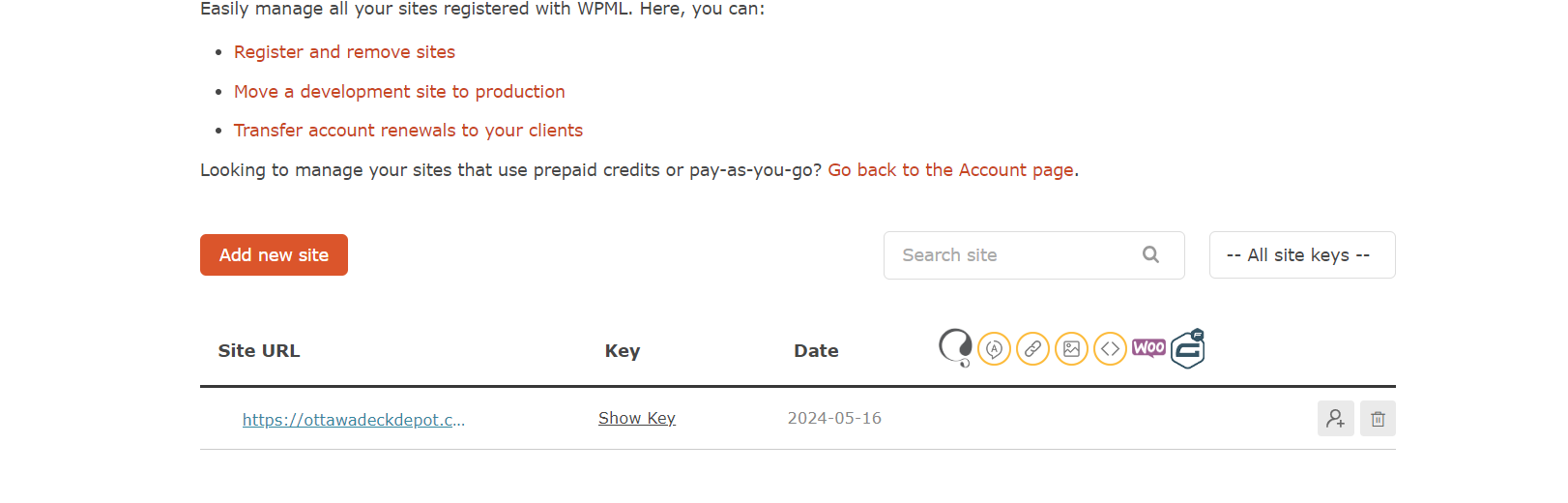
I read that article thoroughly and also searched the internet. My problem is that I can't find the feature shown in the picture for changing the settings.
Please check the photo, and could you please change my key to product yourself? We have a visitor now, and they can see this ugly banner. Thanks.
I understand your concern, but we cannot change the site keys for client sites from our end. This is something you need to do yourself.
From the screenshot, I see that the Gear icon is missing. To solve the issue you can now do the following:
- Click on the Trash icon(Screenshot: hidden link) and delete the site key.
- Once done, click on the "Add New Site" button and generate a new site key under Production site
- After that, Log in to your site’s admin and go to Plugins → Add New and click the Commercial tab. Click on "Unregister WPML from this site".
- Once the page refreshes, insert the newly generated key into the Site key field and press the "Register" button.
I hope it will help. Please feel free to let me know if you need further assistance in this matter. I will be happy to help.
Best regards,
Prosenjit
The topic ‘[Closed] change developer to product’ is closed to new replies.