
This is the technical support forum for WPML - the multilingual WordPress plugin.
Everyone can read, but only WPML clients can post here. WPML team is replying on the forum 6 days per week, 22 hours per day.
This topic contains 5 replies, has 2 voices.
Last updated by Dražen 1 year, 7 months ago.
Assisted by: Dražen.
| Author | Posts |
|---|---|
| August 28, 2024 at 4:51 pm #16116445 | |
 ademE |
Background of the issue: Symptoms: Questions: |
| August 29, 2024 at 6:27 am #16117539 | |
 Dražen Supporter Languages: English (English ) Timezone: Europe/Zagreb (GMT+02:00) |
Hello, thanks for contacting us. I am not sure what old files you mean and what happens. Can you please share a video fo your steps so I can see what you do, what happens, and what error message you get? You can use free tool like LOOM. Thanks, |
| August 29, 2024 at 2:27 pm #16120599 | |
|
ademE |
hidden link hello you can check. This is the first error. |
| August 29, 2024 at 2:37 pm #16120659 | |
|
Dražen Supporter Languages: English (English ) Timezone: Europe/Zagreb (GMT+02:00) |
Hello, okay so after installing wpml your homepage returns 404. Also please do not share admin access data, this is a public forum. When needed I will enable private reply. Regards, |
| August 31, 2024 at 11:37 am #16127369 | |
|
ademE |
i reset as you show. Still same error. 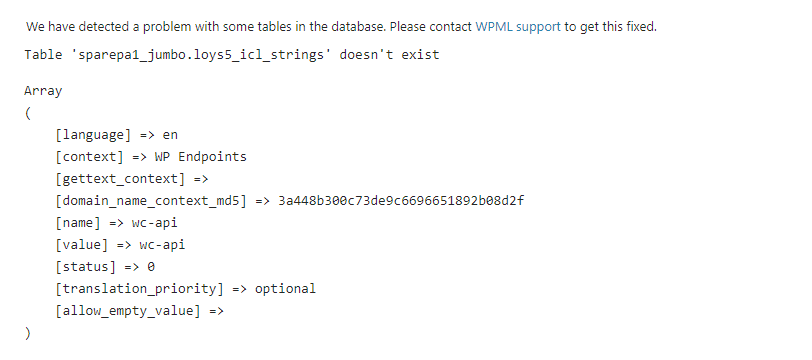 |
| September 2, 2024 at 6:19 am #16130011 | |
|
Dražen Supporter Languages: English (English ) Timezone: Europe/Zagreb (GMT+02:00) |
Hello, it still looks like some tables are missing, maybe some of the plugins or hosting is blocking WPML to create tables. 1) Please disable any other plugins and try reset. 2) If the issue still happens please share admin access and FTP and let me have a look. Make sure to have a backup and if possible share access to staging site. Regards, |
| September 6, 2024 at 2:20 pm #16149388 | |
|
ademE |
i solved the 404 problem but that table warning still exist |






