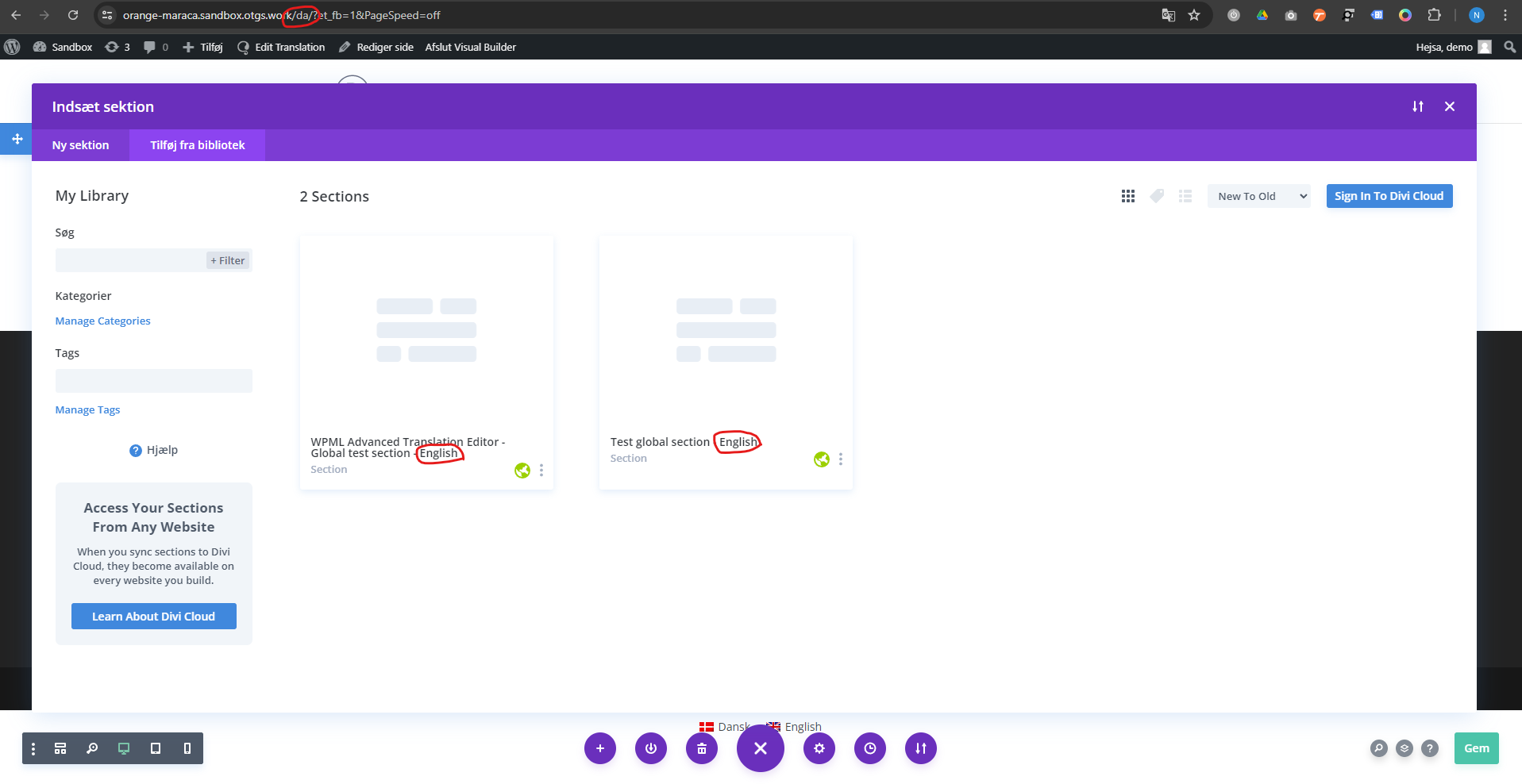
Background of the issue:
We have an issue on a client's website regarding Divi Layouts/Library and WPML. Even though we have made translation for Divi layouts (like global sections), we can only insert the main language version (which is English in this case). This issue only applies to the Divi frontend builder and not if you do it in the backend block builder. I have cloned the site to a staging environment and deactivated all other plugins than the WPML plugins: hidden link
Symptoms:
Translations are made with the WordPress Editor because not all language versions will use the same content and layout. You can only insert the English version of saved Divi layouts on all languages when using the Divi frontend builder. When using the backend builder, it works as intended and as it works on other client sites.
Questions:
Why are the translated Divi layouts not appearing in the frontend builder?
How can we ensure the correct language version of global sections is inserted in the frontend builder?
Here is the sandbox site link: hidden link . Please install the required plugins/theme to replicate the issue. Once done, let me know, and I will investigate further for you.
I've also figured out the issue. It's when you insert a shortcode into the Divi page builder - even the simplest shortcode will cause the issue.
On the Danish page, I've inserted a simple shortcode created through the child theme's functions.php. If you try and insert the saved global section, it will show the English verison. If you remove the shortcode and reload the page builder, you can now insert the Danish global section.
I've also tested creating the shortcode through a plugin like Code Snippets, but the issue remains. So it's not an issue with child themes.
I've followed your instructions and inserted a shortcode to the page here hidden link and translated it. However, I still cannot replicate the issue that you mentioned. Am I missing a step or could you replicate it for me so that I could check?
First off, you have to use a Danish page.
Secondly, it has to be an active shortcode. The shortcode you have inserted is not rendering anything, so it's basically just text.
Use this basic shortcode on a Danish page: [greeting]
I have made a new video showing you this: hidden link
It's a very simple shortcode with no errors and you can find it in the child theme:
function demo_shortcode() {
$message = 'Hello world!';
return $message;
}
add_shortcode('greeting', 'demo_shortcode');
Our second-tier support team has advised that it is always recommended to translate Divi using our Advanced Translation Editor rather than manually. Additionally, issues related to manual translation may receive lower priority as it is not the preferred method for translating content.
Our second-tier support will continue to investigate this and I will come back to you once I've more feedback.
Using your Advanced Translation Editor to translate the global sections makes no difference though. I've already tried that and it will still only insert the English version if there's a shortcode active on the page.
I've created a new global section translated through your Advanced Translation Editor and as you can see, the problem remains.
I think that you should raise the priority again since this is an issue no matter which translation method/editor you use.
Sorry for my late reply. I've been away on vacation.
The code snippet works but there is still an issue with it. If you have a backend window opened at the same time as the window with the page builder, it will always choose the language from the backend window.
So if we have multiple windows open, we would have to switch the language on all of them and to make sure all windows are the same language at all times.
I have a made a video showing the issue, which you can watch here: hidden link
I have feedback from our 2nd Tier Support and this is what they mentioned.
This problem arises because WPML relies on a cookie to determine the current language, and all tabs in the same browser share this cookie. Consequently, if you open several tabs with different languages, the AJAX content will be loaded in the language of the last tab opened, causing inconsistencies.
Details:
AJAX and WPML Cookie Dependency:
WPML uses cookies to keep track of the language settings for AJAX actions.
When multiple tabs are open in the same browser, they all share the same cookie.
As a result, the language setting is overwritten by the most recently opened tab, leading to issues with AJAX content loading.
Issue Scope:
This problem is not specific to the Divi theme but affects any situation where multiple tabs with different languages are open simultaneously.
Resolution and Constraints:
Fixing this issue would require significant changes to the WPML core.
Our team is aware of similar issues but does not have an immediate fix available.
Proposed Workarounds:
To mitigate this issue, we suggest the following workarounds:
Use Different Browsers: Open each language in a separate browser.
Use Incognito Mode: Open each language in an incognito or private browsing window within the same browser. This prevents the sharing of cookies between tabs.
These workarounds should help you manage different language versions of your site without the AJAX content loading issues.
The topic ‘[Closed] Issue regarding Divi Layouts/Library translations’ is closed to new replies.