Background of the issue:
I am trying to resolve an issue where one subsite in my multisite setup is showing an error related to the default language. All other identically configured subsites work fine. I have deactivated the plugins, reset the site according to the documentation, reactivated the plugins, and ran the configuration again. The issue can be seen at: hidden link.
Symptoms:
The error message 'Ihre Standardsprache, Deutsch, muss einer unterstützten Sprache zugeordnet werden, um die automatische Übersetzung zu nutzen' appears in the WPML dashboard. Translators cannot translate pages.
Questions:
Why is this subsite showing an error related to the default language while others are not?
How can I resolve the error message regarding the default language in WPML?
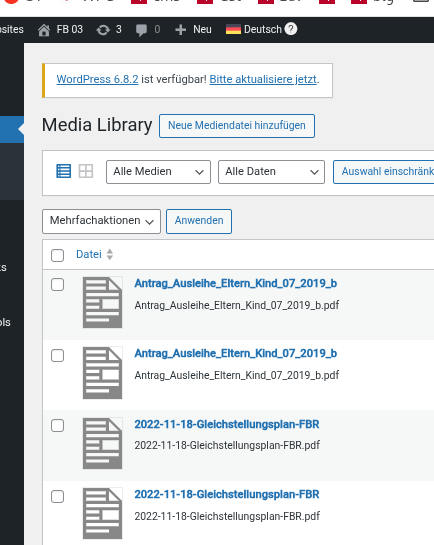
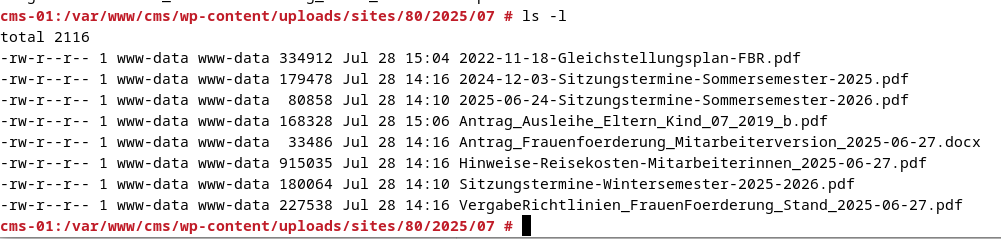
I tried to fix the error by resetting wpml. Now I have all Media Database entries doubled. The files on the disk are there only once. How do I best remove the duplicate Media database entries? There must be a way, if a client decides not to use wpml anymore?
BTW: We cannot use the Media Translation Plugin because it throws an error in our setup if I try to configure it. WPML > Media Translation then says:
"Uncaught Error: Argument 3 passed to WPML_Media_Translations_UI::__construct() must be an instance of WP_Locale, instance of WPML\ST\MO\WPLocaleProxy given, called in /var/www/wprelaunch.local/htdocs/wp-content/plugins/wpml-media-translation/classes/menus/wpml-media-menus.php on line 89
in /var/www/wprelaunch.local/htdocs/wp-content/plugins/wpml-media-translation/classes/menus/wpml-media-translations-ui.php on line 43
Call stack:
WPML_Media_Translations_UI::__construct()
wp-content/plugins/wpml-media-translation/classes/menus/wpml-media-menus.php:89
WPML_Media_Menus::display()
wp-content/plugins/wpml-media-translation/classes/class-wpml-media.php:397
WPML_Media::menu_content()
wp-includes/class-wp-hook.php:324
WP_Hook::apply_filters()
wp-includes/class-wp-hook.php:348
WP_Hook::do_action()
wp-includes/plugin.php:517
do_action()
" Since your policy is that these problems are our own, I understand that you do not have to fix it.
I apologize for the delay in responding. I will take care of this ticket; the reply time will be shorter now.
If I understand correctly, you are able to activate WPML Media and the error only appears when you go to WPML > Media Translation. Right?
❌ Please make a full website backup before proceeding ❌
If so, do the following to delete the duplicated media:
- Temporary reactivate WPML and WPML Media
- Go to the Media Library.
- Switch languages from the top bar, select the images and delete them.
- Deactivate WPML and WPML Media
Dear Otto,
the main problem is not the double media, this is the result trying to fix it.
First: We cannot use the Media Translation Plugin!
The duplicate media are there with the wpml plugin switched on and the Language in the Adminbar set to one language!
for example: hidden link
Attached you find two Screenshots. The Media Library set to Deutsch and the Content of the folder.
As I see it, I have to delete one of each post, but NOT the Media in the Folder. How do I find out which one? Should I do that in the Database directly to avoid removing the file from the folder?
The main problem (that was the reason I reset wpml) remains, there is still the error in WPML Dashboard:
"Your default language, Deutsch, must be mapped to a supported language in order to use automatic translation" .
Yes, I still need assistance. Since there are a hundred sites that I set up just the same I can only hope maybe to reset again, delete all database tables relating to "icl" and appreciate any information what to delete additionally may be in the options Table?
I would like to request temporary access to your site to take a better look at the issue. Is it possible?
It would be better to a testing site where the issue is replicated.
The information you will enter is private which means only you and I can see and have access to it.
Maybe I'll need to replicate your site locally. For this, I'll need to temporarily install a plugin called “Duplicator” or "All in One WP Migration" on your site.
This will allow me to create a copy of your site and your content.
Once the problem is resolved I will delete the local site.
**IMPORTANT**
- Please make a backup of site files and database before providing us access.
- If you do not see the wp-admin/FTP fields this means your post & website login details will be made PUBLIC. DO NOT post your website details unless you see the required wp-admin/FTP fields.
Please apologize. I wasn't aware of the complexities of your site's setup. I'd rather take a look before sharing a solution that may not work, and most clients are happy with that. I understand now that this is not convenient in your case.
You mentioned that you reset WPML. This deletes WPML tables so, the language information was erased. Then, we can't distinguish the entries in the attachment table to erase the "translations".
If the site still have the WPML table (icl_*). It may be possible to delete them directly from the DB. Please confirm that, and I can share some examples that you'll need to tweak for your site.
Best Regards,
Otto
The topic ‘[Closed] one subsite in the multisite has the error’ is closed to new replies.