[Resolved] Translations are not working - loading on wpml.org site
This thread is resolved. Here is a description of the problem and solution.
Problem: If you're experiencing the issue where translations are not working and encountering the error message 'Unable to retrieve job details' when trying to translate a numeric value in the Advanced Translation Editor (ATE), it's because WPML by default excludes numeric values in the job data sent to ATE. Solution: We recommend adding the following custom code to the file
functions.php
in your theme or child theme folder. This code allows the translation of numeric values. After adding the code, re-send the string to translation:
Please ensure to backup your database and website before proceeding. For more details, you can refer to our forum discussion on translating numbers.
If this solution does not apply to your case, or if it seems outdated, we highly recommend checking related known issues at https://wpml.org/known-issues/, verifying the version of the permanent fix, and confirming that you have installed the latest versions of themes and plugins. If you still need assistance, please open a new support ticket at WPML support forum.
This is the technical support forum for WPML - the multilingual WordPress plugin.
Everyone can read, but only WPML clients can post here. WPML team is replying on the forum 6 days per week, 22 hours per day.
Languages: English (English )Vietnamese (Vietnamese )
Timezone: Asia/Ho_Chi_Minh (GMT+07:00)
Hi Frantise,
I’m Long from the WPML Development team, I’m happy to help you with this issue.
The error message "Unable to retrieve job details" occurs when you translate a numeric value in the Advanced Translation Editor (ATE) because there is no translation data in the job.
By default, WPML will exclude the numeric value in the job data that is sent to ATE for translation. If you want to translate the numeric value, you can add the custom code below to the file functions.php in the theme or child theme folder. Then re-send the string to translation.
I pasted it as you said, sent the string to translate manually myself, doesnt work.
Even before that, when I go to translation Jobs tab, I get error Jobs could not be loaded.... same error after pasting the code and resending string for translation...
Currently I can not translate anything from translations queue because there is nothing - error Jobs could not be loaded.
This is absolute major problem, my site is in production!
Languages: English (English )Vietnamese (Vietnamese )
Timezone: Asia/Ho_Chi_Minh (GMT+07:00)
Hi,
It could be another issue with the translation queue and jobs. I would like to request temporary access (wp-admin and FTP) to your site so I can take a better look at the issue. It would be better to have a testing site where the issue is replicated. Your next reply is set to private to share the info.
Languages: English (English )Vietnamese (Vietnamese )
Timezone: Asia/Ho_Chi_Minh (GMT+07:00)
Hi,
I've tried to restore your site on my staging site and didn't see the issue when visiting the WPML > Translations page or Translation Jobs page.
On your site, I see the error message "500 internal server error" in the Console tab of the browser. There could be some different settings between hosting and cause the error in the background.
Could you please enable WP debug log, visit the Translations page again, check the log for a fatal error message and share it with me?
I have already shared my FTP with you, feel free to check.
I tried to enable debug log, but I dont see on the frontend any fatal error, only deprecated warnings, which are not a problem.
The error is shown after loading, so it wont be shown right away.
I checked also debug.log file in wp-content, only fatal error I found was:
PHP Fatal error: Uncaught Error: Failed opening required 'https://cdn.wpml.org/data/a/d/ad2ca022-2abf-4990-a23b-a04139e1edfd/site.xx/web/.maintenance' (include_path='.:/usr/share/php') in /data/a/d/ad2ca022-2abf-4990-a23b-a04139e1edfd/site.xx/web/wp-includes/load.php:444
Stack trace:
#0 /data/a/d/ad2ca022-2abf-4990-a23b-a04139e1edfd/site.xx/web/wp-includes/class-wp-fatal-error-handler.php(37): wp_is_maintenance_mode()
#1 [internal function]: WP_Fatal_Error_Handler->handle()
#2 {main}
thrown in /data/a/d/ad2ca022-2abf-4990-a23b-a04139e1edfd/site.xx/web/wp-includes/load.php on line 444
UPDATE `wp_icl_translation_status` SET `status` = 10 WHERE `status` = 1;
UPDATE `wp_icl_translation_status` SET `status` = 10 WHERE `status` = 2;
UPDATE `wp_icl_translation_status` SET `status` = 10 WHERE `status` = 9;
Can you please try running the SQL queries and let me know if it helps?
❌ IMPORTANT: Please backup your database and website before proceeding ❌
Hi again, I found out there might be a different problem now, related with translating numbers which you suggested earlier.
Is it possible that WPML is now translating array values and shows them on frontend for some plugins?
I dont know how but it may picked up some array values for some dropdown fields and now they are shown in some places on the site. I tried to remove all untranslated strings but it stays there. Weird thing is that only German language works fine-without these array numbers shown, other languages show them.
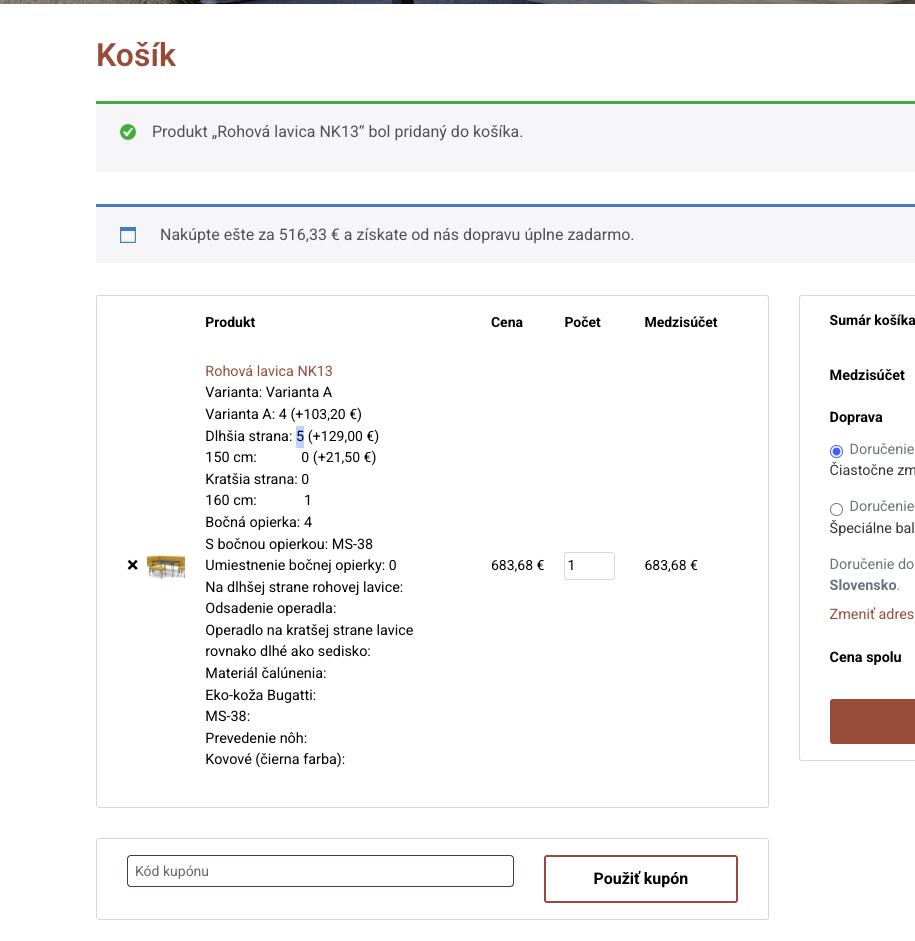
These numbers are metadata for product configuration - yith-woocommerce-product-add-ons plugin, so on product page its not visible, but once I add it with some configuration to shopping cart, its visible from now on all the way to order detail page, order email, invoice, everywhere....
New threads created by Long Nguyen and linked to this one are listed below:
If you see that the issue with the translation of the numeric value in the Advanced Translation Editor has been resolved, please mark this one as Resolved.